插件中文资料库
中文说明、玩家点评、适用场景和替代推荐,方便快速判断是否适合你。
- 背包、银行和物品整理
- 界面布局、头像框、姓名板和动作条优化
 GroupFinder
 FollowerLocationInfo
 Sleek XP Bubbles
GuildHelperClassic 插件下载与使用指南
本页整理了 GuildHelperClassic 的功能用途、适用人群、安装方法和常见问题,方便玩家快速判断是否需要安装。
适合谁用
GuildHelperClassic 是一款 背包与库存 / 专业技能 / 职业 / 公会 类插件,适合需要优化界面、提升操作效率或补充游戏信息提示的魔兽世界玩家。
基本信息
- 插件作者:TheBoringDad
- 插件分类:背包与库存 / 专业技能 / 职业 / 公会
- 适配版本:1.13.2
- 累计下载:39
安装方法
- 点击上方下载按钮获取 GuildHelperClassic插件文件。
- 解压后将插件文件夹放入 World of Warcraft/_retail_/Interface/AddOns 目录。
- 重启游戏或在角色界面点击插件,确认 GuildHelperClassic 已启用。
- 如果插件不生效,请检查版本是否匹配,或关闭同类冲突插件后重试。
使用建议
GuildHelperClassic 安装后建议先在角色界面确认已启用,进入游戏后根据插件提供的命令、小地图按钮或设置面板进行调整。如遇到报错,可先单独启用该插件排查冲突。
GuildHelperClassic 常见问题
GuildHelperClassic 适合需要 背包与库存 / 专业技能 / 职业 / 公会 类功能的玩家,特别是希望提升游戏便利性、界面管理或战斗信息获取效率的用户。
下载后解压到 Interface/AddOns 目录,然后重启游戏并在角色界面启用插件。
常见原因是目录多套一层、游戏版本不匹配、依赖插件缺失或同类插件冲突。
可以查看本页的替代插件推荐和相关插件区域,按下载量和分类选择同类工具。
插件 AI 问答
可以问:这个插件正式服能用吗、和 DBM 冲突吗、怎么设置、有没有替代插件。
GuildHelperClassic 是一款魔兽世界插件,主要用于界面框架、头像、动作条或冷却显示优化、背包、银行、专业制造或物品整理,适合对应经典服或周年服版本使用。建议根据自己的版本和插件环境先测试兼容性。
插件用途
GuildHelperClassic 主要面向需要公会功能的玩家,用来改善游戏体验、减少重复操作或补充默认界面没有直接提供的信息。
适用场景
- 界面框架、头像、动作条或冷却显示优化
- 背包、银行、专业制造或物品整理
使用建议
安装后建议先在角色选择界面或插件管理器中确认已启用,再进入游戏测试是否与现有整合包、WA 和其他插件冲突。如遇报错,可以先禁用同类插件排查。
GuildHelperClassic is designed for guilds and guild members. It allows players to share information with other guild members and helps members find trade work and adventure companions.
HEADS UP: RL has been very hectic this past month and looks to stay that way for the next month or two at least, so updates are going to be delayed. I have some code working towards multiple bank character support since that seems to be the most highly requested feature, but it won't be released very soon. Otherwise, I am actively monitoring for bug reports and have not abandoned this project!
This is an addon early in development, hence the 0.x.y version. You can expect updates weekly, daily, or even multiple times in a day if I get a lot of work done. Please check often to stay up to date! Alpha releases may contain additional debug messages that most users will not want to see unless they're helping to debug an issue.
ALSO: I'm more than happy to accept pull requests over on Bitbucket!
The addon provides a new window that can be moved by clicking and dragging it. The window displays the following information in a tabbed view:
- 1. Guild roster view
- 2. Guild bank alt inventory
- 3. Guild class summary
- 4. Configuration options
The roster will only show basic information (player name, class and level) until guild members share their character data using this addon.
The data shared is character name, race, gender, class, level, primary professions (if any) and role (manually selected), NO talent data is collected or shared. The data allows the addon to show more information about guild members in the roster listview (icons & professions etc).
To open and close the addon window use the minimap button or the slash command /ghc open in the chat window.
By default, your data is automatically shared with other members of your guild that use this addon. You can disable the auto share feature through the configuration window.
Guild Bank System
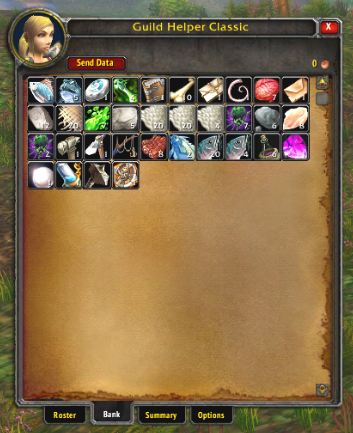
Classic doesn't allow for a guild sharing bank deposit/withdraw system and I'm not aware of any way to replicate this feature.
This implementation of a Guild Bank works kind of like a game of telephone whereby the Guild Bank Alt scans their inventory and sends this data to online guild members who have this addon installed. Those guild members can then share the Guild Bank data with other guild members when they come online using the "Share Data" button in the Bank tab of the addon window.
To use the Guild Bank feature in GuildHelperClassic:
- 1. Create a "Guild Bank Alt" and authorize it using one of the methods described below in the Guild Bank Character Authorization Methods section.
- 2. While logged in with this character visit the bank and talk to the NPC so that your bank frame opens. Addons, including GuildHelperClassic, cannot access the bank inventory unless you explicitly have it open.
- 3. When the Bank window is closed, the Guild Bank Alt's bank, additional bank bags, character bags, and money are automatically scanned and shared with guild members who have GuildHelperClassic installed. As of version 0.1.3, use of the slash command /ghc scangb should no longer be necessary.
- 4. The "Guild Bank" contents will then be available to view by guild members who have the addon installed, even when the Guild Bank Alt is offline.
- 5. "Guild Bank" data can only be sent to guild members who are online when the scan occurs. Players can share the Guild Bank data to other guild members who might have been offline during the scan by using the Share Data button found in the Bank tab of the addon window.
Guild Bank Character Authorization Methods
As of version 0.2.0, GuildHelperClassic supports the following methods of authorizing a Guild Bank character. Only one Guild Bank character per guild is currently supported, though there are plans to eventually support multiple Guild Bank characters.
- The character's guild rank is the highest officer rank or Guild Master; or
- The character's guild rank is a dedicated rank named "Guild Bank" -- rank permissions do not matter; or
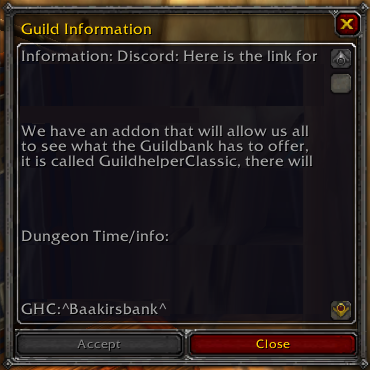
- The character's name is listed in the Guild Information window in the following format: GHC:^Charactername^
For example, if my guild bank character's name is Baakirsbank then you would add GHC:^Baakirsbank^ to the last line of the Guild Information window.
If you encounter any errors or have an suggestions please create an issue (bug, enhancement, proposal) or post a comment here with details including the version of the addon you currently have installed.
You can also create an issue over on Bitbucket if you'd prefer to see additional details surrounding progress towards resolution.
CurseForge: https://www.curseforge.com/wow/addons/guildhelperclassic用户评价
暂无 / 5,0 条评价相关推荐
继续看看这些内容
