插件中文资料库
中文说明、玩家点评、适用场景和替代推荐,方便快速判断是否适合你。
- 界面布局、头像框、姓名板和动作条优化
 LaoLiHelper_UI美化系统自带框架
 GroupFinder
 Ruthe's MountSelector
DejaView 插件下载与使用指南
本页整理了 DejaView 的功能用途、适用人群、安装方法和常见问题,方便玩家快速判断是否需要安装。
适合谁用
DejaView 是一款 动作条 / 地图与小地图 / 聊天与通讯 / 增益与减益 / 单位框架 类插件,适合需要优化界面、提升操作效率或补充游戏信息提示的魔兽世界玩家。
基本信息
- 插件作者:Dejablue
- 插件分类:动作条 / 地图与小地图 / 聊天与通讯 / 增益与减益 / 单位框架
- 适配版本:9.2.7
- 累计下载:0
安装方法
- 点击上方下载按钮获取 DejaView插件文件。
- 解压后将插件文件夹放入 World of Warcraft/_retail_/Interface/AddOns 目录。
- 重启游戏或在角色界面点击插件,确认 DejaView 已启用。
- 如果插件不生效,请检查版本是否匹配,或关闭同类冲突插件后重试。
使用建议
DejaView 安装后建议先在角色界面确认已启用,进入游戏后根据插件提供的命令、小地图按钮或设置面板进行调整。如遇到报错,可先单独启用该插件排查冲突。
DejaView 常见问题
DejaView 适合需要 动作条 / 地图与小地图 / 聊天与通讯 / 增益与减益 / 单位框架 类功能的玩家,特别是希望提升游戏便利性、界面管理或战斗信息获取效率的用户。
下载后解压到 Interface/AddOns 目录,然后重启游戏并在角色界面启用插件。
常见原因是目录多套一层、游戏版本不匹配、依赖插件缺失或同类插件冲突。
可以查看本页的替代插件推荐和相关插件区域,按下载量和分类选择同类工具。
插件 AI 问答
可以问:这个插件正式服能用吗、和 DBM 冲突吗、怎么设置、有没有替代插件。
DejaView 是一款魔兽世界插件,主要用于界面框架、头像、动作条或冷却显示优化。建议根据自己的版本和插件环境先测试兼容性。
插件用途
DejaView 主要面向需要聊天与通讯功能的玩家,用来改善游戏体验、减少重复操作或补充默认界面没有直接提供的信息。
适用场景
- 界面框架、头像、动作条或冷却显示优化
使用建议
安装后建议先在角色选择界面或插件管理器中确认已启用,再进入游戏测试是否与现有整合包、WA 和其他插件冲突。如遇报错,可以先禁用同类插件排查。
Ready for Shadowlands!
DejaDonate:


DejaView is an up to date compilation of all my addons put into one neat and tidy package.
Enjoy!
DejaView contains the following modules:
BobUI BSC Cast Bars
- Bob's simple and neat cast bar replacement.
DejaCharacterStats
Is no longer included. Please download it HERE.
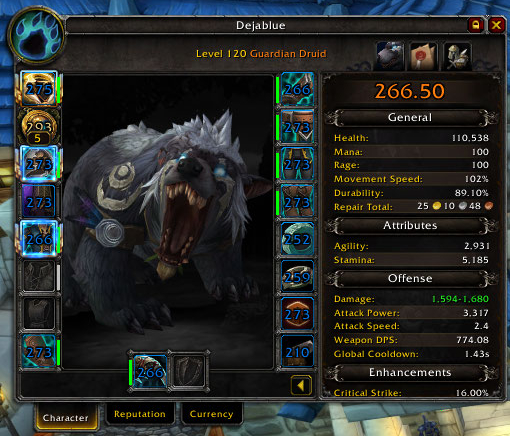
Display logic:
- Only melee (Hunter, melee DPS and tanks) display damage, attack power and attack speed.
- Only casters have Spell Power and Mp5 displayed.
- Only Hunters have Focus Regen displayed.
- Only Death Knights have Rune Speed displayed.
- Only Rogues, Guardian/Feral Druids and Windwalker/Brewmaster Monks have Energy Regen displayed.
- Only tanks have Dodge, Parry and Block displayed, and only if appropriate (i.e. no Block is displayed for Vengeance, no Parry is displayed for Guardian).
- Everything else is hidden unless the character has that stat; i.e. Leech and Avoidance are hidden unless or until you get some of those stats.
DejaChat

- Removes the chat buttons
- Moves the chat edit box to the top of the chat frame
- Allows the chat frame to be moved to the bottom of the screen.
- Allows shift-scroll to top and bottom of the chat frame.
- Hides the chat tabs until mouseover.
DejaMark

- Shows and hides the target and world markers while holding a hotkey.
- Set the key-binding in the WoW key-bindings menu under "DejaMark".
- Hold down your chosen key to show the markers at your mouse cursor. Release the key to hide them again.
- Left click an icon to set a target marker. Left click the same icon again to remove the same marker.
- Left click the circle-backslash symbol while having a target to remove all target markers.
- Right click an icon to place a world marker on your mouse cursor then left click in the world to place the world marker. Right click an icon again to remove the world marker from the world and place it on your mouse cursor again. Right click in the world to remove a world flare from your mouse cursor.
- Right click the circle-backslash symbol to remove all world markers.
DejaMinimap

- Removes all minimap art.
- Adds player coordinates at the top.
- Adds a nicer visible clock at the bottom.
- Makes the minimap drag-able and able to save the user's placement.
- Makes the minimap square.
- Provides minimap mousewheel zoom scrolling.
- Hides the clock button, display time on mouseover of the bottom of the minimap, click for the timer.
- Hides the tracking button, click on the minimap's upper left corner for tracking menu.
- Hides the world map button, click on the top middle of the minimap to open the world map.
- Hides the calendar button, click on the top right of the minimap to open the calendar.
DejaPRFader
- Hides the party and raid manager frame (that bar on the left when you are in a party or raid).
- Shows the party and raid frame manager on mouseover.
- Hide the default raid frames with the built in hide button on the party and raid manager.
DejaStats

- Provides a moveable frame that shows and fades on mouse-over for:
- Memory usage
- Latency
- Frames per second
- Player money
- Remaining player bagslots
- Player armor durability percentage
- Movable with: Hold ALT and Right-click-drag.
Unit Frames
- Removes the art from the player, pet, target and focus frames for a sleek look.
- Moves the target debuff display to the center of the screen horizontally and about 1/3 above the bottom vertically.
- Moves the target buff frame to just above the debuffs so they do not move all the time.
Action Bars
- Removes all main action bar and minimap art.
- Stacks the action bars, stance/shapeshift and pet action bars which are movable with: Hold ALT and Right-click-drag.
- Hidden Micro Menu buttons appear above the Minimap and are movable.
XP & Reputation Bars
- Moves the XP and Reputation bars into the main bar stack. At max level, only the bottom space is used for Reputation.
Other UI Tweaks
- Automatically sells junk gray items.
- Automatically repairs armor at a repair vendor. Guild bank repairs are attempted first.
- Adds simplified commands for reloading the UI, ready check and role check.
Use:
- Install to your addon directory and login to WoW.
- Scale the UI with the default UI scale in the Game Menu>System>Advanced menu screen.
- Scale the minimap with the slider in the DejaView addon options panel.
- Also See "Slash Commands" below.
Movable Frames:
- Stance bar
- Pet action bar
- Bag bar
- Minimap
- Right side action bars
- Stat frame
- Buffs
- Debuffs
- Menu Buttons
- Main Game Tooltip
- Objective Tracker
- Garrison Report Button
Slash Commands:
- /dejaview = display the DejaView slash commands
- /dejaview unlock = unlock/show all DejaView movable frames
- /dejaview lock = lock/hide all DejaView movable frames
- /dejaview config = open the config panel
- /rl = reload UI
- /rc = ready check
- /cr = role check
- /align = display an alignment grid
Object/Frame Movement
- Most elements, except the three stacked main bars, can be moved by unlocking the DejaView frames in the DejaView addons options panel and dragging them to where you wish.
Special Thanks:
CurseForge: https://www.curseforge.com/wow/addons/dejaview用户评价
暂无 / 5,0 条评价相关推荐
继续看看这些内容
