插件中文资料库
中文说明、玩家点评、适用场景和替代推荐,方便快速判断是否适合你。
- 界面布局、头像框、姓名板和动作条优化
 Details! Mythic+ Scoreboard
 BagSync
 GroupFinder
Account Repaired 插件下载与使用指南
本页整理了 Account Repaired 的功能用途、适用人群、安装方法和常见问题,方便玩家快速判断是否需要安装。
适合谁用
Account Repaired 是一款 鼠标提示 / HUD界面 / 职业 / 其他插件 / 插件扩展 类插件,适合需要优化界面、提升操作效率或补充游戏信息提示的魔兽世界玩家。
基本信息
- 插件作者:shodo___
- 插件分类:鼠标提示 / HUD界面 / 职业 / 其他插件 / 插件扩展
- 适配版本:12.0.0,12.0.1,12.0.5
- 累计下载:34
安装方法
- 点击上方下载按钮获取 Account Repaired插件文件。
- 解压后将插件文件夹放入 World of Warcraft/_retail_/Interface/AddOns 目录。
- 重启游戏或在角色界面点击插件,确认 Account Repaired 已启用。
- 如果插件不生效,请检查版本是否匹配,或关闭同类冲突插件后重试。
使用建议
Account Repaired 安装后建议先在角色界面确认已启用,进入游戏后根据插件提供的命令、小地图按钮或设置面板进行调整。如遇到报错,可先单独启用该插件排查冲突。
Account Repaired 常见问题
Account Repaired 适合需要 鼠标提示 / HUD界面 / 职业 / 其他插件 / 插件扩展 类功能的玩家,特别是希望提升游戏便利性、界面管理或战斗信息获取效率的用户。
下载后解压到 Interface/AddOns 目录,然后重启游戏并在角色界面启用插件。
常见原因是目录多套一层、游戏版本不匹配、依赖插件缺失或同类插件冲突。
可以查看本页的替代插件推荐和相关插件区域,按下载量和分类选择同类工具。
插件 AI 问答
可以问:这个插件正式服能用吗、和 DBM 冲突吗、怎么设置、有没有替代插件。
轻量级装备修理提醒插件,会在耐久度可能影响游戏前提醒你及时修理。
插件用途
Account Repaired 主要面向需要其他插件功能的玩家,用来改善游戏体验、减少重复操作或补充默认界面没有直接提供的信息。
适用场景
- 装备修理、金币或商人相关提醒
使用建议
安装后建议先在角色选择界面或插件管理器中确认已启用,再进入游戏测试是否与现有整合包、WA 和其他插件冲突。如遇报错,可以先禁用同类插件排查。
Account Repaired - simple addon to track repair costs sorted by armor type.
Use as a module with AccountPlayed or use the command /arepaired show
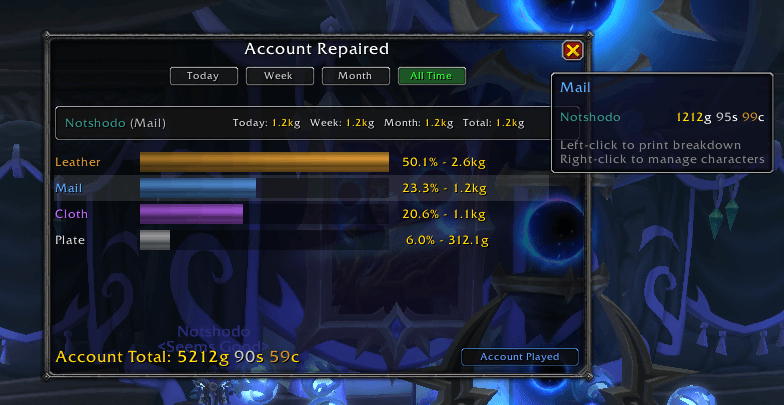
Features:
- View your account's total gold spent on repairs, grouped by armor type (Cloth / Leather / Mail / Plate)
- Sorted by (armor type / total account repairs) as a percentage
- Small popup UI (resize, drag, move, and scroll as you please!)
- Minimap button to toggle UI (fades when mouse is not over minimap)
- Hover over armor types to get a popup of all characters making up the repair cost
- Right-click an armor type bar to open a character management panel (delete characters, view breakdown)
- Filter by Today / Week / Month / All Time
- Press Escape to close window
- Character strip showing your current character's repair costs across all time periods
- If Account Played is installed, a button will appear to quickly switch to the played time window
Usage:
Commands:
/arepaired         - list available commands
/arepaired show    - toggle repair cost window
/arepaired minimap - toggle the AccountRepaired minimap icon on/off
/arepaired reset   - reset the position of the minimap button (Bottom Left)

Debug Commands:
/ardebug             - prints a list of all stored characters to chat
/ardelete Name-Realm - delete a character's stored repair data
Account Played Integration:
- Made by the same author as Account Played - both addons are designed to complement each other
- If Account Played is installed, a button appears at the bottom of the AccountRepaired window to instantly switch to the played time UI
- If Account Played is not installed, AccountRepaired works fully standalone with no dependencies
Contributing:
- PRs/Issues welcome!
- For faster response/general feedback, feel free to reach out via email: jeremy51b5@pm.me
用户评价
暂无 / 5,0 条评价相关推荐
继续看看这些内容
