插件中文资料库
中文说明、玩家点评、适用场景和替代推荐,方便快速判断是否适合你。
- 日常任务、练级和满级玩法辅助
- 界面体验优化和信息展示增强
- 副本前先测试兼容性,确认不报错后再长期使用
 Copy Anything
 BagSync
 GroupFinder
Group Scan 插件下载与使用指南
本页整理了 Group Scan 的功能用途、适用人群、安装方法和常见问题,方便玩家快速判断是否需要安装。
适合谁用
Group Scan 是一款 鼠标提示 / 聊天与通讯 / 职业 / 其他插件 类插件,适合需要优化界面、提升操作效率或补充游戏信息提示的魔兽世界玩家。
基本信息
- 插件作者:di0nysusTV
- 插件分类:鼠标提示 / 聊天与通讯 / 职业 / 其他插件
- 适配版本:12.0.5
- 累计下载:37
安装方法
- 点击上方下载按钮获取 Group Scan插件文件。
- 解压后将插件文件夹放入 World of Warcraft/_retail_/Interface/AddOns 目录。
- 重启游戏或在角色界面点击插件,确认 Group Scan 已启用。
- 如果插件不生效,请检查版本是否匹配,或关闭同类冲突插件后重试。
使用建议
Group Scan 安装后建议先在角色界面确认已启用,进入游戏后根据插件提供的命令、小地图按钮或设置面板进行调整。如遇到报错,可先单独启用该插件排查冲突。
Group Scan 常见问题
Group Scan 适合需要 鼠标提示 / 聊天与通讯 / 职业 / 其他插件 类功能的玩家,特别是希望提升游戏便利性、界面管理或战斗信息获取效率的用户。
下载后解压到 Interface/AddOns 目录,然后重启游戏并在角色界面启用插件。
常见原因是目录多套一层、游戏版本不匹配、依赖插件缺失或同类插件冲突。
可以查看本页的替代插件推荐和相关插件区域,按下载量和分类选择同类工具。
插件 AI 问答
可以问:这个插件正式服能用吗、和 DBM 冲突吗、怎么设置、有没有替代插件。
Group Scan 是一款魔兽世界插件,主要用于组队、队伍交流和自动问候。建议根据自己的版本和插件环境先测试兼容性。
插件用途
Group Scan 主要面向需要聊天与通讯功能的玩家,用来改善游戏体验、减少重复操作或补充默认界面没有直接提供的信息。
适用场景
- 组队、队伍交流和自动问候
使用建议
安装后建议先在角色选择界面或插件管理器中确认已启用,再进入游戏测试是否与现有整合包、WA 和其他插件冲突。如遇报错,可以先禁用同类插件排查。
GroupScan

Tired of forgetting which class has lust/brez or if your character would be a good fit for a mythic+ group?
GroupScan analyzes M+ group compositions in real time. Hover applicants to see their utility. Browsing groups? See if you fill a gap or bring redundant utility. Always shows your party's coverage and what's missing.
The Panel
The panel appears whenever the Group Finder is open and hides when you close it. It can be dragged anywhere on screen and remembers its position between sessions.
The panel has three views that switch automatically based on what you're doing:
| View | When it shows |
|---|---|
| My Party | Default — your current group's utility coverage |
| Group Preview | Hovering or clicking a listing in Browse Groups |
| Applicant View | Hovering an applicant on your own listing |
My Party
Shows your current group's utility coverage at all times.
Coverage score — e.g. 5/6 covered 3/5 members shows how many of the six tracked utilities your group has and how many players are in the group.
COVERED — lists each utility your group has and which members provide it. An amber ~ prefix means the ability requires a specific talent and may not always be present.
MISSING — lists utilities nobody covers, with color-coded class suggestions for each gap.
Tracked Utilities
| Utility | What it covers |
|---|---|
| Bloodlust | Heroism/Lust (Shaman, Mage, Evoker, BM Hunter) |
| Battle Rez | In-combat resurrection (Druid, Warlock, Death Knight, Paladin†) |
| Crowd Ctrl | Hard CC for mob control |
| Defensives | External defensive cooldowns |
| Buffs | Persistent group stat buffs |
| Utility | Class-specific M+ utility (grips, gates, immunities, etc.) |
† Paladin Battle Rez requires the Intercession talent — shown with
~
Group Preview
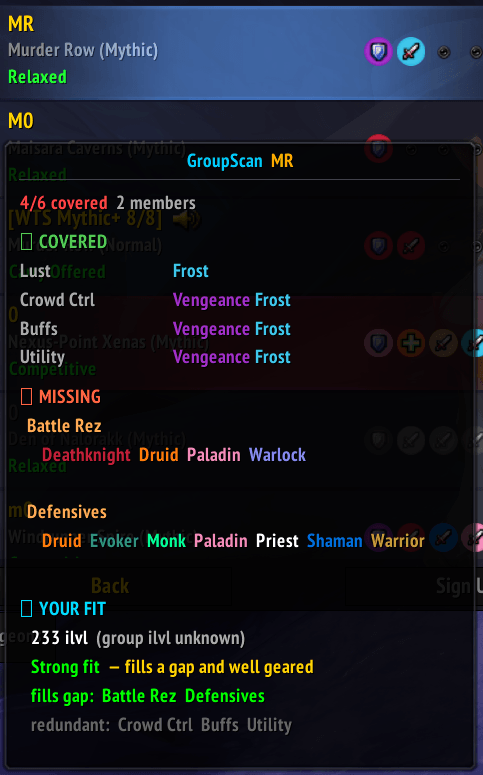
Shown when hovering or clicking any listing in the Browse Groups tab. Displays that group's composition and utility coverage, then shows a YOUR FIT section below it.
YOUR FIT
Item level
- Green — at or above the group's requirement
- Amber — within 10 ilvl below
- Red — more than 10 ilvl below
- If no requirement is set, your raw ilvl is shown
Verdict
| Verdict | Meaning |
|---|---|
Strong fit |
Fills a missing utility and gear is solid |
Risky fit |
Fills a missing utility but gear is below requirement |
Decent fit |
No new utility but gear is solid |
Redundant |
Utility already covered, gear is solid |
Weak fit |
No new utility and gear is below requirement |
fills gap — utilities you bring that the group is missing (green = guaranteed, amber = talent-dependent)
redundant — utilities you bring that the group already has (grey)
Applicant View
Shown when hovering an applicant on your own group listing.
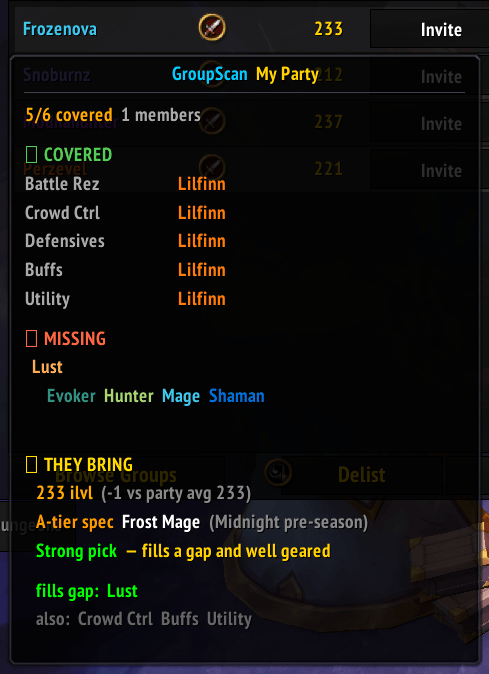
THEY BRING
Item level — applicant's ilvl vs your party average, color-coded green/amber/red.
Verdict
| Verdict | Meaning |
|---|---|
Strong pick |
Fills a gap and well geared |
Risky pick |
Fills a gap but undergeared |
Decent backup |
No new utility but solid gear |
Weak pick |
No gap filled and undergeared |
fills gap — utilities the applicant brings that your group is missing (green = guaranteed, amber = talent-dependent)
also — utilities they bring that your group already has (grey)
Slash Commands
| Command | Description |
|---|---|
/gs or /groupscan |
Toggle the panel manually |
Notes
- Talent-dependent abilities are marked
~throughout. These require a specific talent choice and may not be present even if the class can provide them. - Party member specs are only known for your own character — others show as conditional for spec-gated abilities.
用户评价
暂无 / 5,0 条评价相关推荐
继续看看这些内容
