插件中文资料库
中文说明、玩家点评、适用场景和替代推荐,方便快速判断是否适合你。
- 界面布局、头像框、姓名板和动作条优化
 Details! Mythic+ Scoreboard
 BagSync
 RightClickSelfCast
LookBook 插件下载与使用指南
本页整理了 LookBook 的功能用途、适用人群、安装方法和常见问题,方便玩家快速判断是否需要安装。
适合谁用
LookBook 是一款 宠物对战 / 幻化 / 住房 类插件,适合需要优化界面、提升操作效率或补充游戏信息提示的魔兽世界玩家。
基本信息
- 插件作者:Insomniracc
- 插件分类:宠物对战 / 幻化 / 住房
- 适配版本:12.0.1
- 累计下载:43
安装方法
- 点击上方下载按钮获取 LookBook插件文件。
- 解压后将插件文件夹放入 World of Warcraft/_retail_/Interface/AddOns 目录。
- 重启游戏或在角色界面点击插件,确认 LookBook 已启用。
- 如果插件不生效,请检查版本是否匹配,或关闭同类冲突插件后重试。
使用建议
LookBook 安装后建议先在角色界面确认已启用,进入游戏后根据插件提供的命令、小地图按钮或设置面板进行调整。如遇到报错,可先单独启用该插件排查冲突。
LookBook 常见问题
LookBook 适合需要 宠物对战 / 幻化 / 住房 类功能的玩家,特别是希望提升游戏便利性、界面管理或战斗信息获取效率的用户。
下载后解压到 Interface/AddOns 目录,然后重启游戏并在角色界面启用插件。
常见原因是目录多套一层、游戏版本不匹配、依赖插件缺失或同类插件冲突。
可以查看本页的替代插件推荐和相关插件区域,按下载量和分类选择同类工具。
插件 AI 问答
可以问:这个插件正式服能用吗、和 DBM 冲突吗、怎么设置、有没有替代插件。
LookBook 是一款魔兽世界插件,主要用于坐骑、宠物或击杀记录。建议根据自己的版本和插件环境先测试兼容性。
插件用途
LookBook 主要面向需要幻化功能的玩家,用来改善游戏体验、减少重复操作或补充默认界面没有直接提供的信息。
适用场景
- 坐骑、宠物或击杀记录
使用建议
安装后建议先在角色选择界面或插件管理器中确认已启用,再进入游戏测试是否与现有整合包、WA 和其他插件冲突。如遇报错,可以先禁用同类插件排查。
 LookBook
❤️ Bookmark Your Goals
LookBook allows you to bookmark and easily track any number of transmogs, outfits, furniture, mounts, pets, toys, illusions, and other various items to come back to later when you're ready for the hunt. As well as that it features many qol features to help your fashion journey and general farming!
Simple and Easy Item Tracking
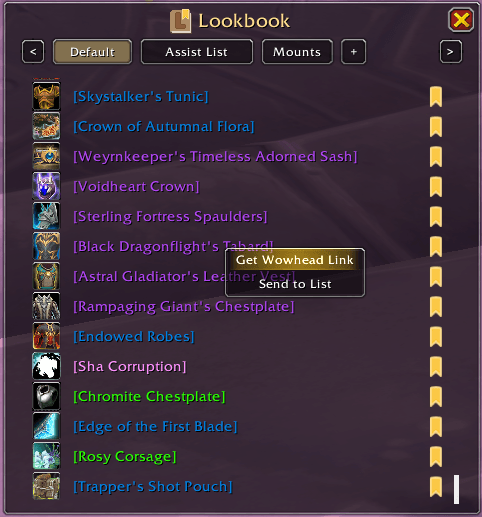
A simple and easy to follow interface to keep track of any content you want. Featuring built in support for Wowhead links making it easy for you to quickly figure out where you need to go! As well as other nice features like automatically showing a ✔️ next to items you've already collected, multiple lists for better organization, list import/exports for sharing, and ctrl+clicking and shift+clicking for previews and chat links. Also pairs amazing with addons like All The Things and Appearance Tooltip for additional features!
Quick View in Dressing Room & Quick Mount Bookmarking
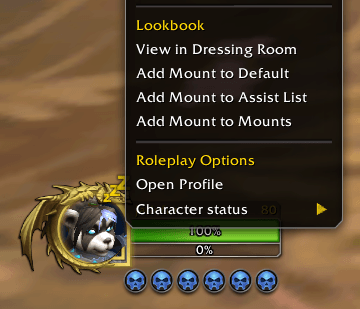
Right click any player to view their outfit in the Dressing Room to see what they're wearing or add their outfit to your collection! Now if they're mounted you'll also have the option to add their mount to your bookmarks! Either of these can be disabled in the settings if you prefer.
QOL Dressing Room Features
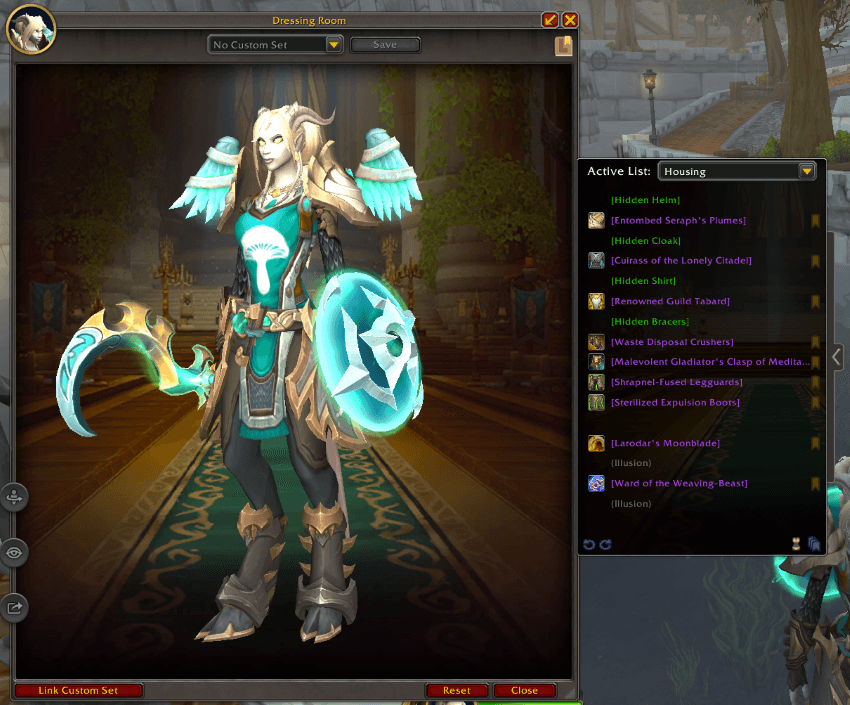
Upgrades to the Dressing Room including:
- A resizable window (pull tab on bottom right of the main window, next to the "close" button)
- Quick access to your bookmarks menu (Lookbook icon in the top right of the main window, below the "x" button)
- Undressing/redressing individual items (left clicking any item in the equipment list to the right)
- Quick bookmarking individual items to the active list (bookmark icon to the right of each item in the equipment list)
- Wowhead link generating for individual items (right clicking any item in the equipment list)
- Bookmark whole outfit button (bottom right of the equipment list)
- Undress/Redress all button (bottom right of the equipment list, to the left of the bookmark outfit button)
- Undo/redo buttons (bottom left of the equipment list)
All of which can be disabled in the settings if prefered!
Bookmarking from Collections Journal & Housing Catalog
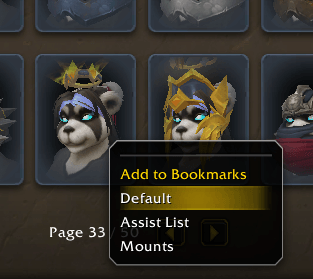
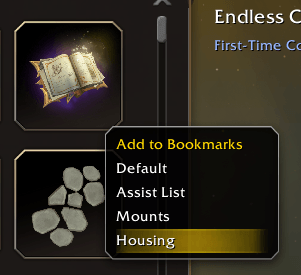
Easily add any transmog, mount, toy, pet, and now furniture from your collections journal (or housing catalog) to your bookmarks with a simple right click! The appearance collections now also has a "Click to preview" option for easier viewing in the dressing room without holding down ctrl. All of these can be disabled if prefered.
Extra Usage Notes
Your bookmark list can be accessed via the minimap button, /lb, or the dressing room.
You can use the command /lb add followed by any amount of item links you'd like to add them to the currently selected list.
In the bookmarks menu you can right click any item or list to get extra options or the + button to import a list.
Clicking the bookmark button in the bookmarks menu on any item, or clicking the bookmark button again in the dressing room if the item is already in the active list will remove it from the list.
Suggestions and Bugs
This is now my second addon! If you intend on inspecting the code you're welcome to of course, but please be gentle.
Any bug reports or suggestions are highly encuraged as always <3
Help Fund My WoW Addiction?

用户评价
暂无 / 5,0 条评价相关推荐
继续看看这些内容
