插件中文资料库
中文说明、玩家点评、适用场景和替代推荐,方便快速判断是否适合你。
- 界面布局、头像框、姓名板和动作条优化
 GroupFinder
 Yapi
Yapi WarlockTools
ADT - Advanced Decoration Tools: Housing Editing Lifesaver 插件下载与使用指南
本页整理了 ADT - Advanced Decoration Tools: Housing Editing Lifesaver 的功能用途、适用人群、安装方法和常见问题,方便玩家快速判断是否需要安装。
适合谁用
ADT - Advanced Decoration Tools: Housing Editing Lifesaver 是一款 HUD界面 / 其他插件 类插件,适合需要优化界面、提升操作效率或补充游戏信息提示的魔兽世界玩家。
基本信息
- 插件作者:rofan
- 插件分类:HUD界面 / 其他插件
- 适配版本:12.1.0
- 累计下载:50
安装方法
- 点击上方下载按钮获取 ADT - Advanced Decoration Tools: Housing Editing Lifesaver插件文件。
- 解压后将插件文件夹放入 World of Warcraft/_retail_/Interface/AddOns 目录。
- 重启游戏或在角色界面点击插件,确认 ADT - Advanced Decoration Tools: Housing Editing Lifesaver 已启用。
- 如果插件不生效,请检查版本是否匹配,或关闭同类冲突插件后重试。
使用建议
ADT - Advanced Decoration Tools: Housing Editing Lifesaver 安装后建议先在角色界面确认已启用,进入游戏后根据插件提供的命令、小地图按钮或设置面板进行调整。如遇到报错,可先单独启用该插件排查冲突。
ADT - Advanced Decoration Tools: Housing Editing Lifesaver 常见问题
ADT - Advanced Decoration Tools: Housing Editing Lifesaver 适合需要 HUD界面 / 其他插件 类功能的玩家,特别是希望提升游戏便利性、界面管理或战斗信息获取效率的用户。
下载后解压到 Interface/AddOns 目录,然后重启游戏并在角色界面启用插件。
常见原因是目录多套一层、游戏版本不匹配、依赖插件缺失或同类插件冲突。
可以查看本页的替代插件推荐和相关插件区域,按下载量和分类选择同类工具。
插件 AI 问答
可以问:这个插件正式服能用吗、和 DBM 冲突吗、怎么设置、有没有替代插件。
ADT - Advanced Decoration Tools: Housing Editing Lifesaver 是一款魔兽世界插件,主要用于界面框架、头像、动作条或冷却显示优化、副本、团本、大秘境或钥石辅助。建议根据自己的版本和插件环境先测试兼容性。
插件用途
ADT - Advanced Decoration Tools: Housing Editing Lifesaver 主要面向需要其他插件功能的玩家,用来改善游戏体验、减少重复操作或补充默认界面没有直接提供的信息。
适用场景
- 界面框架、头像、动作条或冷却显示优化
- 副本、团本、大秘境或钥石辅助
使用建议
安装后建议先在角色选择界面或插件管理器中确认已启用,再进入游戏测试是否与现有整合包、WA 和其他插件冲突。如遇报错,可以先禁用同类插件排查。
Advanced Decoration Tools
Precision. Speed. Perfection.
The professional housing toolkit for World of Warcraft. Build faster. Place precisely. Create effortlessly.
Shortcuts
Copy. Paste. Done.
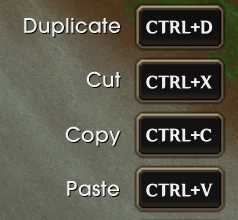
Ctrl+C to copy. Ctrl+V to paste. Ctrl+D to duplicate in place. Ctrl+X to cut and stash. Standard shortcuts you use every day — now in your house editor.
QuickBar
Your favorites, one key away.

8 dedicated slots bound to F1–F8 (fully rebindable). While holding an item, press a key to bind it. While empty-handed, press to instantly start placing. Live stock count updates in real time.
Recent
Just placed it? Place it again.
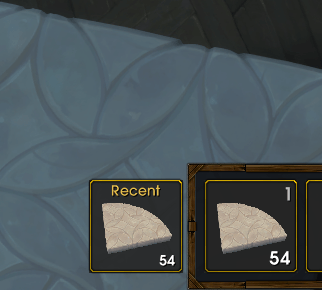
Automatically tracks your last placed items with icons. Click any entry to start placing — no catalog digging required.
Dye Presets
Save colors. Apply everywhere.
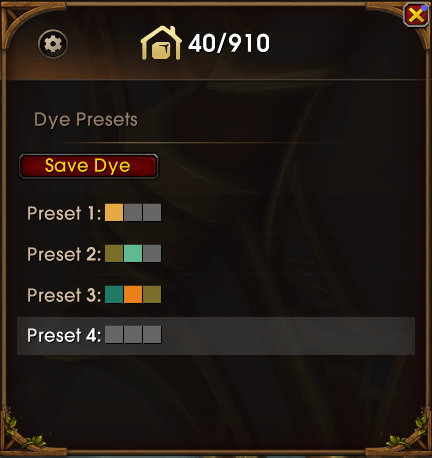
Save your favorite color schemes as presets. Up to 5 slots available. Apply any preset to any decor with one click. Match furniture across your entire house.
Smart Filters
Find anything instantly.
A flexible multi-tag system for organizing your collection. Create custom tags like "Living Room", "Kitchen". Assign multiple tags to any decor. Combine tags with Blizzard's filters — "Elven + Living Room" in one click.
Batch Place
Click once. Repeat forever.
Hold Ctrl while placing. Each click automatically creates another copy at your cursor. Perfect for fences, floor tiles, wall panels — anything repetitive.
Auto-Rotate
Curves without math.
Enable incremental rotation in settings. Choose 15°, 30°, 45°, or any custom angle. Every placement auto-rotates by that amount. Spiral stairs, curved walls — done in seconds.
Temp Tray
Stash while you work.
Press Ctrl+S on a selected decor to stash it and remove from the world. Press Ctrl+R to recall and start placing. Like a temporary clipboard for mid-rearrangement chaos.
Safety Lock
Finished pieces stay finished.
Hover any decor and press L to lock it. Locked items cannot be selected. No more accidental nudges on your finished displays. Press L again to unlock.
Custom Hotkeys
Your keys, your rules.
Every ADT shortcut is fully rebindable in ADT's own settings panel. QuickBar slots, rotation keys, clipboard actions — configure them exactly how you like.
Modern Interface
Feels like 2025.
WoW's default housing UI is functional but dated. ADT modernizes your workflow: Vertical ModeBar docked to the right, persistent QuickBar with live icons, Streamlined Hover HUD with keybind hints. Switch back to Classic anytime.
LOCALIZATION
All client languages supported.
Localization may not be perfect yet and is currently AI-translated. If you'd like to contribute better translations, feel free to send me a Private Message.
You can use /adt to open or close the settings panel.
If you find any bugs or have suggestions, feel free to send me a Private Message.
高级装修工具
精度。效率。完美主义。
魔兽世界住房系统的专业增强工具。 装修更快、放置更准、创作更轻松。
快捷键
复制、粘贴、搞定。
Ctrl+C 复制。Ctrl+V 粘贴。Ctrl+D 就地克隆。Ctrl+X 剪切并暂存。 你每天都在用的快捷键 — 现在住房编辑器也支持了。
批量放置
点一次,放无数次。
放置时按住 **Ctrl**,每次点击**自动放一个副本**在光标位置。 围栏、地砖、墙板 — 所有重复元素,一气呵成。
自动旋转
弧线不用算。
在设置中开启递增旋转,选择 **15°、30°、45°** 或自定义角度。 每放一件**自动转相应角度**。螺旋楼梯、弧形墙壁、圆形花园 — 几秒搞定。
快捷栏
常用物品,一键放。
**8 个专属槽位**,绑定 **F1–F8**(可自定义)。 拿着物品时按键绑定,空手时按键直接放置。**实时显示库存数量**。
最近放置
刚放的,再放一个。
自动记录最近 **10 个放置物品**,带图标。 点击任意条目直接放置 — 不用翻目录。
临时收纳
先收起来,待会儿用。
选中物品后按 **Ctrl+S** 暂存并从世界移除。 按 **Ctrl+R** 取出并开始放置。复杂调整时的**临时剪贴板**。
染色预设
保存配色,一键应用。
将常用配色保存为**预设方案**,最多 **5 套**。 **一键应用**到任意物品。全屋家具统一配色。
智能筛选
想找什么,立刻找到。
灵活的**多标签系统**,轻松整理收藏。 创建自定义标签(如"客厅"、"厨房")。给物品分配多个标签。 标签与暴雪筛选器叠加 — **"精灵 + 客厅"**,一键直达。
安全锁
摆好的,别再动。
悬停物品按 **L** 锁定。锁定后**无法被选中**。 告别手滑误触。再按 **L** 解锁。
自定义热键
你的按键,你说了算。
所有 ADT 快捷键可在 ADT 自己的**设置面板**中修改。 快捷栏槽位、旋转按键、剪贴板操作 — 怎么顺手怎么绑。
现代界面
就该这么顺手。
WoW 默认住房 UI 够用但老旧。ADT 带来现代化体验: 垂直**模式栏**靠右停靠、常驻**快捷栏**实时图标、 精简**悬停 HUD**显示按键提示。想要原版?随时切回传统模式。
Designed for World of Warcraft 12.0 Housing — 2025
CurseForge: https://www.curseforge.com/wow/addons/adt用户评价
暂无 / 5,0 条评价相关推荐
继续看看这些内容
