插件中文资料库
中文说明、玩家点评、适用场景和替代推荐,方便快速判断是否适合你。
- 拍卖行、交易和金币管理
- 界面布局、头像框、姓名板和动作条优化
 Details! Mythic+ Scoreboard
 BagSync
 GroupFinder
XP Timer and Gold Tracker (version 2) 插件下载与使用指南
本页整理了 XP Timer and Gold Tracker (version 2) 的功能用途、适用人群、安装方法和常见问题,方便玩家快速判断是否需要安装。
适合谁用
XP Timer and Gold Tracker (version 2) 是一款 拍卖与商业 / 任务与升级 类插件,适合需要优化界面、提升操作效率或补充游戏信息提示的魔兽世界玩家。
基本信息
- 插件作者:doublej42
- 插件分类:拍卖与商业 / 任务与升级
- 适配版本:12.1.0
- 累计下载:47
安装方法
- 点击上方下载按钮获取 XP Timer and Gold Tracker (version 2)插件文件。
- 解压后将插件文件夹放入 World of Warcraft/_retail_/Interface/AddOns 目录。
- 重启游戏或在角色界面点击插件,确认 XP Timer and Gold Tracker (version 2) 已启用。
- 如果插件不生效,请检查版本是否匹配,或关闭同类冲突插件后重试。
使用建议
XP Timer and Gold Tracker (version 2) 安装后建议先在角色界面确认已启用,进入游戏后根据插件提供的命令、小地图按钮或设置面板进行调整。如遇到报错,可先单独启用该插件排查冲突。
XP Timer and Gold Tracker (version 2) 常见问题
XP Timer and Gold Tracker (version 2) 适合需要 拍卖与商业 / 任务与升级 类功能的玩家,特别是希望提升游戏便利性、界面管理或战斗信息获取效率的用户。
下载后解压到 Interface/AddOns 目录,然后重启游戏并在角色界面启用插件。
常见原因是目录多套一层、游戏版本不匹配、依赖插件缺失或同类插件冲突。
可以查看本页的替代插件推荐和相关插件区域,按下载量和分类选择同类工具。
插件 AI 问答
可以问:这个插件正式服能用吗、和 DBM 冲突吗、怎么设置、有没有替代插件。
XP Timer and Gold Tracker (version 2) 是一款魔兽世界插件,主要用于倒计时、提醒和战斗预警。建议根据自己的版本和插件环境先测试兼容性。
插件用途
XP Timer and Gold Tracker (version 2) 主要面向需要拍卖与商业功能的玩家,用来改善游戏体验、减少重复操作或补充默认界面没有直接提供的信息。
适用场景
- 倒计时、提醒和战斗预警
使用建议
安装后建议先在角色选择界面或插件管理器中确认已启用,再进入游戏测试是否与现有整合包、WA 和其他插件冲突。如遇报错,可以先禁用同类插件排查。
⏱️ XP Timer and gold tracker
Always know when you'll reach the next level
About XP Timer
XP Timer is a lightweight World of Warcraft addon that answers one essential question: How long until I reach the next level?
The addon calculates your experience gain rate per second and provides an accurate estimate of the time needed to reach the next level. It's perfect for planning your gaming sessions and knowing exactly how much time you need to log in before the weekend to join guild activities.
✨ Key Features
- 📊 Real-time XP Tracking - Tracks your XP gain rate and calculates time to next level dynamically
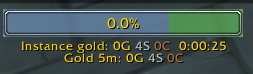
- 🎨 Movable UI Bar - Draggable on-screen experience bar showing percentage and time estimate
- 💰 Gold Tracking - Monitor how much gold you've earned in the last 5 minutes, hour, or day
- 📈 Performance Monitoring - Alerts when your XP speed changes dramatically to help optimize playstyle
- 👥 Dungeon Grouping - Separate tracking for party/dungeon experiences
- 💱 Currency Tracking - Tracks various currencies earned in the last 5 minutes (experimental)
🎮 How to Use
Getting Started
Once installed, the addon will automatically start tracking your experience when you log in. A movable XP bar will appear on your screen showing your current level percentage and estimated time to the next level.
Main Commands
| Command | Description |
|---|---|
/xpt |
Display XP statistics including total XP gained, current rate, and time to next level |
/xpt help |
Show all available commands |
/xpt reset |
Reset the timer (great when entering a new zone or dungeon) |
/xpt hour |
Display XP gained per hour (requires 1+ hour of play) |
/xpt on / /xpt off |
Enable or disable status messages on XP gains |
Gold & Currency Tracking
| Command | Description |
|---|---|
/ct or /cash_timer |
Display gold earned in last 5 minutes, 1 hour, and 24 hours |
/ct [minutes] |
Show gold earned in the last X minutes (max 1440 minutes / 24 hours) |
/ct on / /ct off |
Enable or disable gold earning notifications |
Group & Dungeon Commands
| Command | Description |
|---|---|
/xpt party or /xpt group |
Display separate statistics for your current group session |
/xpt party_start |
Manually start group tracking |
/xpt party_end |
End group tracking and display summary |
🖱️ UI Bar Features
The floating XP bar that appears on your screen includes:
- Top Bar: Shows your current level progress as a percentage and estimated time to reach the next level
- Bottom Text: Displays gold and currency earned in the last 5 minutes, plus instance tracking information
- Draggable Design: Click and drag the bar to reposition it anywhere on your screen; position is saved automatically
- Smart Display: At maximum level, the XP bar hides while gold tracking continues
📥 Installation
- Download the addon
- Extract the
xp_timerfolder to your WoW addons directory:- Windows:
World of Warcraft\_retail_\Interface\AddOns\ - Mac:
World of Warcraft/_retail_/Interface/AddOns/
- Windows:
- Restart World of Warcraft
- Enable the addon in your AddOns menu at the character selection screen
- Log in and type
/xpt helpto get started
⚙️ Settings
Access the addon's settings through the Interface Options or Settings menu under "XP Timer":
- Show chat messages: Enable/disable messages in chat
- Show UI frame: Toggle the on-screen XP bar visibility
🔧 Compatibility
- Game Version: World of Warcraft Retail (Patch 12.0.1 + )
XP Timer with UI
Created by Jeff Jacob
For questions, suggestions, or feature requests:
📧 addon@phansoft.ca
用户评价
暂无 / 5,0 条评价相关推荐
继续看看这些内容
