插件中文资料库
中文说明、玩家点评、适用场景和替代推荐,方便快速判断是否适合你。
- 界面布局、头像框、姓名板和动作条优化
 GroupFinder
 Sleek XP Bubbles
 FollowerLocationInfo
TweaksUI: Cooldowns 插件下载与使用指南
本页整理了 TweaksUI: Cooldowns 的功能用途、适用人群、安装方法和常见问题,方便玩家快速判断是否需要安装。
适合谁用
TweaksUI: Cooldowns 是一款 动作条 / 战斗 / 增益与减益 类插件,适合需要优化界面、提升操作效率或补充游戏信息提示的魔兽世界玩家。
基本信息
- 插件作者:Meltheran
- 插件分类:动作条 / 战斗 / 增益与减益
- 适配版本:12.0.7
- 累计下载:38
安装方法
- 点击上方下载按钮获取 TweaksUI: Cooldowns插件文件。
- 解压后将插件文件夹放入 World of Warcraft/_retail_/Interface/AddOns 目录。
- 重启游戏或在角色界面点击插件,确认 TweaksUI: Cooldowns 已启用。
- 如果插件不生效,请检查版本是否匹配,或关闭同类冲突插件后重试。
使用建议
TweaksUI: Cooldowns 安装后建议先在角色界面确认已启用,进入游戏后根据插件提供的命令、小地图按钮或设置面板进行调整。如遇到报错,可先单独启用该插件排查冲突。
TweaksUI: Cooldowns 常见问题
TweaksUI: Cooldowns 适合需要 动作条 / 战斗 / 增益与减益 类功能的玩家,特别是希望提升游戏便利性、界面管理或战斗信息获取效率的用户。
下载后解压到 Interface/AddOns 目录,然后重启游戏并在角色界面启用插件。
常见原因是目录多套一层、游戏版本不匹配、依赖插件缺失或同类插件冲突。
可以查看本页的替代插件推荐和相关插件区域,按下载量和分类选择同类工具。
插件 AI 问答
可以问:这个插件正式服能用吗、和 DBM 冲突吗、怎么设置、有没有替代插件。
TweaksUI: Cooldowns 是一款魔兽世界插件,主要用于界面框架、头像、动作条或冷却显示优化、增益、减益、光环或职业状态监控。建议根据自己的版本和插件环境先测试兼容性。
插件用途
TweaksUI: Cooldowns 主要面向需要增益与减益功能的玩家,用来改善游戏体验、减少重复操作或补充默认界面没有直接提供的信息。
适用场景
- 界面框架、头像、动作条或冷却显示优化
- 增益、减益、光环或职业状态监控
使用建议
安装后建议先在角色选择界面或插件管理器中确认已启用,再进入游戏测试是否与现有整合包、WA 和其他插件冲突。如遇报错,可以先禁用同类插件排查。
TweaksUI: Cooldowns
Formerly Cooldown Manager Tweaks (CMT)
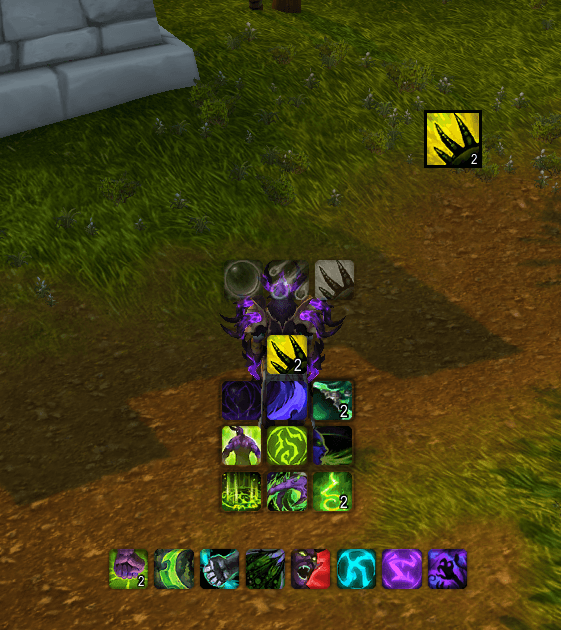
TweaksUI: Cooldowns is a cooldown tracking addon built on top of Blizzard’s Cooldown Manager. It focuses on layout control, visibility rules, and customization that were lost or limited with the upcoming Midnight API changes.
It can be used on its own or as part of the full TweaksUI suite.
Why This Addon Exists
Cooldown Manager Tweaks (CMT) originally started as a way to smooth out some of the rough edges in Blizzard’s Cooldown Manager. As Midnight development progressed, it became clear that many of the tools players relied on—especially addons like WeakAuras—were losing access to features needed for detailed cooldown tracking.
CMT was written to fill some of those gaps while staying within Blizzard’s supported systems.
When TweaksUI was created, the cooldown module was reworked into TweaksUI: Cooldowns (TUI:CD). This helped avoid conflicts with other addons, simplified maintenance, and allowed everything to share a unified codebase and layout system.
Some larger addons have since adapted to Midnight as well, which is a good thing. TUI:CD exists because it solves the specific problems I ran into with my own UI and continues to be developed because other players found it useful.
Migrating from CMT
If you are coming from Cooldown Manager Tweaks, your settings are migrated automatically.
Install TweaksUI: Cooldowns alongside CMT, log in once to allow the migration to complete, then disable CMT and reload your UI. No manual steps are required.
Features
Masque Skinning Support
Optional Masque support is included for cooldown icons.
- Each tracker (Essential, Utility, Buffs, Custom) has its own Masque group
- Masque can be enabled per tracker or disabled entirely
- Masque controls icon appearance, while TUI:CD handles layout and behavior
Layout Mode
Trackers can be positioned anywhere on screen without using Blizzard Edit Mode.
- Unlock frames and drag trackers directly
- Visual overlays show frame names while positioning
- Positions are saved automatically
- Toggle Layout Mode quickly with
/tuicdlayout
Per-Icon Highlights
Important cooldowns can be separated from tracker grids and displayed independently.
- Pull specific abilities out of the grid
- Place highlighted icons anywhere on screen
- Separate settings for ready vs on cooldown states
- Optional proc glow effects for visual alerts
Visibility Controls
Trackers can be shown or hidden based on context.
- Combat state
- Target availability
- Group or solo play
- Instance type (dungeon, raid, arena, battleground)
- Mouseover behavior
- Hidden opacity instead of full invisibility
Layout and Appearance
Control how icons are arranged and displayed.
- Grid layouts with rows, columns, or custom patterns
- Adjustable icon size with aspect ratio presets
- Texture zoom for cleaner icon edges
- Horizontal and vertical spacing controls
- Independent scaling for cooldown text and stack counts
- Border opacity control
Persistent Buff Display
Buffs can remain visible even when inactive.
- Active buffs display full color and cooldown sweep
- Inactive buffs use configurable greyscale and opacity
- Per-buff appearance options
- Safe to use in combat without errors
Custom Tracker
Track any spell or item with a cooldown.
- Spells, racials, and abilities
- Items such as trinkets, potions, food, and equipment
- Per-spec tracking lists
- Drag-and-drop item support from bags
- Charge and stack display
Settings System
Settings are saved per character.
- Independent settings per tracker
- Layout positions persist across reloads
- Custom spell and item lists are preserved
- Per-icon highlight settings are stored
Supported Trackers
- Essential Cooldowns
- Utility Cooldowns
- Buff Tracker (with persistent display)
- Custom Tracker (items and spells)
Commands
| Command | Action |
|---|---|
/tuicd |
Open settings |
/tuicd help |
Show all commands |
/tuicd patchnotes |
View patch notes |
/tuicd debug |
Toggle debug mode |
/tuicd reset |
Reset all settings |
/tuicd resetpos |
Reset tracker positions |
/tuicdlayout |
Toggle Layout Mode |
/tuicdmigrate status |
Check CMT migration status |
/tuicdmigrate force |
Force re-migration from CMT |
Compatibility
- Game Version: The War Within, Midnight Beta
- Interface Versions: 110105, 120000
- Optional: Masque
- Dependencies: None
Part of TweaksUI
TweaksUI: Cooldowns is a standalone addon that also functions as a module within the full TweaksUI suite. It can be used on its own or alongside other TweaksUI modules.
Other TweaksUI modules include:
- Unit Frames
- Cast Bars
- Nameplates
- Action Bars
- Chat
- Resource Bars
- And more
Support & Feedback
If you run into bugs or have feature requests, please use the CurseForge issues page or join the Discord.
Join our Discord
Created by Meltheran
CurseForge: https://www.curseforge.com/wow/addons/cooldown-manager-tweaks用户评价
暂无 / 5,0 条评价相关推荐
继续看看这些内容
