插件中文资料库
中文说明、玩家点评、适用场景和替代推荐,方便快速判断是否适合你。
- 副本、团队本和大秘境战斗提醒
- 界面布局、头像框、姓名板和动作条优化
 BagSync
 GroupFinder
 FollowerLocationInfo
CrieffList 插件下载与使用指南
本页整理了 CrieffList 的功能用途、适用人群、安装方法和常见问题,方便玩家快速判断是否需要安装。
适合谁用
CrieffList 是一款 聊天与通讯 / 其他插件 类插件,适合需要优化界面、提升操作效率或补充游戏信息提示的魔兽世界玩家。
基本信息
- 插件作者:rkst
- 插件分类:聊天与通讯 / 其他插件
- 适配版本:12.0.7
- 累计下载:32
安装方法
- 点击上方下载按钮获取 CrieffList插件文件。
- 解压后将插件文件夹放入 World of Warcraft/_retail_/Interface/AddOns 目录。
- 重启游戏或在角色界面点击插件,确认 CrieffList 已启用。
- 如果插件不生效,请检查版本是否匹配,或关闭同类冲突插件后重试。
使用建议
CrieffList 安装后建议先在角色界面确认已启用,进入游戏后根据插件提供的命令、小地图按钮或设置面板进行调整。如遇到报错,可先单独启用该插件排查冲突。
CrieffList 常见问题
CrieffList 适合需要 聊天与通讯 / 其他插件 类功能的玩家,特别是希望提升游戏便利性、界面管理或战斗信息获取效率的用户。
下载后解压到 Interface/AddOns 目录,然后重启游戏并在角色界面启用插件。
常见原因是目录多套一层、游戏版本不匹配、依赖插件缺失或同类插件冲突。
可以查看本页的替代插件推荐和相关插件区域,按下载量和分类选择同类工具。
插件 AI 问答
可以问:这个插件正式服能用吗、和 DBM 冲突吗、怎么设置、有没有替代插件。
CrieffList 是一款魔兽世界插件,主要用于副本、团本、大秘境或钥石辅助、组队、队伍交流和自动问候。建议根据自己的版本和插件环境先测试兼容性。
插件用途
CrieffList 主要面向需要聊天与通讯功能的玩家,用来改善游戏体验、减少重复操作或补充默认界面没有直接提供的信息。
适用场景
- 副本、团本、大秘境或钥石辅助
- 组队、队伍交流和自动问候
使用建议
安装后建议先在角色选择界面或插件管理器中确认已启用,再进入游戏测试是否与现有整合包、WA 和其他插件冲突。如遇报错,可以先禁用同类插件排查。
CrieffList: One-Click Mythic+ Key Listing
Have you ever opened the group finder to list your key and changed dungeon and had the whole group finder change? I have, and I hate it!
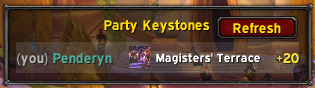
CrieffList is a small World of Warcraft addon for the Premade Groups finder. It adds a side panel that shows every party member's current Mythic+ keystone, and turns listing a key into a single click: pick the row for the dungeon you want to run, type the level (because you have to, can't automate that), hit List Group and go!
Overview
Open Group Finder → Premade Groups → Dungeons → Start a Group. The CrieffList panel anchors to the right of the dialog and lists each party member's keystone — dungeon and level — pulled live from the M+ ecosystem libraries.
Click a row and CrieffList does the rest:
- Selects the correct dungeon activity
- Sets the difficulty to Mythic+
- Sets the playstyle to Relaxed
- Focuses the Name field so you can type the key level
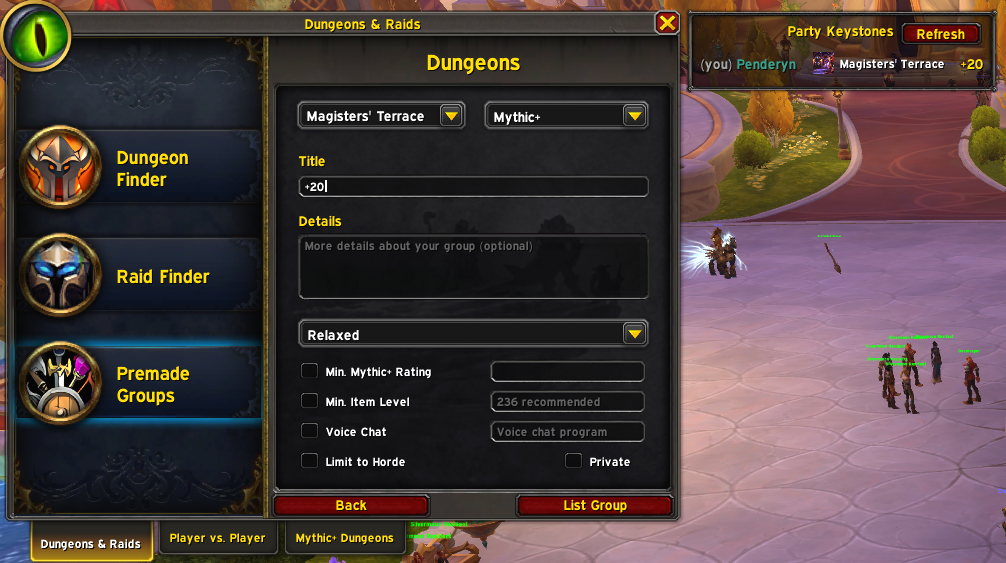
That's the whole addon. No options frame, no profiles, no tooltip integrations.
How It Knows Your Party's Keys
CrieffList reads keystone data from, in order:
- LibKeystone — shipped by BigWigs, Details!, MDT, and Plater. If anyone in your group is running one of those addons, their key shows up within seconds of opening the Group Finder.
- LibOpenRaid — a secondary fallback used by other M+ addons.
- CrieffList's own addon-channel broadcast — so two CrieffList users will see each other's keys even if nobody in the party runs any of the libraries above.
Your own key is read directly from the game and always appears.
Slash Commands
/kl(or/crieff) — opens the Group Finder and navigates straight to the Premade Groups → Dungeons → Start a Group dialog./kl debug— dumps the resolved activity for your current keystone, every M+ activity the client knows about, and the cached party keystones. Output goes to chat and to a copyable text window. Useful for reporting issues./kl test— opens a test panel listing every M+ activity LFGList currently knows about. Each row is hardcoded — clicking it bypasses CrieffList's matcher and asks Blizzard's UI directly. Helps isolate whether a problem is in matching or in the activity setup itself.
One Caveat: The Name Field
Blizzard's Group Finder Name field is engine-protected — addons can read focus and selection but cannot write text into it. CrieffList focuses the field for you, but you'll still need to type the key level (e.g. +15) yourself. Everything else — dungeon, Mythic+ difficulty, Relaxed playstyle — is set automatically.
Installation
CrieffList supports retail WoW (The War Within / Midnight, Interface 12.0.0 and 12.0.5).
- WowUp — search for "CrieffList" in the WowUp Hub catalog.
- Manual — download the latest release zip from the Releases page and extract it into
World of Warcraft/_retail_/Interface/AddOns/.
Reporting Issues
If something doesn't work, run /kl debug, copy the output, and open an issue at https://github.com/rkst/crieff-list/issues with the dump attached. The debug dump includes the addon version, your locale, and the activity table — usually enough to pinpoint a name-matching or localization mismatch.
用户评价
暂无 / 5,0 条评价相关推荐
继续看看这些内容
