魔兽科普汇聚WoW玩家们专属综合资讯门户网站!

FarmHud

FarmHud 是一款魔兽世界插件,主要用于地图、区域、任务路线或交通提醒。建议根据自己的版本和插件环境先测试兼容性。

免费下载 举报 收藏插件
插件详情

插件中文资料库

中文说明、玩家点评、适用场景和替代推荐,方便快速判断是否适合你。

玩家一句话点评
FarmHud 适合需要地图与小地图、界面增强或玩法辅助的玩家,建议结合自己的职业和版本先测试再长期使用。
适用场景
  • 任务路线、地图标记和野外探索
  • 界面布局、头像框、姓名板和动作条优化

FarmHud 插件下载与使用指南

本页整理了 FarmHud 的功能用途、适用人群、安装方法和常见问题,方便玩家快速判断是否需要安装。

适合谁用

FarmHud 是一款 地图与小地图 / 草药学 / 采矿 类插件,适合需要优化界面、提升操作效率或补充游戏信息提示的魔兽世界玩家。

基本信息

  • 插件作者:hizuro_de
  • 插件分类:地图与小地图 / 草药学 / 采矿
  • 适配版本:1.15.8,2.5.5,12.0.5,3.80.1,5.5.4,12.0.7
  • 累计下载:2,857

安装方法

  1. 点击上方下载按钮获取 FarmHud插件文件。
  2. 解压后将插件文件夹放入 World of Warcraft/_retail_/Interface/AddOns 目录。
  3. 重启游戏或在角色界面点击插件,确认 FarmHud 已启用。
  4. 如果插件不生效,请检查版本是否匹配,或关闭同类冲突插件后重试。

使用建议

FarmHud 安装后建议先在角色界面确认已启用,进入游戏后根据插件提供的命令、小地图按钮或设置面板进行调整。如遇到报错,可先单独启用该插件排查冲突。

FarmHud 常见问题

这个插件适合哪些玩家?

FarmHud 适合需要 地图与小地图 / 草药学 / 采矿 类功能的玩家,特别是希望提升游戏便利性、界面管理或战斗信息获取效率的用户。

下载后怎么安装?

下载后解压到 Interface/AddOns 目录,然后重启游戏并在角色界面启用插件。

为什么插件不显示或不生效?

常见原因是目录多套一层、游戏版本不匹配、依赖插件缺失或同类插件冲突。

有没有类似插件可以替代?

可以查看本页的替代插件推荐和相关插件区域,按下载量和分类选择同类工具。

插件 AI 问答

可以问:这个插件正式服能用吗、和 DBM 冲突吗、怎么设置、有没有替代插件。

FarmHud 是一款魔兽世界插件,主要用于地图、区域、任务路线或交通提醒。建议根据自己的版本和插件环境先测试兼容性。

插件用途

FarmHud 主要面向需要地图与小地图功能的玩家,用来改善游戏体验、减少重复操作或补充默认界面没有直接提供的信息。

适用场景

  • 地图、区域、任务路线或交通提醒

使用建议

安装后建议先在角色选择界面或插件管理器中确认已启用,再进入游戏测试是否与现有整合包、WA 和其他插件冲突。如遇报错,可以先禁用同类插件排查。

Description

Turn your minimap into a hud for farming ore / herb.


WARNING: ADDON_ACTION_FORBIDDIN with Midnight

Unfortunately, I have to disable the ping function for FarmHud, and it will remain disabled until /reload is executed.

The reason: The PingLocation function is now a protected function. Unfortunately, I currently see no other way to prevent ADDON_ACTION_FORBIDDEN.

Classic clients are not currently affected.

I'm currently frustrated and angry with Blizzard. Not a good state to be in when contacting Blizzard.


Minimap / Nodes / FarmHud

Blizzard has designed the Minimap element as All-in-One (Terrain texture + Nodes) and the nodes are inaccessable for addons.
It could not be separated. It could not be copied. Minimap and FarmHud can't be displayed at the same time.
While mouseover is activated (Mouse on), the area for access to the 3D world is limited to the left and right on the screen boundaries.
(It's like the Highlander: There can only be one.)


Contains

 ● Gather circle ( color / transparency adjustable )
 ● Direction indicators (cardinal points) ( color / transparency adjustable )
 ● Player coordinations ( color / transparency adjustable )
 ● Minimap button (and broker panel integration) ( optional )
 ● Show minimap terrain texture ( transparency adjustable )
 ● Key bindings
 ● OnScreen buttons ( transparency adjustable )
    ▻ Toggle mouseover mode
    ▻ Toggle background
    ▻ Toggle option panel
    ▻ Close HUD
 ● Tracking options ( retail client only )
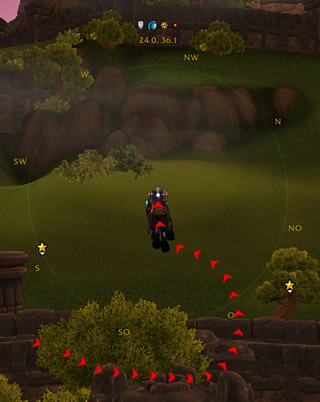
 ● !! New experimental module !! TrailPath
   ▻ Display your path on Minimap/FarmHud with red arrows.
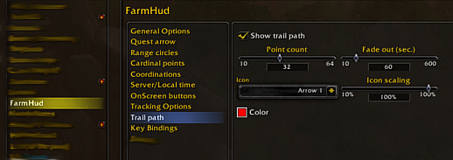
   ▻ Color, transparency and icons are adjustable
TrailPath - Display your path on minimap and farmhud with red arrows. Color, transparency and icons are adjustable.Trail path options


Option panel

The option panel are available over  Game Menu > Interface > AddOns > FarmHud 
or by chat command  /run FarmHud:ToggleOptions() 


Supports

 ● Routes
 ● _NPCScan.Overlay ( outdated )

 ● Bloodhound2 ( outdated )

 ● By library LibHijackMinimap
    ▻ Magneto ( outdated, owner is missing )
 ● By library HereBeDragon
    ▻ TomTom
    ▻ HandyNotes


Addon compatibility

I know it is not a complete list of addons, but you can report addons for the list.
From time to time i will look on updated versions.


Minimap AddOns

 ●  BasicMinimap  v9.2.0 | Okay
 ●  Chinchilla Minimap  v2.12.2 | Okay
 ●  ObeliskMinimap  r14 | Okay  -- outdated since 9.x / owner is missing
 ●  SexyMap  v9.2.0 | Okay
 ●  Mappy Continued  v4.6.8 | Working without errors -- Problems with Minimap Buttons


 ~ (Currently untested) Minimap addons found on Curseforge
 ●  Neat Minimap  | Untested
 ●  Clean-Mini-Map  | Untested
 ●  DejaMinimap | Untested
 ●  DFMinimap  | Untested
 ●  MaxiMap  | Untested
 ●  EKMinimap  | Untested
 ●  ReMinimap Again  | Untested
 ●  zrMinimap (Classic only) | Untested


 ~ (Currently untested) Minimap addons found on WoWInterface
 ●  PocketPlot  | Untested
 ●  Ajs MM  (Classic only) | Untested


UI AddOns

 ● ElvUI | Okay 
 ● GW2_UIOkay -- Working after little fix. Tested version 7.13.0 @ 2025-05-10.
 ● DragonFlight UI Classic | Incompatible -- Force background transparency of minimap to 100% and makes the minimap to a secure frame. That prevents close and/or move in combat. Tested version 0.33.2 @ 2025-08-10


Problems and possible workarounds

[1] Use of anonymous frames makes correct functioning more difficult. Possible workaround: Disable "Show elements" in FarmHud Options.


@Authors of Minimap and UI AddOns

I've added a function to register (anonymous) frames that anchored on Minimap.
Please use it to make smooth cooperation between our AddOns possible.
 FarmHud:RegisterForeignAddOnObject( <frame object>, <addon name> ) 
~~ No addon should have the sole claim to the minidap frame. We should use it cooperatively. ~~


Dragonflight problems

    ▻ I'm currently getting error messages after changing the keyboard layout. Hope it only happens to me.


Bug reports, feature requests and Support


Localization

Do you want to help translate this addon?
See Curseforge localization tool


Macro functions

 /run FarmHud:Toggle() 
 /run FarmHud:ToggleMouse() 
 /run FarmHud:ToggleBackground() 
 /run FarmHud:ToggleOptions() 


Our other projects


Donation would be nice :-)

CurseForge: https://www.curseforge.com/wow/addons/farmhud

用户评价

暂无 / 5,0 条评价
免费插件下载后可以评价;付费插件 / WA 购买后可以评价;委托订单完成后可以评价。
暂无评价。

相关推荐

继续看看这些内容

全站搜索