插件中文资料库
中文说明、玩家点评、适用场景和替代推荐,方便快速判断是否适合你。
- 背包、银行和物品整理
- 伤害、治疗、仇恨和战斗数据统计
 Details! Mythic+ Scoreboard
 BagSync
 GroupFinder
ArtisanFinder 插件下载与使用指南
本页整理了 ArtisanFinder 的功能用途、适用人群、安装方法和常见问题,方便玩家快速判断是否需要安装。
适合谁用
ArtisanFinder 是一款 拍卖与商业 / 聊天与通讯 / 专业技能 类插件,适合需要优化界面、提升操作效率或补充游戏信息提示的魔兽世界玩家。
基本信息
- 插件作者:Darkann2444
- 插件分类:拍卖与商业 / 聊天与通讯 / 专业技能
- 适配版本:12.0.5,12.0.7,12.1.0,12.1.5,1.60.1
- 累计下载:40
安装方法
- 点击上方下载按钮获取 ArtisanFinder插件文件。
- 解压后将插件文件夹放入 World of Warcraft/_retail_/Interface/AddOns 目录。
- 重启游戏或在角色界面点击插件,确认 ArtisanFinder 已启用。
- 如果插件不生效,请检查版本是否匹配,或关闭同类冲突插件后重试。
使用建议
ArtisanFinder 安装后建议先在角色界面确认已启用,进入游戏后根据插件提供的命令、小地图按钮或设置面板进行调整。如遇到报错,可先单独启用该插件排查冲突。
ArtisanFinder 常见问题
ArtisanFinder 适合需要 拍卖与商业 / 聊天与通讯 / 专业技能 类功能的玩家,特别是希望提升游戏便利性、界面管理或战斗信息获取效率的用户。
下载后解压到 Interface/AddOns 目录,然后重启游戏并在角色界面启用插件。
常见原因是目录多套一层、游戏版本不匹配、依赖插件缺失或同类插件冲突。
可以查看本页的替代插件推荐和相关插件区域,按下载量和分类选择同类工具。
插件 AI 问答
可以问:这个插件正式服能用吗、和 DBM 冲突吗、怎么设置、有没有替代插件。
ArtisanFinder 是一款魔兽世界插件,主要用于伤害统计、输出循环或战斗表现分析、背包、银行、专业制造或物品整理。建议根据自己的版本和插件环境先测试兼容性。
插件用途
ArtisanFinder 主要面向需要聊天与通讯功能的玩家,用来改善游戏体验、减少重复操作或补充默认界面没有直接提供的信息。
适用场景
- 伤害统计、输出循环或战斗表现分析
- 背包、银行、专业制造或物品整理
使用建议
安装后建议先在角色选择界面或插件管理器中确认已启用,再进入游戏测试是否与现有整合包、WA 和其他插件冲突。如遇报错,可以先禁用同类插件排查。
Need support, want to provide feedback or feature requests ? Join our Discord ❤️
ArtisanFinder
ArtisanFinder helps players find available crafters directly from the Crafting Orders UI, while giving crafters a simple way to publish prices, notes, quality expectations, reagent recommendations, and availability from the Professions UI.
WoW Forever
Show profession icons above friendly players outdoors and outside combat/instances.
Open discovery with
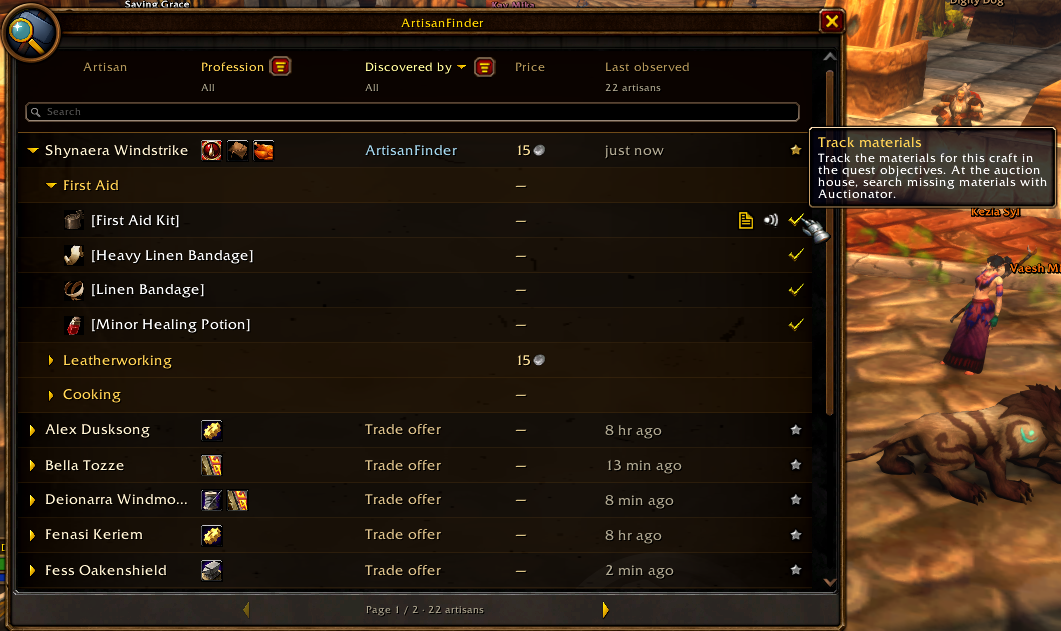
/af, the minimap button, or the ArtisanFinder tab in the crafting window.Search by artisan, profession or item; expand artisans into professions and known crafts. Filter sources, sort columns and favorite artisans.
View known profession levels, profession links, commissions and notes.
Manage advertising, default prices and recipe overrides from the crafting sidebar.
Discover crafters through ArtisanFinder, guild professions, Trade Chat, Linked Inn, CraftBoard and Release Gaming – Find Crafts. Other addons' data does not imply a confirmed price or current availability.
Track an item's required materials in the quest objectives and search missing materials with Auctionator at the auction house.
Request a craft from discovery and negotiate private agreements with addon-enabled artisans. Browse incoming/outgoing agreements, review the customer's materials saved at acceptance, and confirm completion together.
Receive agreement notifications and unread badges without opening a window. Track each accepted agreement separately.

Forever has no Blizzard crafting-order panel, customer quality preview or material-quality selection. Private agreements require a compatible ArtisanFinder version on both clients and do not craft, trade or pay automatically.
Features
- Live artisan search from the Crafting Orders form.
- Crafter profiles with commissions, notes, quality data, and suggested reagents.
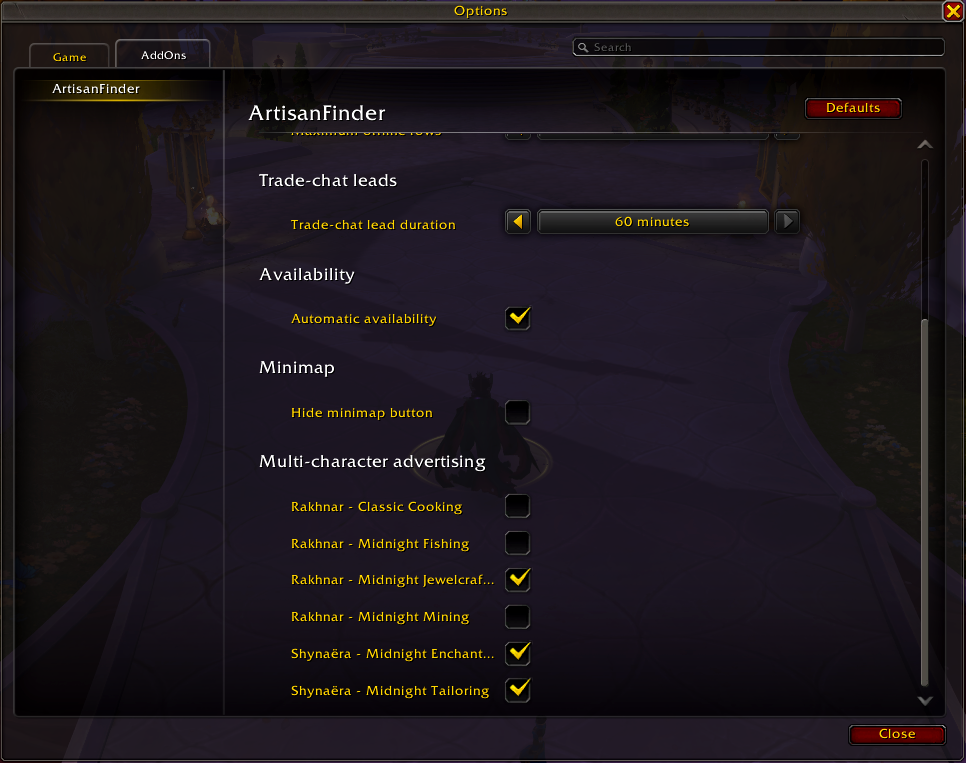
- Multi-character advertising for scanned professions from your alts.
- Guild and trade-chat crafter discovery.
- Favorites, search, sorting, online checks, and personal order helpers.
- Prepare Order tracking with Standard, optional-reagent, and Advanced preparation modes.
- Smart reagent guidance with expected quality estimates and material suggestions.
- One-click order filling from prepared craft materials when a matching artisan is selected.
- Personal order notifications for addon-enabled customers and artisans.
- Manual recipe scanning for supported crafting professions, with optional automatic rescans.
- Minimap, movable button, Options -> AddOns, and Blizzard Edit Mode controls.
- Localization for English, French, German, Spanish, Russian, and Chinese.
For Customers
When you choose an item in the Crafting Order form, ArtisanFinder shows matching artisans who can help with that craft. Results can include commission, note, quality with recommended or optional reagents, AFK state, guild source, trade-chat leads, and actions for whispering or preparing an order.
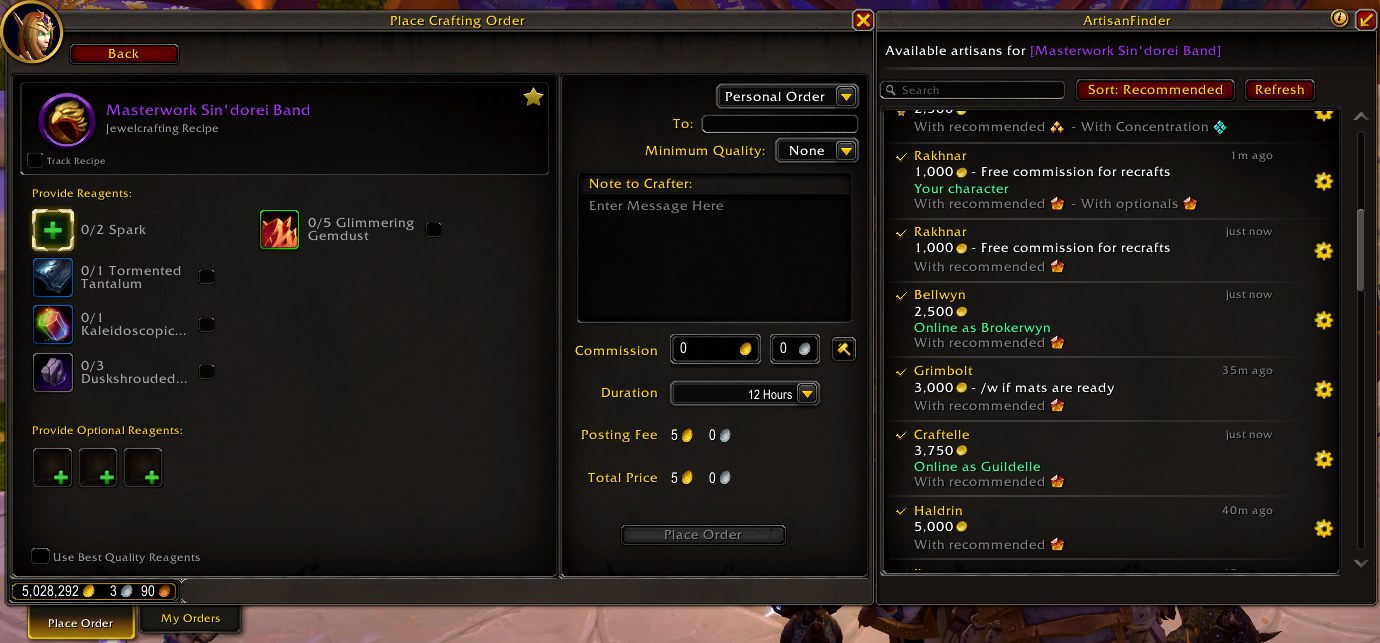
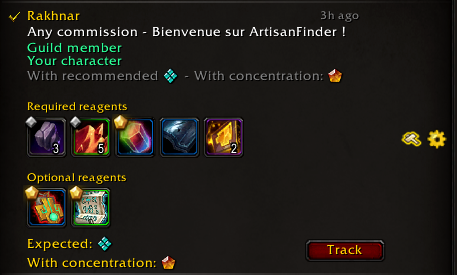
Use the customer row "Prepare order" button to prepare an order as Standard, With optional reagents, or Advanced. Standard preparation adds the craft to the ObjectiveTracker with required components and any artisan quality or reagent recommendations. With optional reagents opens Blizzard-style optional reagent slots inside the artisan row so you can choose one reagent per slot before tracking the craft. Advanced preparation lets you choose required reagent qualities and optional reagents before tracking the craft, with an expected quality preview when ArtisanFinder has enough information.
Prepared crafts appear under ArtisanFinder in the ObjectiveTracker with required components, vendor reagents, selected optional reagents, quantities, owned and missing counts, and quality markers where available. Left-click the craft header to open the profession recipe panel, right-click it to untrack, or use Search at the Auction House to run a temporary Auctionator multi-search for missing reagents when Auctionator is enabled.
When a prepared craft matches the order you are viewing, clicking a matching artisan row can apply the tracked materials directly to the Crafting Order form so you can review the order faster.
ArtisanFinder does not place orders for you. It only helps fill or open the right information so you can review everything before submitting an order yourself.
For Crafters
Quality, commissions and availability
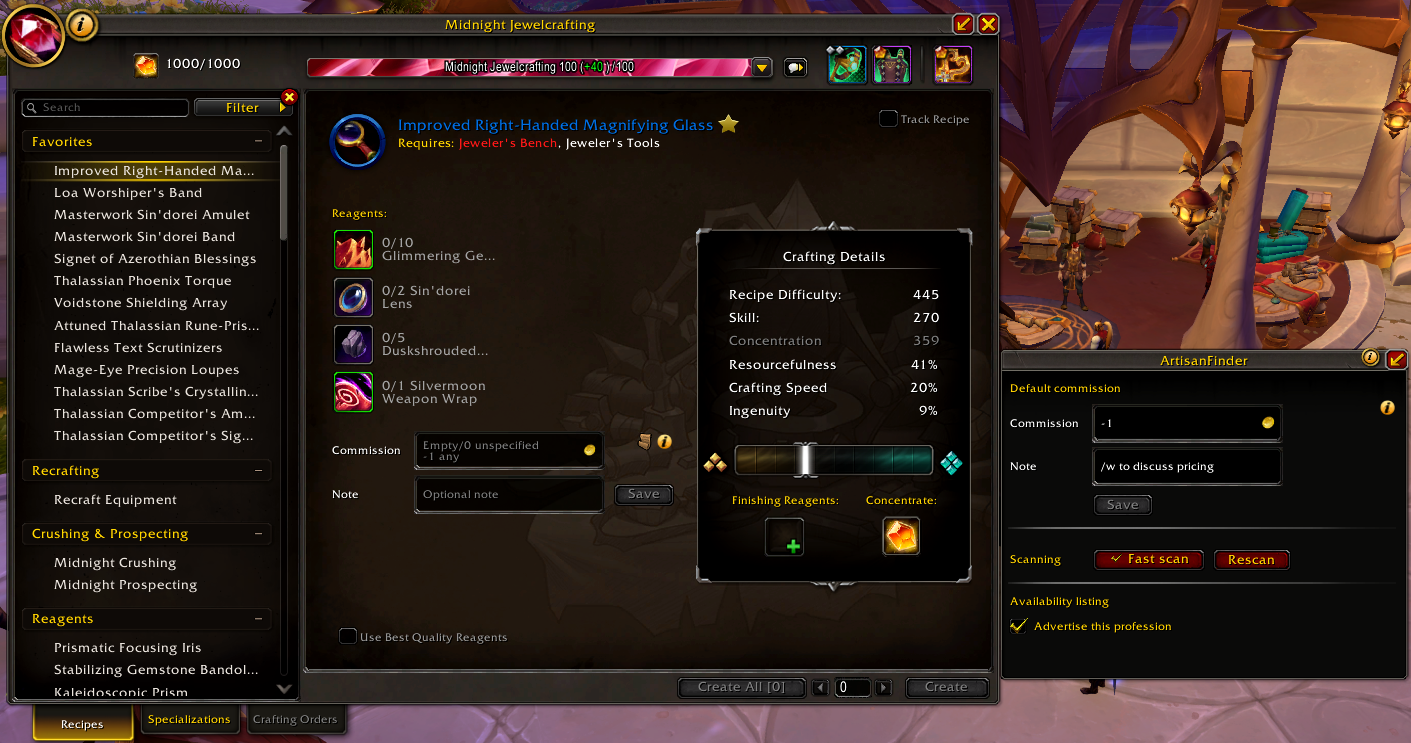
ArtisanFinder adds lightweight controls to the Professions UI for item-specific and profession-default commissions, notes, and availability. It stores scanned profession data and can advertise scanned professions from your other characters while you are online. The crafter panel also includes a customer preview tooltip so you can check what customers will see.
Availability is session-based and resets after login or reload by default. You can cycle between unavailable, current-character availability, and account-wide availability from the minimap button, optionally remember your last manual availability between sessions, or let automatic availability enable it in trade-chat areas and disable it in selected instance types. Profession scans can refresh automatically by default, or you can disable automatic scans in options and press Rescan in the Professions UI when you want to refresh stored craft data.
Notifications
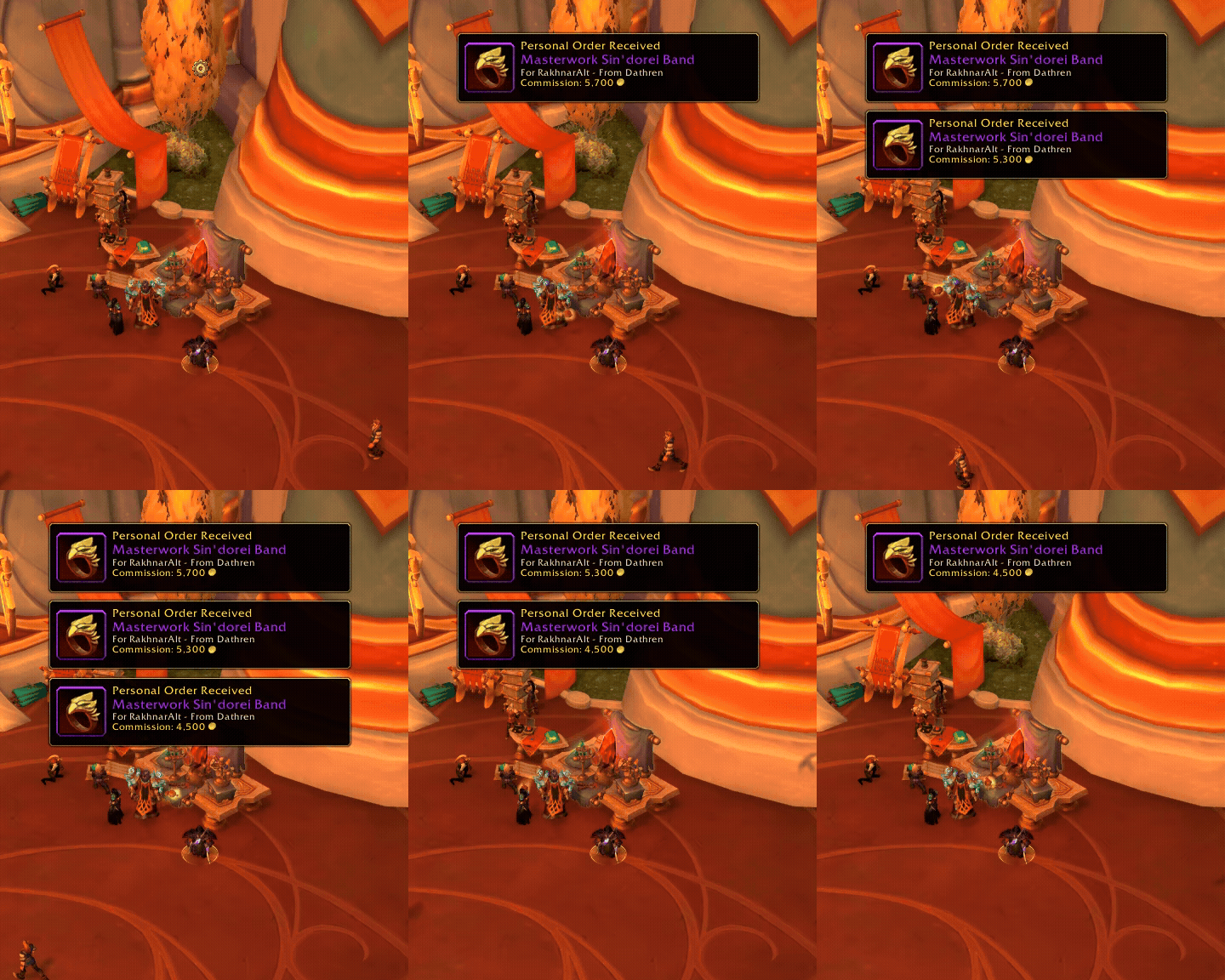
If an addon-enabled customer places a personal order for one of your characters while you are on another character, ArtisanFinder can play your selected notification sound and show a loot-style notification with the item, customer, character, and commission. Notifications are remembered until cleared or completed, and the Blizzard crafting order minimap icon can also show known alt orders.
Reagent Guidance
For addon-enabled crafters, ArtisanFinder can show suggested reagent qualities for the selected craft. Reagent names and icons appear directly in customer tooltips, with optional difficulty estimates when scan data is available.
ArtisanFinder can estimate expected craft quality from the reagents you choose and suggest combinations that reach the best possible result.
Commission Values
On Retail, commission fields use a single gold input:
- Empty or
0: unspecified commission. -1: free commission.- Any positive number: commission in gold.
On Forever, commission fields use separate gold, silver and copper inputs. Leave them blank for an unspecified commission; -1 in Gold accepts any commission.
Options
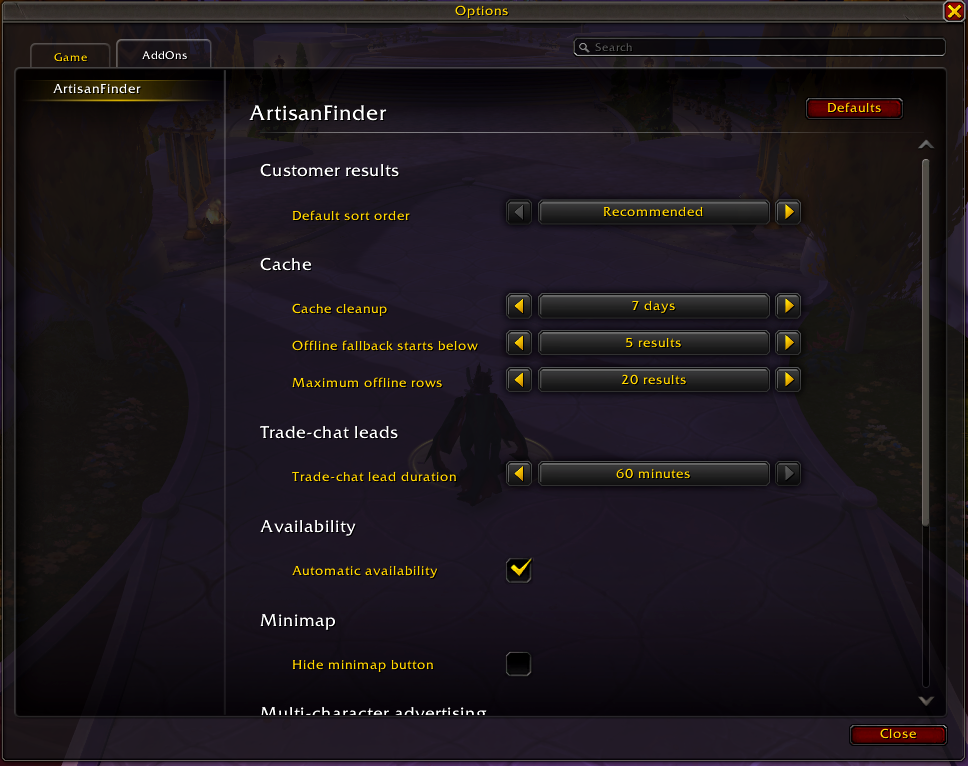
ArtisanFinder has an Options -> AddOns panel ordered around common controls first: minimap/button behavior, availability, scanning, trade-chat leads, order notifications, result sorting, cache behavior and advertised character professions. Blizzard Edit Mode controls the order notification toast and movable ArtisanFinder button placement.
The scanning section includes Artisan import / export. It creates a copy/paste payload containing scanned artisan profiles, profession pricing, advertising choices, and profession links, so another WoW account's artisans can be advertised alongside your main account.
Languages
ArtisanFinder includes localization support for English, French, German, European Spanish, Latin American Spanish, European Portuguese, Brazilian Portuguese, Russian, Simplified Chinese, and Traditional Chinese.
Useful Commands
/af: shows help on Retail; opens discovery on Forever. Use/af helpfor commands./af agreements: opens private crafting agreements on Forever./af scan: force a fresh scan of the currently open profession./af auto: show current automatic availability state./af auto on: enable automatic availability in trade-chat areas./af auto off: disables automatic availability./af auto toggle: toggles the auto availability mode./af transfer: opens artisan import/export./af clear: show clear data commands.
Inspiration
ArtisanFinder was inspired by the convenience of Easycraft.io and the in-game Dofus Artisan list, adapted for World of Warcraft's Crafting Orders and Professions UI.
Special thanks
I would like to thank a few people who made this project possible by their feedback, their help in testing, as well as their help in designing some of the assets of the project: my sister for the beautiful icons, Foxas, Valkhes and Dolkian for their thorough testing and search for bugs, and Reiisal for his input on the addon's accessibility, feedback and continuous support during this adventure.
Third-Party Libraries
ArtisanFinder embeds several addon libraries under Libs/. Their license and notice information is listed in THIRD_PARTY_NOTICES.md.
用户评价
暂无 / 5,0 条评价相关推荐
继续看看这些内容
