插件中文资料库
中文说明、玩家点评、适用场景和替代推荐,方便快速判断是否适合你。
- 背包、银行和物品整理
- 任务路线、地图标记和野外探索
- 界面布局、头像框、姓名板和动作条优化
 Details! Mythic+ Scoreboard
 RightClickSelfCast
 GroupFinder
TenUI 插件下载与使用指南
本页整理了 TenUI 的功能用途、适用人群、安装方法和常见问题,方便玩家快速判断是否需要安装。
适合谁用
TenUI 是一款 动作条 / 战斗 / 增益与减益 类插件,适合需要优化界面、提升操作效率或补充游戏信息提示的魔兽世界玩家。
基本信息
- 插件作者:Tendoriel
- 插件分类:动作条 / 战斗 / 增益与减益
- 适配版本:12.0.5
- 累计下载:26
安装方法
- 点击上方下载按钮获取 TenUI插件文件。
- 解压后将插件文件夹放入 World of Warcraft/_retail_/Interface/AddOns 目录。
- 重启游戏或在角色界面点击插件,确认 TenUI 已启用。
- 如果插件不生效,请检查版本是否匹配,或关闭同类冲突插件后重试。
使用建议
TenUI 安装后建议先在角色界面确认已启用,进入游戏后根据插件提供的命令、小地图按钮或设置面板进行调整。如遇到报错,可先单独启用该插件排查冲突。
TenUI 常见问题
TenUI 适合需要 动作条 / 战斗 / 增益与减益 类功能的玩家,特别是希望提升游戏便利性、界面管理或战斗信息获取效率的用户。
下载后解压到 Interface/AddOns 目录,然后重启游戏并在角色界面启用插件。
常见原因是目录多套一层、游戏版本不匹配、依赖插件缺失或同类插件冲突。
可以查看本页的替代插件推荐和相关插件区域,按下载量和分类选择同类工具。
插件 AI 问答
可以问:这个插件正式服能用吗、和 DBM 冲突吗、怎么设置、有没有替代插件。
TenUI 是一款魔兽世界插件,主要用于界面框架、头像、动作条或冷却显示优化、增益、减益、光环或职业状态监控、背包、银行、专业制造或物品整理。建议根据自己的版本和插件环境先测试兼容性。
插件用途
TenUI 主要面向需要增益与减益功能的玩家,用来改善游戏体验、减少重复操作或补充默认界面没有直接提供的信息。
适用场景
- 界面框架、头像、动作条或冷却显示优化
- 增益、减益、光环或职业状态监控
- 背包、银行、专业制造或物品整理
使用建议
安装后建议先在角色选择界面或插件管理器中确认已启用,再进入游戏测试是否与现有整合包、WA 和其他插件冲突。如遇报错,可以先禁用同类插件排查。
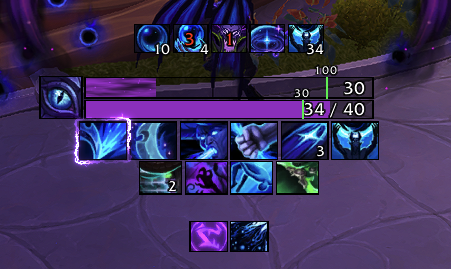
TenUI is a clean, combat-focused HUD: cooldowns, auras, resources, cast bar and trinkets in one configurable package.
Features
Cooldown Bars
- Rows of square cooldown icons driven by the built-in Cooldown Manager, organized into Essential, Utility, Defensive, Trinkets and Custom groups.
- Per-ability settings: visibility, ordering and display behavior for each tracked spell.
- Built-in scanner keeps tracked abilities in sync with your current spec and talents.
Aura Tracking
- Track buffs and debuffs as icon rows or timer bars, with stack counts and cooldown swipes.
- Low-time coloring so expiring effects stand out.
- Designed around the 12.0.x combat data restrictions so timers and swipes keep working in combat.
Cast Bar
- Replacement player cast bar with support for casts, channels and empowered spells.
- Configurable size, textures, fonts and position.
Resources
- Primary and secondary resource bars for every class and spec, including discrete pips for combo points, holy power, chi and similar resources.
- Combat-aware visibility options.
Glow Effects
- Animated border glows for procs and ability highlights, with ten distinct flipbook styles and a live preview in the options window.
Quality of Life
- Combat enter/leave text alerts, stealth indicator, class buff and talent build reminders, optional spell and item IDs in tooltips.
Layout and Profiles
- Every element sits on a named anchor: unlock, drag, snap and fine-tune with X/Y, scale and alpha controls.
- Multiple profiles with copy support, automatic per-spec swapping, and text-based export/import for sharing.
Interface
- A unified, styled options window covering every module.
- SharedMedia support for fonts and bar textures, plus bundled bar fill textures.
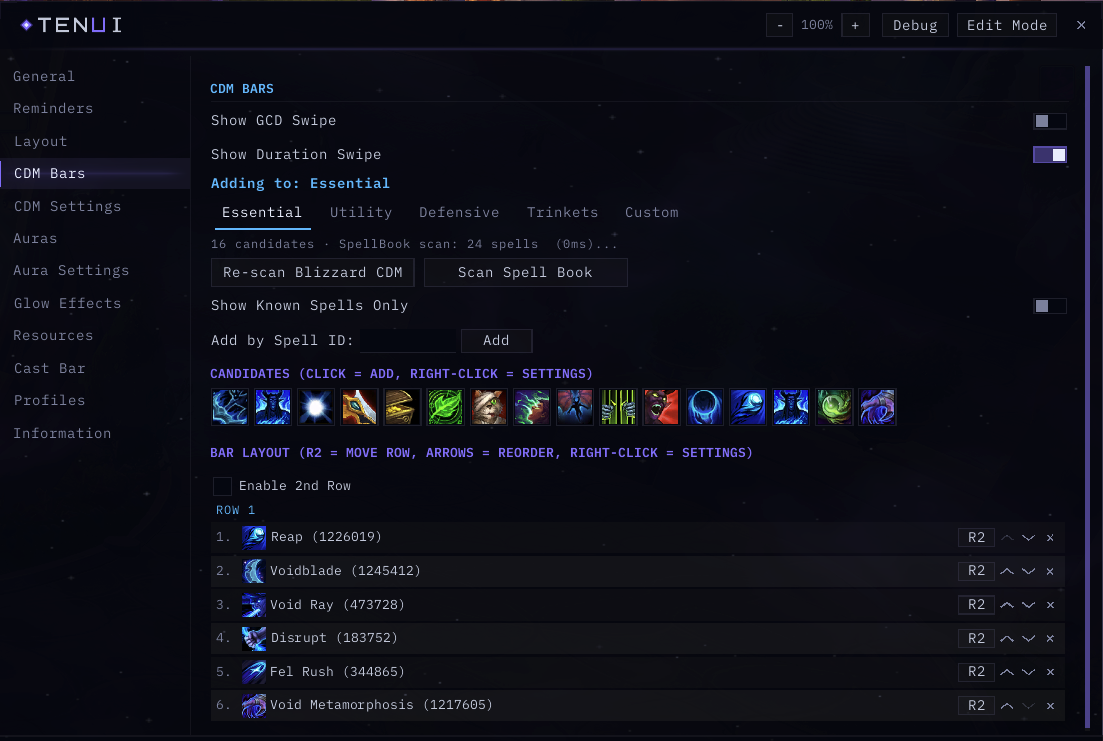
Options window: CDM Bars page with the per-spell list
Getting Started
- Type /tenui to show the version summary and command list, or use the addon compartment button on the minimap.
- Run /tenui unlock to unlock all anchors, drag elements where you want them, then /tenui lock.
- Open the options window to configure modules, abilities and auras.
Commands
- /tenui — show version and command list
- /tenui unlock | /tenui lock — unlock or lock anchors for dragging
- /tenui reset anchors — reset all element positions to defaults
- /tenui reset anchor <name> — reset a single element
- /tenui reset — prompt to wipe all saved settings
FAQ
Some aura timers behave differently in combat. Why?
Since patch 12.0, the game hides certain combat data (exact health, aura durations and similar values) from addons while you are fighting. TenUI uses the supported display mechanisms so swipes, timers and colors keep updating, but a small number of details can only refresh fully once combat ends. This is a game-wide limitation that affects all addons.
Does TenUI replace the built-in Cooldown Manager?
TenUI builds on top of it. The Cooldown Manager remains the source of truth for which abilities are tracked, and TenUI presents them with its own bars, icons and styling.
How do I share my setup with a friend?
Open Profiles in the options window, click Export Active Profile, and copy the text. Your friend pastes it into the Import box on their end. Existing profiles are never overwritten by an import.
Links
- Source code: github.com/Tendoriel/TenUI
- Bug reports and feature requests: GitHub Issues
When reporting a bug, please include your game version, the TenUI version (shown by /tenui), and steps to reproduce.
TenUI is released under the MIT License.
CurseForge: https://www.curseforge.com/wow/addons/tenui用户评价
暂无 / 5,0 条评价相关推荐
继续看看这些内容
