插件中文资料库
中文说明、玩家点评、适用场景和替代推荐,方便快速判断是否适合你。
- 副本、团队本和大秘境战斗提醒
- 背包、银行和物品整理
- 任务路线、地图标记和野外探索
- 界面布局、头像框、姓名板和动作条优化
 GroupFinder
 FollowerLocationInfo
 Sleek XP Bubbles
LootX Enhanced 插件下载与使用指南
本页整理了 LootX Enhanced 的功能用途、适用人群、安装方法和常见问题,方便玩家快速判断是否需要安装。
适合谁用
LootX Enhanced 是一款 动作条 / 背包与库存 / HUD界面 类插件,适合需要优化界面、提升操作效率或补充游戏信息提示的魔兽世界玩家。
基本信息
- 插件作者:IceDNicco
- 插件分类:动作条 / 背包与库存 / HUD界面
- 适配版本:1.15.8,2.5.5,12.0.5,5.5.4,12.0.7
- 累计下载:0
安装方法
- 点击上方下载按钮获取 LootX Enhanced插件文件。
- 解压后将插件文件夹放入 World of Warcraft/_retail_/Interface/AddOns 目录。
- 重启游戏或在角色界面点击插件,确认 LootX Enhanced 已启用。
- 如果插件不生效,请检查版本是否匹配,或关闭同类冲突插件后重试。
使用建议
LootX Enhanced 安装后建议先在角色界面确认已启用,进入游戏后根据插件提供的命令、小地图按钮或设置面板进行调整。如遇到报错,可先单独启用该插件排查冲突。
LootX Enhanced 常见问题
LootX Enhanced 适合需要 动作条 / 背包与库存 / HUD界面 类功能的玩家,特别是希望提升游戏便利性、界面管理或战斗信息获取效率的用户。
下载后解压到 Interface/AddOns 目录,然后重启游戏并在角色界面启用插件。
常见原因是目录多套一层、游戏版本不匹配、依赖插件缺失或同类插件冲突。
可以查看本页的替代插件推荐和相关插件区域,按下载量和分类选择同类工具。
插件 AI 问答
可以问:这个插件正式服能用吗、和 DBM 冲突吗、怎么设置、有没有替代插件。
LootX Enhanced 是一款魔兽世界插件,主要用于界面框架、头像、动作条或冷却显示优化、背包、银行、专业制造或物品整理、团队分配、Roll 点记录或公会管理。建议根据自己的版本和插件环境先测试兼容性。
插件用途
LootX Enhanced 主要面向需要背包与库存功能的玩家,用来改善游戏体验、减少重复操作或补充默认界面没有直接提供的信息。
适用场景
- 界面框架、头像、动作条或冷却显示优化
- 背包、银行、专业制造或物品整理
- 团队分配、Roll 点记录或公会管理
使用建议
安装后建议先在角色选择界面或插件管理器中确认已启用,再进入游戏测试是否与现有整合包、WA 和其他插件冲突。如遇报错,可以先禁用同类插件排查。
LootX Enhanced - Better Loot Interface for WoW
What is it?
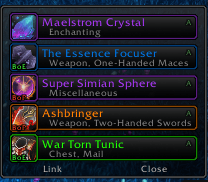
LootX Enhanced is an addon that completely replaces World of Warcraft's default loot windows, making them prettier, more convenient, and faster. Forget about standard windows - now you'll get a modern interface with tons of customization options!
Why you'll love it! 🎁
⚡ Faster & Smoother
- Everything runs 70% faster thanks to smart caching
- Animations are smooth, no lag even during big fights
- Uses little memory - your FPS stays the same
🎨 Looks Amazing
- Automatically matches ElvUI or TukUI if you have them installed
- Tons of ready-made skins to choose from
- Change colors, size, transparency - anything you want
- Quality-based item highlighting (gray, green, blue, purple, etc.)
🎯 Smart with Pawn
If you have Pawn installed (addon that shows if items are better):
- Automatically rolls on upgrades (choose Need or Greed)
- Shows how much % better the item is right in the name
- Green arrow on roll buttons when it's an upgrade
- Fully configurable - turn it off if you don't need it
📊 See All Group Loot
- Monitor shows who looted what in real-time
- See raid/party loot (if you want)
- Gold, currency, items - all in one place
- Configure what to show and what to hide
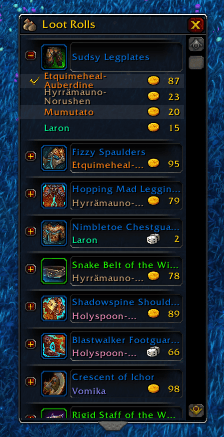
🎲 Better Rolls
- Beautiful group loot windows
- Role icons (tank/heal/dps) next to player names
- Class colors
- Timer showing how much time left to roll
Quick Commands 💬
/lootx- open settings/lootxcache- clear cache (if something glitches)
Basic Settings 🔧
For Beginners
Just install and play! Default settings work great for most players.
If You Want to Customize
- Appearance:
/lootx→ Skins → pick what you like - Pawn Auto-Roll:
/lootx→ Group → Pawn Integration → enable "Auto roll" - Window Position:
/lootx→ unlock anchors → drag where you want - Loot Monitor:
/lootx→ Monitor → configure what to show
Pawn
- Automatic rolls on gear upgrades
- Shows % improvement right next to item name
- Example: "[+] Sword (+15%)" - and addon auto-rolls for you
Compatibility
- Auto-detects ElvUI - uses its colors and style
- Auto-detects TukUI - same thing
- Works with Masque for custom buttons
Which WoW Versions? 🎮
✅ Retail (The War Within 11.2.5+)
✅ Pandaria Classic (5.5.2+)
✅ Classic+ (1.15.8+)
Works on all versions of the game!
FAQ ❓
Q: Is it safe to use?
A: Yes! It's a regular UI addon, doesn't break anything.
Q: Do I need Pawn?
A: No! The addon works without Pawn. Pawn is only needed for auto-rolls on upgrades.
Q: Compatible with ElvUI?
A: Yes! Even better - automatically matches ElvUI style.
Q: How much memory does it use?
A: Only 2-3 MB. That's very little, FPS won't drop.
Q: Can I disable other players' loot monitor?
A: Yes! /lootx → Monitor → turn off "Show other players loot" or raise quality threshold.
Q: How to get back default windows?
A: Just disable the addon in AddOns menu.
Usage Examples 💡
For Raiders
- Enable Pawn auto-rolls so you don't miss upgrades
- Set fast fade times in monitor
- Raise quality threshold to only see epics
For Farmers
- Enable gold display in monitor
- Configure auto-loot for greens and blues
- Hide gray items
For PvP
- Minimal interface - small windows
- Fast animations
- Only your own loot
For Collectors
- Large monitor with all loot
- Altoholic integration shows how many you have
- Tracks all currencies
Support 🆘
If something doesn't work:
- Try
/reload - Try
/lootxcacheto clear cache - Check that all LootX modules are enabled
- Check for conflicts with other loot addons
What's Planned? 🚀
- Sound effects for epics/legendaries
- More ready-made skins
- Loot statistics
- Great Vault integration
- Your ideas - let us know!
Install LootX Enhanced and enjoy a modern, beautiful, and fast loot interface! 🎁✨
用户评价
暂无 / 5,0 条评价相关推荐
继续看看这些内容
