插件中文资料库
中文说明、玩家点评、适用场景和替代推荐,方便快速判断是否适合你。
- 界面布局、头像框、姓名板和动作条优化
 Details! Mythic+ Scoreboard
 BagSync
 GroupFinder
ZeraTooltip 插件下载与使用指南
本页整理了 ZeraTooltip 的功能用途、适用人群、安装方法和常见问题,方便玩家快速判断是否需要安装。
适合谁用
ZeraTooltip 是一款 鼠标提示 类插件,适合需要优化界面、提升操作效率或补充游戏信息提示的魔兽世界玩家。
基本信息
- 插件作者:Anonomit
- 插件分类:鼠标提示
- 适配版本:4.4.2,1.15.8,2.5.5,5.5.4
- 累计下载:41
安装方法
- 点击上方下载按钮获取 ZeraTooltip插件文件。
- 解压后将插件文件夹放入 World of Warcraft/_retail_/Interface/AddOns 目录。
- 重启游戏或在角色界面点击插件,确认 ZeraTooltip 已启用。
- 如果插件不生效,请检查版本是否匹配,或关闭同类冲突插件后重试。
使用建议
ZeraTooltip 安装后建议先在角色界面确认已启用,进入游戏后根据插件提供的命令、小地图按钮或设置面板进行调整。如遇到报错,可先单独启用该插件排查冲突。
ZeraTooltip 常见问题
ZeraTooltip 适合需要 鼠标提示 类功能的玩家,特别是希望提升游戏便利性、界面管理或战斗信息获取效率的用户。
下载后解压到 Interface/AddOns 目录,然后重启游戏并在角色界面启用插件。
常见原因是目录多套一层、游戏版本不匹配、依赖插件缺失或同类插件冲突。
可以查看本页的替代插件推荐和相关插件区域,按下载量和分类选择同类工具。
插件 AI 问答
可以问:这个插件正式服能用吗、和 DBM 冲突吗、怎么设置、有没有替代插件。
ZeraTooltip 是一款魔兽世界插件,主要用于法术、物品 ID 和提示信息显示。建议根据自己的版本和插件环境先测试兼容性。
插件用途
ZeraTooltip 主要面向需要鼠标提示功能的玩家,用来改善游戏体验、减少重复操作或补充默认界面没有直接提供的信息。
适用场景
- 法术、物品 ID 和提示信息显示
使用建议
安装后建议先在角色选择界面或插件管理器中确认已启用,再进入游戏测试是否与现有整合包、WA 和其他插件冲突。如遇报错,可以先禁用同类插件排查。
ZeraTooltip aims to make stats on item tooltips easier to read at a glance. It's extremely customizable, so you can disable features you dislike.
This addon is all about UI, so its features are best explained with a demonstration. Here's a short video (1m20s) that shows a few of the features.
There are also some pictures in the Images section.
ZeraTooltip works in every locale, though parts of the options menu will always be in English. (Currently TBC is only fully working in English)
Rewording
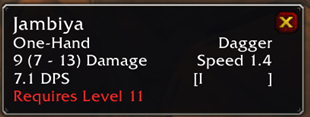
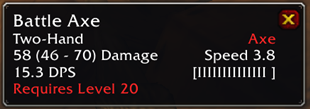
One of the main features of ZeraTooltip is its ability to reword lines. This results in shorter tooltips that are easier to understand at a glance.
For example:
"Improves hit rating by 10"
Can be reworded to:
"+10 Hit"
You can set custom text if you prefer. It's even possible to do this:
"Restores 10 mana per 5 sec." -> "+120 Mana per Minute"
There's also an option to display a "weapon speed bar" which is a visual indicator of weapon speed. It can go beside or below the speed number.
Reordering
ZeraTooltip ensures that stats appear in a consistent order. The order may be customized, or you can disable the reordering entirely.
For example, here is the default order of base stats:
+Stamina
+Strength
+Agility
+Intellect
+Spirit
+Resist
Secondary stats (such as spell power) may also be sorted.
Recoloring
ZeraTooltip can give any stat any color. Every color may be customized or disabled.
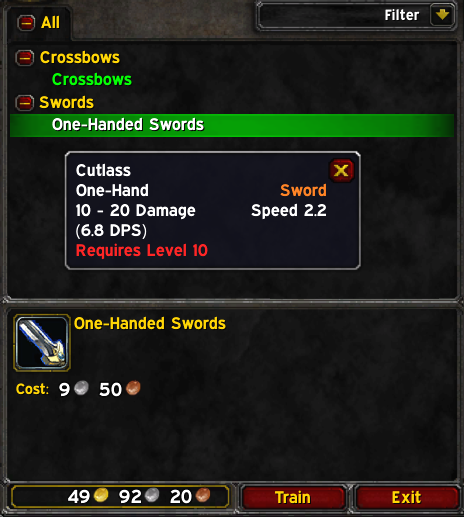
It's also possible to set a color which applies to gear that your character may learn to equip from a weapon/class trainer. This changes the default red text which would appear on items that can't be equipped. Note the orange text in the example below, which indicates that the item requires training to equip.
How to Help
If you find a tooltip that doesn't look right or if you have any other feedback/suggestions, then you can let me know by submitting an issue HERE.
If you're interested in helping to localize this addon for other languages, you can check out the Localization section to get started. To complete the process, contact me through direct message on CurseForge or by submitting an issue above.
CurseForge: https://www.curseforge.com/wow/addons/zeratooltip用户评价
暂无 / 5,0 条评价相关推荐
继续看看这些内容
