插件中文资料库
中文说明、玩家点评、适用场景和替代推荐,方便快速判断是否适合你。
- 界面布局、头像框、姓名板和动作条优化
 Details! Mythic+ Scoreboard
 BagSync
 GroupFinder
Vigil Cooldown HUD 插件下载与使用指南
本页整理了 Vigil Cooldown HUD 的功能用途、适用人群、安装方法和常见问题,方便玩家快速判断是否需要安装。
适合谁用
Vigil Cooldown HUD 是一款 动作条 / 战斗 / HUD界面 / 职业 / 增益与减益 类插件,适合需要优化界面、提升操作效率或补充游戏信息提示的魔兽世界玩家。
基本信息
- 插件作者:JomDarbert
- 插件分类:动作条 / 战斗 / HUD界面 / 职业 / 增益与减益
- 适配版本:12.0.7
- 累计下载:42
安装方法
- 点击上方下载按钮获取 Vigil Cooldown HUD插件文件。
- 解压后将插件文件夹放入 World of Warcraft/_retail_/Interface/AddOns 目录。
- 重启游戏或在角色界面点击插件,确认 Vigil Cooldown HUD 已启用。
- 如果插件不生效,请检查版本是否匹配,或关闭同类冲突插件后重试。
使用建议
Vigil Cooldown HUD 安装后建议先在角色界面确认已启用,进入游戏后根据插件提供的命令、小地图按钮或设置面板进行调整。如遇到报错,可先单独启用该插件排查冲突。
Vigil Cooldown HUD 常见问题
Vigil Cooldown HUD 适合需要 动作条 / 战斗 / HUD界面 / 职业 / 增益与减益 类功能的玩家,特别是希望提升游戏便利性、界面管理或战斗信息获取效率的用户。
下载后解压到 Interface/AddOns 目录,然后重启游戏并在角色界面启用插件。
常见原因是目录多套一层、游戏版本不匹配、依赖插件缺失或同类插件冲突。
可以查看本页的替代插件推荐和相关插件区域,按下载量和分类选择同类工具。
插件 AI 问答
可以问:这个插件正式服能用吗、和 DBM 冲突吗、怎么设置、有没有替代插件。
Vigil Cooldown HUD 是一款魔兽世界插件,主要用于增益、减益、光环或职业状态监控。建议根据自己的版本和插件环境先测试兼容性。
插件用途
Vigil Cooldown HUD 主要面向需要增益与减益功能的玩家,用来改善游戏体验、减少重复操作或补充默认界面没有直接提供的信息。
适用场景
- 增益、减益、光环或职业状态监控
使用建议
安装后建议先在角色选择界面或插件管理器中确认已启用,再进入游戏测试是否与现有整合包、WA 和其他插件冲突。如遇报错,可以先禁用同类插件排查。
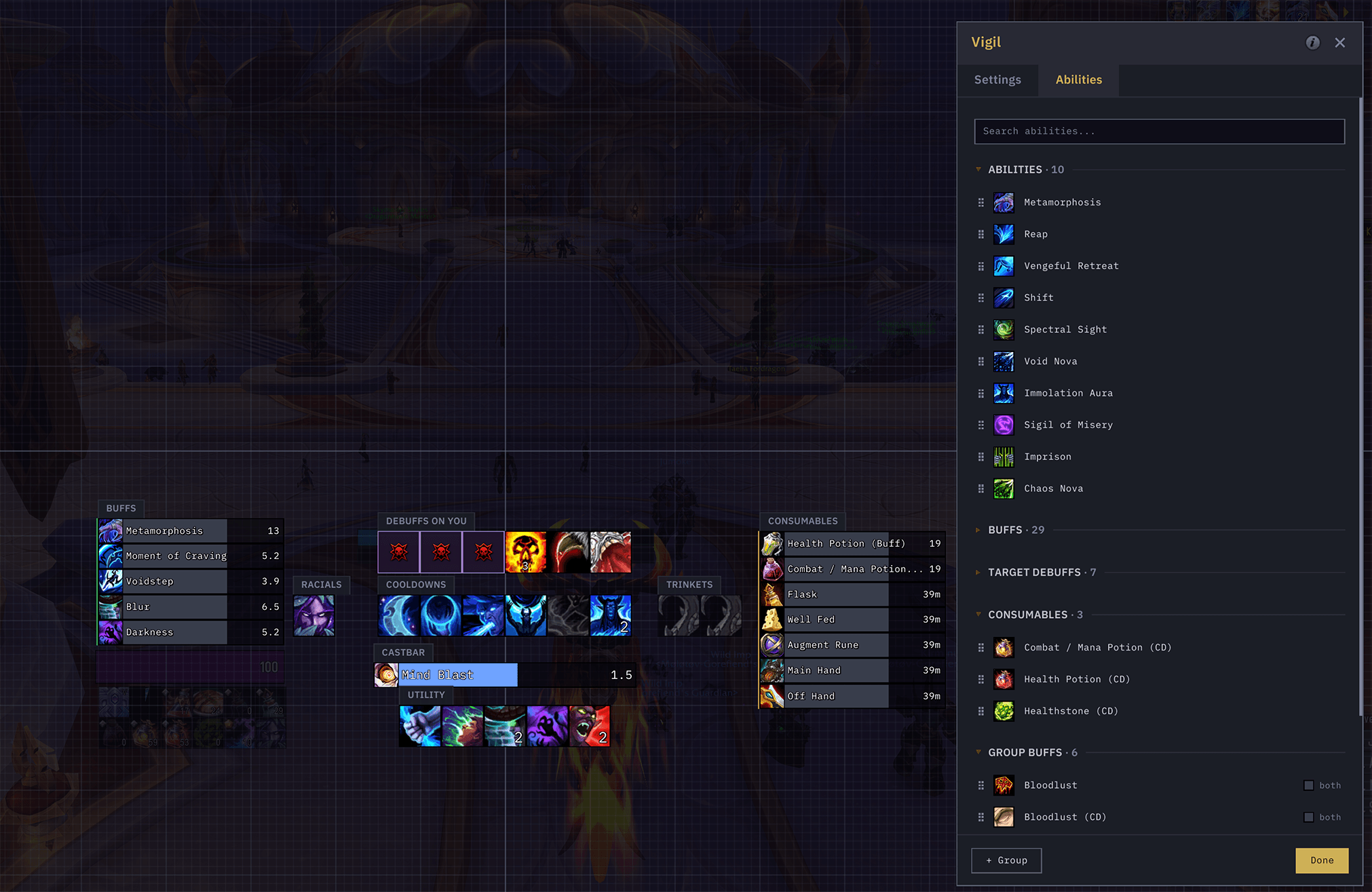
Vigil is a combat HUD that tracks your abilities, buffs, and debuffs. Lay it out however you want with drag-and-drop.
Vigil doesn't use Blizzard's Cooldown Manager, so there's no limit on how you customize, style, and arrange it. You can track almost any buff, debuff, or ability, including ones the Cooldown Manager won't show.
Everything works in all content, including raids, M+, and rated PvP. Blizzard's secret values system doesn't block it.
Found a bug? Please report it.
Layout and editing
- Move, position, and resize every group with no restrictions
- Snap to a grid, or snap groups to each other while you drag
- Lay groups out as rows or columns, grow them in any direction, and wrap long ones into a grid
- Drag to reorder abilities in a group, or drag them from one group to another
- Place cooldown, keybind, stack, and duration text at any of nine spots on an icon
Tracking
- Track almost any buff, debuff, or ability
- Show buffs and debuffs as duration bars with a countdown, or as icons
- Cooldown sweep, countdown, and charge count on every icon
- Show your keybinds on the icons
- Track racials, trinkets, and consumables (potions, weapon oils, weapon enchants)
- Track raid and group buffs
- Dim abilities while they're on cooldown, or collapse them out to close the gap
Debuffs on you
- A dedicated tracker for what's on you: important debuffs, crowd control, dispellable, and other harmful, with defaults set per role
- Reserve slots for boss mechanic auras that Blizzard hides from addons
Castbar
- Cast, channel, and empower bars, with a divider for each empower stage
- Toggle the spell icon, name, cast time, target, latency tail, and an uninterruptible shield
Appearance
- Two looks: Vigil (flat) or Classic (beveled)
- Pick the HUD font, including your own SharedMedia fonts
- Glow styles for procs: Button, Pixel, AutoCast, Proc, or off
- Recolor any element
Visibility
- Set the HUD's opacity in combat, at rest, and while mounted, with an adjustable fade
- Show any group always, only in combat, or only out of combat
Profiles
- Save your setup as a profile and switch per character or spec
- Export a profile to a string to share it, and import someone else's
Compatibility
- Works with Blizzard's proc glows and rotation recommendations
Commands /vigil - Toggle the drag-and-drop editor. Grid snapping, drag-to-reorder, and a sidebar of every ability you can add. /vigil test - Toggle test mode to see what your bars look like in action. /vigil lock & /vigil unlock - Lock or unlock group positions. /vigil reset - Reset everything to defaults.
Thanks to voodoosaurus for app icon :)
CurseForge: https://www.curseforge.com/wow/addons/vigil用户评价
暂无 / 5,0 条评价相关推荐
继续看看这些内容
