插件中文资料库
中文说明、玩家点评、适用场景和替代推荐,方便快速判断是否适合你。
- 界面布局、头像框、姓名板和动作条优化
 LaoLiHelper_UI美化系统自带框架
 GroupFinder
 YuXuanToolbox
Whisper Messenger 插件下载与使用指南
本页整理了 Whisper Messenger 的功能用途、适用人群、安装方法和常见问题,方便玩家快速判断是否需要安装。
适合谁用
Whisper Messenger 是一款 聊天与通讯 类插件,适合需要优化界面、提升操作效率或补充游戏信息提示的魔兽世界玩家。
基本信息
- 插件作者:F0rty_tw0
- 插件分类:聊天与通讯
- 适配版本:4.4.2,3.4.3,1.15.8,2.5.5,12.0.5,5.5.4
- 累计下载:42
安装方法
- 点击上方下载按钮获取 Whisper Messenger插件文件。
- 解压后将插件文件夹放入 World of Warcraft/_retail_/Interface/AddOns 目录。
- 重启游戏或在角色界面点击插件,确认 Whisper Messenger 已启用。
- 如果插件不生效,请检查版本是否匹配,或关闭同类冲突插件后重试。
使用建议
Whisper Messenger 安装后建议先在角色界面确认已启用,进入游戏后根据插件提供的命令、小地图按钮或设置面板进行调整。如遇到报错,可先单独启用该插件排查冲突。
Whisper Messenger 常见问题
Whisper Messenger 适合需要 聊天与通讯 类功能的玩家,特别是希望提升游戏便利性、界面管理或战斗信息获取效率的用户。
下载后解压到 Interface/AddOns 目录,然后重启游戏并在角色界面启用插件。
常见原因是目录多套一层、游戏版本不匹配、依赖插件缺失或同类插件冲突。
可以查看本页的替代插件推荐和相关插件区域,按下载量和分类选择同类工具。
插件 AI 问答
可以问:这个插件正式服能用吗、和 DBM 冲突吗、怎么设置、有没有替代插件。
Whisper Messenger 是一款魔兽世界插件,主要用于界面框架、头像、动作条或冷却显示优化。建议根据自己的版本和插件环境先测试兼容性。
插件用途
Whisper Messenger 主要面向需要聊天与通讯功能的玩家,用来改善游戏体验、减少重复操作或补充默认界面没有直接提供的信息。
适用场景
- 界面框架、头像、动作条或冷却显示优化
使用建议
安装后建议先在角色选择界面或插件管理器中确认已启用,再进入游戏测试是否与现有整合包、WA 和其他插件冲突。如遇报错,可以先禁用同类插件排查。
WhisperMessenger
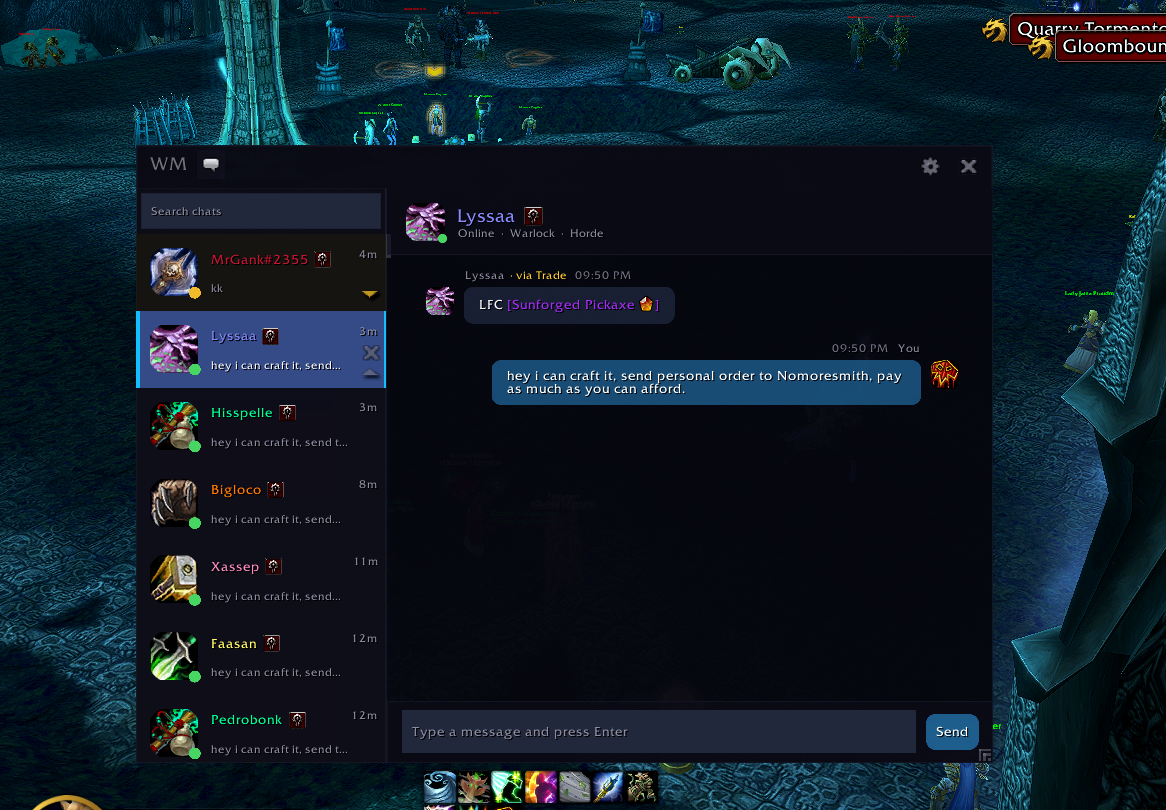
A messenger-style whisper UI for World of Warcraft. Replaces the default whisper chat with a modern conversation interface — contact list, chat bubbles, unread badges, and more.
Whispers are disabled by Blizzard during competitive content. WoW blocks all addon whisper communication during Mythic+ dungeons, rated Battlegrounds, and raid boss encounters. This is a game-level restriction — not a limitation of WhisperMessenger. The addon automatically detects these situations, suspends itself, and resumes when you're done.
Want to support me?
Or just a star on Github would be enough
Features
Messenger-Style Conversations
Chat bubbles with timestamps, date separators, and sender labels — just like a real messenger app. Right-click any bubble to copy its text.
Contact List
Scrollable contact list with online status dots, unread message badges, and last-message previews. Drag contacts to reorder them. Search across names and message history with live filtering.
Battle.net Integration
Seamlessly handles both character whispers and Battle.net friend whispers. Contact details stay in sync with your friends list in real time.
Theme Presets
Switch between multiple visual themes — Default, Midnight, Shadowlands, and Draenor — from the Appearance settings. Themes apply instantly with no reload required.
Font Customization
Choose from Default (Friz Quadrata), System (Arial Narrow), or Custom (inherits fonts from addons like ElvUI).
Smart Notifications
Configurable notification sounds (Whisper, Ping, Chime, Bell, Raid Warning) that play even when in-game audio is muted.
Auto-Open Window
Automatically opens the messenger when you receive a whisper, right-click "Whisper" on a player, or click a name to whisper — configurable in Behavior settings, disabled during combat.
Mythic+ Awareness
Automatically suspends during Mythic+ dungeons and Mythic raids. Your window hides and restores when you leave. Whispers fall through to the default chat during this time.
Quest & Item Linking
Shift-click quests, achievements, spells, and professions to link them directly into the messenger chat.
Settings
Full settings panel with General, Appearance, Behavior, and Notification tabs. Includes a profanity filter toggle, hide-from-default-chat option, and auto-focus control.
Compatibility
WhisperMessenger works on all WoW flavors:
| Flavor | Status |
|---|---|
| Retail (Mainline) | Supported |
| Classic Era | Supported |
| Season of Discovery | Supported |
| TBC Classic Anniversary | Supported |
| Cataclysm Classic | Supported |
| Mists of Pandaria Classic | Supported |
A single install covers every client — WoW automatically loads the correct version.
Download
CurseForge (Recommended)
Install via the CurseForge App for automatic updates.
Wago
Also available on Wago Addons.
GitHub Releases
Download the latest ZIP from GitHub Releases and extract it into your Interface/AddOns/ folder.
Configuration
Open the settings panel by clicking the gear icon in the messenger window, or type:
/wmsg用户评价
暂无 / 5,0 条评价相关推荐
继续看看这些内容
