插件中文资料库
中文说明、玩家点评、适用场景和替代推荐,方便快速判断是否适合你。
- 副本、团队本和大秘境战斗提醒
- 界面布局、头像框、姓名板和动作条优化
 RightClickSelfCast
 AmDotMonitor暗牧多目标监控
 oRA3
oRA3Target Marker Icon Party - quickly put icons on all party members 插件下载与使用指南
本页整理了 Target Marker Icon Party - quickly put icons on all party members 的功能用途、适用人群、安装方法和常见问题,方便玩家快速判断是否需要安装。
适合谁用
Target Marker Icon Party - quickly put icons on all party members 是一款 团队框架 / 单位框架 类插件,适合需要优化界面、提升操作效率或补充游戏信息提示的魔兽世界玩家。
基本信息
- 插件作者:actineon
- 插件分类:团队框架 / 单位框架
- 适配版本:1.15.8,2.5.5,12.0.5,5.5.4,12.0.7
- 累计下载:32
安装方法
- 点击上方下载按钮获取 Target Marker Icon Party - quickly put icons on all party members插件文件。
- 解压后将插件文件夹放入 World of Warcraft/_retail_/Interface/AddOns 目录。
- 重启游戏或在角色界面点击插件,确认 Target Marker Icon Party - quickly put icons on all party members 已启用。
- 如果插件不生效,请检查版本是否匹配,或关闭同类冲突插件后重试。
使用建议
Target Marker Icon Party - quickly put icons on all party members 安装后建议先在角色界面确认已启用,进入游戏后根据插件提供的命令、小地图按钮或设置面板进行调整。如遇到报错,可先单独启用该插件排查冲突。
Target Marker Icon Party - quickly put icons on all party members 常见问题
Target Marker Icon Party - quickly put icons on all party members 适合需要 团队框架 / 单位框架 类功能的玩家,特别是希望提升游戏便利性、界面管理或战斗信息获取效率的用户。
下载后解压到 Interface/AddOns 目录,然后重启游戏并在角色界面启用插件。
常见原因是目录多套一层、游戏版本不匹配、依赖插件缺失或同类插件冲突。
可以查看本页的替代插件推荐和相关插件区域,按下载量和分类选择同类工具。
插件 AI 问答
可以问:这个插件正式服能用吗、和 DBM 冲突吗、怎么设置、有没有替代插件。
Target Marker Icon Party - quickly put icons on all party members 是一款魔兽世界插件,主要用于界面框架、头像、动作条或冷却显示优化。建议根据自己的版本和插件环境先测试兼容性。
插件用途
Target Marker Icon Party - quickly put icons on all party members 主要面向需要团队框架功能的玩家,用来改善游戏体验、减少重复操作或补充默认界面没有直接提供的信息。
适用场景
- 界面框架、头像、动作条或冷却显示优化
使用建议
安装后建议先在角色选择界面或插件管理器中确认已启用,再进入游戏测试是否与现有整合包、WA 和其他插件冲突。如遇报错,可以先禁用同类插件排查。
Major Change:
As you may know, the 12.0.0 release of retail has broken a huge number of addons. Target Marker Icon Party was also broken. Setting raid icons in lua code used SetRaidTarget which has now become a protected function that cannot be used by addon developers. I can still do this, but the only possible way is to use SecureAction buttons to run macros. Consequently, Target Marker Icon Party now uses a new small frame that has 3 buttons on it. The new usage description is now below.
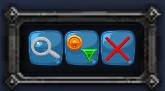
This addon adds a small frame with three buttons that will allow you to apply raid icons to party members that don't have them. It will leave unchanged any raid icons that are already assigned to your party. To do this:
While out of combat, click the left button with a magnifier glass to find which players need which icons. This will generate the macros that the other two buttons use. SecureAction buttons cannot have their macro text changed while in combat so this button can only be pressed outside of combat.
To apply icons, click the middle button that has raid icons on it. This can be done in or out of combat. (If you click this a second time it would try to re-apply the icons which would actually remove the icons. Don't use this button to remove icons because if someone manually removed their icon, clicking this a second time would re-apply the icon they had just removed.)
To remove icons, click the right button with the red x on it. This can be done in or out of combat. This will remove only the icons that you applied. If someone already had an icon before you applied icons, their icon will be left alone.
If you want to hide the small frame, issue the command:
/tmip
To show the small frame after it is hidden, simply type /tmip again.
The state of hide/show will be remembered and persist from game to game so you can leave this hidden and only show it when you need it if you want.
Target Marker Icon Party will assign the following icons in this order: circle, then triangle, then diamond, then square, then star.
You can move the small Target Marker Icon Party frame by dragging the outside of the frame containing the buttons. This addon will remember where you dragged the frame to and put it there again when you reenter the game.
I've been in parties where we all knew each other and we all liked icons on all of us so we could locate each other easier. This may be especially useful when one of your party members is a newbie. In mythic dungeons with pick up groups where you're all strangers, this is meant as a temporary assignment that you can remove later. Why would you want to remove them? Some people prefer to not have target marker icons. If you randomly assign target marker icons to your whole party without good reason, your teammates might be unhappy with you.
Advanced Usage:
If you want some other icons assigned in some other order, simply give this addon a 5 digit number that gives the icons you want to use in the order you want to use them. For example:
/tmip 24358
will assign circle, then triangle, then diamond, then moon, then skull when you next use the magnifier button.
This program will remember your new settings.
The order of assignment is player, party1, party2, party3, party4
--1 Star
--2 Circle
--3 Diamond
--4 Triangle
--5 Moon
--6 Square
--7 Cross (X)
--8 Skull
CurseForge: https://www.curseforge.com/wow/addons/target-marker-icon-party
用户评价
暂无 / 5,0 条评价相关推荐
继续看看这些内容
