插件中文资料库
中文说明、玩家点评、适用场景和替代推荐,方便快速判断是否适合你。
- 背包、银行和物品整理
- 拍卖行、交易和金币管理
 Details! Mythic+ Scoreboard
 BagSync
 GroupFinder
Do Not Vendor - Marks items you don't want to vendor with red and white slash 插件下载与使用指南
本页整理了 Do Not Vendor - Marks items you don't want to vendor with red and white slash 的功能用途、适用人群、安装方法和常见问题,方便玩家快速判断是否需要安装。
适合谁用
Do Not Vendor - Marks items you don't want to vendor with red and white slash 是一款 背包与库存 类插件,适合需要优化界面、提升操作效率或补充游戏信息提示的魔兽世界玩家。
基本信息
- 插件作者:actineon
- 插件分类:背包与库存
- 适配版本:12.0.5,12.0.7
- 累计下载:0
安装方法
- 点击上方下载按钮获取 Do Not Vendor - Marks items you don't want to vendor with red and white slash插件文件。
- 解压后将插件文件夹放入 World of Warcraft/_retail_/Interface/AddOns 目录。
- 重启游戏或在角色界面点击插件,确认 Do Not Vendor - Marks items you don't want to vendor with red and white slash 已启用。
- 如果插件不生效,请检查版本是否匹配,或关闭同类冲突插件后重试。
使用建议
Do Not Vendor - Marks items you don't want to vendor with red and white slash 安装后建议先在角色界面确认已启用,进入游戏后根据插件提供的命令、小地图按钮或设置面板进行调整。如遇到报错,可先单独启用该插件排查冲突。
Do Not Vendor - Marks items you don't want to vendor with red and white slash 常见问题
Do Not Vendor - Marks items you don't want to vendor with red and white slash 适合需要 背包与库存 类功能的玩家,特别是希望提升游戏便利性、界面管理或战斗信息获取效率的用户。
下载后解压到 Interface/AddOns 目录,然后重启游戏并在角色界面启用插件。
常见原因是目录多套一层、游戏版本不匹配、依赖插件缺失或同类插件冲突。
可以查看本页的替代插件推荐和相关插件区域,按下载量和分类选择同类工具。
插件 AI 问答
可以问:这个插件正式服能用吗、和 DBM 冲突吗、怎么设置、有没有替代插件。
Do Not Vendor - Marks items you don't want to vendor with red and white slash 是一款魔兽世界插件,主要用于装备修理、金币或商人相关提醒、背包、银行、专业制造或物品整理、插件库、数据接口或依赖支持。建议根据自己的版本和插件环境先测试兼容性。
插件用途
Do Not Vendor - Marks items you don't want to vendor with red and white slash 主要面向需要背包与库存功能的玩家,用来改善游戏体验、减少重复操作或补充默认界面没有直接提供的信息。
适用场景
- 装备修理、金币或商人相关提醒
- 背包、银行、专业制造或物品整理
- 插件库、数据接口或依赖支持
使用建议
安装后建议先在角色选择界面或插件管理器中确认已启用,再进入游戏测试是否与现有整合包、WA 和其他插件冲突。如遇报错,可以先禁用同类插件排查。
Update
This now works with Bagnon.
Quick Instructions:
This addon puts a red and white slash across items in your bags, bank, or on your character that you want to mark so you will not accidentally vendor or disenchant that item.
To use this addon, left click the minimap DoNotVendor button. Then alt left click any item in your bags, your bank, or your character to toggle the red and white slash mark. If the item doesn't have the slash, alt left clicking it will add the slash. If the item already has the slash, alt left clicking it will remove the slash. Alt left clicking items will stop working 30 seconds after you left clicked the minimap button (actually 30 sec after your last alt left click). After that, you would need to left click the minimap button again to resume more toggling.
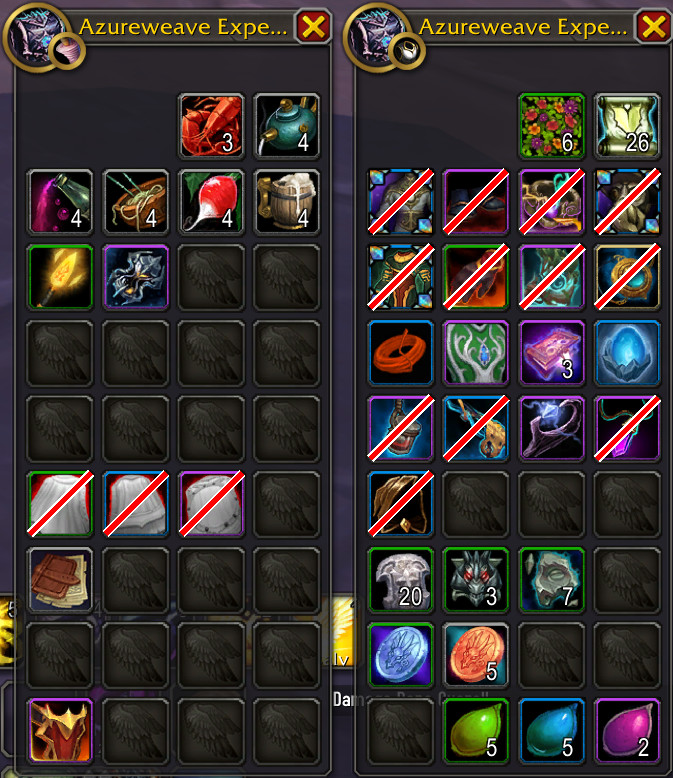
Detailed Instructions:
This stores the itemID of the item in a DoNotVendor list and DoNotVendor only compares itemID's to see if it should add the red and white slash or not. That means if you alt left click an item in your bag, it will mark any item with that item’s itemID as DoNotVendor. So for example, if you alt left click one Goblin Glider, all Goblin Gliders in your bags and bank will get the red and white slash. If you had three Salvaged Viperid Band rings with only one of the rings enchanted and you set the enchanted ring to DoNotVendor, then all three rings will show up as do not vendor because all three rings have the same itemID.
The red and white DoNotVendor slashes will not actually prevent you from vendoring or disenchanting at all. It is merely a visual warning to you. If you mark a grey item as DoNotVendor and then open a vendoring dialog and click the Sell All Junk Items button, you’re going to sell that grey item. So if you want to not vendor grey items, don’t use the Sell All Junk Items icon in the vendoring dialog.
Since this doesn't actually prevent you from vendoring or disenchanting, you might be tempted to simply vendor or disenchant some item that has a red and white DoNotVendor slash on it because you changed your mind and now you want to vendor it. I recommend you not do this. Remove the red and white DoNotVendor slash first before you vendor or disenchant it. The reason for this is because every item with a red and white slash has its itemID stored in a list. If you vendor something that has a red and white slash in it, the itemID will remain in the DoNotVendor list and all these itemID's have to be searched every time you open your bag or bank or character pane and the search happens with every item in your bag. This uses a very fast binary search to minimize time needed to open your bags, but it is better if the list only contains items you actually want to prevent vendoring or disenchanting. I suspect you won't notice any change in the time to open bags until your list contains ten thousand or more items so most people won't need to worry about this.
In the example character pane image, you will see all my equipped gear is marked DoNotVendor. That is because when I use equipment manager to swap into my speed set gear, most of my high level gear is put into my bags. I don't want to accidentally vendor any of that gear while I'm doing an old content dungeon in speed set gear.
This does not work in the guild bank. There isn't much of a problem accidentally vendoring or disenchanting items directly from the guild bank anyway.
Ideally, I’d like to make this addon so it prevents vendoring or disenchanting selected items, but it is easier said than done to do exactly what is desired in an addon given the limited access addon developers have to the user interface. This addon does what is currently easy to do, visually marking items with a red and white diagonal line so we can easily see we are about to do that which we don’t want to do. I’ll investigate further to see if I can physically prevent vendoring or disenchanting, but for now this addon will at least prevent most accidental vendoring and disenchanting.
Background History:
I decided to make this addon after my wife discovered she vendored some gear that she very much did not want to vendor. She had spent a lot of time going into old BfA dungeons to get longstrider speed gear and when she realized she had vendored a piece of longstrider speed gear and hadn’t realized it until it was too late and unavailable to buy back, she almost started to cry. She was frustrated with herself and it definitely destroyed her enjoyment for the day. Since my wife is precious to me, it destroyed my enjoyment for the day as well. I’ve got a lot more experience in wow and yet I know I’ve accidentally vendored gear I didn’t want vendored as well. I know someone with vastly more experience than I have and remembered him saying he deeply regretted vendoring his highest level weapon accidentally, leaving him with only a very low level weapon in its place and dismay at his new abysmally low ilvl. So I decided to make this addon to hopefully prevent more grief and tears for my family and for you as well.
CurseForge: https://www.curseforge.com/wow/addons/do-not-vendor用户评价
暂无 / 5,0 条评价相关推荐
继续看看这些内容
