插件中文资料库
中文说明、玩家点评、适用场景和替代推荐,方便快速判断是否适合你。
- 任务路线、地图标记和野外探索
- 界面布局、头像框、姓名板和动作条优化
 Details! Mythic+ Scoreboard
 BagSync
 TankMD Misdirect
DuduHUD ( Feral Druid and Paladin (Beta) Tank and DPS HUDs) 插件下载与使用指南
本页整理了 DuduHUD ( Feral Druid and Paladin (Beta) Tank and DPS HUDs) 的功能用途、适用人群、安装方法和常见问题,方便玩家快速判断是否需要安装。
适合谁用
DuduHUD ( Feral Druid and Paladin (Beta) Tank and DPS HUDs) 是一款 圣骑士 / 德鲁伊 / HUD界面 / 增益与减益 / 坦克 类插件,适合需要优化界面、提升操作效率或补充游戏信息提示的魔兽世界玩家。
基本信息
- 插件作者:NerfedWar
- 插件分类:圣骑士 / 德鲁伊 / HUD界面 / 增益与减益 / 坦克
- 适配版本:2.5.5
- 累计下载:0
安装方法
- 点击上方下载按钮获取 DuduHUD ( Feral Druid and Paladin (Beta) Tank and DPS HUDs)插件文件。
- 解压后将插件文件夹放入 World of Warcraft/_retail_/Interface/AddOns 目录。
- 重启游戏或在角色界面点击插件,确认 DuduHUD ( Feral Druid and Paladin (Beta) Tank and DPS HUDs) 已启用。
- 如果插件不生效,请检查版本是否匹配,或关闭同类冲突插件后重试。
使用建议
DuduHUD ( Feral Druid and Paladin (Beta) Tank and DPS HUDs) 安装后建议先在角色界面确认已启用,进入游戏后根据插件提供的命令、小地图按钮或设置面板进行调整。如遇到报错,可先单独启用该插件排查冲突。
DuduHUD ( Feral Druid and Paladin (Beta) Tank and DPS HUDs) 常见问题
DuduHUD ( Feral Druid and Paladin (Beta) Tank and DPS HUDs) 适合需要 圣骑士 / 德鲁伊 / HUD界面 / 增益与减益 / 坦克 类功能的玩家,特别是希望提升游戏便利性、界面管理或战斗信息获取效率的用户。
下载后解压到 Interface/AddOns 目录,然后重启游戏并在角色界面启用插件。
常见原因是目录多套一层、游戏版本不匹配、依赖插件缺失或同类插件冲突。
可以查看本页的替代插件推荐和相关插件区域,按下载量和分类选择同类工具。
插件 AI 问答
可以问:这个插件正式服能用吗、和 DBM 冲突吗、怎么设置、有没有替代插件。
DuduHUD ( Feral Druid and Paladin (Beta) Tank and DPS HUDs) 是一款魔兽世界插件,主要用于界面框架、头像、动作条或冷却显示优化、增益、减益、光环或职业状态监控、伤害统计、输出循环或战斗表现分析,适合对应经典服或周年服版本使用。建议根据自己的版本和插件环境先测试兼容性。
插件用途
DuduHUD ( Feral Druid and Paladin (Beta) Tank and DPS HUDs) 主要面向需要增益与减益功能的玩家,用来改善游戏体验、减少重复操作或补充默认界面没有直接提供的信息。
适用场景
- 界面框架、头像、动作条或冷却显示优化
- 增益、减益、光环或职业状态监控
- 伤害统计、输出循环或战斗表现分析
使用建议
安装后建议先在角色选择界面或插件管理器中确认已启用,再进入游戏测试是否与现有整合包、WA 和其他插件冲突。如遇报错,可以先禁用同类插件排查。
DuduHUD (Feral Druid and Paladin (Beta) Tank and DPS HUDs)
Introduction
DuduHUD is a heads-up display addon for World of Warcraft: The Burning Crusade (Anniversary) designed to keep critical information in front of feral Druids (Tank and DPS) and Protection/Retribution Paladins without too much cluttering the screen. The addon includes multiple HUDs to assist your gameplay:
-
Power HUD (Power, ticker and GCD)

-
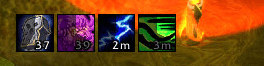
Cooldown HUD (Abilities and Items Cooldown)
-
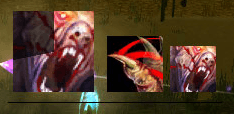
Rotation HUD (Cat DPS and Bear Tank Rotations) - No Paladin rotations yet, my Paladin only lvl 16 :)
-
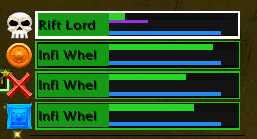
Tank HUD (One card per mob engaged)
-
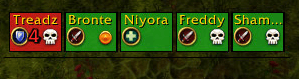
Assist HUD (Left-click assists a party member, right-click taunts — Growl for Druids, Righteous Defense for Paladins. Displays how many mobs are aggroing on each party/raid member).
-
Announcement HUD (Key announcements)

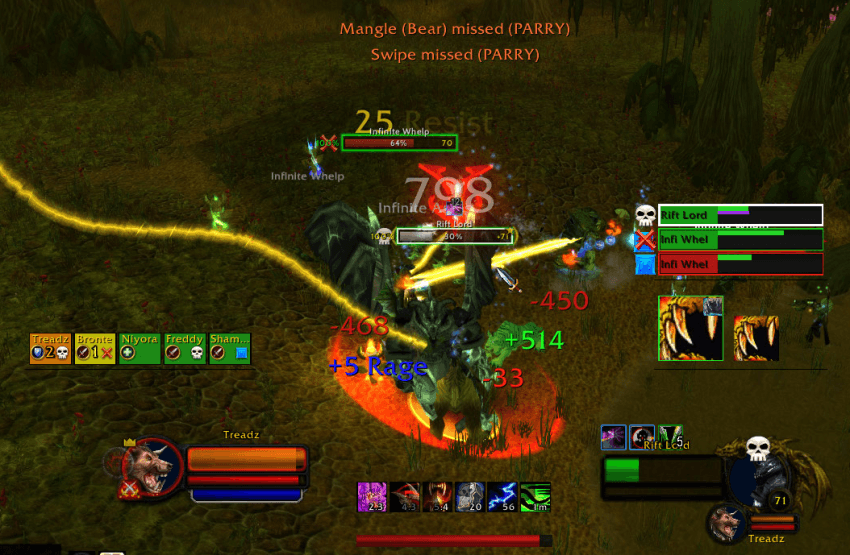
The current version supports Feral Druids (DPS/Cat and Tank/Bear) with full rotations, and Paladins (Protection/Retribution) with beta-level HUD support. Rotations for Paladins are not yet available — see the Paladin Beta section below. Future versions may extend support to Balance (Moonkin), Restoration (Tree of Life), and potentially other classes if there is interest.
The addon activates for Druids and Paladins. All settings and HUD positions are saved between sessions.
Getting Started
Open the options panel via Interface → AddOns → DuduHUD, or by right-clicking the minimap icon.
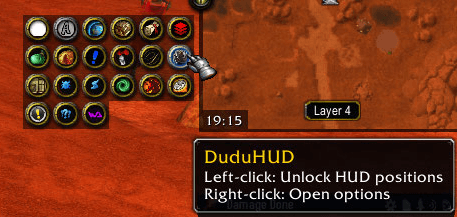
Left-clicking the minimap icon allows you to reposition the HUDs (left click again to save the new positions). By default some of the HUDs are linked together and move as a group. To position each HUD independently, enable Independent HUD positioning in the options (see below).
HUD labels and drag handles are visible outside of combat only — they disappear automatically when you engage, so they should not get in the way when playing.
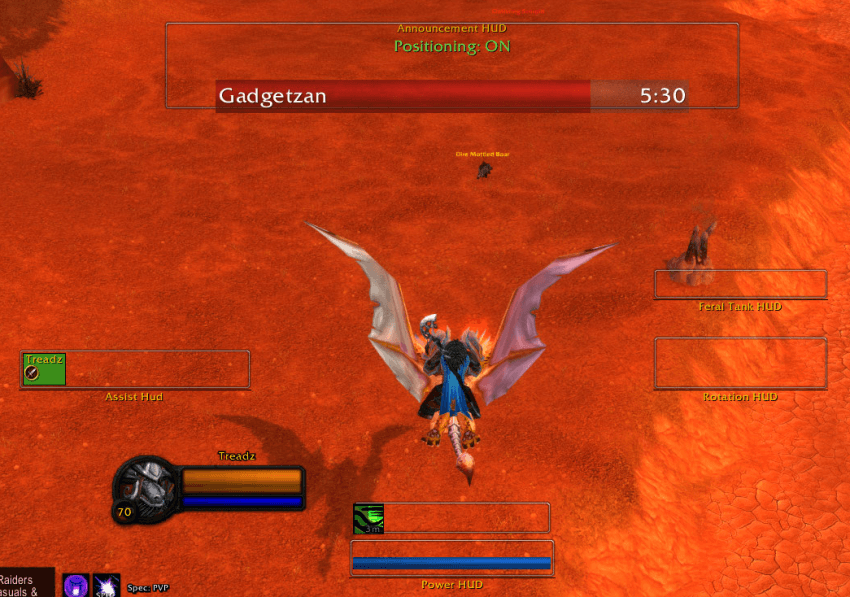
The HUDs
1. Power HUD
The Power HUD shows:
- Power bar — A horizontal bar showing your current resource:
- Red for Rage (Bear form)
- Yellow for Energy (Cat form)
- Blue for Mana (Humanoid / Moonkin form, and all Paladin forms)
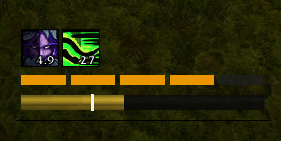
- GCD bars — A thin white bars above and below the power bar that fills as the Global Cooldown progresses and turns green when the GCD enters the spell queue window when you can queue you next ability (there is an option to automatically set your spellqueue window based on your latency, setting this is encouraged).
- Combo points — Five small rectangular indicators above the top GCD bar, lit up gold for each active combo point (Cat form only).
- Energy tick marker — A faint vertical line on the power bar showing where the next energy tick will land (Cat form only). Use this to time your powershifts and ability usage.
Moving the Power HUD: Drag the handle below the bar label. When in linked mode, dragging the Power HUD moves only the Power/Cooldown pair vertically. Enable Independent HUD positioning to move it freely.
2. Cooldown HUD
Sits directly above the Power HUD (in linked mode) and tracks everything that is currently on cooldown.
- Shows ability and item icons in a left-to-right grid, wrapping upward into additional rows as needed.
- Each icon displays a radial sweep overlay (the familiar circular cooldown animation) and a countdown timer in the bottom-right corner.
- Icons are sorted by remaining duration, shortest first.
- Spells with very short cooldowns (less than 2.5 seconds, i.e. GCDs) are filtered out so only meaningful cooldowns are shown.
- Tracks cooldowns from your spellbook, equipped items, and bag items (including consumables — even after the last one in a stack is consumed).
The Cooldown HUD only shows when you have active cooldowns to display. It grows and shrinks dynamically.
Enabling/disabling: Use the Show Cooldown HUD checkbox in the options panel.
3. Rotation HUD
The Rotation HUD is the centrepiece of the addon. It tells you what to press next so you can keep your eyes on the boss rather than your action bars.
It displays three ability icons in sequence:
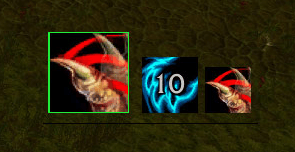
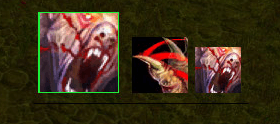
Icons animate when an ability is cast — the forecast abilities shift left to promote into the next slot, and a new forecast enters from the right. This gives a smooth conveyor-belt feel for the rotation. The forcasts are just that, forcasts, critical strikes giving you extra combo points or waiting too long to use an ability so you regain more energy than anticipated will casue the forcasts to change.
For Cat form, the rotation logic also shows a powershift count overlay on the Next icon when you need to powershift to regenerate energy.
For Bear form, the HUD suggests the appropriate threat and mitigation ability based on your current debuff state, rage, and number of mobs.
The Rotation HUD also monitors your Mana Potion cooldown and overlays a potion icon suggestion when it is ready and your mana is low.
Enabling/disabling: Use the Show Cat rotation and Show Bear rotation checkboxes in the options panel. Each can be toggled independently.
The addon options panel has options to select rotation variations and customisations.
4. Tank HUD (Mob Monitor)
The Tank HUD is relevant in Bear form (Druid) or with Righteous Fury active (Paladin, level 16+) and shows a live card for every hostile mob you are engaging.
Out-of-range and pre-combat tracking: The Tank HUD also tracks mobs that are out of nameplate range (such as casters and hunters) for up to 30 seconds as long as they are attacking or being attacked. Additionally, your current target is always shown as a card even if it is out of nameplate range or before combat begins — so you can see debuff states and threat on a mob before the pull.
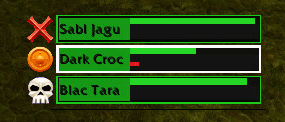
Each card contains:
- Mob name — Truncated to fit the card.
- Raid target icon — Displayed if a raid marker is set on the mob.
- Health bar — Coloured by current threat level:
- Debuff bars — progress bars showing remaining duration on key tank debuffs.
Threat colors show how safe your aggro is at a glance:
- Red: You are not secure on this mob; fix this first.
- Orange: Threat is unstable and may be lost soon.
- Yellow: You are close to secure, but still in caution range.
- Green: Threat is stable and under control.
- Grey: Not enough threat data yet.
- Dark grey: The mob is dead.
Card ordering:
- Cards are automatically sorted by threat safety, with the least safe mobs shown first (top of the list).
- In practice, red/orange threats tend to rise to the top, while safer green mobs appear lower.
Debuffs:
- Up to four compact rows showing key tank debuffs and how long they have left.
- For Druids:
- FF (Faerie Fire / Faerie Fire Feral) — purple
- LC (Lacerate) — orange, with stack count (1–5)
- MG (Mangle) — red
- DR (Demoralising Roar) — blue
- For Paladins:
- JD (Judgement of the Crusader / Wisdom / Light) — gold
- HJ (Hammer of Justice) — amber
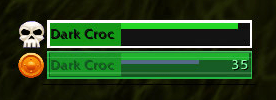
CCC Indicator:
- If the mob is crowd-controlled (Freezing Trap, Hibernate, Banish, Sap, Shackle Undead), the card is overlaid with a coloured shimmer matching the CC type, plus a countdown timer.
The Tank HUD grows and shrinks automatically as mobs appear and disappear. It is always visible in Bear form (Druid) or with Righteous Fury active (Paladin) and hides otherwise.
5. Assist HUD
The Assist HUD lives on the left side of the screen (mirroring the Tank and Rotation HUDs on the right). It shows a compact grid of your party and raid members and allows you to click and quickly assist them if they pull aggro.
By keeping an eye on the assist HUD (and any announcements in the Announcement HUD) you can keep track which mobs your party members are targetting and what is targetting them:
- Do I have aggro on all the mobs being engaged?
- Are they all targetting skull or is that pesky DPS targetting something else again?
- How many mobs has the healer aggro'd?
Each button:
- Displays the member's name and role icon (Tank / Healer / DPS).
- Is coloured by the number of mobs targetting the party member.
- Is an Assist button — clicking it targets the mob that member is fighting. This is particularly useful for quickly picking up mobs that have pulled aggro from the tank.
- Shows any active raid target icon on the member's target.
Assist HUD button color is based on how many visible hostile mobs are currently pressuring that party/raid member:
- Green: no incoming mobs.
- Yellow: 1 incoming mob.
- Orange: 2 incoming mobs.
- Red: 3 or more incoming mobs.
- Dark grey: member is offline or dead.
The small number on each button uses matching urgency colors too:
- 1 = yellow tone
- 2 = orange tone
- 3+ = red tone
Note: It is strongly recommended to keep the Assist HUD enabled even when playing Cat form. Druids are a hybrid class and you may need to emergency-shift into Bear at any moment. For Paladins, the right-click action uses Righteous Defense (taunt) instead of Growl.
Enabling/disabling: Use the Show Assist HUD checkbox in the options panel.
6. Announcement HUD
A wide, horizontally-centred, scrolling message display near the top of the screen. It acts as both an on-screen alert and a group chat announcer for important events.
Messages fade in and out with a lifetime of 6 seconds. Up to 4 messages can be visible simultaneously, with the newest at the top.
Detected events include:
- A non-tank party/raid member gaining aggro (healer aggro is highlighted with a flashing red alert)
- A party/raid member being crowd-controlled (with the CC type indicated)
- The tank missing, being dodged, or parried in the combat opener (first 10 seconds)
- A taunt being resisted — Growl for Druids, Righteous Defense for Paladins
The HUD can also send these alerts to your party or raid chat automatically (see Announcements options below).
Options Reference
Open via Interface → AddOns → DuduHUD.
Rotations
Cat Rotations (Druid only)
These three options are mutually exclusive — pick one to define how finishing moves are handled:
| Option | Behaviour |
|---|---|
| Full Rip | Keep Rip up at all times. Only use Ferocious Bite if the target is about to die before Rip would expire. This is the standard single-target rotation. |
| Bite Weave | Apply Rip as normal. When Rip has 6 or more seconds remaining and you are at 5 combo points with less than 42 Energy, use Ferocious Bite instead of waiting to Shred. If you have 42+ Energy, Shred instead. |
| Bite Only | Never apply Rip. Use Ferocious Bite as your sole finisher at 5 combo points. Useful on short-lived trash where a full Rip DoT would be wasted. |
Cat Rotation Options (Druid only)
These toggles apply on top of your chosen rotation mode:
Note: There is a hidden rotation for when you are playing SOLO. Mangle is the defalt builder and shred is only suggested if the target is stunned (e.g. Maim). Soloing works much better with the first option below selected as mobs die too quickly for Rip to be a viable finsiher.
| Option | Behaviour |
|---|---|
| Bite Only on normal mobs | Normal / trash mobs always use the Bite Only rotation regardless of your main selection. Elites and bosses use your chosen rotation mode above. HIGHLY advised to enable this as the addon has trouble determining the TTK (time to kill) to prioritise finishers on normal mobs as the die so quickly. |
| Non-Wolfshead (2pc T6) | Adjusts powershift energy calculations for the 2-piece Tier 6 set bonus, which reduces Mangle (Cat) energy cost to 35. Enable this if you are not using Wolfshead Helm and have 2pc T6. |
Bear Rotations (Druid only)
| Option | Behaviour |
|---|---|
| Single-target Swipe rotation (2700+ AP) | When your Attack Power exceeds 2700, the rotation will suggest Mangle on cooldown, build and refresh a 5-stack Lacerate, then use Swipe as a filler for additional threat. |
| Multi-target Swipe rotation (3+ mobs) | When three or more mobs are active, switches to a Swipe-priority rotation with Mangle and Growl included for threat recovery on dangerous targets. |
HUDs
HUD Visibility
| Option | Effect |
|---|---|
| Show Power HUD | Toggles the power bar, GCD bars, and combo points. |
| Show Cat rotation | Toggles the Rotation HUD when in Cat form. |
| Show Bear rotation | Toggles the Rotation HUD when in Bear form. |
| Show Assist HUD | Toggles the party/raid assist grid. |
| Show Cooldown HUD | Toggles the cooldown icon display above the Power HUD. |
HUD Positioning
| Option | Effect |
|---|---|
| Independent HUD positioning | When unchecked (default), the Tank, Rotation, and Assist HUDs are all linked together. Dragging any one of them moves the whole group. When checked, each HUD has its own drag handle and can be moved independently. Unchecking this will snap the Tank and Rotation HUDs back into alignment with the Assist HUD. |
Announcements
| Option | Effect |
|---|---|
| Send party/raid announcements only in dungeons/raids | When enabled, group chat messages are only sent when you are inside a dungeon or raid instance. Battlegrounds and arena are never announced regardless of this setting. |
| Announce when a non-tank group member has aggro | Sends a message to party/raid chat when a non-tank pulls aggro from a mob. Healer aggro is highlighted with a flashing alert. |
| Announce when a group member is crowd-controlled | Sends a message to party/raid chat when a CC is applied to a group member. Note: This does not cover many debuffs at present, more work needed on this. |
| Announce when tank misses/is dodged/parried in opener | Sends an alert when the tank's first melee or spell attacks miss, are dodged, or are parried within 10 seconds of combat start. |
| Announce when taunt is resisted | Sends a raid warning when Growl (Druid) or Righteous Defense (Paladin) is resisted. |
Advanced
| Option | Effect |
|---|---|
| Spell Queue Window | Automatically sets the spell queue window based on your latency. Highly recommended to set this unless you have another addon doing the same. |
undefined
Latest Changes
- Left click on assist hud now does the assist, right click does taunt a mob targetting the party/raid member. May add option for feral charge if out of range in future release. Let me know what you think.
- Basic Paladin support: Tank HUD, Power HUD, and Cooldown HUD work for Paladins (Righteous Fury detection replaces bear form checks when lvl 16+). No rotations yet.
- Tank HUD cards no longer block clicks or drags
- Nameplate persistence — out-of-range mobs (casters, hunters) stay visible for 30s as long as they're attacking or being attacked
- Cooldown HUD checkbox moved under HUD Visibility in options
- Short descriptions added under each HUD checkbox in options
(1.1.0 - 1.3.0)
- Greatly improved the Rotation HUD and Cat Rotation logic, now gives much smoother animations, and more accurate forcasts. Note that crits that give additional combo points, omen of clarity procs, and miss/parry/block will cause the forcasts to be recalculated!
- Added rotation debug addon option that lets you collect information about the rotations that I can analyse if you see any issues.
- Increased size of announcements.
- Mana ticker
- Stealth opening rotations
- Rotation HUD displayed on targeting enemy, rather that when combat starts.
- Added FF to the tank rotation.
- Added tank hud card for target even if it is out of nameplate range.
Paladin Support (Beta)
Paladin support is in beta — the following HUDs work for Paladins:
- Power HUD — Shows your mana bar (blue). GCD bars and the spell queue window work as normal.
- Cooldown HUD — Tracks all your spell and item cooldowns, same as for Druids.
- Tank HUD — Activates when Righteous Fury is active (level 16+), showing mob cards with threat colours, debuffs, and CC indicators.
- Assist HUD — Right-click uses Righteous Defense to taunt mobs off party/raid members.
- Announcement HUD — Works identically for Paladins.
What's missing: Rotations are not yet implemented for Paladins. The Rotation HUD will not appear for Paladins until rotation logic is added. Paladin debuff tracking in the Tank HUD is partially implemented (Judgement and Hammer of Justice); more debuffs will be added over time.
Help wanted! If you're an experienced Paladin player who knows the ins and outs of the class and would like to help with rotation logic or debuff tracking, please drop me a message — contributions and feedback are greatly appreciated.
Want Your Class Added?
If you'd like to see support for another class (Warrior, Shaman, Priest, etc.) and you know the class well — its rotations, key debuffs, and mechanics — get in touch! I'm happy to work with class experts to expand the addon.
Potential Future Enhancements
- Other classes and specs — Under consideration for a future release (Boomkin, Tree, Warrior, Shaman…) — only if requested. undefined
用户评价
暂无 / 5,0 条评价相关推荐
继续看看这些内容
