插件中文资料库
中文说明、玩家点评、适用场景和替代推荐,方便快速判断是否适合你。
- 副本、团队本和大秘境战斗提醒
- 背包、银行和物品整理
- 界面布局、头像框、姓名板和动作条优化
 LL_Alt小号助手
 GroupFinder
 Sleek XP Bubbles
SimpleAltTracker 插件下载与使用指南
本页整理了 SimpleAltTracker 的功能用途、适用人群、安装方法和常见问题,方便玩家快速判断是否需要安装。
适合谁用
SimpleAltTracker 是一款 背包与库存 / 专业技能 / 其他插件 / 伙伴 类插件,适合需要优化界面、提升操作效率或补充游戏信息提示的魔兽世界玩家。
基本信息
- 插件作者:NeBja
- 插件分类:背包与库存 / 专业技能 / 其他插件 / 伙伴
- 适配版本:12.1.0,12.1.5
- 累计下载:52
安装方法
- 点击上方下载按钮获取 SimpleAltTracker插件文件。
- 解压后将插件文件夹放入 World of Warcraft/_retail_/Interface/AddOns 目录。
- 重启游戏或在角色界面点击插件,确认 SimpleAltTracker 已启用。
- 如果插件不生效,请检查版本是否匹配,或关闭同类冲突插件后重试。
使用建议
SimpleAltTracker 安装后建议先在角色界面确认已启用,进入游戏后根据插件提供的命令、小地图按钮或设置面板进行调整。如遇到报错,可先单独启用该插件排查冲突。
SimpleAltTracker 常见问题
SimpleAltTracker 适合需要 背包与库存 / 专业技能 / 其他插件 / 伙伴 类功能的玩家,特别是希望提升游戏便利性、界面管理或战斗信息获取效率的用户。
下载后解压到 Interface/AddOns 目录,然后重启游戏并在角色界面启用插件。
常见原因是目录多套一层、游戏版本不匹配、依赖插件缺失或同类插件冲突。
可以查看本页的替代插件推荐和相关插件区域,按下载量和分类选择同类工具。
插件 AI 问答
可以问:这个插件正式服能用吗、和 DBM 冲突吗、怎么设置、有没有替代插件。
SimpleAltTracker 是一款魔兽世界插件,主要用于背包、银行、专业制造或物品整理、副本、团本、大秘境或钥石辅助、插件库、数据接口或依赖支持。建议根据自己的版本和插件环境先测试兼容性。
插件用途
SimpleAltTracker 主要面向需要背包与库存功能的玩家,用来改善游戏体验、减少重复操作或补充默认界面没有直接提供的信息。
适用场景
- 背包、银行、专业制造或物品整理
- 副本、团本、大秘境或钥石辅助
- 插件库、数据接口或依赖支持
使用建议
安装后建议先在角色选择界面或插件管理器中确认已启用,再进入游戏测试是否与现有整合包、WA 和其他插件冲突。如遇报错,可以先禁用同类插件排查。
SimpleAltTracker
AltTracker is a lightweight World of Warcraft addon that lets you view and compare information across all your characters in one convenient window.
Features
- Character Overview — See all your alts at a glance with class, level, race, item level, and specialization
- Professions Tracking — View each character's professions, skill levels across expansions, and full recipe lists with item tooltips
- Bags & Bank — Browse bag and bank contents for any character, even when offline
- Warbound Bank — View your account-wide warbound bank tabs with search functionality
- Mythic+ Keystones — Check which keystone each alt is holding, plus dungeon ratings and best runs
- Quest Log — See active quests on any character with objectives and completion status
- Gold Tracking — Compare gold across all characters with gold-per-hour tracking (session and cumulative)
- Mounts — Browse all collected mounts with filters (Flying, Ground, Aquatic, Favorites), search, drag-to-action-bar, and right-click to favorite
- Quick Access Mounts — Configure up to 6 mounts on a floating draggable radial button for instant summoning
- Hearthstones — Browse all collected hearthstone toys in a grid view
- Quick Access Hearthstones — Configure up to 6 hearthstone toys on a floating draggable radial button for instant use
- Multi-Language Support — English, German, and Greek translations
- Customization — Background theme/color/opacity, font selection, class-colored names, short gold format
- Minimap Button — Quick access via a minimap icon powered by LibDBIcon
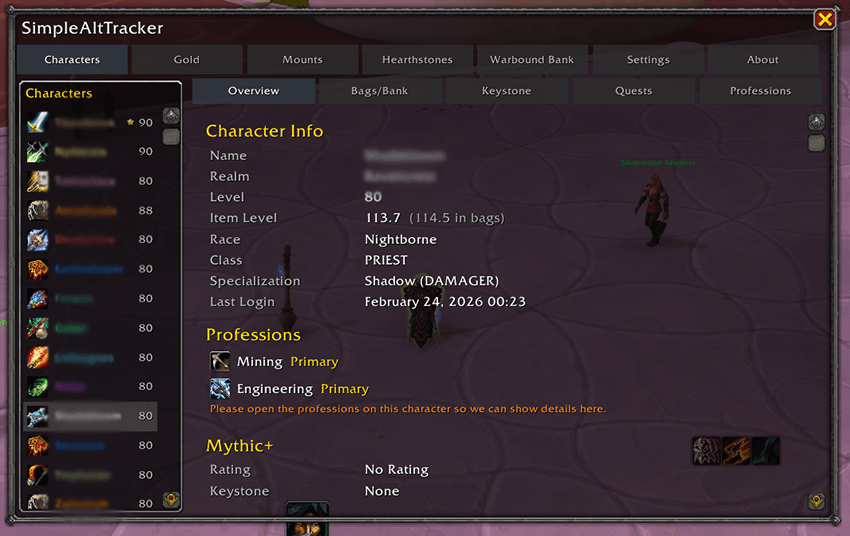
Usage
Click the minimap button or type /alt to open the main window. Select a character from the list on the left, then use the tabs to browse their professions, keystones, and more. Data is saved account-wide and updates each time you log into a character.
Slash Commands
- /at — Toggle the main window
- /at collect — Re-collect character data
- /at minimap — Toggle minimap button
- /at help — Show all commands
Support
If you like it and want to say thanks, you can leave a tip at https://www.paypal.biz/nebja.
CurseForge: https://www.curseforge.com/wow/addons/simplealttracker用户评价
暂无 / 5,0 条评价相关推荐
继续看看这些内容
