插件中文资料库
中文说明、玩家点评、适用场景和替代推荐,方便快速判断是否适合你。
- 界面布局、头像框、姓名板和动作条优化
 Details! Mythic+ Scoreboard
 BagSync
 GroupFinder
Visual Hammer Repair 插件下载与使用指南
本页整理了 Visual Hammer Repair 的功能用途、适用人群、安装方法和常见问题,方便玩家快速判断是否需要安装。
适合谁用
Visual Hammer Repair 是一款 拍卖与商业 / 锻造 / 背包与库存 / 专业技能 / 其他插件 类插件,适合需要优化界面、提升操作效率或补充游戏信息提示的魔兽世界玩家。
基本信息
- 插件作者:Godzaimasu
- 插件分类:拍卖与商业 / 锻造 / 背包与库存 / 专业技能 / 其他插件
- 适配版本:12.0.0,12.0.1,12.0.5,12.0.7
- 累计下载:0
安装方法
- 点击上方下载按钮获取 Visual Hammer Repair插件文件。
- 解压后将插件文件夹放入 World of Warcraft/_retail_/Interface/AddOns 目录。
- 重启游戏或在角色界面点击插件,确认 Visual Hammer Repair 已启用。
- 如果插件不生效,请检查版本是否匹配,或关闭同类冲突插件后重试。
使用建议
Visual Hammer Repair 安装后建议先在角色界面确认已启用,进入游戏后根据插件提供的命令、小地图按钮或设置面板进行调整。如遇到报错,可先单独启用该插件排查冲突。
Visual Hammer Repair 常见问题
Visual Hammer Repair 适合需要 拍卖与商业 / 锻造 / 背包与库存 / 专业技能 / 其他插件 类功能的玩家,特别是希望提升游戏便利性、界面管理或战斗信息获取效率的用户。
下载后解压到 Interface/AddOns 目录,然后重启游戏并在角色界面启用插件。
常见原因是目录多套一层、游戏版本不匹配、依赖插件缺失或同类插件冲突。
可以查看本页的替代插件推荐和相关插件区域,按下载量和分类选择同类工具。
插件 AI 问答
可以问:这个插件正式服能用吗、和 DBM 冲突吗、怎么设置、有没有替代插件。
轻量级装备修理提醒插件,会在耐久度可能影响游戏前提醒你及时修理。
插件用途
Visual Hammer Repair 主要面向需要锻造功能的玩家,用来改善游戏体验、减少重复操作或补充默认界面没有直接提供的信息。
适用场景
- 装备修理、金币或商人相关提醒
- 界面框架、头像、动作条或冷却显示优化
- 倒计时、提醒和战斗预警
使用建议
安装后建议先在角色选择界面或插件管理器中确认已启用,再进入游戏测试是否与现有整合包、WA 和其他插件冲突。如遇报错,可以先禁用同类插件排查。
Visual Hammer Repair
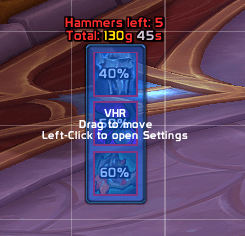
Visual Hammer Repair is an addon for characters with the Blacksmithing profession. It displays a frame with icons of your damaged gear slots on the screen when their durability falls below a set threshold. You can click on these icons to repair the corresponding items using blacksmithing hammers from your bags.
Features
- One-Click Repairs: Click on the slot icon to repair that specific item using available hammers.
- Hammer Detection: Automatically searches your bags and uses:
- Thalassian Master Repair Hammer (reusable)
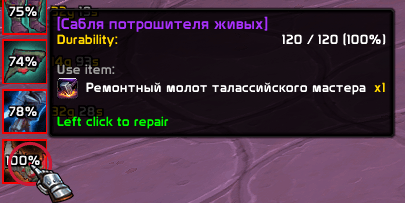
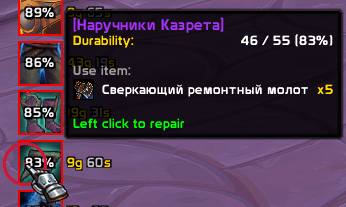
- Refulgent Repair Hammer (consumable)
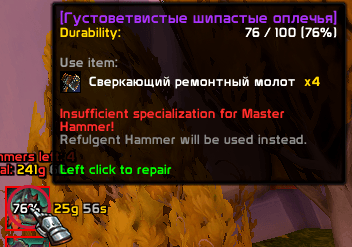
- Fallback for Master Repair Hammer specialisation after first repair attempt on the slot
- Thalassian Master Repair Hammer (reusable)
- Durability & Cost Tracking: Displays the current durability percentage and the calculated repair cost for each slot (and the total sum), working anywhere in the game world without a vendor.
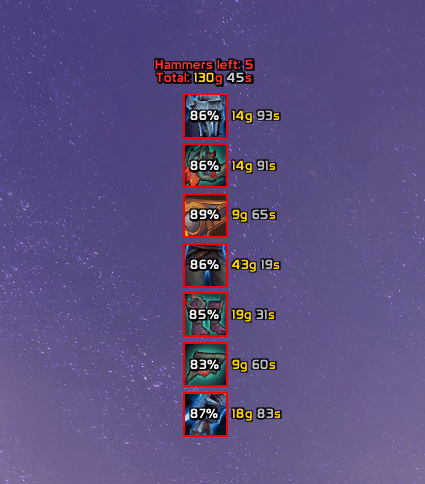
- Edit Mode Support: Integrates into WoW's Edit Mode. You can drag the frame to any location on your screen. Left-clicking the drag frame opens the configuration panel.
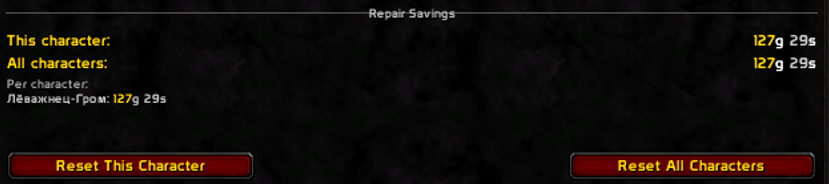
- Savings History: Tracks and displays saved gold (calculated from vendor repair costs) on the current character and account-wide.
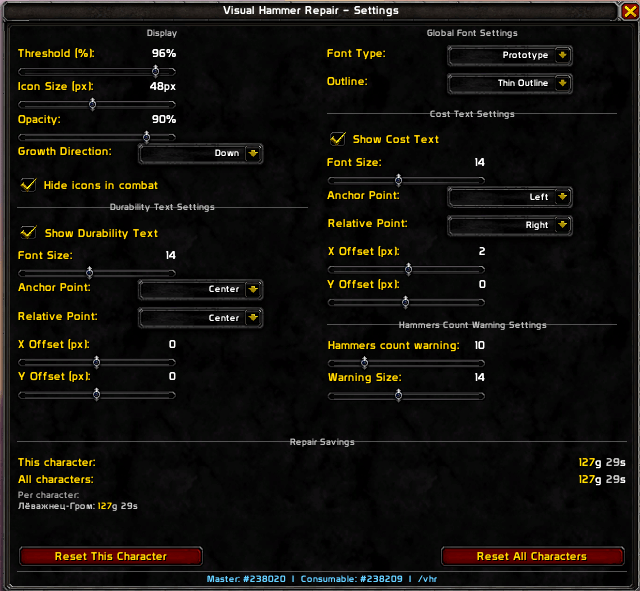
Customization Options (/vhr & Left click in edit mode)
The configuration window (/vhr) allows you to adjust the layout and text:
- Growth Direction: Change how icons stack (Down, Up, Left, or Right).
- Visibility: Hide the addon icons automatically when entering combat.
- Global Fonts: Apply a single font type and outline style (None, Thin, or Thick) to all texts in the addon. Supports fonts registered via LibSharedMedia-3.0.
- Durability Text Settings: Toggle visibility, change font size, and set custom anchor points (Anchor Point & Relative Point) with manual X and Y offsets. By default, durability is centered on the icon.
- Cost Text Settings: Toggle visibility, change font size, and set custom anchor points. By default, the cost is displayed to the right of the icon.
- Hammers count warning: Adjust the font size and the threshold of remaining consumable hammers that triggers a low count warning.
- Multi-line Warnings: The warning and total repair cost texts are separated into two lines to prevent overlap.
用户评价
暂无 / 5,0 条评价相关推荐
继续看看这些内容
