插件中文资料库
中文说明、玩家点评、适用场景和替代推荐,方便快速判断是否适合你。
- 副本、团队本和大秘境战斗提醒
- 界面布局、头像框、姓名板和动作条优化
 GroupFinder
 LootRollMover
 TooltipRealmInfo
GIS - Group Ilvl Scanner 插件下载与使用指南
本页整理了 GIS - Group Ilvl Scanner 的功能用途、适用人群、安装方法和常见问题,方便玩家快速判断是否需要安装。
适合谁用
GIS - Group Ilvl Scanner 是一款 团队框架 / HUD界面 / 战场 类插件,适合需要优化界面、提升操作效率或补充游戏信息提示的魔兽世界玩家。
基本信息
- 插件作者:AMEM
- 插件分类:团队框架 / HUD界面 / 战场
- 适配版本:12.0.5
- 累计下载:49
安装方法
- 点击上方下载按钮获取 GIS - Group Ilvl Scanner插件文件。
- 解压后将插件文件夹放入 World of Warcraft/_retail_/Interface/AddOns 目录。
- 重启游戏或在角色界面点击插件,确认 GIS - Group Ilvl Scanner 已启用。
- 如果插件不生效,请检查版本是否匹配,或关闭同类冲突插件后重试。
使用建议
GIS - Group Ilvl Scanner 安装后建议先在角色界面确认已启用,进入游戏后根据插件提供的命令、小地图按钮或设置面板进行调整。如遇到报错,可先单独启用该插件排查冲突。
GIS - Group Ilvl Scanner 常见问题
GIS - Group Ilvl Scanner 适合需要 团队框架 / HUD界面 / 战场 类功能的玩家,特别是希望提升游戏便利性、界面管理或战斗信息获取效率的用户。
下载后解压到 Interface/AddOns 目录,然后重启游戏并在角色界面启用插件。
常见原因是目录多套一层、游戏版本不匹配、依赖插件缺失或同类插件冲突。
可以查看本页的替代插件推荐和相关插件区域,按下载量和分类选择同类工具。
插件 AI 问答
可以问:这个插件正式服能用吗、和 DBM 冲突吗、怎么设置、有没有替代插件。
GIS - Group Ilvl Scanner 是一款魔兽世界插件,主要用于界面框架、头像、动作条或冷却显示优化、倒计时、提醒和战斗预警、副本、团本、大秘境或钥石辅助。建议根据自己的版本和插件环境先测试兼容性。
插件用途
GIS - Group Ilvl Scanner 主要面向需要团队框架功能的玩家,用来改善游戏体验、减少重复操作或补充默认界面没有直接提供的信息。
适用场景
- 界面框架、头像、动作条或冷却显示优化
- 倒计时、提醒和战斗预警
- 副本、团本、大秘境或钥石辅助
使用建议
安装后建议先在角色选择界面或插件管理器中确认已启用,再进入游戏测试是否与现有整合包、WA 和其他插件冲突。如遇报错,可以先禁用同类插件排查。
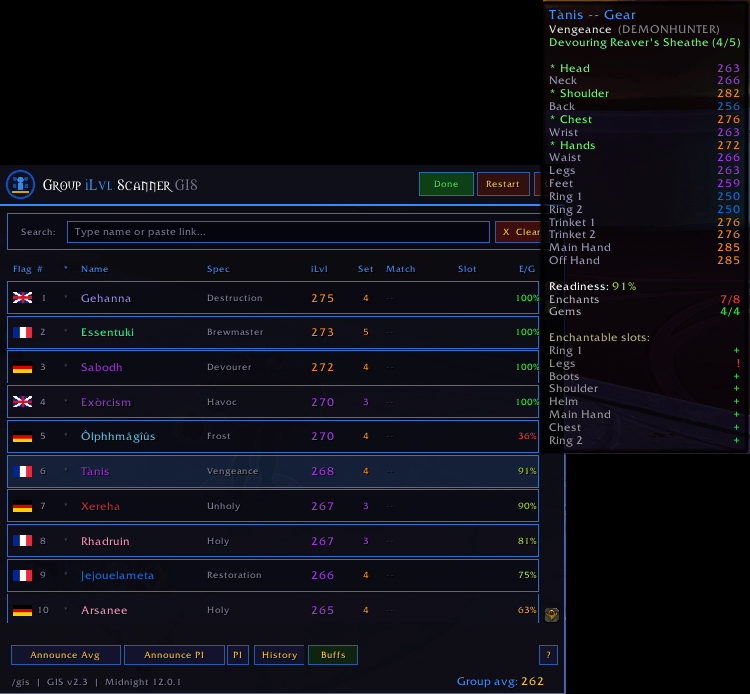
Group iLvl Scanner (GIS) is a lightweight but complete raid utility that scans every group and raid member's equipped item level in real time, captures their active specialisation, identifies their server region, and lets you search who has a specific item equipped. It handles out-of-range players automatically and keeps scanning until the entire roster is resolved.
Built for WoW Midnight 12.0.1. No configuration required — open with /gis and click Scan.
Scan engine
Inspects all group and raid members incrementally, preserving data between passes. Up to 8 inspect passes per scan run. Out-of-range players are retried automatically every 6 seconds for up to 4 minutes. A thin bar below each row shows slot resolution: amber while loading, red while retrying out of range. The scan button reflects the current state at all times: Scan, Scanning, Done, Retry, or Rescan.
Specialisation detection
Each player's active spec is captured during inspect using GetInspectSpecialization, validated with GetSpecializationRoleByID to guard against corrupt IDs, and displayed in the Spec column. Falls back to class name while waiting for inspect data. Player's own spec is always available immediately without an inspect.
Server region flags
A flag icon on the first column of each row identifies the player's server locale and region. Hover the flag to see the realm name. Supports US, EU English, FR, DE, ES, MX, IT, RU, PT, KR, TW, CN, and Oceanic. Requires LibRealmInfo for full accuracy; falls back to client locale without it.
Item search
Type a partial item name or paste an item link into the search bar to see who has that item equipped and in which slot. Drag an item from your bags to search by link. Autocomplete shows matching items from current group gear, coloured by quality rarity.
Favourites and search history
Star any searched item to pin it to the quick-bar. Favourites persist across sessions via AceDB. The History button shows your last 10 searches as a clickable popup.
Tier set counter
The Set column shows how many tier pieces each player wears. Purple = 2 to 3 pieces, gold = 4 or more. Detection uses an internal item ID database covering Midnight Season 1 and The War Within Season 2 for all 13 classes, independent of C_Item.GetItemSetID which is unreliable in Midnight. Hover any row to see the full gear list with set pieces highlighted green.
Announce PI
The Announce PI button counts priests in the group and announces that many DPS targets ranked by item level. Priests are excluded from the target pool (they receive PI anyway). Tanks and healers are also excluded. If there are two priests, the two highest-item-level DPS players are announced. Sent to party, raid, or instance chat automatically.
Newcomer detection
GIS snapshots group member names at each scan start. When GROUP_ROSTER_UPDATE fires, it compares current names against the snapshot — detecting new arrivals even when the group count stays the same because someone else left. A blinking red alert appears in the header with the newcomer names, and the scan button changes to Refresh.
Minimap button
Draggable minimap button via LibDBIcon. Position is saved per character and restored on login. Use /gis minimap to restore it if hidden.
Feature overview
|
Incremental scan Re-inspects only incomplete members. Up to 8 passes with automatic oor retry every 6s for 4 minutes. |
Per-row progress bar Thin bar below each row: amber=loading, red=oor retrying, gone when fully resolved. |
|
Spec column Active spec name captured via GetInspectSpecialization. Validated with GetSpecializationRoleByID. Falls back to class name. |
Server region flag Flag icon per row. Hover for realm name. FR, DE, ES, MX, IT, RU, PT, US, EU, KR, TW, CN, OC. |
|
Item search Type, paste, or drag-drop items. Autocomplete from group gear. Highlights matched rows. |
Favourites Star items to pin to the quick-bar. AceDB-persisted across sessions. |
|
Search history Last 10 searches saved. History button opens clickable popup. |
Tier set detection Internal item ID database. Midnight S1 + TWW S2, all 13 classes. No API dependency. |
|
Announce Avg Broadcasts group average iLvl to party/raid/instance chat. Blocked during combat. |
Announce PI Announces DPS targets per priest count. Excludes priests, tanks, healers. Sorted by iLvl. |
|
Newcomer alerts Name-based roster diff. Detects changes even at equal group size. Blink alert + Refresh button. |
Resizable window Drag grip to resize. Columns scale proportionally. Position and size saved via AceDB. |
Slash commands
|
/gis |
Toggle the scanner window open or closed |
|
/gis minimap |
Restore the minimap button if it has been hidden |
Notes
- Spec data requires an active inspect. Out-of-range players show their class name until they come into range and are re-inspected on a later pass.
- The Set column uses an internal item ID database and does not depend on C_Item.GetItemSetID, which returns 0 for most items in Midnight 12.0.1.
- The PI announce excludes priests from the target pool because they receive Power Infusion from other priests. It also excludes tanks and healers, targeting only DAMAGER role specs.
Group iLvl Scanner GIS | v2.1 | WoW Midnight 12.0.1 | Author: AMEM
CurseForge: https://www.curseforge.com/wow/addons/gis-group-ilvl-scanner用户评价
暂无 / 5,0 条评价相关推荐
继续看看这些内容
