插件中文资料库
中文说明、玩家点评、适用场景和替代推荐,方便快速判断是否适合你。
- 任务路线、地图标记和野外探索
- 界面布局、头像框、姓名板和动作条优化
 GroupFinder
 Sleek XP Bubbles
 FollowerLocationInfo
RepLine 插件下载与使用指南
本页整理了 RepLine 的功能用途、适用人群、安装方法和常见问题,方便玩家快速判断是否需要安装。
适合谁用
RepLine 是一款 HUD界面 / 任务与升级 / 其他插件 类插件,适合需要优化界面、提升操作效率或补充游戏信息提示的魔兽世界玩家。
基本信息
- 插件作者:gabcinder2004
- 插件分类:HUD界面 / 任务与升级 / 其他插件
- 适配版本:2.5.5
- 累计下载:0
安装方法
- 点击上方下载按钮获取 RepLine插件文件。
- 解压后将插件文件夹放入 World of Warcraft/_retail_/Interface/AddOns 目录。
- 重启游戏或在角色界面点击插件,确认 RepLine 已启用。
- 如果插件不生效,请检查版本是否匹配,或关闭同类冲突插件后重试。
使用建议
RepLine 安装后建议先在角色界面确认已启用,进入游戏后根据插件提供的命令、小地图按钮或设置面板进行调整。如遇到报错,可先单独启用该插件排查冲突。
RepLine 常见问题
RepLine 适合需要 HUD界面 / 任务与升级 / 其他插件 类功能的玩家,特别是希望提升游戏便利性、界面管理或战斗信息获取效率的用户。
下载后解压到 Interface/AddOns 目录,然后重启游戏并在角色界面启用插件。
常见原因是目录多套一层、游戏版本不匹配、依赖插件缺失或同类插件冲突。
可以查看本页的替代插件推荐和相关插件区域,按下载量和分类选择同类工具。
插件 AI 问答
可以问:这个插件正式服能用吗、和 DBM 冲突吗、怎么设置、有没有替代插件。
RepLine 是一款魔兽世界插件,主要用于地图、区域、任务路线或交通提醒,适合对应经典服或周年服版本使用。建议根据自己的版本和插件环境先测试兼容性。
插件用途
RepLine 主要面向需要任务与升级功能的玩家,用来改善游戏体验、减少重复操作或补充默认界面没有直接提供的信息。
适用场景
- 地图、区域、任务路线或交通提醒
使用建议
安装后建议先在角色选择界面或插件管理器中确认已启用,再进入游戏测试是否与现有整合包、WA 和其他插件冲突。如遇报错,可以先禁用同类插件排查。
RepLine
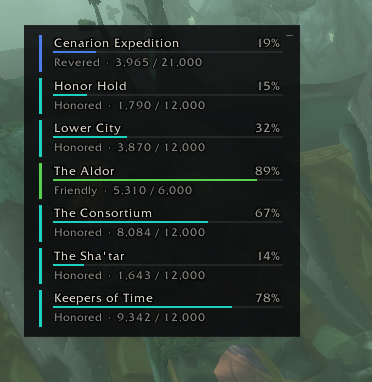
Track all your reputations in one small panel on the side of the screen.
Why you might want it
Blizzard's default UI allows tracking of one reputation at the bottom of the screen. If you're working on several factions at once, you have to keep swapping which one is watched. RepLine allows you to select multiple reputations to track at once in a small, compact window on your screen.
How to use it
When you first install RepLine, an empty panel appears on the right edge of the screen with a hint: Right-click to add factions. You'll get a picker listing every faction you currently have any reputation with your active standings, sorted alphabetically and a checkbox next to each.
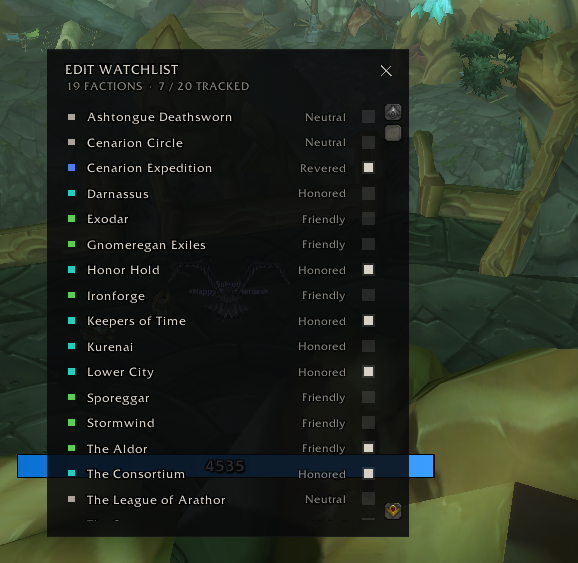
Tick the ones you care about. They appear in the panel immediately. Untick to remove. You can track up to 20.
Each bar shows the faction name, your current standing, the numbers, and a progress bar.
Compact mode
If your watchlist gets long, click the small – icon in the top-right of the panel to switch to compact mode. Each bar collapses to a single thin row with a tier letter on the left (F for Friendly, H for Honored, R for Revered, E for Exalted), the name, and a percent.
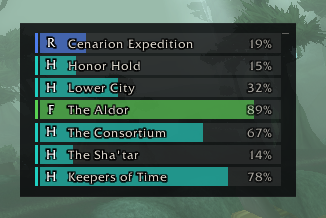
Click the icon again to expand back. Your choice is remembered.
Reading the colors
Every standing tier has its own color, both on the left accent strip and inside the progress bar:
- Red / orange / gold — Hated, Hostile, Unfriendly
- Taupe — Neutral
- Green — Friendly
- Turquoise — Honored
- Blue — Revered
- Magenta — Exalted
So if you glance over and see a row of turquoise bars and one suddenly shows up blue, you know that faction just hit Revered.
Moving the panel
Click-and-drag anywhere on the panel to move it. The position is saved across all your characters. If you ever lose track of where you put it, type /rep reset and it'll snap back to the right edge.
Slash commands
| Command | What it does |
|---|---|
/rep |
Show or hide the panel |
/rep edit |
Open the watchlist picker (same as right-clicking the panel) |
/rep compact |
Switch between compact and expanded views |
/rep reset |
Move the panel back to the default position |
/rep show / /rep hide |
Force the panel visible or hidden |
Compatibility
Built for TBC Anniversary Classic
Bugs and feedback
Credits
Logo icon: "Network bars" by Delapouite, under CC BY 3.0, from game-icons.net.
Bundled font: Inconsolata, SIL Open Font License.
License
MIT.
CurseForge: https://www.curseforge.com/wow/addons/repline用户评价
暂无 / 5,0 条评价相关推荐
继续看看这些内容
