插件中文资料库
中文说明、玩家点评、适用场景和替代推荐,方便快速判断是否适合你。
- 界面布局、头像框、姓名板和动作条优化
 LaoLiHelper_UI美化系统自带框架
 GroupFinder
 Sleek XP Bubbles
Diras Suite 插件下载与使用指南
本页整理了 Diras Suite 的功能用途、适用人群、安装方法和常见问题,方便玩家快速判断是否需要安装。
适合谁用
Diras Suite 是一款 战斗 / HUD界面 / 职业 / 其他插件 类插件,适合需要优化界面、提升操作效率或补充游戏信息提示的魔兽世界玩家。
基本信息
- 插件作者:Diras
- 插件分类:战斗 / HUD界面 / 职业 / 其他插件
- 适配版本:12.0.0,12.0.1
- 累计下载:0
安装方法
- 点击上方下载按钮获取 Diras Suite插件文件。
- 解压后将插件文件夹放入 World of Warcraft/_retail_/Interface/AddOns 目录。
- 重启游戏或在角色界面点击插件,确认 Diras Suite 已启用。
- 如果插件不生效,请检查版本是否匹配,或关闭同类冲突插件后重试。
使用建议
Diras Suite 安装后建议先在角色界面确认已启用,进入游戏后根据插件提供的命令、小地图按钮或设置面板进行调整。如遇到报错,可先单独启用该插件排查冲突。
Diras Suite 常见问题
Diras Suite 适合需要 战斗 / HUD界面 / 职业 / 其他插件 类功能的玩家,特别是希望提升游戏便利性、界面管理或战斗信息获取效率的用户。
下载后解压到 Interface/AddOns 目录,然后重启游戏并在角色界面启用插件。
常见原因是目录多套一层、游戏版本不匹配、依赖插件缺失或同类插件冲突。
可以查看本页的替代插件推荐和相关插件区域,按下载量和分类选择同类工具。
插件 AI 问答
可以问:这个插件正式服能用吗、和 DBM 冲突吗、怎么设置、有没有替代插件。
Diras Suite 是一款魔兽世界插件,主要用于界面框架、头像、动作条或冷却显示优化。建议根据自己的版本和插件环境先测试兼容性。
插件用途
Diras Suite 主要面向需要HUD界面功能的玩家,用来改善游戏体验、减少重复操作或补充默认界面没有直接提供的信息。
适用场景
- 界面框架、头像、动作条或冷却显示优化
使用建议
安装后建议先在角色选择界面或插件管理器中确认已启用,再进入游戏测试是否与现有整合包、WA 和其他插件冲突。如遇报错,可以先禁用同类插件排查。
A modular UI addon that lets you customize cooldowns, cast bars, resource bars, and adds quality-of-life enhancements.
Slash Command: /ds
Simple Positioning
Auto position and resize the Cooldown Manager, Cast Bars, and Resource Bars to fit your UI.
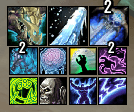
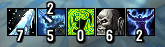
Cooldown Manager
Fully customize the Cooldown Manager to suit your personal needs.
Resource Bars
Customize both primary and secondary resource bars for optimal visibility.

Cast Bars
Personalize player, target, and focus cast bars for a clear and efficient display.

Dragonriding Bars
Integrated Dragonriding bars with a clean, custom texture for improved visibility while flying.

Equipment & Consumables
Show equipment slot and consumable cooldowns in a separate bar for quick access.


Miscellaneous
Optional quality-of-life features:
- Mouse cursor circle
- Player position marker
- Group auto-accept (friends, guild, and Randoms)
- LFG auto-accept role check
Profiles
Import and export profiles to share or backup your settings easily.
FAQ
- To reposition frames, first check Position & Sizing → Main Layout.
- If a module or bar is enabled there, its position and order is controlled by the positioning system.
- Uncheck a bar/module to free it and move it using Blizzard Edit Mode.
- The same applies to Equipment Bar and Consumable Bar:
- If they are anchored in Custom Bar → Equipment Bar / Consumable Bar, their position is locked.
- Disable the anchor to reposition them freely in Edit Mode.
👉 If something is positioned via main layout settings, Blizzard Edit Mode cannot move it.
CurseForge: https://www.curseforge.com/wow/addons/diras-suite用户评价
暂无 / 5,0 条评价相关推荐
继续看看这些内容
