插件中文资料库
中文说明、玩家点评、适用场景和替代推荐,方便快速判断是否适合你。
- 拍卖行、交易和金币管理
- 界面布局、头像框、姓名板和动作条优化
 Details! Mythic+ Scoreboard
 GroupFinder
 FollowerLocationInfo
Coinscry 插件下载与使用指南
本页整理了 Coinscry 的功能用途、适用人群、安装方法和常见问题,方便玩家快速判断是否需要安装。
适合谁用
Coinscry 是一款 拍卖与商业 类插件,适合需要优化界面、提升操作效率或补充游戏信息提示的魔兽世界玩家。
基本信息
- 插件作者:WastelandRoot
- 插件分类:拍卖与商业
- 适配版本:2.5.5
- 累计下载:54
安装方法
- 点击上方下载按钮获取 Coinscry插件文件。
- 解压后将插件文件夹放入 World of Warcraft/_retail_/Interface/AddOns 目录。
- 重启游戏或在角色界面点击插件,确认 Coinscry 已启用。
- 如果插件不生效,请检查版本是否匹配,或关闭同类冲突插件后重试。
使用建议
Coinscry 安装后建议先在角色界面确认已启用,进入游戏后根据插件提供的命令、小地图按钮或设置面板进行调整。如遇到报错,可先单独启用该插件排查冲突。
Coinscry 常见问题
Coinscry 适合需要 拍卖与商业 类功能的玩家,特别是希望提升游戏便利性、界面管理或战斗信息获取效率的用户。
下载后解压到 Interface/AddOns 目录,然后重启游戏并在角色界面启用插件。
常见原因是目录多套一层、游戏版本不匹配、依赖插件缺失或同类插件冲突。
可以查看本页的替代插件推荐和相关插件区域,按下载量和分类选择同类工具。
插件 AI 问答
可以问:这个插件正式服能用吗、和 DBM 冲突吗、怎么设置、有没有替代插件。
Coinscry 是一款魔兽世界插件,主要用于装备修理、金币或商人相关提醒、界面框架、头像、动作条或冷却显示优化、坐骑、宠物或击杀记录,适合对应经典服或周年服版本使用。建议根据自己的版本和插件环境先测试兼容性。
插件用途
Coinscry 主要面向需要拍卖与商业功能的玩家,用来改善游戏体验、减少重复操作或补充默认界面没有直接提供的信息。
适用场景
- 装备修理、金币或商人相关提醒
- 界面框架、头像、动作条或冷却显示优化
- 坐骑、宠物或击杀记录
使用建议
安装后建议先在角色选择界面或插件管理器中确认已启用,再进入游戏测试是否与现有整合包、WA 和其他插件冲突。如遇报错,可以先禁用同类插件排查。
Coinscry
Vendor-browsing filters for World of Warcraft TBC Anniversary. A companion overlay for TradeSkillMaster — but it works standalone, too.
TSM ships its vendor filter button as a stub (literal -- TODO in Core/UI/VendoringUI/Buy.lua), so vendor browsing inside TSM is text-search only. Coinscry layers on quality, item-type, item-level, affordability, can-use, already-known, demon-type, and TSM-group filters — accessible via a side tab + slide-out panel that follows whichever vendor frame (TSM's or Blizzard's) is in front.
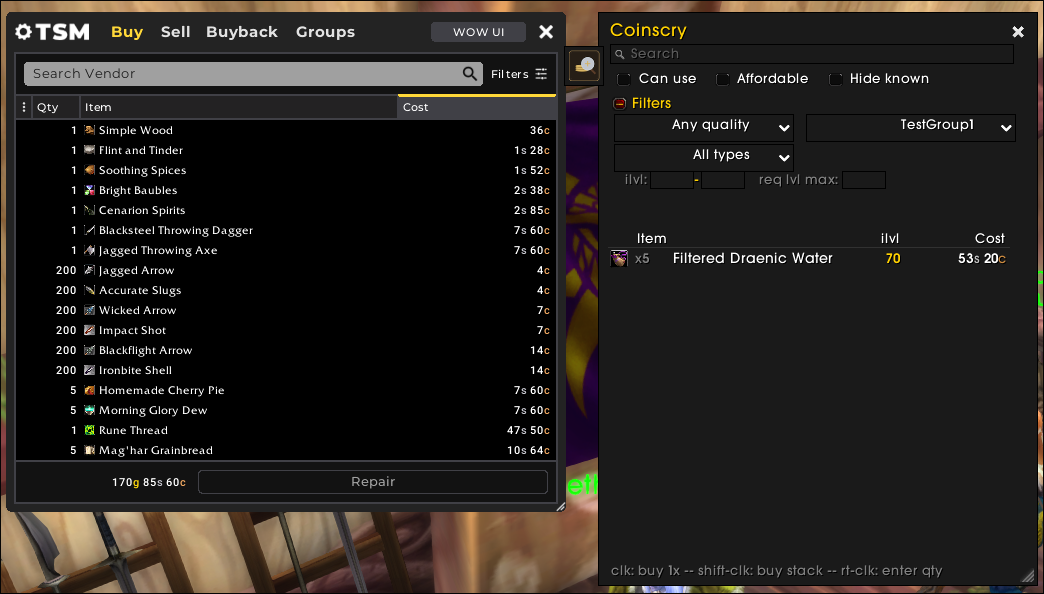
Two display modes
- Embedded mode (no TSM) — Coinscry replaces Blizzard's merchant grid in-place. The MerchantFrame widens to fit, the vanilla item buttons hide, and the filter panel fills that area. Click the side tab to flip back to the normal merchant view at any time. Blizzard's Buyback and Repair tabs still work — clicking them yields the embed automatically.
- Attached mode (with TSM) — when TSM's vendoring UI is up, Coinscry floats beside it as a slide-out panel. TSM's own vendor frame is untouched.
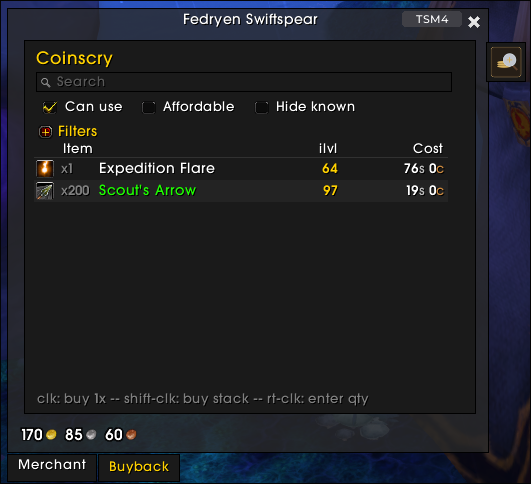
The panel auto-detects which frame is in front and re-anchors as you open and close them.
Filters
Compact by default — only search and the three usage checkboxes are shown until you expand the Filters header.
- Search — case-insensitive substring on item names.
- Can use — hides items WoW marks red in the merchant frame (wrong class, wrong proficiency, level too low, missing profession, etc.). Driven by
GetMerchantItemInfo'sisUsableflag, so it matches WoW's own determination exactly. - Affordable — checks both gold and any extended-cost items/currencies.
- Hide already known — recipes the player has learned, and warlock demon tomes the currently-summoned pet has learned.
- Quality — Common+ through Legendary.
- Item type / subtype — Armor (Cloth/Leather/Mail/Plate), Weapon (1H Sword / Polearm / Bow / …), Consumable, Trade Goods, Recipe, etc. Auto-populated from items present at the current vendor.
- Item level — min / max range.
- Required level — max.
- TSM group — exact match against a TSM group path (requires TSM).
- Demon type — Imp / Voidwalker / Succubus / Felhunter / Felguard. Contextual: only appears at vendors selling warlock demon tomes.
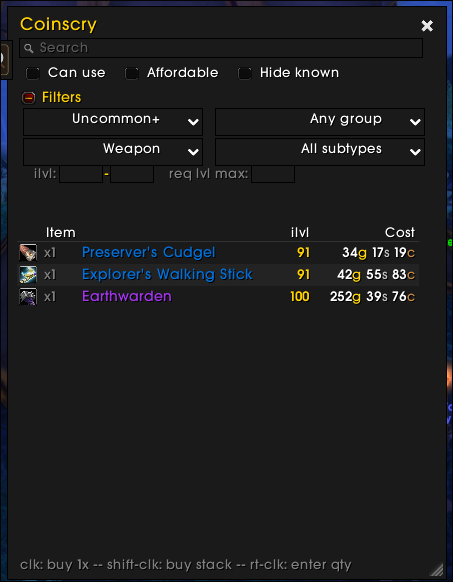
Buying from the filtered list
- Left-click a row — buys 1
- Shift-left-click — buys a full stack (e.g., 200 arrows)
- Right-click — quantity dialog, pre-filled with the stack size and capped at the merchant's remaining supply for limited items
Hold Shift while hovering and each row's qty preview updates live to xN so you can see what a stack-click would actually buy.
ElvUI support
Detected automatically at load. With ElvUI present, the panel, dropdowns, checkboxes, and edit boxes pick up ElvUI's skinning. No configuration required.
Slash commands
/coinscry— toggle the filter panel at a vendor/coinscry config— open the settings window (also reachable from Game Menu → Options → AddOns → Coinscry)/coinscry reset— clear all active filters/coinscry anchor [merchant|tsm|auto]— manually pin the anchor or return to auto-detect
Requirements
- WoW TBC Anniversary client (Interface
20505) - TradeSkillMaster — optional; without it, all non-group filters still work and Coinscry attaches to Blizzard's merchant frame
- ElvUI — optional; detected at load
Known limitations
Demon-type filter is English-only
The demon-type filter matches Teaches Imp … / Teaches Voidwalker … etc. in the item tooltip. On non-English clients the word "Teaches" and/or the demon name is localized, so the pattern doesn't match and the dropdown won't appear at warlock trainers. PRs welcome adding patterns for other locales in Scanner.lua.
The other filters use WoW's localized internals (e.g., ITEM_SPELL_KNOWN for already-known) and work on all locales out of the box.
Warlock demon tomes: only the currently summoned demon is checked
The WoW API only exposes the currently summoned pet's spellbook. "Hide already known" can correctly hide tomes the summoned demon already knows, but tomes for other demons (e.g., a Voidwalker tome while you have your Imp out) always appear unknown — the API can't see Voidwalker's spellbook unless Voidwalker is the active pet.
Standard workflow: summon the relevant demon before visiting that demon's trainer.
Issues and source
- Bug reports / feature requests: github.com/WastelandRoot/coinscry/issues
- Source: active development on Forgejo; GitHub is the release mirror
用户评价
暂无 / 5,0 条评价相关推荐
继续看看这些内容
