插件中文资料库
中文说明、玩家点评、适用场景和替代推荐,方便快速判断是否适合你。
- 背包、银行和物品整理
- 界面布局、头像框、姓名板和动作条优化
 Details! Mythic+ Scoreboard
 BagSync
 GroupFinder
Talent Tree Tweaks 插件下载与使用指南
本页整理了 Talent Tree Tweaks 的功能用途、适用人群、安装方法和常见问题,方便玩家快速判断是否需要安装。
适合谁用
Talent Tree Tweaks 是一款 开发工具 / 聊天与通讯 / 专业技能 / 职业 类插件,适合需要优化界面、提升操作效率或补充游戏信息提示的魔兽世界玩家。
基本信息
- 插件作者:Numy
- 插件分类:开发工具 / 聊天与通讯 / 专业技能 / 职业
- 适配版本:12.1.5,1.60.1
- 累计下载:40
安装方法
- 点击上方下载按钮获取 Talent Tree Tweaks插件文件。
- 解压后将插件文件夹放入 World of Warcraft/_retail_/Interface/AddOns 目录。
- 重启游戏或在角色界面点击插件,确认 Talent Tree Tweaks 已启用。
- 如果插件不生效,请检查版本是否匹配,或关闭同类冲突插件后重试。
使用建议
Talent Tree Tweaks 安装后建议先在角色界面确认已启用,进入游戏后根据插件提供的命令、小地图按钮或设置面板进行调整。如遇到报错,可先单独启用该插件排查冲突。
Talent Tree Tweaks 常见问题
Talent Tree Tweaks 适合需要 开发工具 / 聊天与通讯 / 专业技能 / 职业 类功能的玩家,特别是希望提升游戏便利性、界面管理或战斗信息获取效率的用户。
下载后解压到 Interface/AddOns 目录,然后重启游戏并在角色界面启用插件。
常见原因是目录多套一层、游戏版本不匹配、依赖插件缺失或同类插件冲突。
可以查看本页的替代插件推荐和相关插件区域,按下载量和分类选择同类工具。
插件 AI 问答
可以问:这个插件正式服能用吗、和 DBM 冲突吗、怎么设置、有没有替代插件。
Talent Tree Tweaks 是一款魔兽世界插件,主要用于界面框架、头像、动作条或冷却显示优化、背包、银行、专业制造或物品整理。建议根据自己的版本和插件环境先测试兼容性。
插件用途
Talent Tree Tweaks 主要面向需要聊天与通讯功能的玩家,用来改善游戏体验、减少重复操作或补充默认界面没有直接提供的信息。
适用场景
- 界面框架、头像、动作条或冷却显示优化
- 背包、银行、专业制造或物品整理
使用建议
安装后建议先在角色选择界面或插件管理器中确认已启用,再进入游戏测试是否与现有整合包、WA 和其他插件冲突。如遇报错,可以先禁用同类插件排查。



This addon brings various small improvements (tweaks) to the Talent Tree, and Profession Tree systems.
Each of these tweaks are modular, and can be disabled/enabled separately.
Auto Purchase "generic traits" - Reshii Cloak upgrades and more
This tweak automatically purchases Reshii Cloak upgrades, horrific vision upgrades, and any other trait tree blizzard is adding in the future. As soon as you log in, get enough currency, or unlock the tree, the upgrades will be auto purchased, making it especially useful for alts.
Auto Purchase Dragonriding/SkyRiding Talents
This tweak will automatically purchase skyriding talents whenever you have enough currency. This is especially helpful for when you level a new alt.
In The War Within, you can also select whether to automatically enable/disable the Ride Along feature on all characters on login.
The auto purchasing is disabled until you relog or reload your UI, when you refund any of the skyriding talents.

D.R.I.V.E Auto Selector
Similar to the SkyRiding tweak, this tweak allows you to select a DRIVE build to apply to all your alts automatically on login.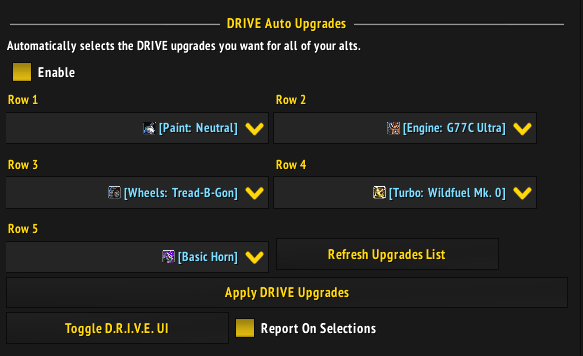
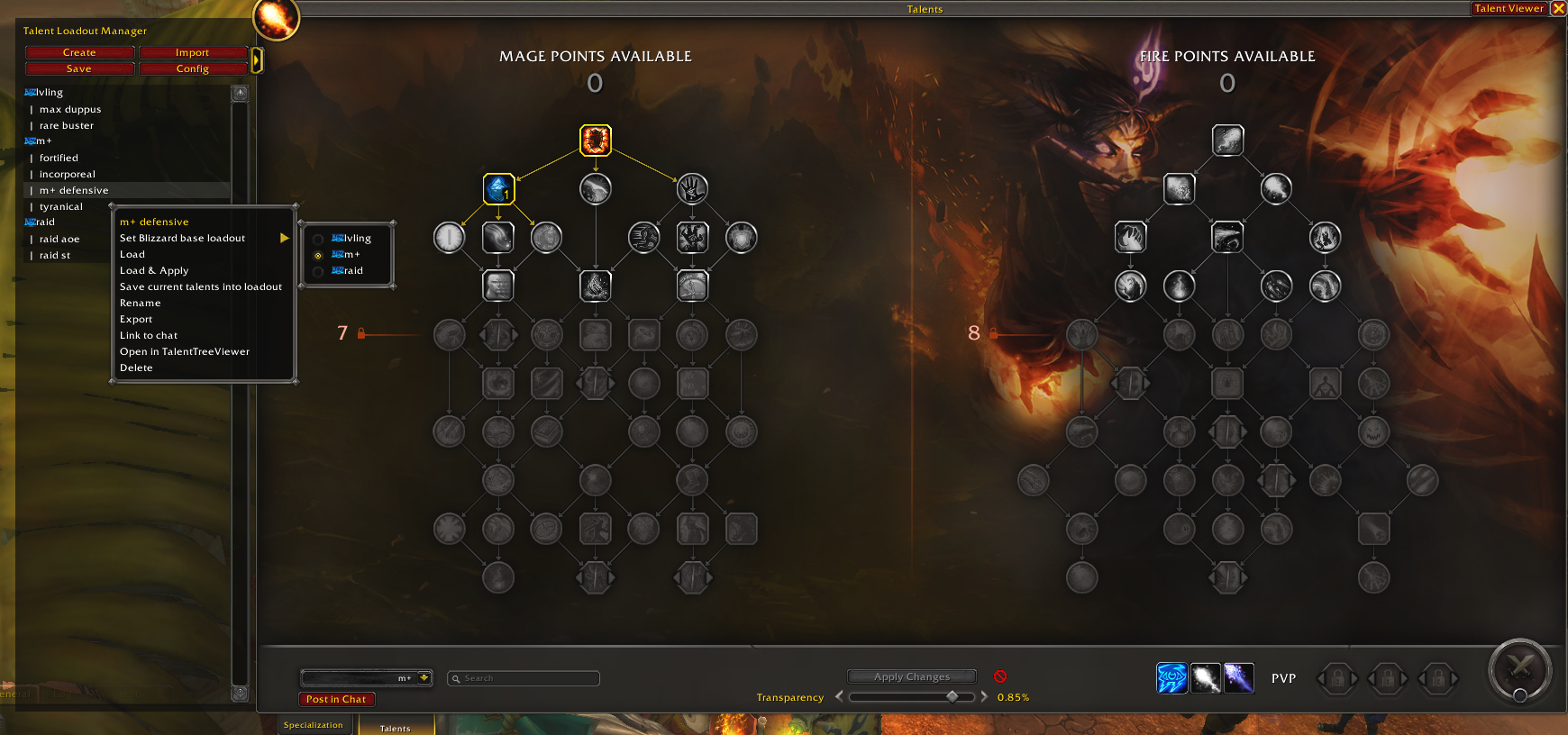
Account-wide (unlimited) saved loadouts
This feature has been split out into its own addon Talent Loadout Manager, feel free to try it out! (To be clear, it no longer is part of Talent Tree Tweaks)
Talent Loadout Manager is also fully integrated into Talent Tree Viewer, allowing you to view and manage your loadouts from any character, without relogs!
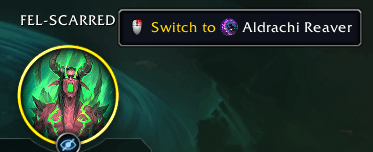
Hero Talents
This module adds a small QoL feature, allowing you to switch hero specs with 1 click.
Export Loadouts
When you open the loadout dropdown, you can right-click any loadout, and copy the export string, without having to switch to it first!

Improved Talent Loadout Links
Talent Loadout links are now improved, to allow you to open the build in Talent Tree Viewer, copy the loadout text, import it, or link it in chat.
This module is also able to automatically scan for "raw" talent loadout strings, and replace them with interactive links. Now you no longer need a chat copy-paste addon, or ask your friends/guildies to send loadouts via discord. Just tell them to put it in chat, and the loadout will be magically transformed into a clickable link 🙂.
A tooltip is added when you hover over the link, to give some basic info, and to explain the different click actions available.
Note: automatically scanning for "raw" talent loadout strings is disabled by default, since it can cause a small amount of frame loss when walking around busy areas on larger realms.
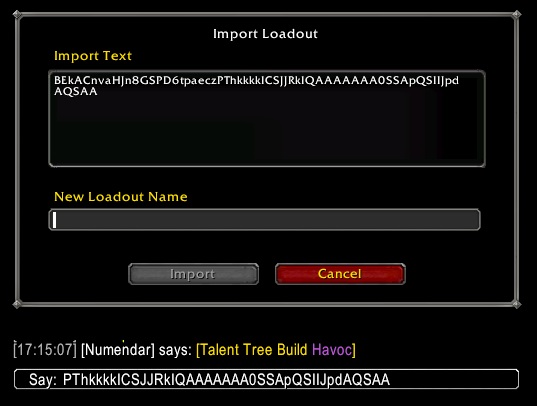
With the Mini Trees Tweak enabled, the tooltip when hovering over a link, will also include a mini preview of the build!

Mini Talent Tree Previews in tooltips
This tweak adds mini previews of the relevant builds to many tooltips throughout the UI!
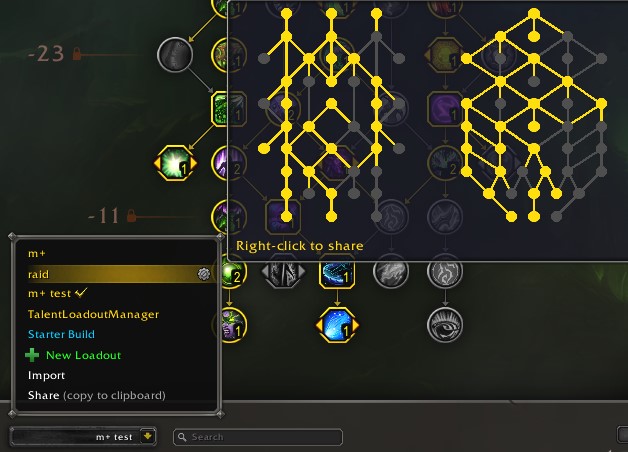
As shown above, a tooltip is added to Talent Build links. But mini trees are also added to Talent Loadout Manager when hovering over loadouts in the sidebar.
Another place you'll find these mini trees, is in the default loadout dropdown, like in the screenshot below, and when hovering over the Talents button, in the Inspect UI.
This lets you quickly compare builds at a glance, especially if you're already familiar with the spec, you'll be able to tell which talents are picked, just at a glance.
More places for these previews might be added in the future, suggestions are welcome!
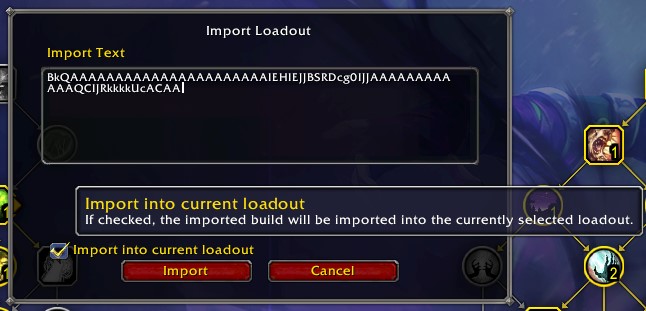
Import talent build string into current loadout
Instead of being forced to create a new loadout when importing, this tweak allows you to simply update your existing loadout, with the exported build.
There is a setting in the options UI to enable/disable this checkbox by default.
Additionally, you are now able to click import, when you're maxed out on loadouts. This will not allow you to create more loadouts than the limit though! It's just to allow you to import into your current loadout, when you're maxed out.
CTRL+Scroll to change the windows size
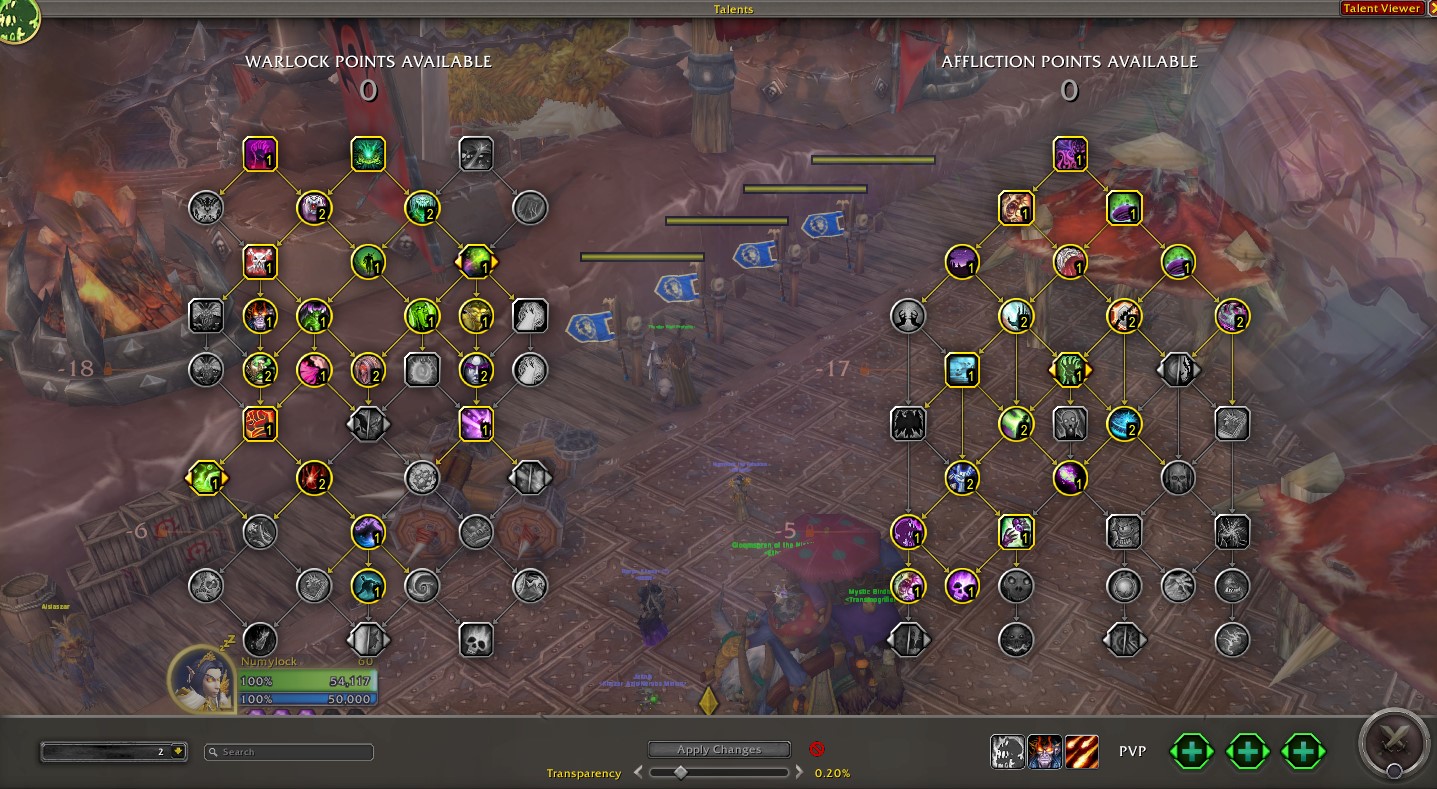
The new talent tree UI is absolutely massive, and almost fills the entire screen for most players. With this module installed, you can simply CTRL+scroll while hovering over the frame to make it smaller / larger 🙂
This tweak is deactivated while the addon BlizzMove is loaded, since that provides the same feature (and more).
Inspect diff - see the difference between your talent selections, and your inspected target
When you're inspecting a player with the same spec as you, it will show highlights to show the difference from your own talents. You can fully customize colors used for this in the options UI.
By default:
- Green = they have a talent that you do not
- Red = they are missing a talent that you have
- Yellow = they have a different number of points in a ranked talent; or they selected a different choice in a choice talent
These highlights will optionally also show up in the Talent Tree Viewer UI (when looking at a tree that matches your spec), there's a separate toggle to turn this on/off.

Always show "spend x more points" gates
This tweak will force the "gates" to always be visible, with a count of how many extra points you have spent. If the gate is "unlocked", it becomes semi-transparent.

Respec without switching tabs
This tweak adds respec buttons to the Talent Tree Talents tab, so you don't have to switch to the Specialization tab any more.
There's an option to change the highlights, so that your current spec is coloured, and the other specs are greyed out.

Change Background
This tweak adds a slider to adjust the background transparency of the talent tree UI.
It's fully compatible with Talent Tree Viewer, but makes no changes to the specialization selection tab.
The sidebar from Talent Loadout Manager will have its background adjusted, if installed.
There's an option to hide the slider (you can still adjust it in the options regardless).
Highlight "Cascade Repurchasable" talents
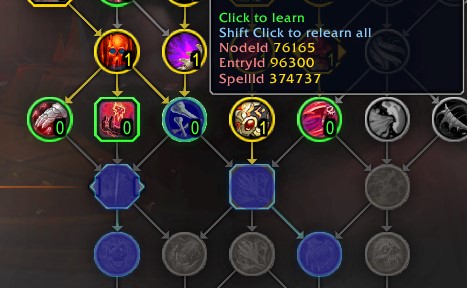
The default UI allows you to relearn talents when you deselect them; but the default blue outline is very easy to miss. This tweak adds a blue overlay (you can fully customize the color), to make it easier to spot that talents can be relearned in bulk.
Display IDs in the tooltip
The NodeID, SpellID, EntryID, and DefinitionID are added into the tooltip. You can enable/disable each individually. Only NodeID and SpellID are shown by default.
This also works for the Dragonriding Talent UI, and for the Profession Spec UI

CTRL + C to copy spellID
You can CTRL-C to copy the spellID of a talent you hover over (while not in combat). This also works for dragonriding talents.
You can just CTRL-C twice to instantly copy the spellID to your clipboard.

CTRL + Left-Click a talent, to dump its nodeInfo
This tweak is aimed at addon developers, but others might find it interesting too. CTRL + left-click a talent button, and the nodeInfo will be dumped to any out of 4 debug tools.
You can freely select any of the following: /tinspect, LuaBrowser, ViragDevTools, and/or /dump. If you miss your favourite table viewing addon/tool, you can request it in the comments, or on github (or if you're a dev, create a PR).
Unlock Restrictions
This tweak allows you to reallocate your talent points while in combat. This does not work inside m+ etc. It will allow you to change your talents while in combat, and then press Apply Changes as soon as you leave combat.
Another restriction that is removed, is that you can now share talent loadout strings without having to spend all of your talent points. This allows you to share a build with your friends, but still leave optional talents open as well.
Reduce Taint
The word "Taint" brings terror and sadness to many wow addon developers' hearts. This tweak addresses some risks in the Blizzard Talent Tree UI, which allows this addon (and others) more freedom to implement our customization 🙂.
Disabling this tweak, may mean that your action bars will break over time! It also means that opening and closing the talent UI will be blocked (unless another addon which fixes that, like No Auto Close is installed).
For those interested in the specifics: this tweak replaces the Share Loadout button to use a custom CopyToClipboard alternative (using a popup), replaces the Action Button Highlight Marks functionality when hovering over spells, and more. This is compatible with the default blizzard action bars, and any addon that uses LibActionBars, or derivatives thereof (e.g. ElvUI and Bartender should both work fine). And a raw frame:Show/Hide call is used when the user tries to show/hide the UI in combat.
Reduce Spam
This tweak will filter out the "New spell learned/unlearned" spam, that happens whenever you respec, or change loadouts.
Misc fixes
This tweak is a collection of minor bugfixes, that aren't big enough to have their own category.
- Fixed a blizzard bug, where the loadout dropdown isn't updating correctly when using certain macros or addons to change loadouts.
- Fixed a blizzard bug, that prevents you from SHIFT-Clicking choice talents, when inspecting players or linked loadouts
More coming soon ™
Feel free to comment, or create issues on github if you have suggestions 🙂. Most of these tweaks are the result of people giving me their great ideas, and I'd love to hear more.
Planned features
General improvements and bugfixes; feel free to request specific features you're missing :)
Talent Tree Viewer/calculator
This addon is made to be fully compatible with my other addon, Talent Tree Viewer (an ingame talent tree calculator)
How to prevent the game from closing all other windows when you open the talent tree UI?
You can install No Auto Close (best used together with BlizzMove) to prevent the game from closing any windows, just because you opened some other window.
Skins
- ElesmereUI skin: EllesmereUI_AddonSkins
- GW2 UI: part of the GW2 UI core addon
用户评价
暂无 / 5,0 条评价相关推荐
继续看看这些内容
