插件中文资料库
中文说明、玩家点评、适用场景和替代推荐,方便快速判断是否适合你。
- 副本、团队本和大秘境战斗提醒
 Details! Mythic+ Scoreboard
 GroupFinder
 Sleek XP Bubbles
Looty(New) 插件下载与使用指南
本页整理了 Looty(New) 的功能用途、适用人群、安装方法和常见问题,方便玩家快速判断是否需要安装。
适合谁用
Looty(New) 是一款 背包与库存 / 首领战斗 / 聊天与通讯 类插件,适合需要优化界面、提升操作效率或补充游戏信息提示的魔兽世界玩家。
基本信息
- 插件作者:ravelo
- 插件分类:背包与库存 / 首领战斗 / 聊天与通讯
- 适配版本:3.3.5
- 累计下载:41
安装方法
- 点击上方下载按钮获取 Looty(New)插件文件。
- 解压后将插件文件夹放入 World of Warcraft/_retail_/Interface/AddOns 目录。
- 重启游戏或在角色界面点击插件,确认 Looty(New) 已启用。
- 如果插件不生效,请检查版本是否匹配,或关闭同类冲突插件后重试。
使用建议
Looty(New) 安装后建议先在角色界面确认已启用,进入游戏后根据插件提供的命令、小地图按钮或设置面板进行调整。如遇到报错,可先单独启用该插件排查冲突。
Looty(New) 常见问题
Looty(New) 适合需要 背包与库存 / 首领战斗 / 聊天与通讯 类功能的玩家,特别是希望提升游戏便利性、界面管理或战斗信息获取效率的用户。
下载后解压到 Interface/AddOns 目录,然后重启游戏并在角色界面启用插件。
常见原因是目录多套一层、游戏版本不匹配、依赖插件缺失或同类插件冲突。
可以查看本页的替代插件推荐和相关插件区域,按下载量和分类选择同类工具。
插件 AI 问答
可以问:这个插件正式服能用吗、和 DBM 冲突吗、怎么设置、有没有替代插件。
Looty(New) 是一款魔兽世界插件,主要用于伤害统计、输出循环或战斗表现分析、团队分配、Roll 点记录或公会管理、副本、团本、大秘境或钥石辅助。建议根据自己的版本和插件环境先测试兼容性。
插件用途
Looty(New) 主要面向需要首领战斗功能的玩家,用来改善游戏体验、减少重复操作或补充默认界面没有直接提供的信息。
适用场景
- 伤害统计、输出循环或战斗表现分析
- 团队分配、Roll 点记录或公会管理
- 副本、团本、大秘境或钥石辅助
使用建议
安装后建议先在角色选择界面或插件管理器中确认已启用,再进入游戏测试是否与现有整合包、WA 和其他插件冲突。如遇报错,可以先禁用同类插件排查。
Looty
A lightweight Master Loot & Group Loot addon for WoW WotLK (3.3.5). Tracks rolls in real-time, gives the Master Looter full control over loot distribution, and syncs automatically to other players using the addon — no configuration needed.
Screenshots
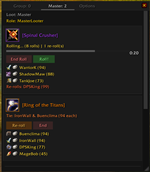
Master Loot Dashboard
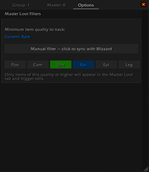
Options — Quality Filter
Why Looty?
WoW's default loot windows are slow, cluttered, and disappear after a roll. Looty keeps everything visible in one scrollable window: who rolled, what they rolled, who's winning, and when the timer expires.
Whether you're a raid leader managing drops or a player tracking your rolls, Looty makes loot transparent and organized.
Features
Group Loot Tracking
- Captures roll results from the native Group Loot system as they happen
- Organizes players by choice: Need, Greed, Disenchant, Pass
- Expand each roll to see who rolled what value
- Winner highlighted in green, live countdown on active rolls
- "Clear History" button to reset
Master Loot Control
- View all looted items across the entire raid, accumulated as you clear bosses
- Start, end, and restart rolls with a single button (label changes to "Re-Roll" after the first roll)
- Ties detected automatically — only tied players can re-roll
- Award items in one click: automatically gives the item to the winner, whether the loot window is open or the item is in your bags (no manual targeting required)
- Override the winner: choose any raid member from a dropdown if you want to award differently
- "Done" button to mark distributed items
- Syncs everything to raiders who also use Looty
Quality Filter
- Six-tier filter (Poor → Legendary) to control which items appear in the UI
- Automatically follows WoW's default loot threshold if you toggle the option
- Filter applies instantly to existing items — no need to re-open the loot window
- Syncs automatically from Master Looter to Raiders
UI
- Scrollable, resizable window that remembers its position
- Class icons next to every player name
- Timer bars that change color as time runs out (grey → yellow → red)
- Three tabs: Group (your rolls), Master (ML dashboard), Options (settings)
No Sync? No Problem
Looty works in two modes:
- Addon sync — when ML and Raiders both use Looty, everything syncs automatically (items, rolls, filters, award state)
- Standalone — Group Loot hooks into WoW's built-in system; Master Loot still tracks rolls and items locally
You always get value, regardless of how many people are using Looty.
Installation
- Download the addon
- Place the
Lootyfolder inInterface/AddOns/ - Reload or restart WoW
- Type
/lootyto open the window
Commands
| Command | Description |
|---|---|
/looty |
Open or close the Looty window |
/looty lock |
Lock the window in place (prevents dragging/resizing) |
/looty clear |
Clear group loot history |
/lr |
Shortcut — same as /looty |
Compatibility
- WoW 3.3.5a (Wrath of the Lich King)
- Works with any loot method (Group Loot, Need Before Greed, Master Loot)
- No external libraries required
用户评价
暂无 / 5,0 条评价相关推荐
继续看看这些内容
