插件中文资料库
中文说明、玩家点评、适用场景和替代推荐,方便快速判断是否适合你。
- 拍卖行、交易和金币管理
 Details! Mythic+ Scoreboard
 BagSync
 TankMD Misdirect
FlipQueue 插件下载与使用指南
本页整理了 FlipQueue 的功能用途、适用人群、安装方法和常见问题,方便玩家快速判断是否需要安装。
适合谁用
FlipQueue 是一款 拍卖与商业 / 数据导出 / 背包与库存 类插件,适合需要优化界面、提升操作效率或补充游戏信息提示的魔兽世界玩家。
基本信息
- 插件作者:gezmodean
- 插件分类:拍卖与商业 / 数据导出 / 背包与库存
- 适配版本:12.0.5
- 累计下载:46
安装方法
- 点击上方下载按钮获取 FlipQueue插件文件。
- 解压后将插件文件夹放入 World of Warcraft/_retail_/Interface/AddOns 目录。
- 重启游戏或在角色界面点击插件,确认 FlipQueue 已启用。
- 如果插件不生效,请检查版本是否匹配,或关闭同类冲突插件后重试。
使用建议
FlipQueue 安装后建议先在角色界面确认已启用,进入游戏后根据插件提供的命令、小地图按钮或设置面板进行调整。如遇到报错,可先单独启用该插件排查冲突。
FlipQueue 常见问题
FlipQueue 适合需要 拍卖与商业 / 数据导出 / 背包与库存 类功能的玩家,特别是希望提升游戏便利性、界面管理或战斗信息获取效率的用户。
下载后解压到 Interface/AddOns 目录,然后重启游戏并在角色界面启用插件。
常见原因是目录多套一层、游戏版本不匹配、依赖插件缺失或同类插件冲突。
可以查看本页的替代插件推荐和相关插件区域,按下载量和分类选择同类工具。
插件 AI 问答
可以问:这个插件正式服能用吗、和 DBM 冲突吗、怎么设置、有没有替代插件。
FlipQueue 是一款魔兽世界插件,主要用于拍卖与商业相关功能。建议根据自己的版本和插件环境先测试兼容性。
插件用途
FlipQueue 主要面向需要拍卖与商业功能的玩家,用来改善游戏体验、减少重复操作或补充默认界面没有直接提供的信息。
适用场景
- 拍卖与商业相关功能
使用建议
安装后建议先在角色选择界面或插件管理器中确认已启用,再进入游戏测试是否与现有整合包、WA 和其他插件冲突。如遇报错,可以先禁用同类插件排查。

FlipQueue — Cross-Realm Flipping, On Autopilot
FlipQueue is a workflow addon for cross-realm auction house flipping. It manages the entire process — from tracking your inventory across every character and realm, to finding deals, to building a step-by-step to-do list that tells you what to post, from where, on which character.
FlipQueue isn't here to replace the great tools you already use — it's built to augment them. TSM handles pricing and posting rules. Auctionator handles shopping and scanning. FlippingPal finds the deals. FlipQueue ties them all together into one workflow, so you spend less time managing alts and more time making gold.
!FlipQueue main view: per-character to-do list with [POST], [BUY], and [CHECK MAIL] tasks
Step 1: Know What You Have
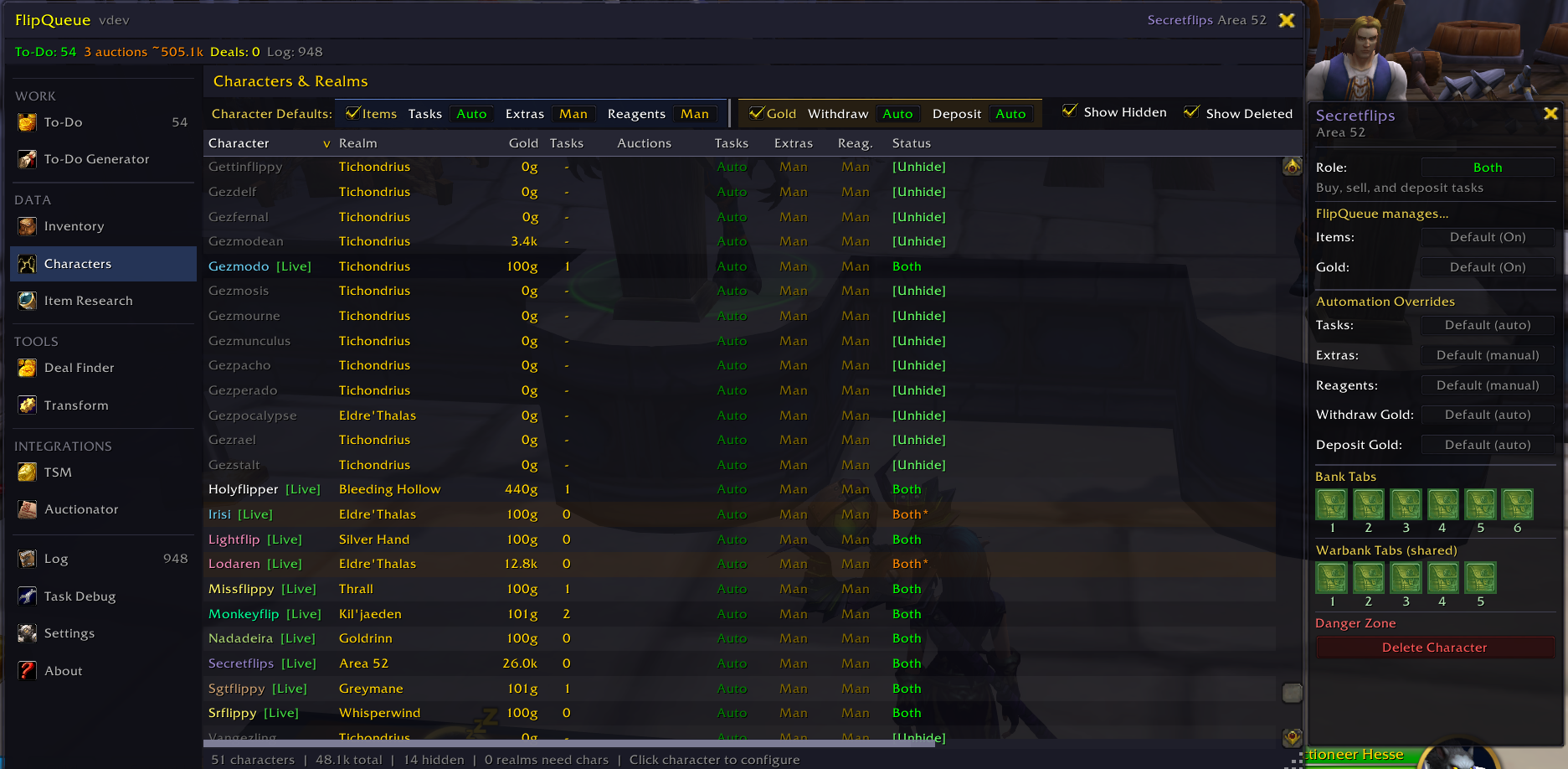
The foundation of cross-realm flipping is knowing your inventory. FlipQueue tracks every tradeable item across all of your characters — bags, bank, and warbank — and keeps it updated in real time as items move around.
- Full cross-character inventory — see every item you own in one place, with status badges showing what's assigned, posted, or sitting idle
- Character overview — gold totals, task counts, auction stats, and which AH cluster each character belongs to
- Realm coverage map — instantly see which realms you have characters on, which ones need a new alt, and how much gold is waiting on each
- Multi-account support — share inventory and realm coverage between WoW accounts
- Live tracking — inventory updates automatically as you move items between bags, bank, and warbank
Step 2: Find Deals
Once FlipQueue knows your inventory, it's time to find what's worth flipping.
Deal Finder (Built-in)
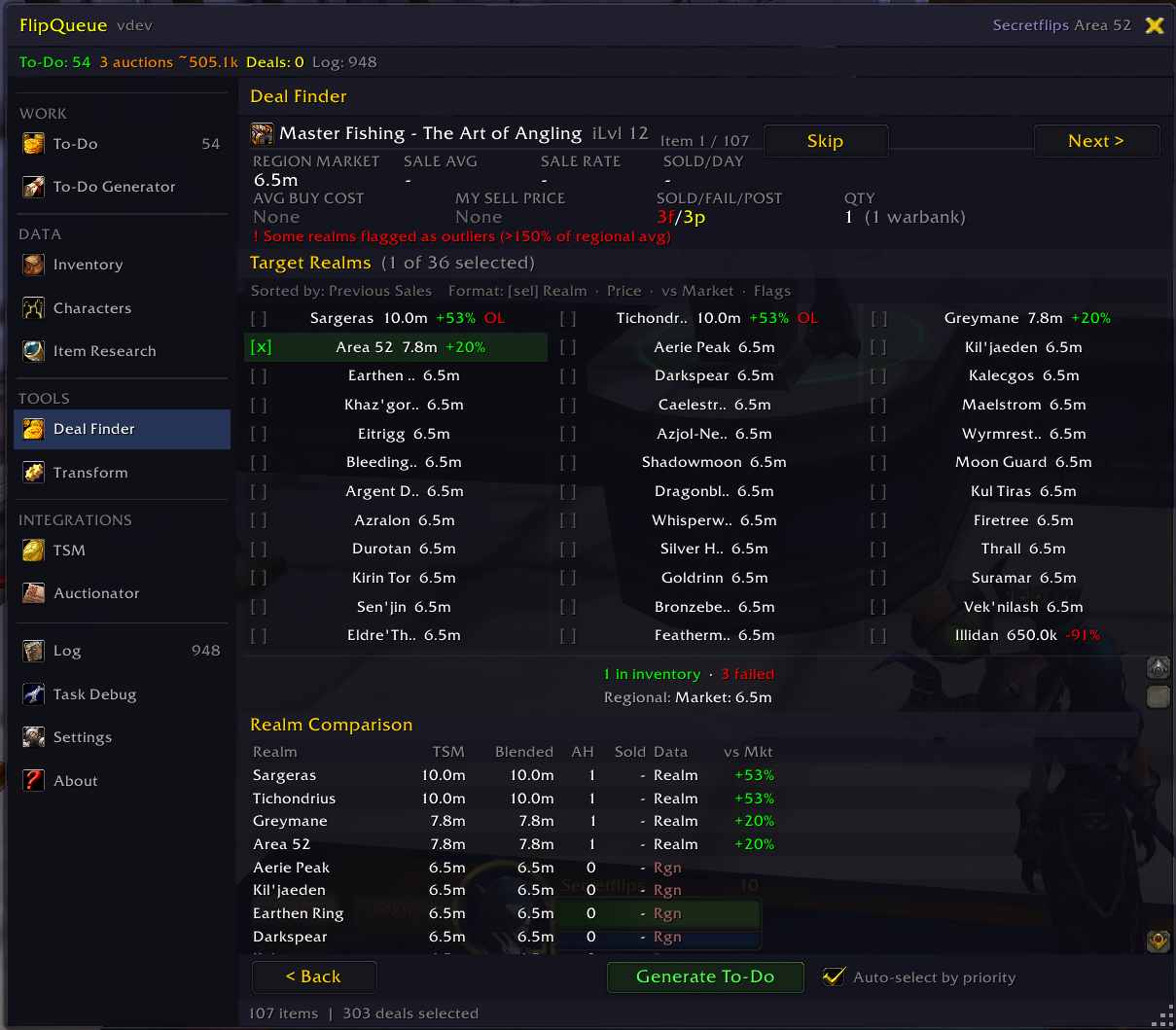
Powered by TSM pricing data, the Deal Finder scans your entire inventory and finds items that are worth more on another realm's auction house. It auto-selects the best destination realm for each item based on profit margin — then lets you generate tasks with one click.
FlippingPal (External Deals)
FlippingPal provides cross-realm deal data — including items you don't currently own. Export deals from FlippingPal and import them into FlipQueue, where they're matched against your inventory automatically. Items you already have get routed to the right character. Items you don't have yet become buy tasks — and FlipQueue can generate Auctionator shopping lists so you can go pick them up.
Auctionator Shopping Lists
Already have a curated shopping list in Auctionator? Import it directly into FlipQueue and generate tasks from it.
Item Research
Not sure about an item? The Research page lets you deep-dive into individual items with pricing data and bonus/ilvl variant breakdowns — so you can understand which variants actually sell before committing gold.
Step 3: Generate Your To-Do List
This is where FlipQueue shines. The Generator Wizard takes your deals — whether from the Deal Finder, FlippingPal, shopping lists, or any combination — and turns them into a per-character task list.
- Filter by TSM Group or Auctionator List to control exactly which items go into the run
- Smart character routing — FlipQueue assigns each item to the best character based on realm, inventory, and AH cluster
- Cross-character handoffs — items on the wrong character get deposit instructions ("via CharName")
- TSM-aware — reads your Auctioning operations for postCap, duration, and minPrice so items below your threshold are auto-skipped
Step 4: Follow the List
Log into each character and FlipQueue tells you exactly what to do. Tasks advance through stages automatically based on game events.
Sell-side flow: retrieve → post → collect
Buy-side flow: browse → buy → check mail → deposit
The mini overlay relabels each row as you progress through the workflow — [BUY] while you still need to click in the AH, [CHECK MAIL] the moment the buyout completes (no waiting for the item to arrive), [DEPOSIT] once the item is in your bags and needs to move to the warbank. The header at the top splits the same way: X to post, Y to buy, Z in mail, W to deposit, so you always know what's left at a glance.
Your to-do list is reactive — it responds to what actually happens in the game. Decided to keep an item you bought? FlipQueue notices it's gone and reallocates. An item gets sold or moved before you get to it? The task is skipped automatically. You can regenerate or adjust on the fly without starting over.
- Mini overlay — a compact floating view shows your current tasks at a glance without opening the main window
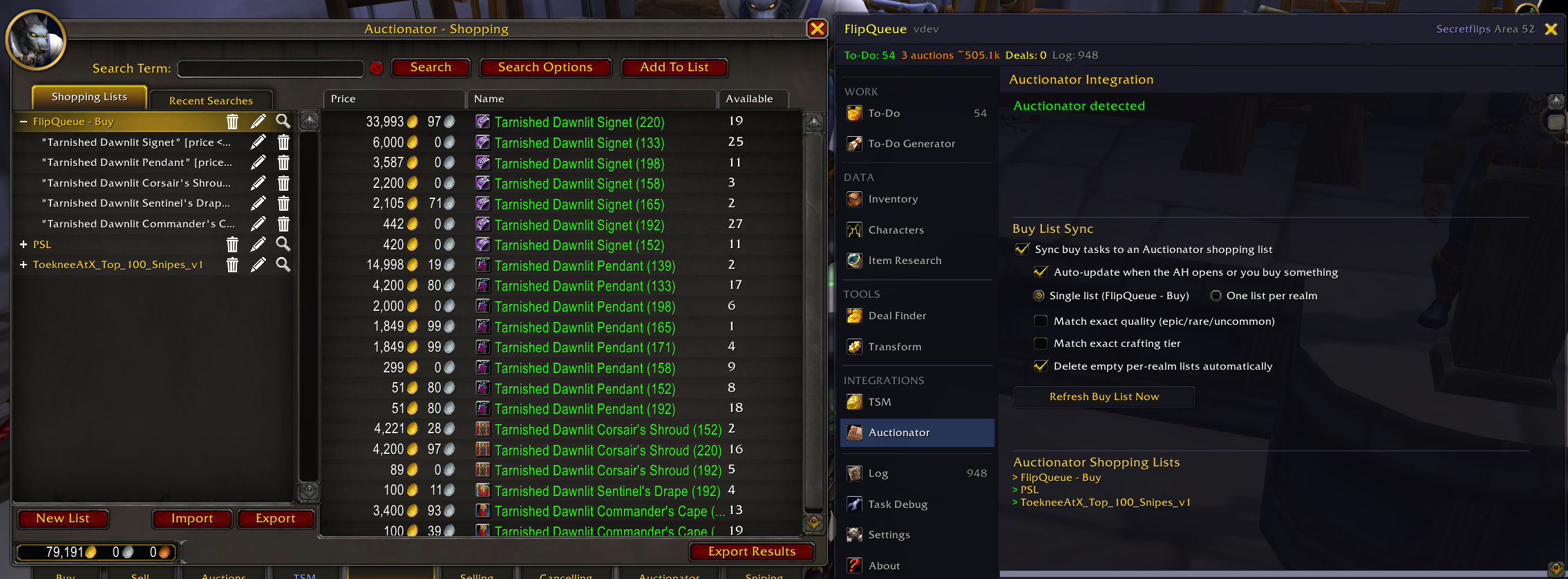
- Live Auctionator buy list — when you have buy tasks, FlipQueue keeps a shopping list called FlipQueue - Buy synced to what your current character still needs, with the right max-price ceiling on every entry. Items drop off the list automatically the moment you buy them
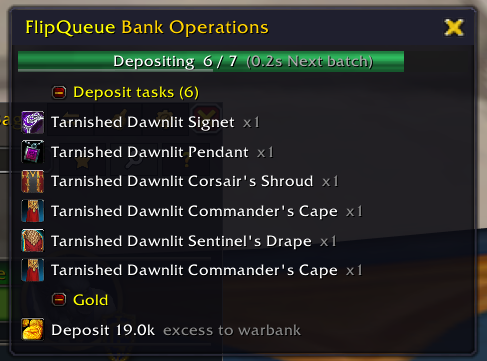
- Auto-pull — queued items are pulled from bank/warbank automatically when you open it
- Auto-deposit — items that belong to another character are sent to the warbank
- Auto-withdraw — posting fees are withdrawn from the warbank (configurable limit per visit)
Auto / Manual / Disabled per action
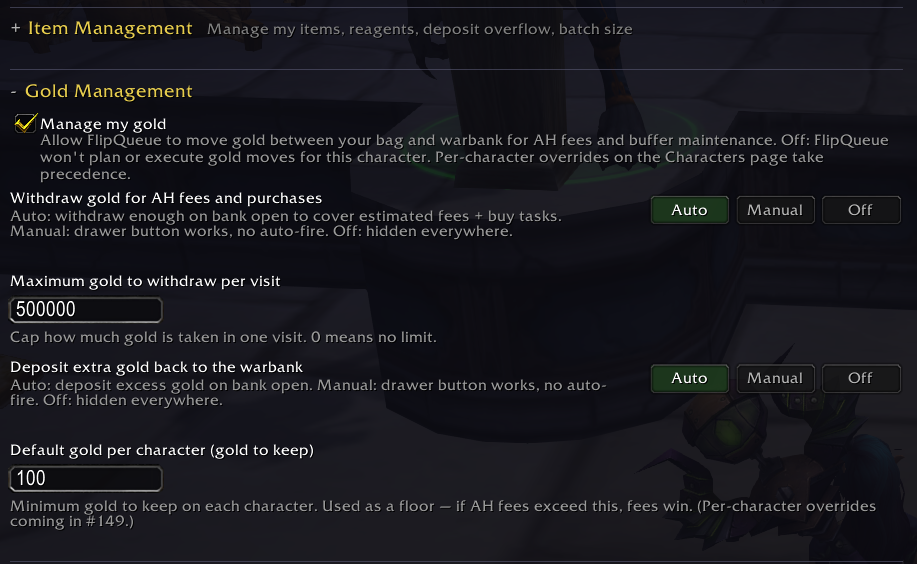
Every automated action — pull, deposit-to-warbank, deposit-extras, deposit-reagents, gold withdraw, gold deposit — has its own three-state setting:
- Auto runs on bank open, button still works manually
- Manual doesn't auto-fire (so opening the bank doesn't surprise you), button still works
- Disabled is hidden everywhere
Two master switches at the top of the settings page — Manage my items and Manage my gold — let you scope FlipQueue to exactly what you want it touching, with per-character overrides on the Characters page.
Make FlipQueue More Powerful
FlipQueue works on its own, but it gets better with every tool you add to the stack:
TradeSkillMaster
The backbone of FlipQueue's pricing. With TSM installed, FlipQueue can power the Deal Finder with real market data, read your Auctioning operations for postCap, duration, and minPrice thresholds, auto-skip bad deals, and show live AH prices in every table. TSM characters are auto-detected — no setup needed.
Auctionator
Your shopping companion. FlipQueue imports items from your Auctionator shopping lists and can generate per-realm buy lists with price caps — so when you log into a buy realm, the shopping list is already waiting for you.
FlippingPal
Take your flipping beyond what you already own. FlippingPal offers a suite of tools — cross-realm deals, dropshipping, inventory scans, and more — many of which export directly into FlipQueue. Import those deals and FlipQueue handles the rest: routing items you have, creating buy tasks for items you don't, and generating shopping lists to go get them.
Azeroth Auction Assassin
Don't wait for deals — snipe them. Export your deal data from FlipQueue as AAA-compatible JSON and let sniping tools or hosted services like FlippingPal act on good deals the moment they appear.
Other Features
- Pause Automation — drawer button that pauses auto-fire on bank open without disabling manual access. Drawer buttons stay clickable while paused
- Instance auto-pause — automatically pauses bank ops while you're inside a raid, dungeon, arena, battleground, or scenario, so a stale queued op can't fire from an unsafe context
- About page with installed version, embedded library version, current WoW build, and a one-click Copy Diagnostics button for bug reports
- Reagent tracking as its own action class, separate from extras — auto-deposit your gear leftovers without sending crafting mats too
- Do Not Track list — permanently exclude items you don't want routed
- Accent-insensitive realm matching — works correctly on EU servers with accented realm names
- Battle pet support
- Configurable bank tab selection for auto-deposit
- Multi-account synchronization — link a second WoW account via BattleNet and both accounts see each other's characters, bags, banks, and to-do lists in real time
- Minimap button & slash commands (
/fq,/fq settings,/fq mini,/fq import,/fq scan,/fq bank,/fq version)
Getting Started
- Install FlipQueue alongside TradeSkillMaster and/or Auctionator
- Open FlipQueue with
/fqor the minimap button - Log into your characters and open your bank and warbank — FlipQueue scans and builds your inventory automatically
- Open the Deal Finder to scan for profitable flips, or import deals from FlippingPal or an Auctionator shopping list
- Run the To-Do Generator to build your task list
- Follow the list character by character — FlipQueue handles the rest
- Ready for more? Check out the Make FlipQueue More Powerful section above to expand your workflow with TSM, Auctionator, FlippingPal, and sniping tools
FlipQueue in the Wild
Feedback & Support
Found a bug or have a feature request? Report it on the CurseForge project page.
CurseForge: https://www.curseforge.com/wow/addons/flipqueue用户评价
暂无 / 5,0 条评价相关推荐
继续看看这些内容
