插件中文资料库
中文说明、玩家点评、适用场景和替代推荐,方便快速判断是否适合你。
- 副本、团队本和大秘境战斗提醒
- 背包、银行和物品整理
- 任务路线、地图标记和野外探索
- 伤害、治疗、仇恨和战斗数据统计
 Details! Mythic+ Scoreboard
 RightClickSelfCast
 Ultimate Gathering Counter
LuraHelper - L'ura Memory game 插件下载与使用指南
本页整理了 LuraHelper - L'ura Memory game 的功能用途、适用人群、安装方法和常见问题,方便玩家快速判断是否需要安装。
适合谁用
LuraHelper - L'ura Memory game 是一款 首领战斗 类插件,适合需要优化界面、提升操作效率或补充游戏信息提示的魔兽世界玩家。
基本信息
- 插件作者:yenst
- 插件分类:首领战斗
- 适配版本:12.0.5,12.0.7
- 累计下载:49
安装方法
- 点击上方下载按钮获取 LuraHelper - L'ura Memory game插件文件。
- 解压后将插件文件夹放入 World of Warcraft/_retail_/Interface/AddOns 目录。
- 重启游戏或在角色界面点击插件,确认 LuraHelper - L'ura Memory game 已启用。
- 如果插件不生效,请检查版本是否匹配,或关闭同类冲突插件后重试。
使用建议
LuraHelper - L'ura Memory game 安装后建议先在角色界面确认已启用,进入游戏后根据插件提供的命令、小地图按钮或设置面板进行调整。如遇到报错,可先单独启用该插件排查冲突。
LuraHelper - L'ura Memory game 常见问题
LuraHelper - L'ura Memory game 适合需要 首领战斗 类功能的玩家,特别是希望提升游戏便利性、界面管理或战斗信息获取效率的用户。
下载后解压到 Interface/AddOns 目录,然后重启游戏并在角色界面启用插件。
常见原因是目录多套一层、游戏版本不匹配、依赖插件缺失或同类插件冲突。
可以查看本页的替代插件推荐和相关插件区域,按下载量和分类选择同类工具。
插件 AI 问答
可以问:这个插件正式服能用吗、和 DBM 冲突吗、怎么设置、有没有替代插件。
LuraHelper - L'ura Memory game 是一款魔兽世界插件,主要用于伤害统计、输出循环或战斗表现分析、背包、银行、专业制造或物品整理、副本、团本、大秘境或钥石辅助。建议根据自己的版本和插件环境先测试兼容性。
插件用途
LuraHelper - L'ura Memory game 主要面向需要首领战斗功能的玩家,用来改善游戏体验、减少重复操作或补充默认界面没有直接提供的信息。
适用场景
- 伤害统计、输出循环或战斗表现分析
- 背包、银行、专业制造或物品整理
- 副本、团本、大秘境或钥石辅助
使用建议
安装后建议先在角色选择界面或插件管理器中确认已启用,再进入游戏测试是否与现有整合包、WA 和其他插件冲突。如遇报错,可以先禁用同类插件排查。
LuraHelper
A polished fork of PugaHelper by Vaelhys — a World of Warcraft addon that displays L'ura symbol sequences in real-time during the Midnight Falls.
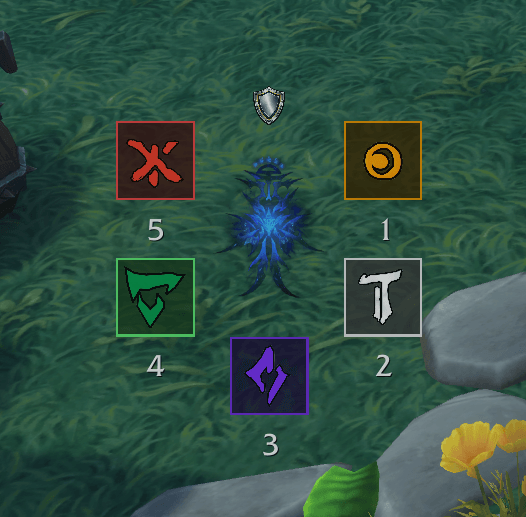
Why Fork?
The original PugaHelper nails the core functionality — symbol detection from raid chat events works flawlessly, even in combat. But it ships as a single monolithic file with no settings UI, no keybindings, hardcoded values, French-only strings, and an always-visible command frame that clutters the screen.
PugaHelper Extended keeps all the battle-tested combat logic intact and wraps it in a proper addon shell.
What Changed
New Features
- WoW Settings Panel — all options accessible via the native Settings UI (Esc > Options > Addons > PugaHelper Extended)
- Keybindings — bindable shortcuts for Toggle Diagram, Toggle Solo Mode, and Toggle Test Mode (Options > Keybindings > PugaHelper)
- Test Mode — press your macros outside of an encounter to fill the diagram and practice (
/puga test) - Frame Locking — prevent accidental repositioning (
/puga lock) - Opacity Control — adjustable transparency with hover-to-full-opacity effect
- UI Scale — scale all frames from 50% to 200%
- Full Slash Command System —
/puga [toggle|solo|template|test|clear|heroic|normal|macro|lock|reset|settings|help]
Polish
- Tooltips on every interactive element — hover anything for an explanation
- English strings throughout (original was French)
- Proper SavedVariables — settings, frame positions, and visibility state persist correctly across sessions
- Clean frame position saving — stored as compact tables instead of flat key sprawl
- Diagram hidden by default — respects your saved enabled/disabled state on login
- Command frame removed — replaced by slash commands and the settings panel
- Icon and categories in the addon list
Code Quality
- Multi-file architecture —
Core.lua(init, events, commands),PugaHelper.lua(UI),Settings.lua(options panel),Bindings.xml(keybindings) - Consolidated symbol definitions — single
SYMBOLStable instead of three separate lookup tables - De-duplicated frame builders — diagram and template frames share parameterized constructors
- Removed unnecessary pcall wrapping around safe API calls
- Extracted constants — addon path, media path, color prefixes defined once
Unchanged
- Symbol detection logic — the chat event buffer system (yell + ping = triangle, etc.) is untouched
- Encounter timing windows — the three timed input windows with their open/close/reset/sound timers
- Solo mode — clickable symbol template for practice
- Macro creation — same 5 macros with the same icons and chat commands
Installation
Copy the PugaHelperExtended folder into your Interface/AddOns/ directory. The original PugaHelper folder is included in this repo for reference but is not needed to run the extended version.
Commands
| Command | Description |
|---|---|
/puga |
Toggle the diagram |
/puga solo |
Toggle solo practice mode |
/puga template |
Toggle the macro template bar |
/puga test |
Toggle test mode (macros fill diagram without encounter) |
/puga clear |
Clear the diagram |
/puga heroic |
Heroic mode (5 symbols) |
/puga normal |
Normal mode (3 symbols) |
/puga macro |
Create/update the 5 symbol macros |
/puga lock |
Lock/unlock frame positions |
/puga reset |
Reset positions and scale to defaults |
/puga settings |
Open the settings panel |
Credits
- PugaHelper by Vaelhys — original addon and all combat mechanics
- PugaHelper Extended — UI overhaul, settings panel, test mode, and code cleanup
用户评价
暂无 / 5,0 条评价相关推荐
继续看看这些内容
