插件中文资料库
中文说明、玩家点评、适用场景和替代推荐,方便快速判断是否适合你。
- 副本、团队本和大秘境战斗提醒
- 背包、银行和物品整理
- 任务路线、地图标记和野外探索
 Details! Mythic+ Scoreboard
 BagSync
 RightClickSelfCast
MDTHelper - Map & Count 插件下载与使用指南
本页整理了 MDTHelper - Map & Count 的功能用途、适用人群、安装方法和常见问题,方便玩家快速判断是否需要安装。
适合谁用
MDTHelper - Map & Count 是一款 地图与小地图 / 插件扩展 类插件,适合需要优化界面、提升操作效率或补充游戏信息提示的魔兽世界玩家。
基本信息
- 插件作者:yenst
- 插件分类:地图与小地图 / 插件扩展
- 适配版本:12.1.5
- 累计下载:43
安装方法
- 点击上方下载按钮获取 MDTHelper - Map & Count插件文件。
- 解压后将插件文件夹放入 World of Warcraft/_retail_/Interface/AddOns 目录。
- 重启游戏或在角色界面点击插件,确认 MDTHelper - Map & Count 已启用。
- 如果插件不生效,请检查版本是否匹配,或关闭同类冲突插件后重试。
使用建议
MDTHelper - Map & Count 安装后建议先在角色界面确认已启用,进入游戏后根据插件提供的命令、小地图按钮或设置面板进行调整。如遇到报错,可先单独启用该插件排查冲突。
MDTHelper - Map & Count 常见问题
MDTHelper - Map & Count 适合需要 地图与小地图 / 插件扩展 类功能的玩家,特别是希望提升游戏便利性、界面管理或战斗信息获取效率的用户。
下载后解压到 Interface/AddOns 目录,然后重启游戏并在角色界面启用插件。
常见原因是目录多套一层、游戏版本不匹配、依赖插件缺失或同类插件冲突。
可以查看本页的替代插件推荐和相关插件区域,按下载量和分类选择同类工具。
插件 AI 问答
可以问:这个插件正式服能用吗、和 DBM 冲突吗、怎么设置、有没有替代插件。
MDTHelper - Map & Count 是一款魔兽世界插件,主要用于背包、银行、专业制造或物品整理、地图、区域、任务路线或交通提醒、副本、团本、大秘境或钥石辅助。建议根据自己的版本和插件环境先测试兼容性。
插件用途
MDTHelper - Map & Count 主要面向需要地图与小地图功能的玩家,用来改善游戏体验、减少重复操作或补充默认界面没有直接提供的信息。
适用场景
- 背包、银行、专业制造或物品整理
- 地图、区域、任务路线或交通提醒
- 副本、团本、大秘境或钥石辅助
使用建议
安装后建议先在角色选择界面或插件管理器中确认已启用,再进入游戏测试是否与现有整合包、WA 和其他插件冲突。如遇报错,可以先禁用同类插件排查。
MDTHelper — Live Route Guide for M+
Stop alt-tabbing to check your MDT route mid-key. MDTHelper puts your planned route right on screen as a pull-by-pull checklist that updates automatically as you go.
How It Works
- Plan your route in Mythic Dungeon Tools like you normally would.
- Enter the dungeon. MDTHelper reads your active MDT route and displays it as a compact overlay.
- Play the key. As your group kills mobs and gains forces, the addon tracks your progress and automatically advances through the pull list.
That's it. No setup required — it just works out of the box.
What You See On Screen
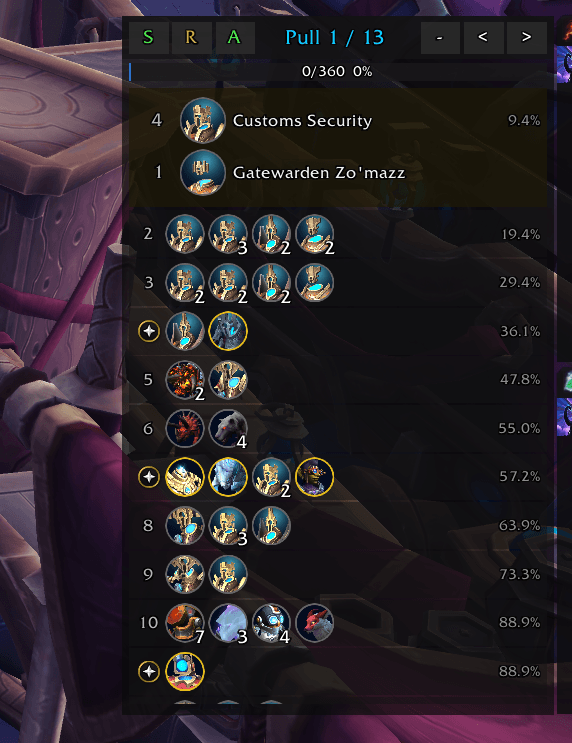
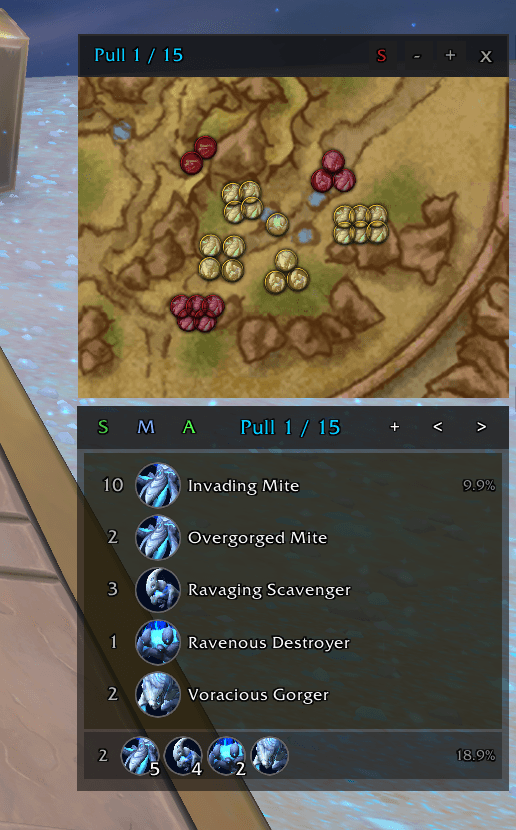
- A pull list showing every pull from your MDT route in order. Each pull displays mob portraits so you can quickly see what you're pulling next.
- The current pull expanded with full details: mob names, portraits, how many of each mob, and how much forces each group is worth as a percentage.
- A forces bar at the top showing your overall forces progress (e.g. 187/300 — 62%).
- Completed pulls get checked off and dimmed so you always know where you are.
- Minimized mode — collapse to just the current and next pull when you want a smaller footprint.
Auto-Advance
The addon watches your forces progress during the key. When you've killed enough mobs to match a pull, it automatically marks that pull complete and moves to the next one. Boss kills also advance the tracker. You never have to touch anything during the run. You can toggle auto-advance on/off with the A button in the header.
If the auto-tracking gets out of sync (maybe you pulled extra mobs or skipped something), you can manually step forward or back with the arrow buttons on the overlay, or with chat commands.
Route Sharing
- Click the S button in the header to send your route to the group (left-click) or copy the export string (right-click).
- Auto-import — when your party leader shares an MDT route, it's automatically imported so the whole group stays on the same page. Toggle this in settings.
Customization
Open the settings panel with /mdth settings:
- Opacity slider — make the overlay more transparent so it doesn't block your view.
- Lock / Unlock — when unlocked, drag the frame to move it and drag the bottom edge to resize the height of the scroll area. Lock it when you're happy with the layout.
- Auto-import toggle — enable or disable automatic route imports from your party leader.
- Reset Position & Size — snap the overlay back to its default location and size.
You can also bind Next Pull and Previous Pull in WoW's Key Bindings menu (look under "MDT Helper").
Commands
Type these in chat:
- /mdth — show or hide the overlay
- /mdth lock — lock the frame in place so you don't accidentally drag or resize it
- /mdth min — toggle minimized mode
- /mdth next — manually advance to the next pull
- /mdth prev — go back one pull
- /mdth reset — start the tracker over from pull 1
- /mdth pos — reset position and size to defaults
- /mdth settings — open the settings panel
- /mdth share — send your route to the group
- /mdth copy — copy the route export string
- /mdth autoimport — toggle auto-import of leader routes
- /mdth status — print current state to chat
Requirements
- Mythic Dungeon Tools must be installed. MDTHelper reads your route from MDT — without it there's nothing to display.
FAQ
Does it work with any dungeon? Yes, any dungeon that MDT supports. Whatever route you have selected in MDT is what gets displayed.
Does it affect performance? No. The overlay is lightweight and only updates when forces change or you switch pulls.
What if I don't follow the route exactly? The auto-advance is based on forces gained, not which specific mobs you kill. It handles small deviations fine. For bigger differences, use the manual next/prev buttons to get back on track.
Does it do anything outside of dungeons? No. The overlay automatically hides when you're not in a dungeon instance.
用户评价
暂无 / 5,0 条评价相关推荐
继续看看这些内容
