插件中文资料库
中文说明、玩家点评、适用场景和替代推荐,方便快速判断是否适合你。
- 任务路线、地图标记和野外探索
- 界面布局、头像框、姓名板和动作条优化
 Details! Mythic+ Scoreboard
 RightClickSelfCast
 GroupFinder
Aeon: Tools 插件下载与使用指南
本页整理了 Aeon: Tools 的功能用途、适用人群、安装方法和常见问题,方便玩家快速判断是否需要安装。
适合谁用
Aeon: Tools 是一款 地图与小地图 / 战斗 / HUD界面 / 任务与升级 / 其他插件 类插件,适合需要优化界面、提升操作效率或补充游戏信息提示的魔兽世界玩家。
基本信息
- 插件作者:Aeondev
- 插件分类:地图与小地图 / 战斗 / HUD界面 / 任务与升级 / 其他插件
- 适配版本:12.0.5
- 累计下载:43
安装方法
- 点击上方下载按钮获取 Aeon: Tools插件文件。
- 解压后将插件文件夹放入 World of Warcraft/_retail_/Interface/AddOns 目录。
- 重启游戏或在角色界面点击插件,确认 Aeon: Tools 已启用。
- 如果插件不生效,请检查版本是否匹配,或关闭同类冲突插件后重试。
使用建议
Aeon: Tools 安装后建议先在角色界面确认已启用,进入游戏后根据插件提供的命令、小地图按钮或设置面板进行调整。如遇到报错,可先单独启用该插件排查冲突。
Aeon: Tools 常见问题
Aeon: Tools 适合需要 地图与小地图 / 战斗 / HUD界面 / 任务与升级 / 其他插件 类功能的玩家,特别是希望提升游戏便利性、界面管理或战斗信息获取效率的用户。
下载后解压到 Interface/AddOns 目录,然后重启游戏并在角色界面启用插件。
常见原因是目录多套一层、游戏版本不匹配、依赖插件缺失或同类插件冲突。
可以查看本页的替代插件推荐和相关插件区域,按下载量和分类选择同类工具。
插件 AI 问答
可以问:这个插件正式服能用吗、和 DBM 冲突吗、怎么设置、有没有替代插件。
Aeon: Tools 是一款魔兽世界插件,主要用于地图、区域、任务路线或交通提醒。建议根据自己的版本和插件环境先测试兼容性。
插件用途
Aeon: Tools 主要面向需要任务与升级功能的玩家,用来改善游戏体验、减少重复操作或补充默认界面没有直接提供的信息。
适用场景
- 地图、区域、任务路线或交通提醒
使用建议
安装后建议先在角色选择界面或插件管理器中确认已启用,再进入游戏测试是否与现有整合包、WA 和其他插件冲突。如遇报错,可以先禁用同类插件排查。
Interface
Enlarge Objective Text
Makes quest objectives, system errors, and ability notifications dramatically easier to read. Choose your font and size in the settings.
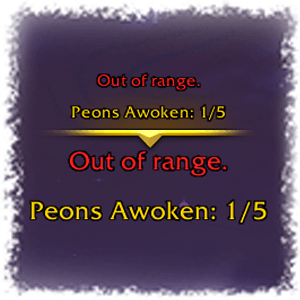
Escape Menu Scale
Shrink or enlarge the pause menu to fit your screen and workflow. A simple slider controls the scale; the menu recenters itself automatically.
Extra Action Button Enhanced
Zone ability buttons can block clicks on targets behind them. This module makes them click-through and optionally hides their decorative art, so they never get in your way.
UI Scale
Applies pixel-perfect scaling based on your monitor's resolution, with one-click presets for 1080p, 1440p, and 4K. Automatically adjusts when your screen resolution changes. Disabled automatically if ElvUI is detected.
HUD & Overlays
Alt Power Text
Adds clear numeric text labels to alternate power bars instead of only showing on hover.
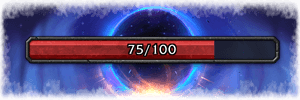
Cursor Ring
Draws a colored ring around your cursor and displays your Global Cooldown as a radial sweep inside it.
Toggle combat-only mode, add a center dot, and dial in the size and color to taste.

Informational Popups
Shows brief on-screen popups for events that matter: entering and leaving combat, a missing pet, or a pet stuck on passive. Each popup type has its own color, duration, and font settings. Fully repositionable and compatible with Blizzard's Edit Mode.

Instance Difficulty
Displays your current instance difficulty as color-coded text next to the minimap — LFR, Normal, Heroic, Mythic, or the Mythic+ keystone level at a glance. Font, size, alignment, and position are all configurable.
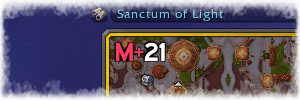
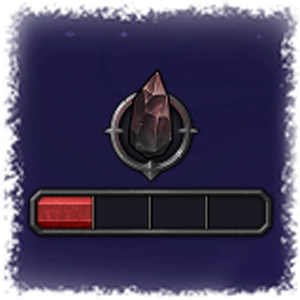
Prey Bar
Replaces the default UIWidget power bar for Prey Hunt encounters with a clean, purpose-built progress bar. Hover it for a tooltip with stage descriptions. A "Bar Only" mode hides the Blizzard widget entirely.
Gameplay
Cooldown Manager Slash
Adds /cd slash command that toggle Blizzard's built-in Cooldown Viewer. Quick access without digging through menus — cannot be used in combat.
Focus Mouse Keybind
Binds a modifier + mouse button to focus-target whatever unit your cursor is hovering over. Supports every major unit frame addon. Optionally also targets the focused unit's target, and can auto-apply a raid mark on focus.
Automation
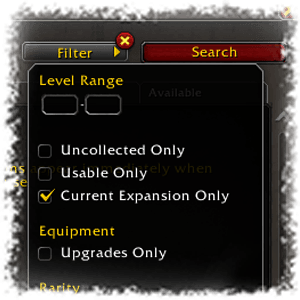
Current Expansion Filter
Automatically enables the "Current Expansion Only" filter in both the Auction House and the Crafting Orders browser every time you open them, so you're never sifting through outdated results.
Group & Raid
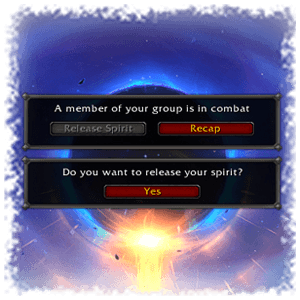
Can't Release
Adds a confirmation dialog before your character releases spirit. A simple safeguard that prevents an accidental click from turning a recoverable wipe into a full graveyard run.
Raid Markers Bar
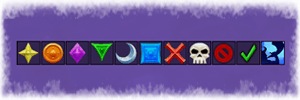
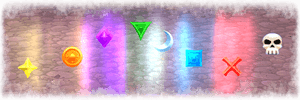
A fully customizable button bar for raid leaders. Eight marker buttons, a clear-all button, a ready check button, and an integrated pull countdown (BigWigs/DBM). Arrange it horizontally or vertically, set it to show only in a party, enable mouseover fade, and drag it anywhere on screen. Supports Blizzard Edit Mode.
World Marker Cycler
Place world markers one at a time with a single keybind. Drag and drop to reorder your preferred marker sequence, toggle individual markers on or off, and use a second keybind to clear them all at once. The cycle resets automatically when all markers are removed.
🙏 Special Thanks
用户评价
暂无 / 5,0 条评价相关推荐
继续看看这些内容
