插件中文资料库
中文说明、玩家点评、适用场景和替代推荐,方便快速判断是否适合你。
- 界面布局、头像框、姓名板和动作条优化
 Details! Mythic+ Scoreboard
 BagSync
 RightClickSelfCast
GG Kick Practice 插件下载与使用指南
本页整理了 GG Kick Practice 的功能用途、适用人群、安装方法和常见问题,方便玩家快速判断是否需要安装。
适合谁用
GG Kick Practice 是一款 竞技场 / PVP / 战场 类插件,适合需要优化界面、提升操作效率或补充游戏信息提示的魔兽世界玩家。
基本信息
- 插件作者:xyzfq
- 插件分类:竞技场 / PVP / 战场
- 适配版本:12.0.1,12.0.5
- 累计下载:0
安装方法
- 点击上方下载按钮获取 GG Kick Practice插件文件。
- 解压后将插件文件夹放入 World of Warcraft/_retail_/Interface/AddOns 目录。
- 重启游戏或在角色界面点击插件,确认 GG Kick Practice 已启用。
- 如果插件不生效,请检查版本是否匹配,或关闭同类冲突插件后重试。
使用建议
GG Kick Practice 安装后建议先在角色界面确认已启用,进入游戏后根据插件提供的命令、小地图按钮或设置面板进行调整。如遇到报错,可先单独启用该插件排查冲突。
GG Kick Practice 常见问题
GG Kick Practice 适合需要 竞技场 / PVP / 战场 类功能的玩家,特别是希望提升游戏便利性、界面管理或战斗信息获取效率的用户。
下载后解压到 Interface/AddOns 目录,然后重启游戏并在角色界面启用插件。
常见原因是目录多套一层、游戏版本不匹配、依赖插件缺失或同类插件冲突。
可以查看本页的替代插件推荐和相关插件区域,按下载量和分类选择同类工具。
插件 AI 问答
可以问:这个插件正式服能用吗、和 DBM 冲突吗、怎么设置、有没有替代插件。
GG Kick Practice 是一款魔兽世界插件,主要用于战场相关功能。建议根据自己的版本和插件环境先测试兼容性。
插件用途
GG Kick Practice 主要面向需要战场功能的玩家,用来改善游戏体验、减少重复操作或补充默认界面没有直接提供的信息。
适用场景
- 战场相关功能
使用建议
安装后建议先在角色选择界面或插件管理器中确认已启用,再进入游戏测试是否与现有整合包、WA 和其他插件冲突。如遇报错,可以先禁用同类插件排查。
GGKick Practice helps you train interrupt timing in a controlled way: you get real casts you should kick in a window, and fake casts that end early—so you learn when to commit and when to hold the kick.
Why use it
- Muscle memory: Repeat the same kick-window timing without needing a duel partner or arena queue.
- Fake discipline: Random fake timing trains you not to panic-kick every bar you see.
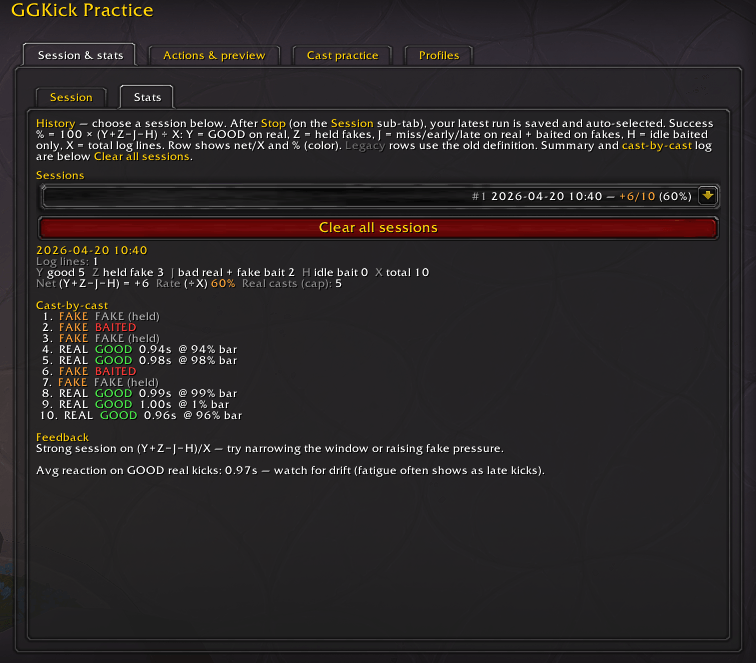
- Clear feedback: Each attempt is labeled (e.g. good kick, early, late, miss, baited) so you see what went wrong, not just “I wasted kick.”
- Works where you play: Bar on the target nameplate or a floating bar when you don’t want plates (e.g. arena mindset).
What you can do
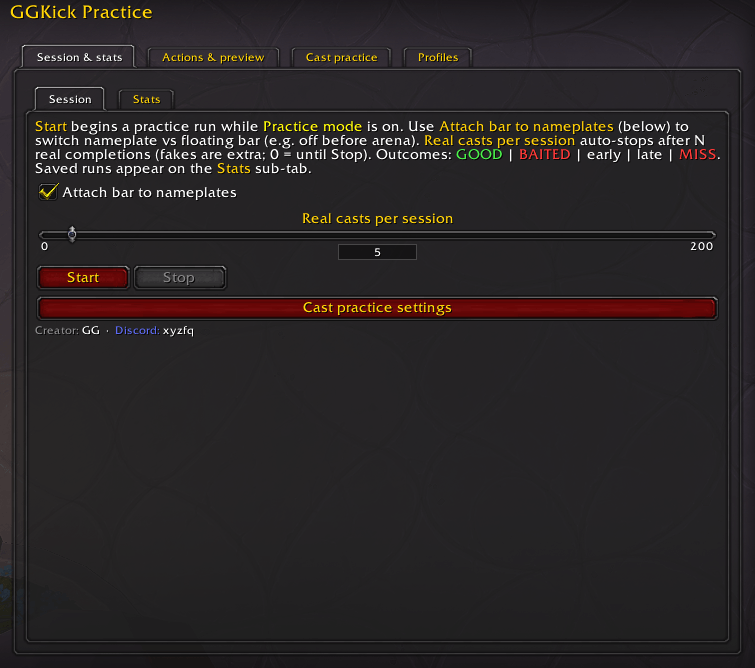
- Turn Practice mode on and run sessions: start a block of rounds, stop when you want, and review results later.
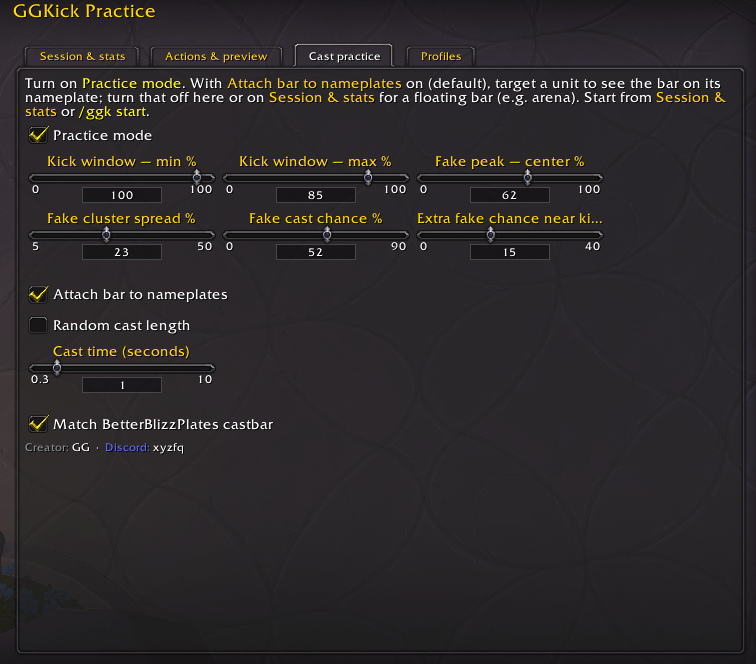
- Tune your kick window (the % range on the bar that counts as a clean kick on real casts).
- Adjust fake chance, fake timing, and how tightly fakes cluster—make drills easier or brutal.
- Use fixed or random cast lengths to match the situations you care about.
- Optionally match BetterBlizzPlates’ cast bar look so practice feels like your real UI (when that addon’s settings are available).
- Turn on layout preview to see kick window and fake spread on the bar while you tweak sliders.
- Use slash commands (e.g. open options, toggle practice, start a session, kick, stats) for quick control without digging through menus.
How to use
-
- Turn Practice Mode ON
- Start a session:
/ggk start - Use your macro to kick casts
- Rounds repeat automatically (real + fake casts)
- Stop from the UI when you’re done
- Review results in Session & stats → Stats
Slash commands
/ggk— open options/ggk practice on / off / toggle— enable/disable practice mode/ggk start— start a session/ggk kick— perform practice kick/ggk stats— print stats to chat/ggk export— export settings/profile
Who it’s for
Anyone who wants cleaner kicks in PvP — especially against fake casts, jukes, and last-moment cancels—without relying on random queue RNG to get reps.
用户评价
暂无 / 5,0 条评价相关推荐
继续看看这些内容
