插件中文资料库
中文说明、玩家点评、适用场景和替代推荐,方便快速判断是否适合你。
- 拍卖行、交易和金币管理
- 界面布局、头像框、姓名板和动作条优化
 GroupFinder
 FollowerLocationInfo
 Sleek XP Bubbles
TreenAH 插件下载与使用指南
本页整理了 TreenAH 的功能用途、适用人群、安装方法和常见问题,方便玩家快速判断是否需要安装。
适合谁用
TreenAH 是一款 拍卖与商业 类插件,适合需要优化界面、提升操作效率或补充游戏信息提示的魔兽世界玩家。
基本信息
- 插件作者:mrpooley92
- 插件分类:拍卖与商业
- 适配版本:2.5.5
- 累计下载:0
安装方法
- 点击上方下载按钮获取 TreenAH插件文件。
- 解压后将插件文件夹放入 World of Warcraft/_retail_/Interface/AddOns 目录。
- 重启游戏或在角色界面点击插件,确认 TreenAH 已启用。
- 如果插件不生效,请检查版本是否匹配,或关闭同类冲突插件后重试。
使用建议
TreenAH 安装后建议先在角色界面确认已启用,进入游戏后根据插件提供的命令、小地图按钮或设置面板进行调整。如遇到报错,可先单独启用该插件排查冲突。
TreenAH 常见问题
TreenAH 适合需要 拍卖与商业 类功能的玩家,特别是希望提升游戏便利性、界面管理或战斗信息获取效率的用户。
下载后解压到 Interface/AddOns 目录,然后重启游戏并在角色界面启用插件。
常见原因是目录多套一层、游戏版本不匹配、依赖插件缺失或同类插件冲突。
可以查看本页的替代插件推荐和相关插件区域,按下载量和分类选择同类工具。
插件 AI 问答
可以问:这个插件正式服能用吗、和 DBM 冲突吗、怎么设置、有没有替代插件。
TreenAH 是一款魔兽世界插件,主要用于拍卖与商业相关功能。建议根据自己的版本和插件环境先测试兼容性。
插件用途
TreenAH 主要面向需要拍卖与商业功能的玩家,用来改善游戏体验、减少重复操作或补充默认界面没有直接提供的信息。
适用场景
- 拍卖与商业相关功能
使用建议
安装后建议先在角色选择界面或插件管理器中确认已启用,再进入游戏测试是否与现有整合包、WA 和其他插件冲突。如遇报错,可以先禁用同类插件排查。
🌳 TreenAH – Real Auction House Pricing for TBC Anniversary
TreenAH brings back real Auctioneer-style pricing to TBC — using historical data instead of misleading last-seen prices.
Support: If this addon helps your auction-house workflow, donations are optional and support continued maintenance, packaging, testing, and documentation.

Built specifically for TBC Anniversary players who miss Auctioneer, TreenAH tracks pricing over time to give you a more accurate view of item value.
New to TreenAH?
Scroll down to Quick Start and Tips for Best Results to get up and running in under 2 minutes.
Why TreenAH?
Most AH addons show:
- ❌ last seen price (often unreliable)
TreenAH shows:
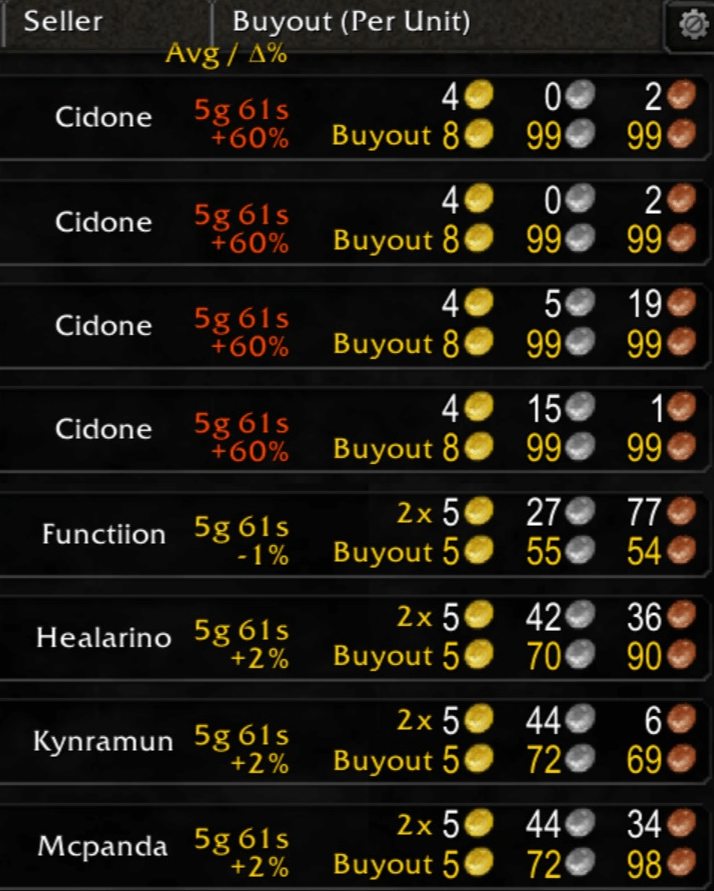
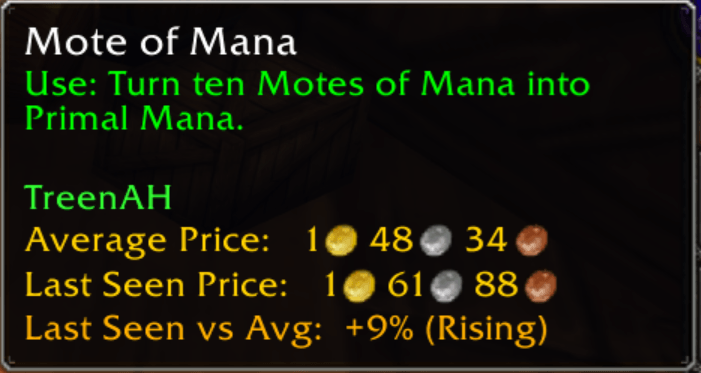
- ✅ historical average price
- ✅ most recent price
- ✅ % difference (see if prices are rising or falling)
This helps you:
- spot deals instantly
- avoid overpaying
- understand market trends
TreenAH is also simple, intuitive, and easy to understand.
It's designed to give players clear, reliable pricing without unnecessary complexity.
Quick Start
Getting started with TreenAH is straightforward:
1. Run a scan at the Auction House
- Open the AH and run a scan to collect pricing data
- Fast scan is quick (30–60 sec) and ideal for everyday use
- Slow scan is more complete, but takes longer
2. Scan when you visit the AH
- No need to spam scans — just scan when you’re there
- Your data stays fresh naturally as you play
3. Track the items you care about
- Create lists in the Lists panel (shift-click items to add them quickly)
- Scan these lists to keep high-priority items highly accurate
- Great for materials, consumables, and flipping targets
4. Let the data build over time
- Pricing is based on historical lows, not a single snapshot
- Accuracy improves automatically as more data is collected
Good to know:
- Fast scans are limited by WoW and don’t capture the full AH
- Your pricing database is shared across characters on the same realm/faction
- Tracked lists can be imported between characters
Core Features
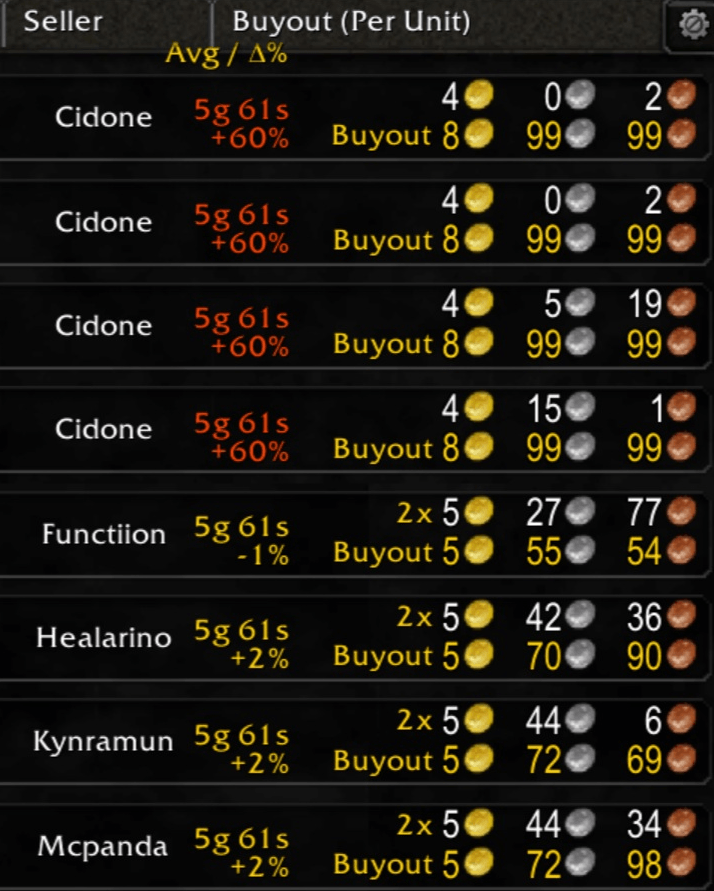
Auction House Browse Column
- Displays Avg / Δ% directly in the AH
- Compare current listings vs historical value at a glance
- Color-coded differences (rising / falling prices)
Chat-Based Price Checks
Send price checks to specific targets:
/pc <target> <itemName>
Supports:
- playerName (whisper)
- party / raid / guild / say
- bn:BattleTag
Example:/pc guild Fel Iron Ore
Auto-Reply System
Automatically responds to incoming price check requests. (Responds to: 'pc itemName' in incoming messages; pictured below)

Smart Request Tracking
Items players ask about are saved to your Requests list
Useful for:
- discovering demand
- building scan lists
- tracking popular items
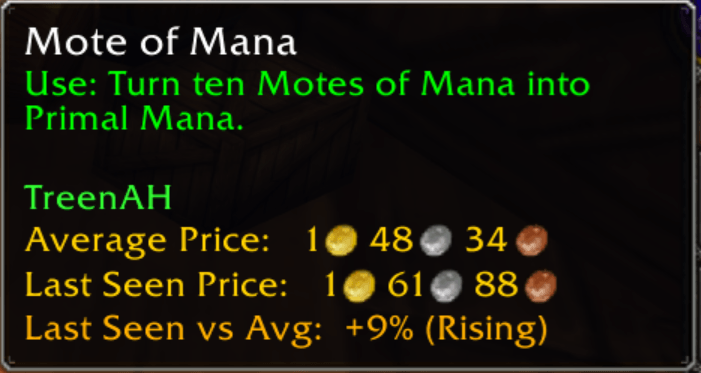
Tooltip Price Info
- See pricing data directly in item tooltips
- No need to open the Auction House
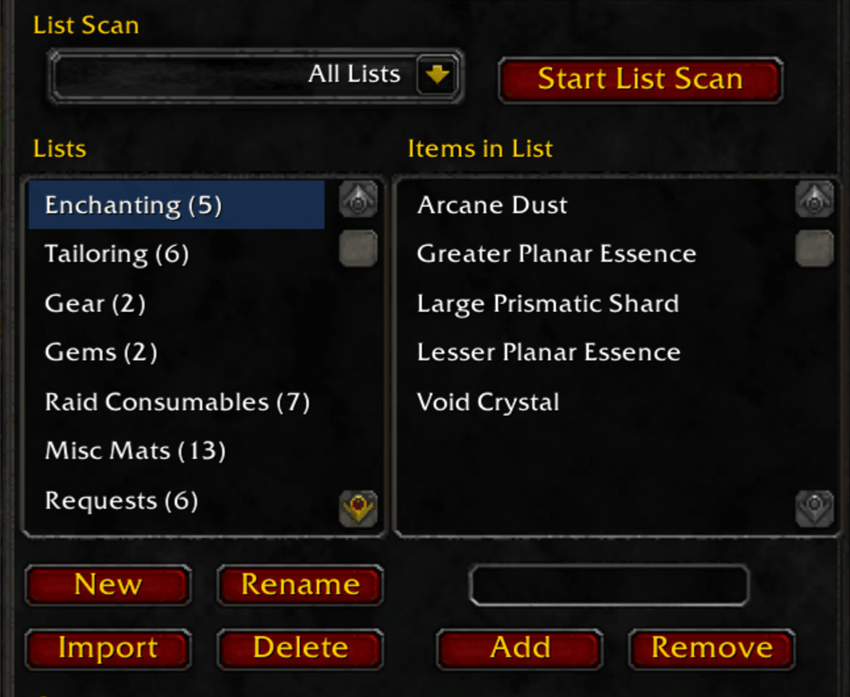
Scan Saved Item Lists
- Create and scan entire custom lists for:
- flipping
- farming
- market tracking
Lists can be shared across characters via import.
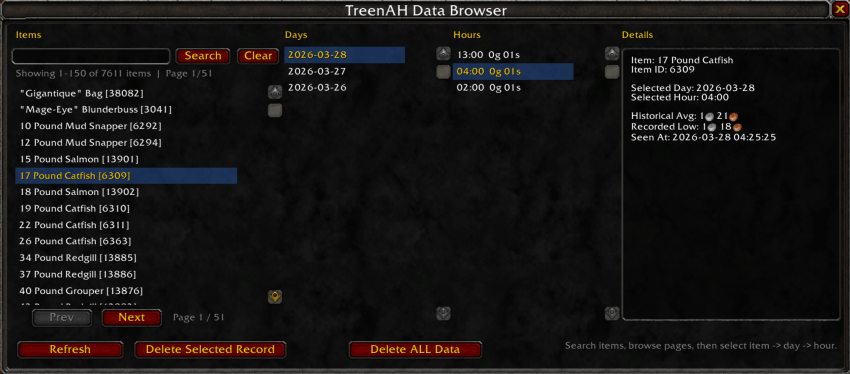
Data Browser
- View price history by:
- day
- hour
Analyze trends over time and understand market movement.
How TreenAH Keeps Data Useful
TreenAH is designed to avoid obviously wild or misleading prices from distorting your history.
The Outlier Threshold setting filters out extreme prices that fall far outside an item’s normal recorded range. For example, if an item usually sells for 1g, a listing at 100g may be ignored depending on your threshold. By default, this is set to 5. If you want stricter filtering, lower it. Raise it if you want TreenAH to allow more unusual prices into your recorded history.
TreenAH does not try to use every old price forever by default.
TreenAH uses a Recent Average Window to keep displayed averages relevant to the current market. By default, TreenAH only uses the previous 14 calendar days when calculating the displayed historical average. This helps keep old stale prices from dragging the average away from what the market looks like now. For most players, the default 14-day window works well and does not need to be changed. If you want a broader average, increase the Recent Average Window Days setting in Options.
Tips for Best Results
- Scan when you visit the Auction House — that’s enough for strong data
- Use fast scans for convenience and regular updates
- Use slow scans when you want a more complete snapshot
- Keep important items in tracked lists for the most accurate pricing
- TreenAH becomes more powerful over time as your dataset grows
Who This Is For
TreenAH is designed for players who:
- miss Auctioneer’s average pricing
- want better data, not just faster scans
- care about market trends and accuracy
Status
TreenAH is actively being developed and improving rapidly.
Your feedback directly helps shape where it goes next.
💬 Feedback & Donations
If you try it out, I’d love to hear what you think or what you'd like to see added.
mr.pooley92@gmail.com
If you like TreenAH, please consider donating to help me continue living as an independent developer.

用户评价
暂无 / 5,0 条评价相关推荐
继续看看这些内容
