插件中文资料库
中文说明、玩家点评、适用场景和替代推荐,方便快速判断是否适合你。
- 背包、银行和物品整理
- 任务路线、地图标记和野外探索
- 界面布局、头像框、姓名板和动作条优化
 Details! Mythic+ Scoreboard
 RightClickSelfCast
 GroupFinder
CraftPresence 插件下载与使用指南
本页整理了 CraftPresence 的功能用途、适用人群、安装方法和常见问题,方便玩家快速判断是否需要安装。
适合谁用
CraftPresence 是一款 聊天与通讯 / 其他插件 类插件,适合需要优化界面、提升操作效率或补充游戏信息提示的魔兽世界玩家。
基本信息
- 插件作者:CDAGaming_
- 插件分类:聊天与通讯 / 其他插件
- 适配版本:1.15.2,1.15.3,4.4.2,4.4.1,1.15.6,5.5.1,1.15.4,5.5.0
- 累计下载:38
安装方法
- 点击上方下载按钮获取 CraftPresence插件文件。
- 解压后将插件文件夹放入 World of Warcraft/_retail_/Interface/AddOns 目录。
- 重启游戏或在角色界面点击插件,确认 CraftPresence 已启用。
- 如果插件不生效,请检查版本是否匹配,或关闭同类冲突插件后重试。
使用建议
CraftPresence 安装后建议先在角色界面确认已启用,进入游戏后根据插件提供的命令、小地图按钮或设置面板进行调整。如遇到报错,可先单独启用该插件排查冲突。
CraftPresence 常见问题
CraftPresence 适合需要 聊天与通讯 / 其他插件 类功能的玩家,特别是希望提升游戏便利性、界面管理或战斗信息获取效率的用户。
下载后解压到 Interface/AddOns 目录,然后重启游戏并在角色界面启用插件。
常见原因是目录多套一层、游戏版本不匹配、依赖插件缺失或同类插件冲突。
可以查看本页的替代插件推荐和相关插件区域,按下载量和分类选择同类工具。
插件 AI 问答
可以问:这个插件正式服能用吗、和 DBM 冲突吗、怎么设置、有没有替代插件。
CraftPresence 是一款魔兽世界插件,主要用于背包、银行、专业制造或物品整理。建议根据自己的版本和插件环境先测试兼容性。
插件用途
CraftPresence 主要面向需要聊天与通讯功能的玩家,用来改善游戏体验、减少重复操作或补充默认界面没有直接提供的信息。
适用场景
- 背包、银行、专业制造或物品整理
使用建议
安装后建议先在角色选择界面或插件管理器中确认已启用,再进入游戏测试是否与现有整合包、WA 和其他插件冲突。如遇报错,可以先禁用同类插件排查。
CraftPresence
Completely customize the way others see you play World of Warcraft via Discord's Rich Presence API & the pypresence API by qwertyquerty!




How To Install
- This addon requires addition steps to setup, more info can be found here
Port Notes
- Please check here for the Minecraft Version of this addon
Features
In addition to having the ability to change your discord status from "Playing gameNameHere", This mod offers plenty of customization options to specify entirely how others see you play. From having your current zone show up, to which instance your in, as well as which realm you're in, and far more. The customization possibilities are limitless, with the only real limit being how creative you customize your display.
Client Support
CraftPresence will detect and adjust its abilities towards the following versions:
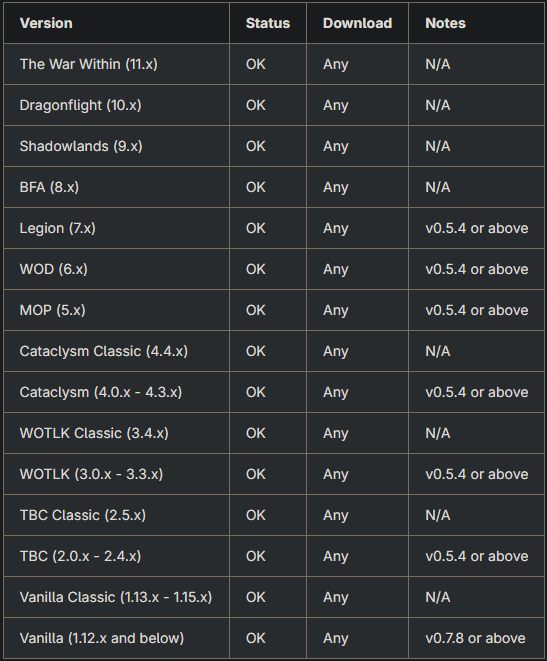
As this addon uses a singular codebase, different segments of code trigger depending on which version you are loading it within.
For example, this will mean that while the placeholders will remain the same, their contents may change depending on the version.
Additionally, while PTR and pre-release versions of the game should work fine, they are often untested until closer to release and may contain issues.
Commands
CraftPresence currently offers the following Commands:
Keep in mind the following:
- Commands must be prefixed by either
/craftpresenceor/cp
/cp (help | ?)- Help Command to display the below commands and these explanations/cp config (migrate,standalone)- Displays the Config menu to customize options and placeholder data/cp (clear,clean)- Reset all frames to their original positions and colors./cp update (debug)- Force or Debug an RPC update/cp minimap- Toggles the display of the minimap button/cp compartment- Toggles the display of the addon compartment entry/cp status- Displays your last sent RPC Data, in text form (RequiresVerbose Mode)/cp reset (grp,key)- Resets all (or a specific) setting(s) within the config menu./cp set (grp,key)- Sets specific setting(s) within the config menu manually./cp integration (query)- Enable optional integrations, using specified query/cp placeholders (create,remove,list) (query)- Views/modifies the currently available placeholders./cp events (create,remove,list) (query)- Views/modifies the currently available events./cp labels (create,remove,list) (query)- Views/modifies the currently available labels.
Placeholders
In some configuration areas, CraftPresence provides some placeholders to make things easier:
Keep in mind the following:
- Placeholder can either be presets or use direct info. Presets use a combination of direct info placeholders to return a formatted layout, while direct info placeholders simply use 1-2 API calls to return it's output with very minimal formatting.
- Some placeholders may not be available in some clients, either due to API instability or simply because the API call(s) it uses do not exist.
- While this list is quite expansive, users can create their own placeholders with the
/cp placeholderscommand. - Creating more advanced layouts might require some Lua experience, as well as experience with the World of Warcraft APIs. Usage of the
Eventssection may also be needed if your placeholder requires the usage of specific in-game events that this addon does not already have registered.
Presence Display / Global Placeholders
These placeholders can be added within the Presence and Buttons menu within the Config Gui.
These types of placeholders are designed for more generalized information, such as what to display in certain instances. They often combine quite a few inner placeholders representing the instance.
#default#- The message to generate whilst not in a detected instance.#arena#- The message to generate whilst in an arena instance.- Availability: 3.2.0 clients and above (Or rebased clients)
#battleground#- The message to generate whilst in a battleground instance.- Availability: 3.2.0 clients and above (Or rebased clients)
#raid#- The message to generate whilst in a raid instance.- Availability: 3.2.0 clients and above (Or rebased clients)
#dungeon#- The message to generate whilst in a dungeon instance.- Availability: 3.2.0 clients and above (Or rebased clients)
#scenario#- The message to generate whilst in a scenario instance.- Availability: 3.2.0 clients and above (Or rebased clients)
Presence Display / Inner Placeholders
These placeholders can be added within the Presence and Buttons menu within the Config Gui.
These types of placeholders are designed for specialized pieces of information, or rather a subset of information.
Presets
@player_info@- Shows basic character info such as status, name, and level@player_icon@- The player's current in-game personality icon, using both@player_race@and@player_gender@(Format:race_gender)@realm_info@- The player's current region and realm in use@zone_info@- The player's current location, formatted with zone and sub-zone info as applicable@difficulty_info@- The player's current difficulty info, formatted with keystone and difficulty data as applicable- Availability: 3.2.0 clients and above (Or rebased clients)
@lockout_encounters@- The player's current lockout info within an instance, if applicable, containing total and current data- Availability: 6.0.0 clients and above
Direct Info
@player_name@- Your player's in-game name@title_name@- The currently active title for your character, or@player_name@if not applicable@player_level@- The player's current in-game level@player_realm@- The player's current realm in use- Will return
Unknownif function is not available
- Will return
@player_region@- The player's current region in use- Returns
regionTable[playerRegionId]orTRas the output regionTablecan be tweaked to customize the abbreviations, if desired
- Returns
@player_class@- The player's current in-game class name@player_race@- The player's current in-game race name@player_gender@- The player's current in-game gender name- Returns
genderData[playerGenderId or 1]as the output genderDatacan be tweaked to customize the result, if desired
- Returns
@player_status@- The player's current in-game status- Refer to the
Labelssection of the Config UI - By default, this function supports Away, Busy, and Dead/Alive player states
- Will return
Unknownif there is no applicable data
- Refer to the
@player_reason@- The player's current in-game reason message- While normally empty, certain player states (Such as being AFK or Busy) can supply the reason string to be used here.
@player_faction@- The player's current faction name- Returns the
localizedFaction, with a fallback toenglishFaction, thenNoneif neither exist.
- Returns the
@player_alliance@- The player's current dynamic faction name- This is a highly dynamic placeholder that can change depending on location, expansion content, and applicability.
- For 9.x Zones, this will return the name of your current covenant
- If not in any of the aforementioned conditions, this will return the same as
@player_faction@.
@player_covenant@- The player's current covenant name- Availability: 9.0.0 clients and above
- Returns
Noneif the player does not have a covenant
@player_spec_name@- The player's current specialization name- References: GetSpecialization, GetSpecializationInfo, GetSpecializationRoleByID
- Availability: 5.0.4 clients and above
- Returns
Noneif the player does not have a specialization
@player_spec_role@- The player's current instance role, tied to current spec if applicable- References: GetSpecialization, GetSpecializationInfo, GetSpecializationRoleByID
- Availability: 5.0.4 clients and above
- Returns
Noneif the player does not have a specialization
@player_covenant_renown@- The player's current covenant renown level- Availability: 9.0.0 clients and above
@localized_name@- The player's current in-game map instance name- This can be otherwise known as the continent name
- Returns
Unknownif there is no applicable data - For Clients at 3.2.0 or above (Or clients that are rebased), this function uses the 1st return value from GetInstanceInfo
- For Clients below 3.2.0 that are not rebased, this function uses the World Map's continent name
@instance_type@- The player's current in-game instance type- Uses the 2nd return value from GetInstanceInfo
- Availability: 3.2.0 clients and above (Or rebased clients)
@instance_difficulty@- The player's current instance difficulty id- Uses the 3rd return value from GetInstanceInfo
- Availability: 3.2.0 clients and above (Or rebased clients)
@difficulty_name@- The player's current difficulty level name- Uses the 4th return value from GetInstanceInfo
- Availability: 3.2.0 clients and above (Or rebased clients)
@current_players@- The current amount of players allowed in the given instance- References: GetNumGroupMembers, GetNumPartyMembers, GetNumRaidMembers
@max_players@- The current amount of players allowed in the given instance- Uses the 5th return value from GetInstanceInfo
- Availability: 3.2.0 clients and above (Or rebased clients)
@dynamic_difficulty@- The dynamic difficulty level for an instance- Uses the 6th return value from GetInstanceInfo
- Availability: 3.2.0 clients and above (Or rebased clients)
@is_dynamic@- Whether the instance difficulty can be changed while zoned in- Uses the 7th return value from GetInstanceInfo
- Availability: 3.2.0 clients and above (Or rebased clients)
@instance_id@- The player's current in-game instance map id- Uses the 8th return value from GetInstanceInfo
- Availability: 5.0.4 clients and above
@instance_group_size@- The number of players currently within your instance group- Uses the 9th return value from GetInstanceInfo
- Availability: 5.4.0 clients and above
@lfg_dungeon_id@- The dungeon id for the player's current instance- Uses the 10th return value from GetInstanceInfo
- Availability: 8.0.0 clients and above
@zone_name@- The player's current in-game zone name- Returns
Unknownif in an indeterminable zone
- Returns
@sub_zone_name@- The player's current in-game sub-zone name- Returns
Unknownif in an indeterminable sub-zone
- Returns
@item_level@- The player's current item level- Uses the 1st return value from GetAverageItemLevel
- Returns
0if the function is not available or result is null
@item_level_equipped@- The player's currently equipped item level- Uses the 2nd return value from GetAverageItemLevel
- Returns
@item_level@if the function is not available or result is null
@item_level_pvp@- The player's currently scaled item level, for pvp scenarios- Uses the 3rd return value from GetAverageItemLevel
- Returns
@item_level@if the function is not available or result is null
@active_keystone_level@- The player's currently active keystone level- See CraftPresence/InstanceInfo for more info on retrieving this output
- Availability: 5.0.0 clients and above
@active_keystone_affixes@- The player's currently active keystone affix names- See CraftPresence/InstanceInfo for more info on retrieving this output
- Availability: 5.0.0 clients and above
@active_keystone_rating@- The player's current Mythic Plus Rating- See CraftPresence/InstanceInfo for more info on retrieving this output
- Availability: 5.0.0 clients and above
@internal_keystone_rating@- The primary placeholder for@active_keystone_rating@- See CraftPresence/InstanceInfo for more info on retrieving this output
- The internal rating is from C_ChallengeMode.GetOverallDungeonScore
- If this function is not present, it will fallback to
0 - Availability: 5.0.0 clients and above
@external_keystone_rating@- The fallback placeholder for@active_keystone_rating@- See CraftPresence/InstanceInfo for more info on retrieving this output
- The external rating involves the usage of 3rd party addon api's, such as RaiderIO
- If this function is not present, it will fallback to
@internal_keystone_rating@ - Availability: 5.0.0 clients and above
@owned_keystone_name@- The player's currently owned keystone name- See CraftPresence/InstanceInfo for more info on retrieving this output
- Availability: 5.0.0 clients and above
@owned_keystone_level@- The player's currently owned keystone level- See CraftPresence/InstanceInfo for more info on retrieving this output
- Availability: 5.0.0 clients and above
@lockout_current_encounters@- The player's current encounters/stages completed in an instance- See CraftPresence/InstanceInfo for more info on retrieving this output
- Availability: 6.0.0 clients and above
@lockout_total_encounters@- The player's total encounters/stages within an instance- See CraftPresence/InstanceInfo for more info on retrieving this output
- Availability: 6.0.0 clients and above
Disclaimers & Additional Info
Icon Requesting
Not seeing an Icon you like or have a suggestion for an Icon to add/modify on the default Client ID?
If so, you can make a request on my Issue Tracker, with the following requirements:
If adding an Icon from a dimension, specify the Mod's link that the dimension derives from
- This is because specific Icon IDs must be used, which can be found by the mod or from checking your Logs/Chat after entering the dimension as CraftPresence will tell you the ID expected
An Icon of size between
512x512and1024x1024to be used (Either minimum or recommended size for best quality)- Icons between these sizes can be used, but may not give a great final quality
If requesting an icon to be modified or removed from the Default Client ID, please specify a reason why
- Mostly just so it can be logged why it was changed for future reference
Additionally, you can also create your own Set of Icons by following this guide
Support
Need some assistance with one of my mods or wish to provide feedback?
I can be contacted via the following methods:

Additionally, codebase documentation for this mod is available here with further guides available on the wiki
Licensing
This Mod is under the MIT License as well as the Apache 2.0 License
This project makes usage of the following dependencies internally:
Discord Terms of Service
As with other RPC Mods, this Mod uses your in-game data to send display information to a 3rd party service (In this Case, Discord).
The terms of service relating to Creating a Discord ID for icons can be found here
The terms of service for using Discord as a service can additionally be located here
CurseForge: https://www.curseforge.com/wow/addons/craftpresence用户评价
暂无 / 5,0 条评价相关推荐
继续看看这些内容
