插件中文资料库
中文说明、玩家点评、适用场景和替代推荐,方便快速判断是否适合你。
- 背包、银行和物品整理
- 任务路线、地图标记和野外探索
 Details! Mythic+ Scoreboard
 RightClickSelfCast
 GroupFinder
Zenith 插件下载与使用指南
本页整理了 Zenith 的功能用途、适用人群、安装方法和常见问题,方便玩家快速判断是否需要安装。
适合谁用
Zenith 是一款 数据代理 / HUD界面 / 界面美化 / 其他插件 / 插件扩展 类插件,适合需要优化界面、提升操作效率或补充游戏信息提示的魔兽世界玩家。
基本信息
- 插件作者:winterflame
- 插件分类:数据代理 / HUD界面 / 界面美化 / 其他插件 / 插件扩展
- 适配版本:12.0.1
- 累计下载:44
安装方法
- 点击上方下载按钮获取 Zenith插件文件。
- 解压后将插件文件夹放入 World of Warcraft/_retail_/Interface/AddOns 目录。
- 重启游戏或在角色界面点击插件,确认 Zenith 已启用。
- 如果插件不生效,请检查版本是否匹配,或关闭同类冲突插件后重试。
使用建议
Zenith 安装后建议先在角色界面确认已启用,进入游戏后根据插件提供的命令、小地图按钮或设置面板进行调整。如遇到报错,可先单独启用该插件排查冲突。
Zenith 常见问题
Zenith 适合需要 数据代理 / HUD界面 / 界面美化 / 其他插件 / 插件扩展 类功能的玩家,特别是希望提升游戏便利性、界面管理或战斗信息获取效率的用户。
下载后解压到 Interface/AddOns 目录,然后重启游戏并在角色界面启用插件。
常见原因是目录多套一层、游戏版本不匹配、依赖插件缺失或同类插件冲突。
可以查看本页的替代插件推荐和相关插件区域,按下载量和分类选择同类工具。
插件 AI 问答
可以问:这个插件正式服能用吗、和 DBM 冲突吗、怎么设置、有没有替代插件。
Zenith 是一款魔兽世界插件,主要用于背包、银行、专业制造或物品整理。建议根据自己的版本和插件环境先测试兼容性。
插件用途
Zenith 主要面向需要数据代理功能的玩家,用来改善游戏体验、减少重复操作或补充默认界面没有直接提供的信息。
适用场景
- 背包、银行、专业制造或物品整理
使用建议
安装后建议先在角色选择界面或插件管理器中确认已启用,再进入游戏测试是否与现有整合包、WA 和其他插件冲突。如遇报错,可以先禁用同类插件排查。
Zenith
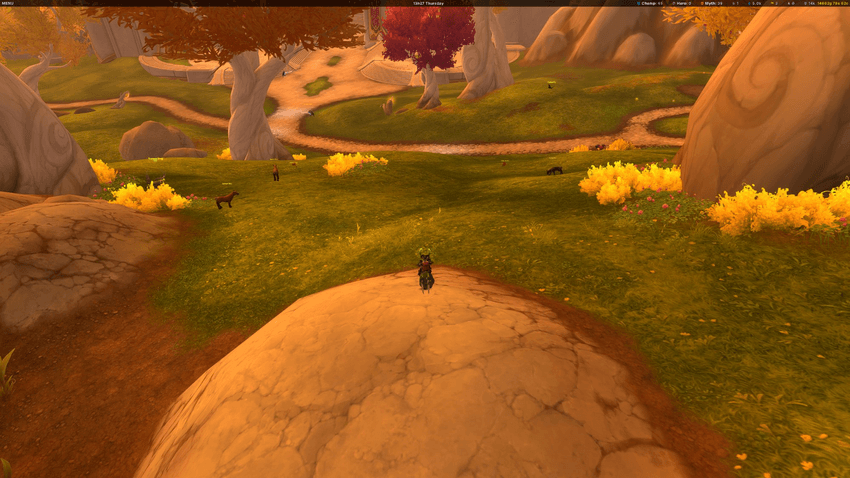
A clean, modern information bar for World of Warcraft. Zenith sits at the top of your screen and shows what matters — no clutter, no WoW-textured backgrounds, no excessive nesting.



At a Glance
Zenith is a single semi-transparent bar with three customizable zones:
- Left — Game menu as a hamburger dropdown or inline icon row — hide Blizzard's default micro menu entirely
- Center — Server clock in four formats
- Right — Gold tracking (per-char or realm total) and 19 Midnight currencies with per-currency display modes
Every module can be moved, reordered, or disabled via right-click context menus.
Modules
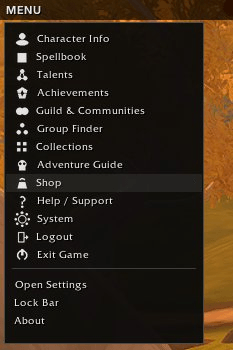
MicroMenu — Two display modes. Hamburger mode shows a clean dropdown with icons for every game panel (Character, Spellbook, Talents, Collections, etc.) plus quick access to Zenith settings, bar lock, and about info. Inline mode spreads 13 compact icons across the bar.
Clock — Server time with four format options via right-click: 9h52m, 09:52, 9:52 AM, 9h52m Wednesday.
Gold — Abbreviated (14k) or full (14862g 78s 62c) display. Tooltip shows session gain/loss and all alts on the realm. Toggle between current character and realm total.
Currency — 19 Midnight currencies (Valorstones, Myth/Hero/Champ crests, Coffer Keys, and more). Each currency can be shown or hidden individually, with three display modes: text label, colored icon, or icon + text.
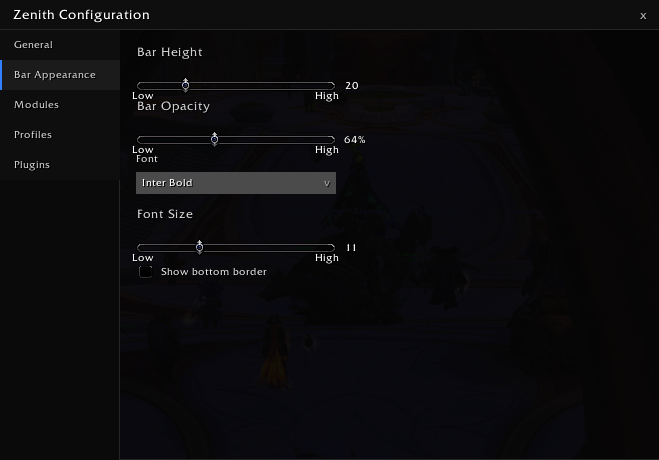
Bar Customization
- Height: 18–28px
- Opacity: 50–90%
- Background color picker
- Font: ships with Inter; supports any LibSharedMedia font
- Font size: 9–16px
- Text color picker
- Optional bottom border
Settings
Modern tabbed config panel — not a dropdown menu. Open with /zenith, right-click the bar, or from the hamburger menu.
Profiles
- Create, rename, delete named profiles
- Auto-switch per character or per specialization
- Import/export as compressed text strings — share your setup
Plugin API
Third-party addons can register modules on the Zenith bar:
Zenith:RegisterPlugin(config)— full lifecycle hooks (OnUpdate, OnClick, OnTooltip, etc.)- LibDataBroker auto-import — existing LDB data sources appear on the bar automatically
- Dedicated Plugins tab in settings
Planned
- Location module (zone + coordinates)
- Latency and FPS modules
- Drag-and-drop module reordering
- Theming presets
- More built-in modules (Durability, Bag Space, iLvl, Loot Spec)
Installation
Drop the Zenith folder into your Interface/AddOns directory, or install via CurseForge app.
No required dependencies — all libraries are bundled.
Slash Commands
/zenith— Open settings
Feedback & Issues
Found a bug or have a feature request? Open an issue on the project page or leave a comment below.
CurseForge: https://www.curseforge.com/wow/addons/zenith用户评价
暂无 / 5,0 条评价相关推荐
继续看看这些内容
