插件中文资料库
中文说明、玩家点评、适用场景和替代推荐,方便快速判断是否适合你。
- 副本、团队本和大秘境战斗提醒
- 界面布局、头像框、姓名板和动作条优化
 Details! Mythic+ Scoreboard
 BagSync
 RightClickSelfCast
Atone Bars 插件下载与使用指南
本页整理了 Atone Bars 的功能用途、适用人群、安装方法和常见问题,方便玩家快速判断是否需要安装。
适合谁用
Atone Bars 是一款 团队框架 / 牧师 / 增益与减益 / 治疗 / 单位框架 类插件,适合需要优化界面、提升操作效率或补充游戏信息提示的魔兽世界玩家。
基本信息
- 插件作者:sacelean
- 插件分类:团队框架 / 牧师 / 增益与减益 / 治疗 / 单位框架
- 适配版本:12.0.5
- 累计下载:57
安装方法
- 点击上方下载按钮获取 Atone Bars插件文件。
- 解压后将插件文件夹放入 World of Warcraft/_retail_/Interface/AddOns 目录。
- 重启游戏或在角色界面点击插件,确认 Atone Bars 已启用。
- 如果插件不生效,请检查版本是否匹配,或关闭同类冲突插件后重试。
使用建议
Atone Bars 安装后建议先在角色界面确认已启用,进入游戏后根据插件提供的命令、小地图按钮或设置面板进行调整。如遇到报错,可先单独启用该插件排查冲突。
Atone Bars 常见问题
Atone Bars 适合需要 团队框架 / 牧师 / 增益与减益 / 治疗 / 单位框架 类功能的玩家,特别是希望提升游戏便利性、界面管理或战斗信息获取效率的用户。
下载后解压到 Interface/AddOns 目录,然后重启游戏并在角色界面启用插件。
常见原因是目录多套一层、游戏版本不匹配、依赖插件缺失或同类插件冲突。
可以查看本页的替代插件推荐和相关插件区域,按下载量和分类选择同类工具。
插件 AI 问答
可以问:这个插件正式服能用吗、和 DBM 冲突吗、怎么设置、有没有替代插件。
Atone Bars 是一款魔兽世界插件,主要用于界面框架、头像、动作条或冷却显示优化、增益、减益、光环或职业状态监控。建议根据自己的版本和插件环境先测试兼容性。
插件用途
Atone Bars 主要面向需要团队框架功能的玩家,用来改善游戏体验、减少重复操作或补充默认界面没有直接提供的信息。
适用场景
- 界面框架、头像、动作条或冷却显示优化
- 增益、减益、光环或职业状态监控
使用建议
安装后建议先在角色选择界面或插件管理器中确认已启用,再进入游戏测试是否与现有整合包、WA 和其他插件冲突。如遇报错,可以先禁用同类插件排查。
ATONE BARS
==============
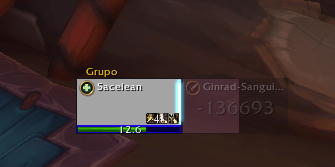
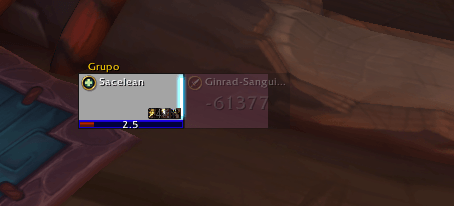
Atone Bars adds clean duration bars to party and raid unit frames, so you can quickly see how long your tracked buff has left on each ally.
Originally built for Discipline Priest, it now works as a generic tracked-buff duration overlay with specialization-aware defaults.
FEATURES
--------
- Shows a compact duration bar on supported unit frames for your tracked buff.
- Updates in real time as auras are applied, refreshed, or removed.
- Color-codes remaining time for quick decisions:
- Green: high remaining time
- Yellow: medium remaining time
- Orange/Red: low remaining time
- Works in both party and raid groups.
TRACKED BUFF PRIORITY
---------------------
The addon chooses what to track in this order:
1) Automatic Discipline Priest mode (Atonement forced in Disc spec)
2) Character-level SpellID override
3) Global SpellID override
4) Spec default SpellID table (when enabled)
If no valid source is found, bars stay hidden until a buff is configured.
DEFAULT BUFFS BY CLASS AND SPEC
-------------------------------
When specialization defaults are enabled, these buffs are used:
Paladin
- Holy (Spec ID 65): Spell ID 53563 - Beacon of Light
- Protection (Spec ID 66): Spell ID 6940 - Blessing of Sacrifice
- Retribution (Spec ID 70): Spell ID 6940 - Blessing of Sacrifice
Priest
- Discipline (Spec ID 256): Spell ID 194384 - Atonement
- Holy (Spec ID 257): Spell ID 139 - Renew
- Shadow (Spec ID 258): Spell ID 17 - Power Word: Shield
Shaman
- Elemental (Spec ID 262): Spell ID 974 - Earth Shield
- Enhancement (Spec ID 263): Spell ID 974 - Earth Shield
- Restoration (Spec ID 264): Spell ID 61295 - Riptide
Monk
- Mistweaver (Spec ID 270): Spell ID 119611 - Renewing Mist
Druid
- Restoration (Spec ID 105): Spell ID 774 - Rejuvenation
Evoker
- Preservation (Spec ID 1468): Spell ID 366155 - Reversion
AVAILABLE SETTINGS
------------------
- Enable or disable bars
- Enable or disable debug logging
- Enable or disable specialization defaults
- Set or clear character override SpellID
- Set or clear global override SpellID
- Reset character overrides
UI COMPATIBILITY
----------------
The addon automatically attaches bars to visible unit frames and supports:
- Blizzard Raid Frames (CompactRaidFrame) and Blizzard Party Frames
- DandersFrames
- ElvUI unit frames (beta support)
It also includes robust aura handling and frame detection logic for modern client environments.
TYPICAL USE CASES
-----------------
- Healers: track one key maintenance HoT or shield buff.
- Support utility play: track a specific friendly buff by SpellID.
NOTES
-----
- Only friendly units are tracked.
- Buff matching is based on your own aura applications.
- SpellID validation is performed before applying manual overrides.
用户评价
暂无 / 5,0 条评价相关推荐
继续看看这些内容
