插件中文资料库
中文说明、玩家点评、适用场景和替代推荐,方便快速判断是否适合你。
- 背包、银行和物品整理
- 任务路线、地图标记和野外探索
- 界面布局、头像框、姓名板和动作条优化
 Details! Mythic+ Scoreboard
 Copy Anything
 BagSync
QuietValeera 插件下载与使用指南
本页整理了 QuietValeera 的功能用途、适用人群、安装方法和常见问题,方便玩家快速判断是否需要安装。
适合谁用
QuietValeera 是一款 音频与视频 / 聊天与通讯 类插件,适合需要优化界面、提升操作效率或补充游戏信息提示的魔兽世界玩家。
基本信息
- 插件作者:arc909
- 插件分类:音频与视频 / 聊天与通讯
- 适配版本:12.0.5
- 累计下载:37
安装方法
- 点击上方下载按钮获取 QuietValeera插件文件。
- 解压后将插件文件夹放入 World of Warcraft/_retail_/Interface/AddOns 目录。
- 重启游戏或在角色界面点击插件,确认 QuietValeera 已启用。
- 如果插件不生效,请检查版本是否匹配,或关闭同类冲突插件后重试。
使用建议
QuietValeera 安装后建议先在角色界面确认已启用,进入游戏后根据插件提供的命令、小地图按钮或设置面板进行调整。如遇到报错,可先单独启用该插件排查冲突。
QuietValeera 常见问题
QuietValeera 适合需要 音频与视频 / 聊天与通讯 类功能的玩家,特别是希望提升游戏便利性、界面管理或战斗信息获取效率的用户。
下载后解压到 Interface/AddOns 目录,然后重启游戏并在角色界面启用插件。
常见原因是目录多套一层、游戏版本不匹配、依赖插件缺失或同类插件冲突。
可以查看本页的替代插件推荐和相关插件区域,按下载量和分类选择同类工具。
插件 AI 问答
可以问:这个插件正式服能用吗、和 DBM 冲突吗、怎么设置、有没有替代插件。
QuietValeera 是一款魔兽世界插件,主要用于界面框架、头像、动作条或冷却显示优化、背包、银行、专业制造或物品整理。建议根据自己的版本和插件环境先测试兼容性。
插件用途
QuietValeera 主要面向需要聊天与通讯功能的玩家,用来改善游戏体验、减少重复操作或补充默认界面没有直接提供的信息。
适用场景
- 界面框架、头像、动作条或冷却显示优化
- 背包、银行、专业制造或物品整理
使用建议
安装后建议先在角色选择界面或插件管理器中确认已启用,再进入游戏测试是否与现有整合包、WA 和其他插件冲突。如遇报错,可以先禁用同类插件排查。
2026-04-09 this addon is no longer being developed, please feel free to fork the repo and resurrect.
QuietValeera
Fed up with hearing and seeing the same emotes from Valeera?
An efficient, lightweight, high-performance World of Warcraft addon that silences Valeera.
Why use this?
TL;DR reduced audio and chat distraction while Delving in Midnight.
Key features
- Sound muting: Mutes all of Valeera's voice lines and emote sound effects on login
- Chat filtering: Removes all of Valeera's say, yell, and emote messages from chat channels
- Debug mode: Optional debug channel to view Valeera's messages when needed
- Ultra-fast: Single-pass string comparison filter with minimal overhead
- Efficient: ~2KB RAM usage, runs once on login for sound mutes
- Respects settings: Works seamlessly with your WoW chat channel preferences
Installation
- Move/copy the
QuietValeerafolder to your_retail_/Interface/AddOns/directory - Restart World of Warcraft or logout and login
On load/login, the addon mutes a set of Valeera voice/sound effect IDs so the emotes are silent for the session.
Configuration
The addon requires no setup. All silencing happens automatically on login.
Debug mode
To view Valeera's messages while debugging or testing:
/quietvaleera debug onThis creates or reuses a chat window called Debug and routes all of Valeera's messages there. Other chat windows remain unaffected.
To disable debug mode:
/quietvaleera debug offIs this addon really necessary?
In a recent Twilight Crypts Delve, I had 109 lines of Valeer's chat that I didn't see (as recorded instead in the debug log while testing). That's a lot of lines of text scrolling your other chat mesages away into oblivion. Sure, you can use a separate window for her and other creature messages but the authour's feeling is that her chat doesn't add to the game experience.
I use a couple of different chat windows to separate out message sources: General, Guild, Instance, 1-5 (1. General, 2. Trade, 3. LocalDefense, 4. Services, 5. WorldDefense), Debug, and Loot.
Note
Valeera does emote "system" type messages in chat, I decided to leave these enabled as in a complete Delve she only said a few lines eg.
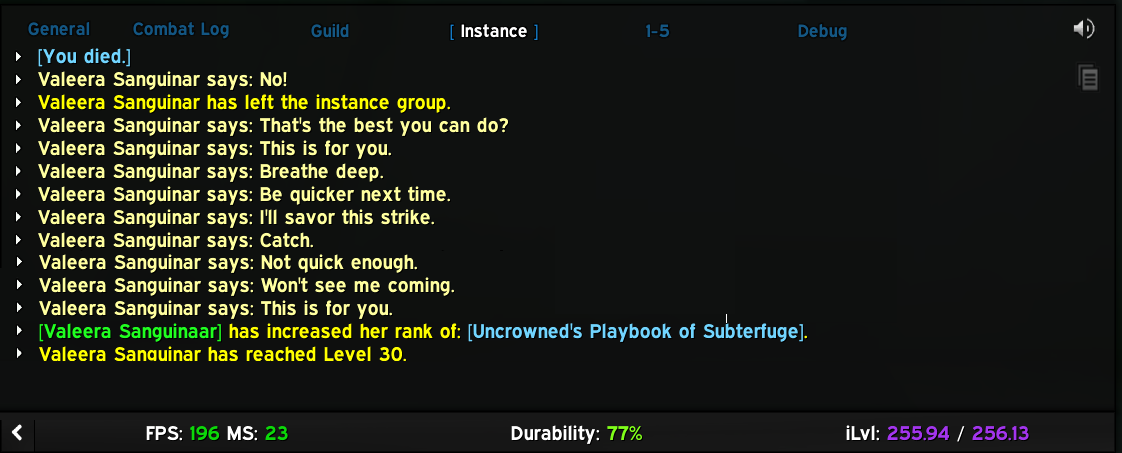
If there's interest, I could disable the "Valeers Sanguinar says: xyz" messages via a slash command.
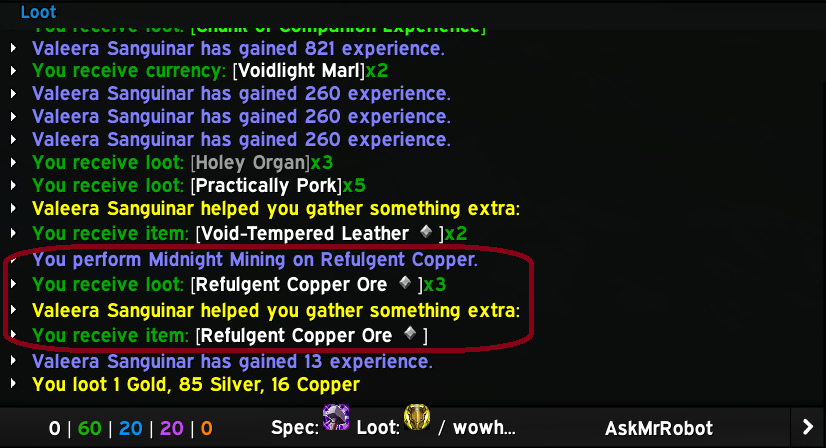
Also, if I'd disabled these "system" messages from her that'd make my "Loot" window look odd: in the below example I'd not have been able to see what Valeera contributed to my ore mining:
Technical details
Sound muting
- Event-based mute: uses a frame listening for
PLAYER_LOGINand runs once per login - MuteSoundFile loop: iterates through 160+ Valeera sound IDs and mutes each via
MuteSoundFile(id) - One-time execution:
mutedflag prevents repeated re-muting if the event fires more than once - Memory efficient: sound ID table is set to
nilafter muting to release memory
Chat message filtering
- Ultra-fast filter: Single string comparison per message
- Respects chat settings: Only called by WoW for enabled chat channel types
- Supported events:
CHAT_MSG_MONSTER_SAY(creature say messages)CHAT_MSG_MONSTER_YELL(creature yell messages)CHAT_MSG_MONSTER_EMOTE(creature emotes like casting)CHAT_MSG_TEXT_EMOTE(text-based emotes)CHAT_MSG_SAY(player say)CHAT_MSG_EMOTE(player emote)
Debug mode
- Duplicate prevention: Tracks last message to avoid duplicate entries
- Smart frame handling:
- Searches case-insensitively for existing
debugchat window - Creates one if it doesn't exist (once per session)
- Configures it to receive only creature say/emote messages
- Searches case-insensitively for existing
- Proper formatting:
- Say/yell:
[QuietValeera Debug] Valeera Sanguinar: <message> - Emotes:
[QuietValeera Debug] Valeera Sanguinar <emote text>
- Say/yell:
Performance
- Tiny footprint: ~2KB RAM during gameplay
- Minimal CPU: filters run only on Valeera messages, single string comparison
- One-time cost: 160+ mutes executed once on login, then discarded
Credit
Inspired by NAESSAH's addon ShutUpValeera.
Contributing
Contributions to improve this tool are welcome! To contribute:
- Fork the repository
- Create a feature branch
- Make your changes to the source code or documentation
- Test with various class configurations and buff scenarios
- Submit a pull request with a clear description of the improvements
Please ensure your changes maintain compatibility with existing functionality and follows Lua best practices.
Bugs and new features
Found a bug or want to submit a feature request? open an issue here
Support
This tool is unsupported and may cause objects in mirrors to be closer than they appear etc. Batteries not included.
License
This program is free software: you can redistribute it and/or modify it under the terms of the GNU General Public License as published by the Free Software Foundation, either version 3 of the License, or (at your option) any later version.
This program is distributed in the hope that it will be useful, but WITHOUT ANY WARRANTY; without even the implied warranty of MERCHANTABILITY or FITNESS FOR A PARTICULAR PURPOSE. See the GNU General Public License for more details.
You should have received a copy of the GNU General Public License along with this program. If not, see https://www.gnu.org/licenses/.
Copyright (C) 2026 ArcNineOhNine
CurseForge: https://www.curseforge.com/wow/addons/quietvaleera用户评价
暂无 / 5,0 条评价相关推荐
继续看看这些内容
