插件中文资料库
中文说明、玩家点评、适用场景和替代推荐,方便快速判断是否适合你。
- 界面布局、头像框、姓名板和动作条优化
 Copy Anything
 BagSync
 GroupFinder
GuildRouter 插件下载与使用指南
本页整理了 GuildRouter 的功能用途、适用人群、安装方法和常见问题,方便玩家快速判断是否需要安装。
适合谁用
GuildRouter 是一款 聊天与通讯 / 公会 类插件,适合需要优化界面、提升操作效率或补充游戏信息提示的魔兽世界玩家。
基本信息
- 插件作者:arc909
- 插件分类:聊天与通讯 / 公会
- 适配版本:12.0.5
- 累计下载:42
安装方法
- 点击上方下载按钮获取 GuildRouter插件文件。
- 解压后将插件文件夹放入 World of Warcraft/_retail_/Interface/AddOns 目录。
- 重启游戏或在角色界面点击插件,确认 GuildRouter 已启用。
- 如果插件不生效,请检查版本是否匹配,或关闭同类冲突插件后重试。
使用建议
GuildRouter 安装后建议先在角色界面确认已启用,进入游戏后根据插件提供的命令、小地图按钮或设置面板进行调整。如遇到报错,可先单独启用该插件排查冲突。
GuildRouter 常见问题
GuildRouter 适合需要 聊天与通讯 / 公会 类功能的玩家,特别是希望提升游戏便利性、界面管理或战斗信息获取效率的用户。
下载后解压到 Interface/AddOns 目录,然后重启游戏并在角色界面启用插件。
常见原因是目录多套一层、游戏版本不匹配、依赖插件缺失或同类插件冲突。
可以查看本页的替代插件推荐和相关插件区域,按下载量和分类选择同类工具。
插件 AI 问答
可以问:这个插件正式服能用吗、和 DBM 冲突吗、怎么设置、有没有替代插件。
GuildRouter 是一款魔兽世界插件,主要用于界面框架、头像、动作条或冷却显示优化。建议根据自己的版本和插件环境先测试兼容性。
插件用途
GuildRouter 主要面向需要聊天与通讯功能的玩家,用来改善游戏体验、减少重复操作或补充默认界面没有直接提供的信息。
适用场景
- 界面框架、头像、动作条或冷却显示优化
使用建议
安装后建议先在角色选择界面或插件管理器中确认已启用,再进入游戏测试是否与现有整合包、WA 和其他插件冲突。如遇报错,可以先禁用同类插件排查。
2026-04-09 this addon is no longer being developed, please feel free to fork the repo and resurrect.
GuildRouter
A lightweight, high-performance World of Warcraft addon that routes guild events (MOTD, joins/leaves, achievements, roster changes), login/logout, and Guild & Officer chat into a single, dedicated 'Guild' tab.
Why use this?
TL;DR be better connected with your guild.
Stop losing track of your guild's activity in a flood of trade chat, raid alerts, and world messages. GuildRouter intercepts system messages that usually vanish beneath the flood and organises them into a clean, readable stream.
Why not just make your own “Guild” chat tab?
You can create a custom chat tab and enable Guild, Officer, System, Announce, and Achievement messages but Blizzard’s routing is purely mechanical. It simply dumps raw events into a window with no intelligence, no filtering, and no awareness of guild context.
GuildRouter goes far beyond what the default UI can do:
- Guild‑only achievements: Blizzard’s Achievement channel shows every nearby player’s achievements, including party and raid members, even when they aren’t in your guild. GuildRouter filters and formats only guild member achievements, keeping the feed focused and noise‑free.
- Class‑coloured, clickable names: all system events (joins, leaves, achievements, roster changes) are enriched with class colours, clickable links, and realm‑aware name resolution.
- Roster‑aware presence logic: configurable login/logout visibility (guild‑only, all, off) with correct handling of short names and out‑of‑order events.
- Enhanced roster‑change visibility: promotions, demotions, rank changes, and note updates are formatted cleanly with class‑coloured, clickable names that are far easier to read than Blizzard’s raw system messages.
- Presence filtering: with the SYSTEM channel enabled, GuildRouter suppresses all non‑guild login/logout messages unless you explicitly choose the
allmode, keeping the Guild tab focused and noise‑free. - Anti‑spam engine: prevents redundant roster refreshes and repeated event processing during rapid‑fire GUILD_ROSTER_UPDATE storms, keeping the addon lightweight and responsive.
- Consistent, normalised formatting: ensures all guild‑related events use the same class‑coloured, clickable, realm‑aware format, even when Blizzard sends short names or events arrive out of order.
- Automatic tab creation, repair, and docking: /grreset, /grfix, and /grdock ensure the Guild tab always exists, is correctly configured, and stays where you want it.
- Developer‑grade tools: /grstatus, /grpresence, /grtest, /grforceroster, and /grnames provide visibility and testing Blizzard doesn’t offer.
Blizzard gives you a bucket. GuildRouter gives you a curated, intelligent guild activity feed.
Key features
- Set and forget: install as with any other addon but no configuration is necessary
- Dedicated routing: automatically creates and manages a "Guild" chat tab
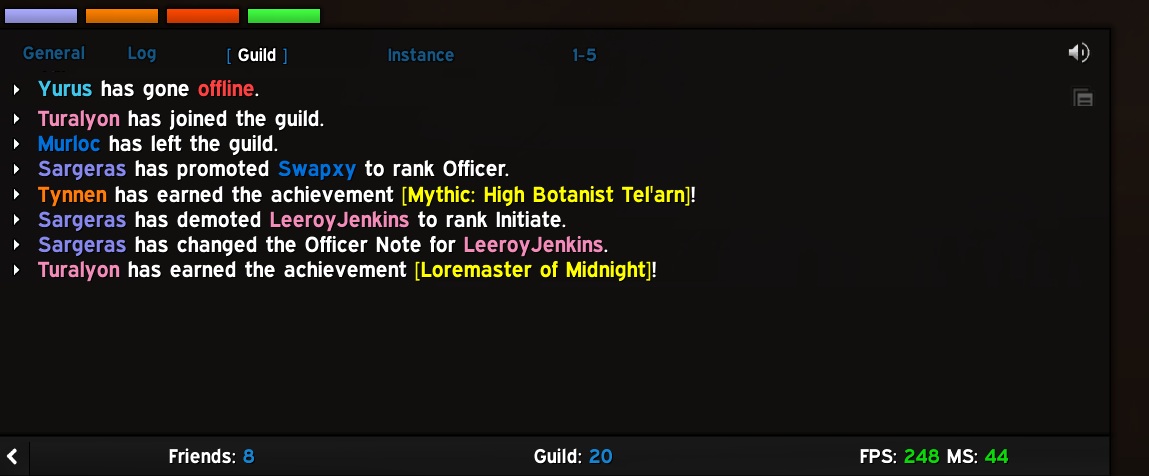
- Intelligent class colouring: all player names in join/leave, roster changes, and achievements are class-coloured
- Interactive links: player names are fully clickable for whispering, inviting, or inspecting
- Roster change tracking: captures promotions, demotions, and note changes (officer & public)
- MOTD integration: routes the guild message of the day to the tab upon login and update
- Anti-spam engine: uses monotonic game-time tracking to de-duplicate rapid-fire system messages
- Performance: built with active name caching, localized globals, and inlined pattern escaping to ensure zero impact on your FPS
- Efficiency: consumes trivial memory (567KB with a 773 player guild), only fires on system events
- Privacy: all routed messages respect the data source, you can't see more than allowed e.g. officer chat restricted per Guild config
Installation
-
Move/copy the
GuildRouterfolder to your_retail_/Interface/AddOns/or_classic_/Interface/AddOns/directory -
Restart World of Warcraft or logout and login
On load or login:
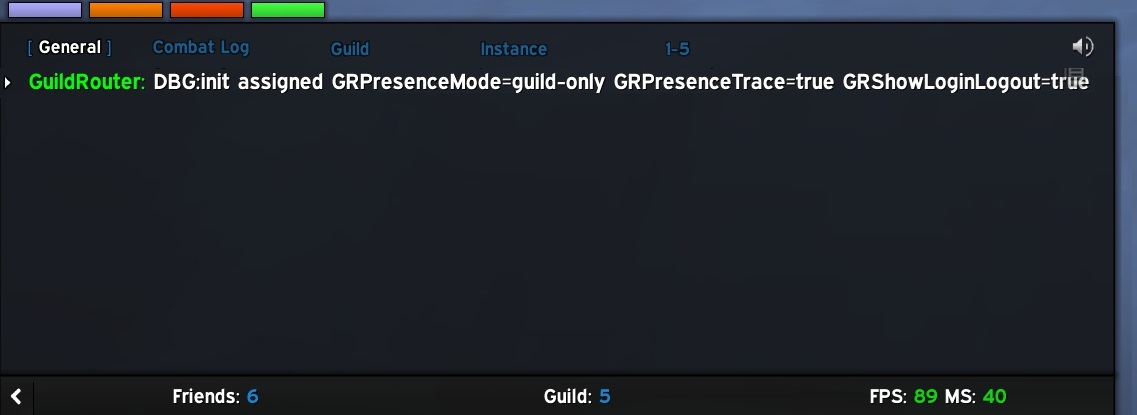
Example updates:
Configuration
The addon requires no setup. When it loads, it looks for a chat tab named “Guild”. If it doesn’t exist, GuildRouter creates it and assigns Guild, Officer, Guild Announcement, and Blizzard System channels, plus optional login/logout messages, giving you one clean, dedicated tab for all guild activity.
To declutter your chat, disable Guild Chat, Officer Chat, and Guild Announce in your primary windows; these messages are now routed to the Guild tab.
If you are using ElvUI, you may need to drag the ‘Guild’ tab once to your preferred position. After that, if you ever delete or need to reset the tab, you can use /grreset and it should retain the previous ordering sequence.
You can modify four values that affect how the addon operates. These are configurable via the standard Blizzard addon UI under <ESCAPE>->Options->Addons->GuildRouter.
Addon options: 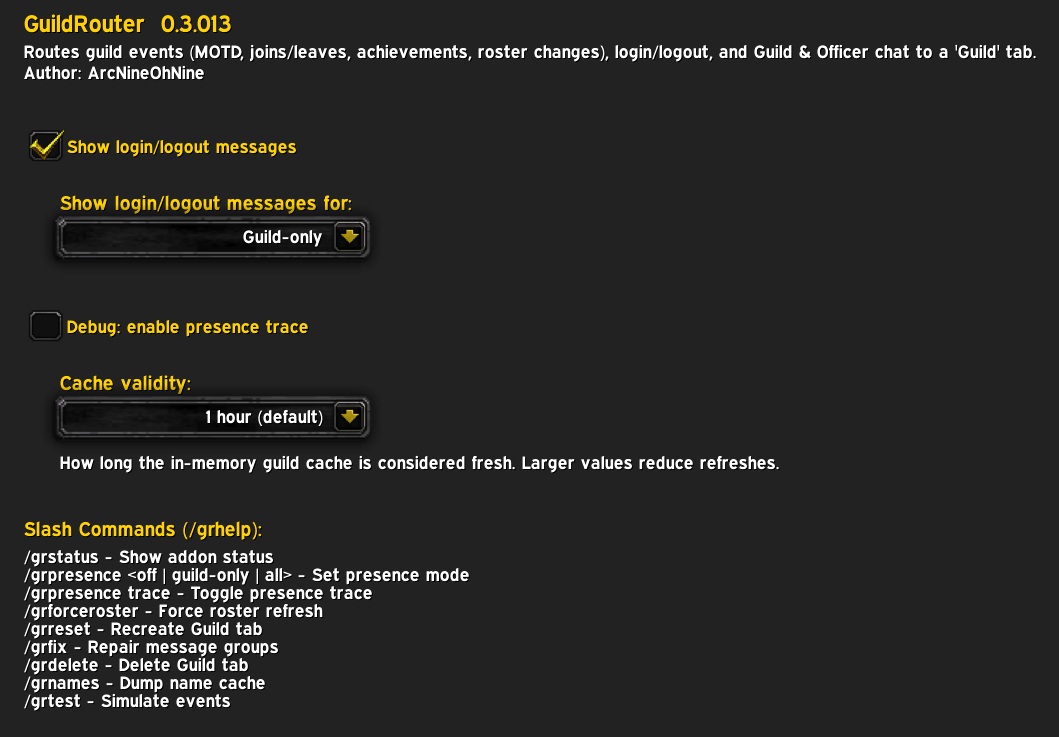
- Show login/logout messages:
enable (default) | disabledisplay of login and logout messages in the Guild tab - Show login/logout messages for:
Guild-only (default) | off | allwhich types of users' login/logout messages will be displayed. Selectingallenables anyone in your friends list to be announced to the Guild tab. - Debug:enable presence trace:
enable | disable (default)turns on detailed diagnostic logging for presence‑related events (login, logout, cache checks, stale‑cache refreshes, throttling decisions, etc.). When enabled, GuildRouter prints internal routing decisions to the chat frame so you can see exactly why a message was shown, hidden, or refreshed. This option is intended for troubleshooting or for users who want full visibility into how the addon processes presence events. It should normally remain disabled, as it produces a lot of output during busy periods. - Cache Validity:
5 mins | 15 mins | 30 mins | 1 hour (default) | 2 hourscontrols how long GuildRouter considers its internal guild roster cache “fresh.” A longer validity period means fewer roster scans and lower overhead, which is ideal for normal gameplay, the default of one hour is perfect for most players. If you’re actively managing the guild roster (promotions, demotions, invites, removals), you may want to choose a shorter interval so the addon refreshes its data more frequently and reflects changes sooner.
Any changes take effect immediately but are only written to the savedvariables file on successful logout
Command Line Options
GuildRouter provides several slash commands to manage the Guild tab, control presence announcements, and test events. None are required for normal operation.
/grhelpdisplays available GuildRouter commands./grstatusdisplay addon status including memory use./grpresence [mode]controls login/logout announcements. Modes:guild-only(default),all,off, ortrace(debug)./grresetrecreates the Guild tab with correct configuration and docking./grdeletedeletes the Guild tab without confirmation!/grfixrepairs the Guild tab's configuration and docking./grdockforces the Guild tab to dock./grtest join | leave | promote | demote | note | achsimulates guild events for testing purposes./grforcerosterforce guild roster acquisition/update./grnamesdisplay cached player→realm mappings.
GuildRouter status /grstatus: 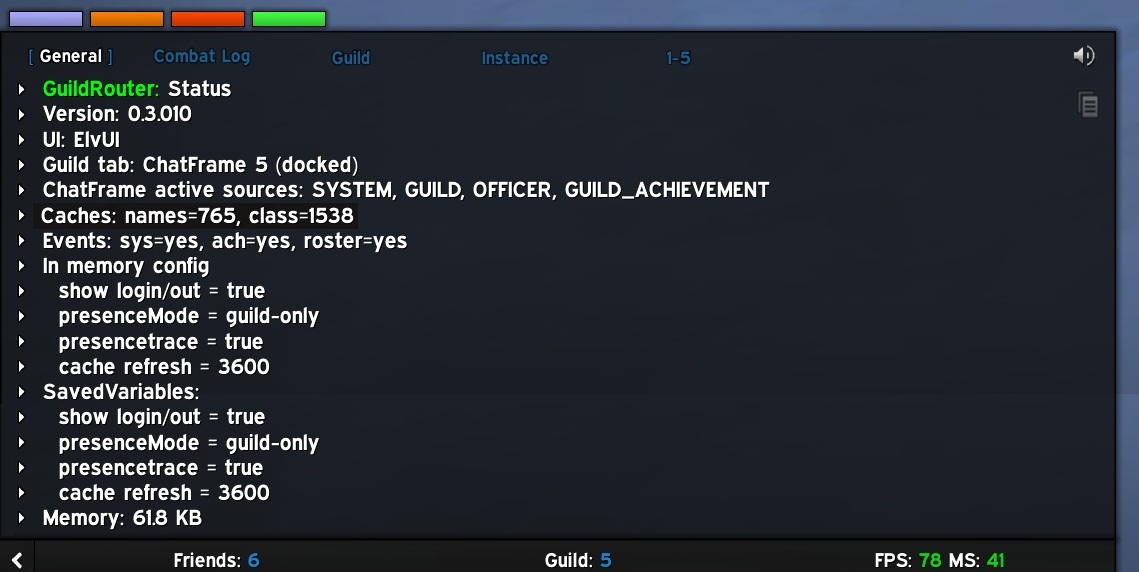
Technical details
- System messages: intercepts, formats and routes guild and related
systemmessages - Cache system: to ensure no impact to your gaming, GuildRouter caches your guild roster, details below
- Monotonic timing: uses
GetTime()instead of system clock to ensure anti-spam reliability during clock syncs or DST changes - Pattern robustness: uses
gsubrealm-stripping to ensure compatibility with hyphenated names on international realms - Deterministic logic: sequential pattern matching to ensure complex roster changes (like note updates) are captured with 100% accuracy
- Lookups: caches the Guild roster for performance
Cache system
GuildRouter uses a smart, event‑driven caching system to keep guild presence routing fast and accurate. Instead of hammering the roster API or rebuilding data every time Blizzard fires a GUILD_ROSTER_UPDATE (which can happen dozens of times per minute), the addon maintains a lightweight cache of guild member names, realms, and classes. This cache is refreshed only when it actually needs to be, on login, or when it becomes stale based on a user‑configurable validity period.
When a presence message arrives (“X has come online”), GuildRouter resolves the player’s full name and class instantly from the cache, producing correct clickable links and accurate guild‑membership checks even when Blizzard sends short names or out‑of‑order events. If the cache is stale, the addon requests a roster update in the background, but only if enough time has passed since the last request. All refreshes are throttled and debounced to avoid UI lag, unnecessary work, or API spam.
The result is a system that is instantaneous and rock‑solid: presence messages are always correct, class colours are always accurate, and the addon never stutters or rebuilds more than necessary. It’s engineered to stay fast under heavy event storms, behave deterministically, and keep your chat clean without wasting CPU cycles or impacting your FPS.
Contributing
Contributions to improve this tool are welcome! To contribute:
- Fork the repository https://github.com/ExponentiallyDigital/GuildRouter
- Create a feature branch
- Make your changes to the source code or documentation
- Test with sample data and various input scenarios, see
testcases.txtas a starting point - Submit a pull request with a clear description of the improvements
Please ensure your changes maintain compatibility with existing variable formats and follows Lua best practices.
Bugs and new features
Found a bug or want to submit a feature request? open an issue here.
Support
This tool is unsupported and may cause objects in mirrors to be closer than they appear etc. Batteries not included.
License
This program is free software: you can redistribute it and/or modify it under the terms of the GNU General Public License as published by the Free Software Foundation, either version 3 of the License, or (at your option) any later version.
This program is distributed in the hope that it will be useful, but WITHOUT ANY WARRANTY; without even the implied warranty of MERCHANTABILITY or FITNESS FOR A PARTICULAR PURPOSE. See the GNU General Public License for more details.
You should have received a copy of the GNU General Public License along with this program. If not, see https://www.gnu.org/licenses.
Copyright (C) 2026 ArcNineOhNine
CurseForge: https://www.curseforge.com/wow/addons/guildrouter用户评价
暂无 / 5,0 条评价相关推荐
继续看看这些内容
