插件中文资料库
中文说明、玩家点评、适用场景和替代推荐,方便快速判断是否适合你。
- 界面布局、头像框、姓名板和动作条优化
 LaoLiHelper_UI美化系统自带框架
 RightClickSelfCast
 GroupFinder
DeModal 插件下载与使用指南
本页整理了 DeModal 的功能用途、适用人群、安装方法和常见问题,方便玩家快速判断是否需要安装。
适合谁用
DeModal 是一款 HUD界面 / 界面美化 / 其他插件 类插件,适合需要优化界面、提升操作效率或补充游戏信息提示的魔兽世界玩家。
基本信息
- 插件作者:nezroy
- 插件分类:HUD界面 / 界面美化 / 其他插件
- 适配版本:1.15.8,5.5.3,2.5.5,12.0.1
- 累计下载:56
安装方法
- 点击上方下载按钮获取 DeModal插件文件。
- 解压后将插件文件夹放入 World of Warcraft/_retail_/Interface/AddOns 目录。
- 重启游戏或在角色界面点击插件,确认 DeModal 已启用。
- 如果插件不生效,请检查版本是否匹配,或关闭同类冲突插件后重试。
使用建议
DeModal 安装后建议先在角色界面确认已启用,进入游戏后根据插件提供的命令、小地图按钮或设置面板进行调整。如遇到报错,可先单独启用该插件排查冲突。
DeModal 常见问题
DeModal 适合需要 HUD界面 / 界面美化 / 其他插件 类功能的玩家,特别是希望提升游戏便利性、界面管理或战斗信息获取效率的用户。
下载后解压到 Interface/AddOns 目录,然后重启游戏并在角色界面启用插件。
常见原因是目录多套一层、游戏版本不匹配、依赖插件缺失或同类插件冲突。
可以查看本页的替代插件推荐和相关插件区域,按下载量和分类选择同类工具。
插件 AI 问答
可以问:这个插件正式服能用吗、和 DBM 冲突吗、怎么设置、有没有替代插件。
DeModal 是一款魔兽世界插件,主要用于界面框架、头像、动作条或冷却显示优化。建议根据自己的版本和插件环境先测试兼容性。
插件用途
DeModal 主要面向需要其他插件功能的玩家,用来改善游戏体验、减少重复操作或补充默认界面没有直接提供的信息。
适用场景
- 界面框架、头像、动作条或冷却显示优化
使用建议
安装后建议先在角色选择界面或插件管理器中确认已启用,再进入游戏测试是否与现有整合包、WA 和其他插件冲突。如遇报错,可以先禁用同类插件排查。
NOTE
If you are having issues with the addon not working at all or not loading, please delete the DeModal addon directory entirely from the WoW interface folder and re-install the latest release. I made TOC/file layout changes a while ago that don't seem to behave nicely when mixed on top of an older install, and not every addon manager handles this well.
DeModal
DeModal disables WoW's modal style, panel-based, automatic window management for a number of default UI windows. It allows these windows to be moved and stacked by the user like a modern window-based UI.
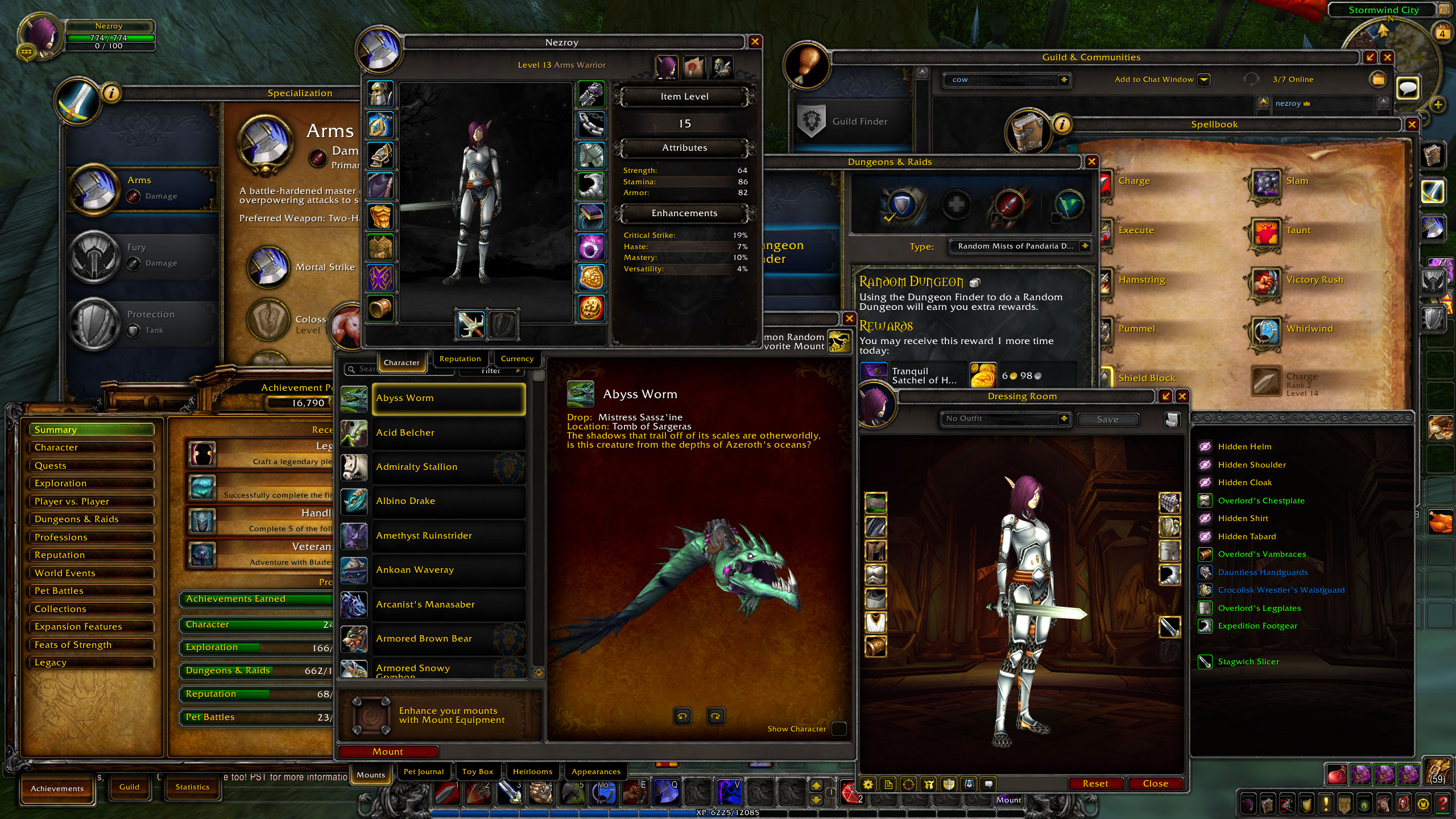
Blizzard opted to automatically manage UI panels in a very limited fashion to control the UI on small resolutions, restricting the total number of panels that can be displayed at once and enforcing automatic positioning. With modern resolutions and window-based sensibilities, this automatic panel management now feels clunky and unnecessary.
The WoW API contains all of the underlying code needed to handle user-based window placement. It is simply not enabled for most of the default UI panels. This addon enables this built-in functionality where possible. It does not re-write or replace ANY of the default UI elements so it should remain very lightweight and widely compatible.
⸻
MOVABLE WINDOWS
- Character, Spellbook, Spec and Talents
- Merchants, Auction House
- Bank Vault, Guild Bank, Void Storage
- NPC/Quest Dialog, Trainers
- Group Finder, Adventure Guide, Map and Quest Log
- Mailbox, Friends List
- Achievements, Calendar
- Dressing Room, Inspect, Transmogrify, Collections
- Garrison, Order Hall, Covenant, Soulbinds
- more…
The goal is to let you move anything that looks like a movable UI window (e.g. panels with a well-defined frame or title bar). It is not for moving intrinsic UI elements like tooltips, action bars, talking heads, unit frames, etc.
⸻
SETTINGS
Settings are found in the default AddOn options location: ESC → Options → AddOns → DeModal.
- Save windows only for this character: check this to save window settings only for the current character. If unchecked (default) the current character will share saved window settings with all characters.
- Reset All Saved Window Settings: click to reset all saved window settings in the current character and shared profiles. Forces a UI reload.
- Merge quest, gossip, and merchant frames: check this (default) to prevent certain frames being open at the same time, as well as to use a common position for them. This fixes some bugs caused by the Blizz UI not expecting some windows to ever be open together. For example, a gossip frame offering multiple quests doesn't always update correctly after accepting or completing a quest. Left this as an option for those who, because of other addons or whatever reason, want to keep the legacy behavior of having these completely separate, even with the possible bugginess.
⸻
BLIZZMOVE
Isn't this just BlizzMove? They are similar, but BlizzMove does not fully disable the automatic panel management and does not allow unlimited panels to be open at once. For example, you cannot have the Adventure Guide and Map open at the same time in the default WoW UI or with BlizzMove.
⸻
KNOWN ISSUES
The "Guild & Communities" window being movable broke as of 10.0.0. Support for moving this panel has been disabled until I can determine the cause.
When certain protected panels are opened for the first time while in combat, DeModal cannot initially modify their behavior. These windows should get properly DeModal-fied once exiting combat. This is working as intended and is a fundamental limitation of working with protected frames in the WoW API.
⸻
TROUBLESHOOTING
If you encounter any serious bugs or missing windows you can try resetting your saved window positions from the settings menu.
If you encounter issues and used a version of DeModal prior to 0.7.0, you can also try deleting the layout cache. Do this by logging out of Warcraft and then deleting the layout-local.txt file from your WTF cache.
CurseForge: https://www.curseforge.com/wow/addons/demodal用户评价
暂无 / 5,0 条评价相关推荐
继续看看这些内容
