插件中文资料库
中文说明、玩家点评、适用场景和替代推荐,方便快速判断是否适合你。
- 副本、团队本和大秘境战斗提醒
- 背包、银行和物品整理
 Details! Mythic+ Scoreboard
 BagSync
 GroupFinder
LootG 插件下载与使用指南
本页整理了 LootG 的功能用途、适用人群、安装方法和常见问题,方便玩家快速判断是否需要安装。
适合谁用
LootG 是一款 数据代理 / 背包与库存 类插件,适合需要优化界面、提升操作效率或补充游戏信息提示的魔兽世界玩家。
基本信息
- 插件作者:Aynrand
- 插件分类:数据代理 / 背包与库存
- 适配版本:12.0.0,12.0.1,12.0.5
- 累计下载:29
安装方法
- 点击上方下载按钮获取 LootG插件文件。
- 解压后将插件文件夹放入 World of Warcraft/_retail_/Interface/AddOns 目录。
- 重启游戏或在角色界面点击插件,确认 LootG 已启用。
- 如果插件不生效,请检查版本是否匹配,或关闭同类冲突插件后重试。
使用建议
LootG 安装后建议先在角色界面确认已启用,进入游戏后根据插件提供的命令、小地图按钮或设置面板进行调整。如遇到报错,可先单独启用该插件排查冲突。
LootG 常见问题
LootG 适合需要 数据代理 / 背包与库存 类功能的玩家,特别是希望提升游戏便利性、界面管理或战斗信息获取效率的用户。
下载后解压到 Interface/AddOns 目录,然后重启游戏并在角色界面启用插件。
常见原因是目录多套一层、游戏版本不匹配、依赖插件缺失或同类插件冲突。
可以查看本页的替代插件推荐和相关插件区域,按下载量和分类选择同类工具。
插件 AI 问答
可以问:这个插件正式服能用吗、和 DBM 冲突吗、怎么设置、有没有替代插件。
LootG 是一款魔兽世界插件,主要用于背包、银行、专业制造或物品整理、团队分配、Roll 点记录或公会管理、插件库、数据接口或依赖支持。建议根据自己的版本和插件环境先测试兼容性。
插件用途
LootG 主要面向需要背包与库存功能的玩家,用来改善游戏体验、减少重复操作或补充默认界面没有直接提供的信息。
适用场景
- 背包、银行、专业制造或物品整理
- 团队分配、Roll 点记录或公会管理
- 插件库、数据接口或依赖支持
使用建议
安装后建议先在角色选择界面或插件管理器中确认已启用,再进入游戏测试是否与现有整合包、WA 和其他插件冲突。如遇报错,可以先禁用同类插件排查。
# LootG

**LootG** is a lightweight World of Warcraft addon for loot notification and combat state display. Recommended to use with Leatrix_Plus's "disable banner" feature.
## Features
### Loot Notification
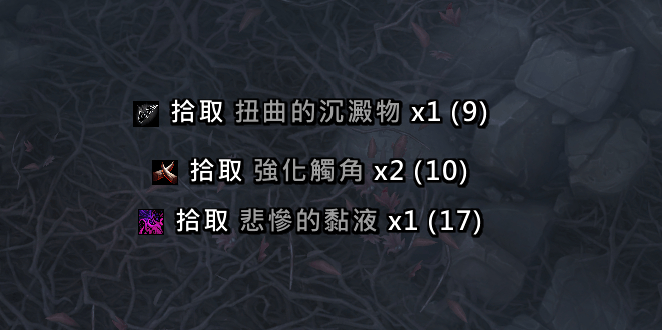
- **Scrolling Loot Display** - Looted items scroll with smooth animation
- **Item Quality Colors** - Items are displayed with their quality colors (Common, Uncommon, Rare, Epic, Legendary)
- **Item Icons** - Shows item icons alongside the item name
- **Bag Count** - Displays the total count of the item in your bags (only when > 0)
- **Currency & Gold Support** - Also displays looted currency and gold
- **Customizable Position** - Drag the blue anchor to position the display anywhere on screen
- **Clean Interface** - Only shows YOUR loot, not party/raid members
### Combat State
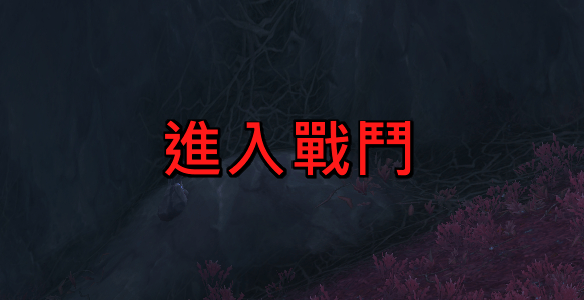
- **Enter/Leave Combat Flash** - Displays flash text when entering or leaving combat
- **Scroll & Static Modes** - Choose between scrolling animation or static display
- **4-Direction Scrolling** - Scroll Up, Down, Left, or Right
- **Custom Text** - Set your own enter/leave combat text, or use localized defaults
- **Independent Anchor** - Drag the red anchor to position combat text separately from loot
### Shared
- **Independent Font Settings** - Each module has its own font, size, outline, and shadow settings
- **Multi-Language** - Supports English, Simplified Chinese (zhCN), and Traditional Chinese (zhTW)
## Installation
1. Download and extract the `LootG` folder
2. Place it in your `World of Warcraft\_retail_\Interface\AddOns\` directory
3. Restart WoW or reload your UI (`/reload`)
## Usage
### Commands
- `/lootg` - Open settings panel
- `/lootg test` - Display a test loot message
### Settings
Access settings through:
- Type `/lootg` in chat
- Click the LootG icon in the Addon Compartment (minimap button)
- Go to Game Menu → Options → AddOns → LootG
The settings panel is organized into:
- **LootG** (main page) - Plugin intro and description
- **Loot Notification** (subcategory) - All loot display settings
- **Combat State** (subcategory) - All combat flash text settings
### Loot Notification Settings
| Setting | Description |
|---------|-------------|
| **Enabled** | Enable/disable loot notifications |
| **Lock Position** | Lock/unlock the blue anchor for positioning |
| **Show Icon** | Toggle item icon display |
| **X/Y Coordinate** | Fine-tune the display position |
| **Display Duration** | How long messages stay visible (0.5-10s) |
| **Scroll Time** | Animation speed (0.1-5s) |
| **Fade Speed** | Fade out duration (0.1-2s) |
| **Scroll Direction** | Up or Down |
| **Font Size** | Text size (8-48) |
| **Font** | Standard, Chat, Damage, or Quest |
| **Font Outline** | None, Thin, Thick, or Monochrome |
| **Font Shadow** | Enable/disable text shadow |
### Combat State Settings
| Setting | Description |
|---------|-------------|
| **Enabled** | Enable/disable combat state flash |
| **Lock Position** | Lock/unlock the red anchor for positioning |
| **X/Y Coordinate** | Fine-tune the display position |
| **Display Mode** | Scroll or Static |
| **Scroll Direction** | Up, Down, Left, or Right |
| **Flash Duration** | How long the text is displayed (0.1-3s) |
| **Fade Time** | Fade out duration (0.1-3s) |
| **Scroll Speed** | Animation speed multiplier (0.1-5) |
| **Font Size** | Text size (8-72) |
| **Font** | Standard, Chat, Damage, or Quest |
| **Font Outline** | None, Thin, Thick, or Monochrome |
| **Font Shadow** | Enable/disable text shadow |
| **Enter Combat Text** | Custom text (empty = localized default) |
| **Leave Combat Text** | Custom text (empty = localized default) |
## Display Format
### Loot
```
[Icon] Loot ItemName x1 (BagCount)
```
### Combat State
```
Enter Combat (red flash text)
Leave Combat (green flash text)
```
## Screenshots
*Coming soon*
Changelog
### v1.1.1
- Bug fix
### v1.1.0
- Added Combat State flash text module with Scroll/Static modes and 4-direction scrolling
- Subcategory settings, independent anchors and font settings per module
- Merged into single LootG.lua, continuous scrolling, localized UI labels
### v1.0.0
- Initial release
- Scrolling loot display with animation
- Item quality colors
- Customizable fonts and positioning
- Settings panel integration
## License
This addon is free to use and modify.
## Author
**Claude** (AI Assistant by Anthropic)
---
*Made with ❤️ for the WoW community*
CurseForge: https://www.curseforge.com/wow/addons/lootg用户评价
暂无 / 5,0 条评价相关推荐
继续看看这些内容
