插件中文资料库
中文说明、玩家点评、适用场景和替代推荐,方便快速判断是否适合你。
- 副本、团队本和大秘境战斗提醒
- 界面布局、头像框、姓名板和动作条优化
 Details! Mythic+ Scoreboard
 GroupFinder
 Sleek XP Bubbles
JSpecBar 插件下载与使用指南
本页整理了 JSpecBar 的功能用途、适用人群、安装方法和常见问题,方便玩家快速判断是否需要安装。
适合谁用
JSpecBar 是一款 动作条 / 其他插件 类插件,适合需要优化界面、提升操作效率或补充游戏信息提示的魔兽世界玩家。
基本信息
- 插件作者:Eternalguard
- 插件分类:动作条 / 其他插件
- 适配版本:12.0.1,12.0.5
- 累计下载:46
安装方法
- 点击上方下载按钮获取 JSpecBar插件文件。
- 解压后将插件文件夹放入 World of Warcraft/_retail_/Interface/AddOns 目录。
- 重启游戏或在角色界面点击插件,确认 JSpecBar 已启用。
- 如果插件不生效,请检查版本是否匹配,或关闭同类冲突插件后重试。
使用建议
JSpecBar 安装后建议先在角色界面确认已启用,进入游戏后根据插件提供的命令、小地图按钮或设置面板进行调整。如遇到报错,可先单独启用该插件排查冲突。
JSpecBar 常见问题
JSpecBar 适合需要 动作条 / 其他插件 类功能的玩家,特别是希望提升游戏便利性、界面管理或战斗信息获取效率的用户。
下载后解压到 Interface/AddOns 目录,然后重启游戏并在角色界面启用插件。
常见原因是目录多套一层、游戏版本不匹配、依赖插件缺失或同类插件冲突。
可以查看本页的替代插件推荐和相关插件区域,按下载量和分类选择同类工具。
插件 AI 问答
可以问:这个插件正式服能用吗、和 DBM 冲突吗、怎么设置、有没有替代插件。
JSpecBar 是一款魔兽世界插件,主要用于团队分配、Roll 点记录或公会管理。建议根据自己的版本和插件环境先测试兼容性。
插件用途
JSpecBar 主要面向需要其他插件功能的玩家,用来改善游戏体验、减少重复操作或补充默认界面没有直接提供的信息。
适用场景
- 团队分配、Roll 点记录或公会管理
使用建议
安装后建议先在角色选择界面或插件管理器中确认已启用,再进入游戏测试是否与现有整合包、WA 和其他插件冲突。如遇报错,可以先禁用同类插件排查。
Versions prior to 1.5.0 had a critical issue. Please accept version 1.5.0 or later.
JSpecBar
- Simple SpecBar like default addon. Easy change of Spec and Loot Spec
- It works in conjunction with basic add-ons and options.
Important
- I aim for add-ons that do not have options and commands if possible.
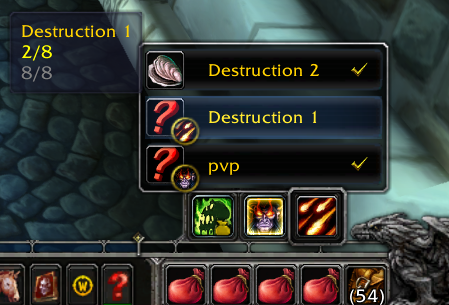
function
1. SpecChange
- LeftClick - Change Spec
- RightClick - Change Loot Spec
2. Change Assign Equip Set
- when you place the cursor on the SpecButton, the EquipSet window pops up.
- LeftClick - change Spec with change Assign EquipSet
- RightClick - just use EquipSet
- Shift+Click - Unassign EquipSet
- Tooltip1 (Item to swap/Number of items in EquipSet)
- Tooltip2 (missing Items/Number of items in EquipSet)
- Only the EquipSet corresponding to the SpecName(ex:Holy, Destruction) of the SpecButton and the EquipSet not included in any SpecName are displayed in the list.
3. Moving SpecBar
- You can drag a Shift+LeftMouseButton to a SpecButton.
- If you do not like the location, you can initialize the location by double-clicking the Shift+LeftMouseClick.
- Location storage uses the wow official function. It is therefore managed on the server.
- path(...\World of Warcraft\WTF\Account\accountName\Servere\CharacterName\layout-local.txt)
4. Multilingual
- Language is not required when using
ps. I am Korean and I am not familiar with English. Please understand.
There are currently three addons I am updating:
--JMainMenuBar (Classic style bottom main menu bar artwork)
--JTooltip (Just place the tooltip next to the cursor without any modifications.)
CurseForge: https://www.curseforge.com/wow/addons/jspecbar
用户评价
暂无 / 5,0 条评价相关推荐
继续看看这些内容
