插件中文资料库
中文说明、玩家点评、适用场景和替代推荐,方便快速判断是否适合你。
- 背包、银行和物品整理
- 拍卖行、交易和金币管理
 GroupFinder
 ClassyMap
 YuXuanToolbox
Goblin Toolbox 插件下载与使用指南
本页整理了 Goblin Toolbox 的功能用途、适用人群、安装方法和常见问题,方便玩家快速判断是否需要安装。
适合谁用
Goblin Toolbox 是一款 拍卖与商业 / 鼠标提示 / 背包与库存 / 专业技能 / HUD界面 类插件,适合需要优化界面、提升操作效率或补充游戏信息提示的魔兽世界玩家。
基本信息
- 插件作者:_Wooraah_
- 插件分类:拍卖与商业 / 鼠标提示 / 背包与库存 / 专业技能 / HUD界面
- 适配版本:12.0.1
- 累计下载:44
安装方法
- 点击上方下载按钮获取 Goblin Toolbox插件文件。
- 解压后将插件文件夹放入 World of Warcraft/_retail_/Interface/AddOns 目录。
- 重启游戏或在角色界面点击插件,确认 Goblin Toolbox 已启用。
- 如果插件不生效,请检查版本是否匹配,或关闭同类冲突插件后重试。
使用建议
Goblin Toolbox 安装后建议先在角色界面确认已启用,进入游戏后根据插件提供的命令、小地图按钮或设置面板进行调整。如遇到报错,可先单独启用该插件排查冲突。
Goblin Toolbox 常见问题
Goblin Toolbox 适合需要 拍卖与商业 / 鼠标提示 / 背包与库存 / 专业技能 / HUD界面 类功能的玩家,特别是希望提升游戏便利性、界面管理或战斗信息获取效率的用户。
下载后解压到 Interface/AddOns 目录,然后重启游戏并在角色界面启用插件。
常见原因是目录多套一层、游戏版本不匹配、依赖插件缺失或同类插件冲突。
可以查看本页的替代插件推荐和相关插件区域,按下载量和分类选择同类工具。
插件 AI 问答
可以问:这个插件正式服能用吗、和 DBM 冲突吗、怎么设置、有没有替代插件。
Goblin Toolbox 是一款魔兽世界插件,主要用于背包、银行、专业制造或物品整理。建议根据自己的版本和插件环境先测试兼容性。
插件用途
Goblin Toolbox 主要面向需要拍卖与商业功能的玩家,用来改善游戏体验、减少重复操作或补充默认界面没有直接提供的信息。
适用场景
- 背包、银行、专业制造或物品整理
使用建议
安装后建议先在角色选择界面或插件管理器中确认已启用,再进入游戏测试是否与现有整合包、WA 和其他插件冲突。如遇报错,可以先禁用同类插件排查。
Goblin Toolbox is a lightweight, highly configurable and modular gold-making HUD for Retail World of Warcraft (The War Within and beyond).
It is designed to provide accessible "at a glance" information for all kinds of gold makers, including farmers, crafters, flippers and bank alts.
It displays critical gold related information including Character name, realm, gold totals (in bags/warbank/guildbank), gold per hour calculations in terms of both raw gold and item value, clearly displays free bag slots.
Meanwhile fully customisable tracker bars allow users to track both materials and currencies, and a Utility bar provides context aware shortcuts for common banker actions (Mobile Banking/Warband Bank/Hearthstones etc).
New in latest releases: Add your own custom Mounts, Spells, Professions, Pets and Toys to the Utility Bar.
Quick Facts
- Dependencies: None (standalone). TSM is optional (used only for price data when available).
- Minimap integration: A minimap icon is being added (via bundled LibDataBroker/LibDBIcon internals for compatibility with minimap button managers). No separate library installs required
- Pricing Data: Configurable TSM price source (choose from multiple TSM pricing sources to value your items and auctions, including DBRegionSaleAvg, DBMarket, DBRegionMarketAvg and more, (for users without TSM value calculations default to vendor value).
- Performance: Designed to be low-impact (event-driven updates, refreshes are rate-limited, caching where access is limited).
- UI compatibility: Uses standard movable frames and is intended to work alongside the default UI and common UI overhauls (e.g., ElvUI/TukUI).
Quick Start
Install
- Type
/gtbto open menu options and select the fields you'd like to display in your UI - Position and scale the HUD, tracker bars and utility bars to your liking.
- Add any items, currencies, spells,mounts,pets or toys you want to track, They all use the same simple
/gtb add [item or spell link]. For items, you canalso drag them directly onto the + symbol on the tracker bar - Enjoy!
Full Feature Set (totally modular):
👤 Character Data
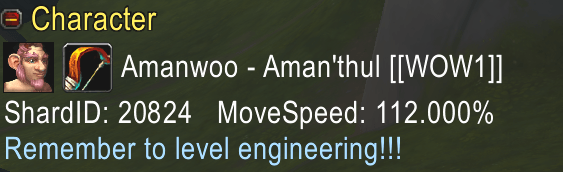
- Character/realm line with race and class icons
- Movement speed display (useful for speed-set testing)
- Shard ID display (useful for farming/phasing context)
- Character Notes for character reminders/tags, e.g. "Farming Character" OR "Remember to level Blacksmithing"
💰 Gold and economy overview

- Character gold
- Warband gold
- Guild bank gold with an indicator for how recently the value was updated/cached
- WoW Token price with a simple trend indicator based on recent averages
⏱️Session tracking
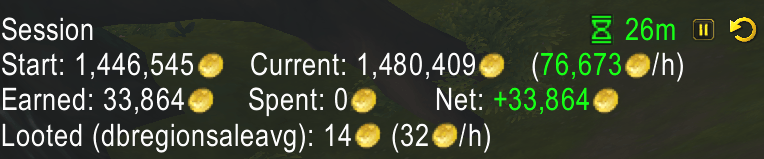
Goblin Toolbox session tracking is designed for “how is my session going right now?” visibility:
- Elapsed time with options to pause pause/resume and reset the session
- Simple and detailed views (net and GPH, plus earned/spent breakdown)
- Auto-Pause on AFK Options
- The option for sessions to persist across logouts
Note: session gold changes are based on the character’s actual money changes while the session is running. That means it will reflect whatever gold events occur during the session (loot, quest rewards, vendor sales, mail, trade, etc.), but it does not parse Auction House sales history or categorize transaction sources like a dedicated accounting addon.
📦 Looted item value & Bag Value

- Tracks the value of items in your bags and the value of items you pick up during your session (based on selected price source).
📈 Total Auction Value & Number of Auctions

- Shows active auction count and total posted value as a practical “what do I currently have up?” indicator.
- Updates from Blizzard’s Auction House data when you visit the AH; otherwise shows your most recent cached state.
- Updates are rate-limited to avoid adding lag during mass posting.
🎒 Inventory
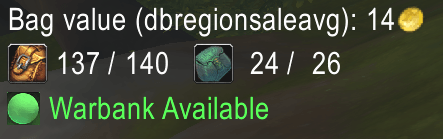
- Free bag slots
- Bag value estimation
- Uses a configurable TSM price source (defaults to DBRegionSaleAvg; also supports DBMarket, DBRegionMarketAvg, DBRecent, Vendor, and Custom)
- Falls back to vendor sell price when TSM is not installed or does not return a value
- Warband bank access indicator (useful when running multiple clients and only one has access at a time)
- Storage counts are cached on bank/Warband bank visits.
↔️Bar Scaling & Flexibility
With v1.1.0, all three bars support independent scaling, configurable “buttons per row” wrapping, and growth direction controls (LEFT/RIGHT + UP/DOWN) so you can anchor bars cleanly to any corner without UI drift when scaling. A dedicated Reset Bar Positions option exists to recover quickly if you are rearranging layouts.
📜 Tracker bars (items and currencies you care about)
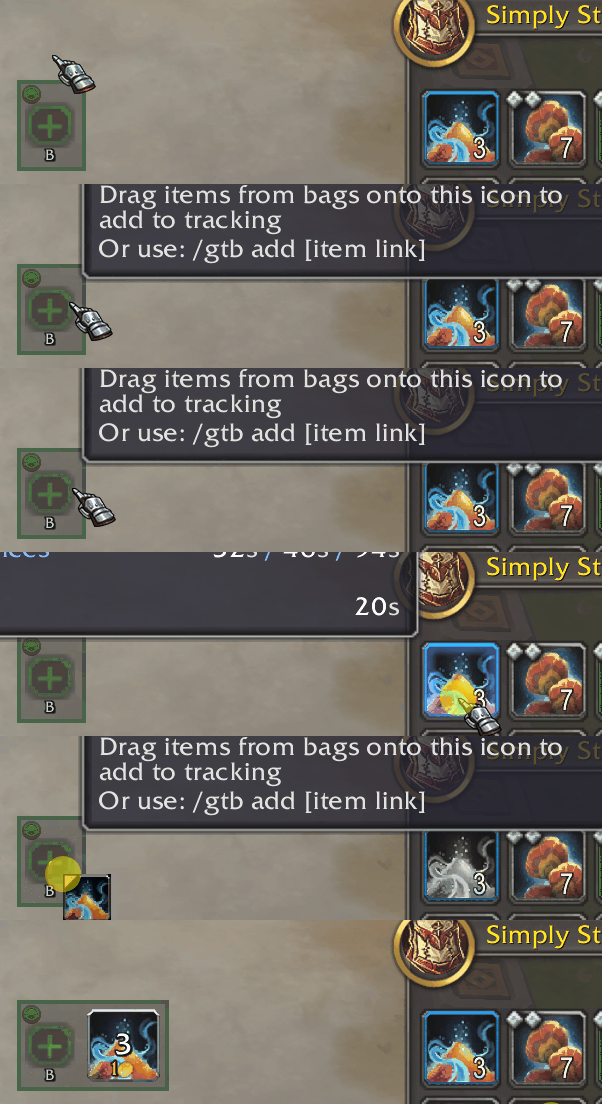
Track specific items and currencies you choose and see quantities at a glance.
Items:
- Add via
/gtb add [item]or simply drag items from your bags onto the tracker bar. - Supports modern quality tiers for relevant reagents (e.g., Q1/Q2/Q3-style variants).
- Optional value overlay for tracked items when price data is available.
- Options to include item counts across: player bags / personal bank / warband bank
Currencies
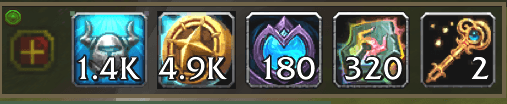
- Add currencies via /gtb add [currencylink] (drag and drop not possible).
🛠️Utility bar
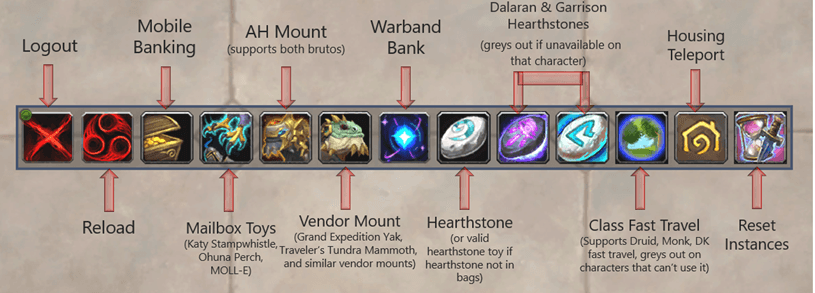
A dynamic, context-aware row of one-click utilities intended to reduce action bar clutter and repeated UI navigation. Buttons automatically grey out when an option isn’t available on the current character (not learned, missing item, wrong location, cooldown, etc.) and the tooltip explains why.
Now fully scalable and sortable into rows or columns, customise to display exactly how you wish.
Includes support for:
- Mobile Banking
- Portable mailbox items (Katy Stampwhistle, Ohuna Perch, MOLL-E)
- Auction House mounts (Trader’s Gilded Brutosaur, Mighty Caravan Brutosaur)
- Vendor mounts with priority selection (Grand Expedition Yak, Traveler’s Tundra Mammoth, and similar vendor mounts)
- Warband Bank access
- Hearthstone (handles the standard item and common hearthstone toys), plus Dalaran and Garrison hearthstones
- Quick travel (support for Druid's Dreamwalk, Monk's Zen Pilgrimage and Death Knight's Death Gate. Greys out on characters without access to a relevant spell.
- Housing teleport
- Reset Instances button.
🧩 New Feature: Add Custom Buttons to the Utility Bar
- For maximum customizability, you can now add your own spells, toys, mounts, and battle pets to the Utility Bar!
- Simply find the spell/toy/mount or pet in your journal, then type "/gtb add [link]" (shift click the spell) to create a custom button.
- Custom buttons show cooldowns, grey out when unavailable, and can be removed by shift+right-clicking them.
This gives you the flexibility to add things like:
- Spells (Such as class specific abilities, or utility racials such as Vulpera's Make Camp/Return to Camp, Switch Flying Style, or Herb/Ore Overloading)

- Useful Toys from your collection such as the Chef's Hat

- Mounts (e.g. your favorite mount, 2-person mounts, swimming mounts etc.)

- Battle pets (e.g. Utility pets such as Pierre or Lil' Ragnaros for cooking, or Alvin the Anvil for blacksmithing
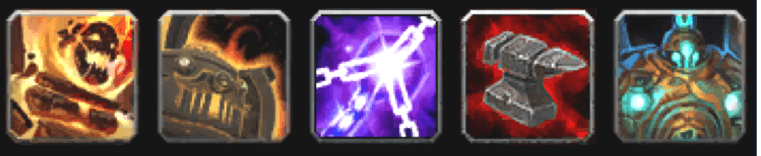
- Profession spells (opens spellbook), Disenchant or Milling spells.

Note: Adding stackable consumables (potions, food, etc.) are not supported by the custom button functionality due to limitations with the secure action system's targeting requirements.
🏷️ Tooltip IDs
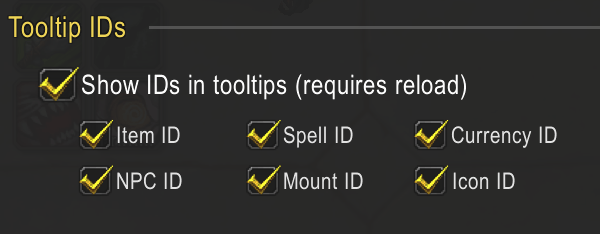
- Tooltip IDs for IDs of items, spells, currencies, NPCs, mounts, and icons directly in tooltips. (Useful for writing macros, reporting bugs, or verifying exactly what an ability/object is).
📋 Profiles & Presets
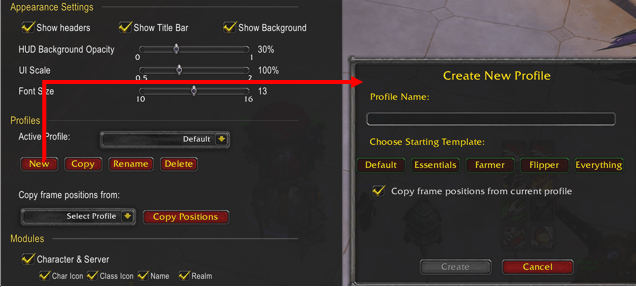
- Profile system enables you to create profiles for different roles
- Create, rename, copy, and delete profiles
- Assign profiles to characters (so each alt loads the right layout automatically)
- Switch profiles at any time
- Copy layout/positions between profiles for consistent placement across setups
When creating a new profile, you can start from one of the built-in preset templates:
- Default — Balanced “everything most players need”: character + gold + inventory + utility, plus tracker bars.
- Essentials — Minimal HUD for core visibility: character and key gold/session info, without inventory/utility/tracker bars.
- Farmer — Farming-focused layout: detailed session view, looted value emphasis, and movement speed enabled.
- Flipper — AH-focused layout: includes token trend and posted-auctions context, and enables tracking across banks/Warband storage for stock awareness.
- Everything — Enables all modules and most optional extras (including the full utility set and Tooltip IDs), intended as a maximal starting point.
What the addon does not do
- Not an Auction House replacement: no posting/canceling/shopping workflows.
- Not a long-term accounting ledger: it does not maintain a historical profit/loss database across weeks or months.
- Not a transaction parser: it does not read mailbox contents or interpret Auction House sales logs to classify income sources.
Goblin Toolbox is intended to complement other well established gold making related addons, rather than replace them, it focuses on clean, in-play HUD visibility.
Commands
/gtb— open settings/gtb add [item link / item name / currency name or ID / spell / toy / mount / pet]— adds items, currencies, spells, toys, mounts or pets to respective GTB bars./gtb reset— reset the current session/gtb pause— pause/resume the session timer/gtb lock— lock frame positions/gtb unlock— unlock frame positions/gtb show— show the HUD/gtb hide— hide the HUD/gtb headers— toggle group headers/gtb profiles— print profile information (active profile, available profiles, assignments)
Roadmap (planned / future changes)
Goblin Toolbox is largely feature-complete based on my original plan. However, the following additional features are still planned/under consideration:
- Support for additional price sources, particularly Auctionator.
- Profile import/export (share setups between accounts/friends, and back up profiles)
- Opacity sliders for bar display.
- More font options for the HUD display
- Sold-auction visibility: a simple “sold value” signal alongside posted-auctions context (without turning GTB into a full accounting ledger)
- Automated session timer reset (Daily or Weekly option)
- Adding key binding functionality for the Utility bar (to investigate, not sure how complex this might be).
Currently Out of Scope
The following features have been deferred or explicitly excluded from active development:
Profession Features (Paused)
Various Profession Related Features have been proposed, but are currently deferred, as: 1) Professions and crafting are neither my area of expertise or my passion 2) Support for professions across multiple expanions is complex 3) Professions status is very much in flux for Midnight at the time of writing 4) Dedicated addons that are better placed (and probably better coded) should emerge to serve these needs. 5) Limiting the functionality of Goblin Toolbox should allow it to remain relatively lightweight, foccused on gold tracking, and "at-a-glance", complementing rather than replacing dedicated addons for things like crafting, concentration, profession treasures and cooldowns etc.
Therefore the following profession related features are currently on hold/deffered or out of scope
Profession concentration tracking:
Concentration values are character-specific and would require significant UI spaceMost concentration tracking is better handled by dedicated profession addons May be reconsidered if a compact, elegant implementation is found
Profession skill level display
Faster Looting
Not included to avoid conflicts with the many excellent addons that already handle this (SpeedyAutoLoot, FasterLoot, Leatrix Plus, etc.). GTB seeks to complement these addons rather than duplicating them.
Session Income/Expense Filtering (e.g. Ignore Income from mail).
Not currently feasible due to GTB's delta-based session tracking, which monitors total gold changes without attributing them to specific sources (auctions, mail, vendors, etc.). Implementing automatic source detection and filtering would require extensive refactoring of core session tracking logic. For now, use the pause button before collecting mail or checking auctions to manually exclude those transactions from your session.
Feedback & suggestions
- If you have feature requests or bug reports, please leave a comment on the CurseForge project page.
- If you encounter errors, please describe what you were doing when the error occurred, along with a full bug report from BugGrabber/BugSack if you can.
Acknowledgments
Thanks to my team of beta testers for their feature suggestions, feedback and bug reports. These include Manthieus, SlickRock, Liqorice, negue, Yohanan, chosen2choose, Amazul Askira, Cirvis, Týýr, Aylin, Goldzen_tv, Quixxan, Bomanski, Kristian, ElonCS, bakoto, Warshal, special thanks also to Indopan for your guidance regarding efficient AI workflows and migration of the project from ChatGPT to Claude Code.
Thanks also to the wider gold making and Addon/Weak Aura development community for your great addons and weakauras both past and present that have helped inspire many of the features included in GoblinToolbox.
Documentation and changelog
For full documentation, more in-depth description of features, and the complete changelog/release history, use the GitHub link on this page https://github.com/Wooraah-addon/GoblinToolbox.
CurseForge: https://www.curseforge.com/wow/addons/goblintoolbox用户评价
暂无 / 5,0 条评价相关推荐
继续看看这些内容
