插件中文资料库
中文说明、玩家点评、适用场景和替代推荐,方便快速判断是否适合你。
- 副本、团队本和大秘境战斗提醒
- 伤害、治疗、仇恨和战斗数据统计
 Details! Mythic+ Scoreboard
 BagSync
 GroupFinder
Speed Splits - Speedrun Recorder 插件下载与使用指南
本页整理了 Speed Splits - Speedrun Recorder 的功能用途、适用人群、安装方法和常见问题,方便玩家快速判断是否需要安装。
适合谁用
Speed Splits - Speedrun Recorder 是一款 小游戏 / 首领战斗 / 其他插件 类插件,适合需要优化界面、提升操作效率或补充游戏信息提示的魔兽世界玩家。
基本信息
- 插件作者:Aceman
- 插件分类:小游戏 / 首领战斗 / 其他插件
- 适配版本:12.0.0,11.2.7,12.0.1
- 累计下载:0
安装方法
- 点击上方下载按钮获取 Speed Splits - Speedrun Recorder插件文件。
- 解压后将插件文件夹放入 World of Warcraft/_retail_/Interface/AddOns 目录。
- 重启游戏或在角色界面点击插件,确认 Speed Splits - Speedrun Recorder 已启用。
- 如果插件不生效,请检查版本是否匹配,或关闭同类冲突插件后重试。
使用建议
Speed Splits - Speedrun Recorder 安装后建议先在角色界面确认已启用,进入游戏后根据插件提供的命令、小地图按钮或设置面板进行调整。如遇到报错,可先单独启用该插件排查冲突。
Speed Splits - Speedrun Recorder 常见问题
Speed Splits - Speedrun Recorder 适合需要 小游戏 / 首领战斗 / 其他插件 类功能的玩家,特别是希望提升游戏便利性、界面管理或战斗信息获取效率的用户。
下载后解压到 Interface/AddOns 目录,然后重启游戏并在角色界面启用插件。
常见原因是目录多套一层、游戏版本不匹配、依赖插件缺失或同类插件冲突。
可以查看本页的替代插件推荐和相关插件区域,按下载量和分类选择同类工具。
插件 AI 问答
可以问:这个插件正式服能用吗、和 DBM 冲突吗、怎么设置、有没有替代插件。
Speed Splits - Speedrun Recorder 是一款魔兽世界插件,主要用于伤害统计、输出循环或战斗表现分析、倒计时、提醒和战斗预警、副本、团本、大秘境或钥石辅助。建议根据自己的版本和插件环境先测试兼容性。
插件用途
Speed Splits - Speedrun Recorder 主要面向需要首领战斗功能的玩家,用来改善游戏体验、减少重复操作或补充默认界面没有直接提供的信息。
适用场景
- 伤害统计、输出循环或战斗表现分析
- 倒计时、提醒和战斗预警
- 副本、团本、大秘境或钥石辅助
使用建议
安装后建议先在角色选择界面或插件管理器中确认已启用,再进入游戏测试是否与现有整合包、WA 和其他插件冲突。如遇报错,可以先禁用同类插件排查。
SpeedSplits
A reward-focused speedrunner's addon that smoothly tracks Boss Splits, Personal Bests, Run History, and includes unique Individual Timer, PB Sound Effects, and Route Awareness!
Note: Feedback and suggestions are welcomed as comments or Issues!
Unique Features
Individual Frames, Resizing, and Customisation
Fully adjustable, individual, and toggleable frames for the running Timer and Splits Table.

PB Reward Toasts
Celebrate Personal Bests with custom textures and sound effects!

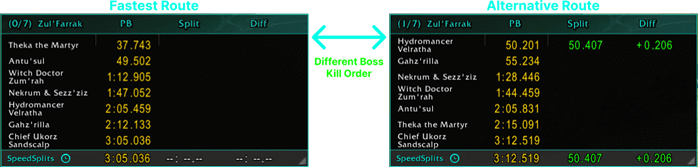
Route Awareness
Automatically adjust your PBs to match the exact order you have killed bosses. Try out different routes and compare them to your fastest at the end!
Other Features
- Speedrun Mode Support: Choose between All Bosses mode and Last Boss mode.
- Boss Split Tracking: Automatically records live boss-by-boss split times during your run.
- Personal Best Comparison: Compares each split against your saved PB pace and overall run pace.
- Full Visual Customisation: Adjust colours, fonts, textures, scaling, and overall presentation to suit your UI.
- Adjustable Columns: Resize each Splits Table column to be wider or smaller, or add a scroll bar when needed.
- Boss Ignore Controls: Ignore specific bosses manually, sending all completed runs with them to a separate database table.
- Reload Awareness: Prevents against cheats such as using /reloads to reset the timer. Also prevents setting impossible-to-beat times.
- Highly-reabable Splits: All Splits centred in their columns, aligned on digits, and appropriately coloured.
- Run History Logging: Stores all runs with filters so you can review and compare attempts over time.
- Custom Split Thresholds:
- On pace: First threshold for runs close to a PB.
- Behind pace: Second threshold for runs behind PB.
- Dynamic colours: split colours will dynamically fit between threshold colours.
Usage
Commands
- Use '/ss' to open settings.
- Use '/ss history' to open Run History.
Example
- Enter any instance with bosses (loads entries via Objectives or Adventure Journal).
- Start moving = start timer.
- Set speedrun mode to either 'All Bosses' (default) or 'Last Bosses'.
- Kill any boss: Records coloured split time, shows toast effect, and adjusts route.
- Kill last boss: Timer stops instantly, colour indicates speedrun success, run and route saved to database.
- Review speedrun via Run History (timer icon or '/ss history')
Planned Features
- 3D Models for current instance bosses (BETA)
- Global leader board comparison.
- Waypoint routing and route sharing.
- Per-boss notes, reminders, suggestions.
- Instance difficulty awareness and toggle.
- Detailed Run History inspection and analysis.
New Additions:
- Route Awareness, comparison, and 'exploration' mode. DONE
- Reload awareness and forged run protection. DONE


CurseForge: https://www.curseforge.com/wow/addons/speed-splitsGame: World of Warcraft
Topics: speed, speedrun, speedrunner, speedrunning, splits, timer, run, SpeedSplitsDisclaimer: SpeedSplits timer icon represents the concept of 'speed' generally, not necessarily the UI of the addon. This addon is in early development; your feedback is highly appreciated.
用户评价
暂无 / 5,0 条评价相关推荐
继续看看这些内容

%2526business%253dace.case05%2540hotmail.com%2526bn%253dPP-DonationsBF%253abtn_donateCC_LG.gif%253aNonHosted%2526cancel_return%253dhttps%253a%252f%252fwww.curseforge.com%252fwow%252faddons%252fspeed-splits%2526lc%253dUS%2526item_name%253dSpeed%2bSplits%2b-%2bSpeedrun%2bRecorder%2b(from%2bwww.curseforge.com)%2526cmd%253d_donations%2526rm%253d1%2526no_shipping%253d1%2526currency_code%253dUSD)