插件中文资料库
中文说明、玩家点评、适用场景和替代推荐,方便快速判断是否适合你。
- 任务路线、地图标记和野外探索
- 界面布局、头像框、姓名板和动作条优化
 Details! Mythic+ Scoreboard
 BagSync
 LaoLiHelper_UI美化系统自带框架
NomTools - UI Improvements & Additions 插件下载与使用指南
本页整理了 NomTools - UI Improvements & Additions 的功能用途、适用人群、安装方法和常见问题,方便玩家快速判断是否需要安装。
适合谁用
NomTools - UI Improvements & Additions 是一款 背包与库存 / HUD界面 / 任务与升级 / 其他插件 / 住房 类插件,适合需要优化界面、提升操作效率或补充游戏信息提示的魔兽世界玩家。
基本信息
- 插件作者:Nomiis
- 插件分类:背包与库存 / HUD界面 / 任务与升级 / 其他插件 / 住房
- 适配版本:12.1.5
- 累计下载:51
安装方法
- 点击上方下载按钮获取 NomTools - UI Improvements & Additions插件文件。
- 解压后将插件文件夹放入 World of Warcraft/_retail_/Interface/AddOns 目录。
- 重启游戏或在角色界面点击插件,确认 NomTools - UI Improvements & Additions 已启用。
- 如果插件不生效,请检查版本是否匹配,或关闭同类冲突插件后重试。
使用建议
NomTools - UI Improvements & Additions 安装后建议先在角色界面确认已启用,进入游戏后根据插件提供的命令、小地图按钮或设置面板进行调整。如遇到报错,可先单独启用该插件排查冲突。
NomTools - UI Improvements & Additions 常见问题
NomTools - UI Improvements & Additions 适合需要 背包与库存 / HUD界面 / 任务与升级 / 其他插件 / 住房 类功能的玩家,特别是希望提升游戏便利性、界面管理或战斗信息获取效率的用户。
下载后解压到 Interface/AddOns 目录,然后重启游戏并在角色界面启用插件。
常见原因是目录多套一层、游戏版本不匹配、依赖插件缺失或同类插件冲突。
可以查看本页的替代插件推荐和相关插件区域,按下载量和分类选择同类工具。
插件 AI 问答
可以问:这个插件正式服能用吗、和 DBM 冲突吗、怎么设置、有没有替代插件。
NomTools - UI Improvements & Additions 是一款魔兽世界插件,主要用于界面框架、头像、动作条或冷却显示优化、地图、区域、任务路线或交通提醒。建议根据自己的版本和插件环境先测试兼容性。
插件用途
NomTools - UI Improvements & Additions 主要面向需要任务与升级功能的玩家,用来改善游戏体验、减少重复操作或补充默认界面没有直接提供的信息。
适用场景
- 界面框架、头像、动作条或冷却显示优化
- 地图、区域、任务路线或交通提醒
使用建议
安装后建议先在角色选择界面或插件管理器中确认已启用,再进入游戏测试是否与现有整合包、WA 和其他插件冲突。如遇报错,可以先禁用同类插件排查。
NomTools
A suite of various customizable improvements to the default UI and additional useful tools.
⮞ Discord Community
⮞ Core Features
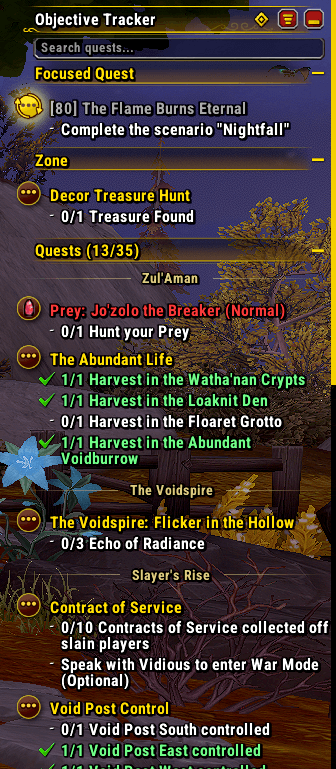
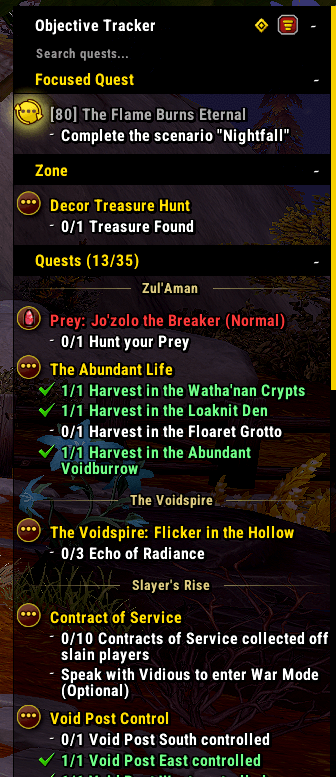
- Heavily customizable Objective Tracker revamp with additional features and scrolling
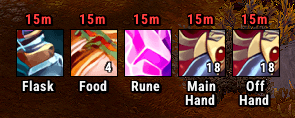
- Clickable and customizable Consumables Reminder for Mythic+ and Raiding
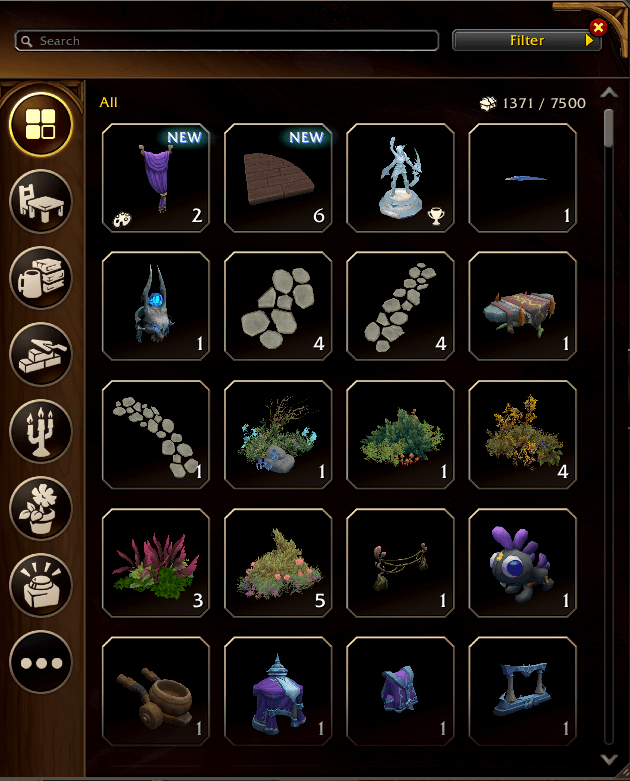
- Various Housing Improvements, more information further down!
- Filterable and customizable World Quest List built into the World Map
- Reminders for talent loadouts, great vault spec, and more.
- Class specific features
- More to come!
⮞ Additional Features
- Detach Queue Eye from Micro Menu
- Great Vault Specialization Reminder
- Dungeon Difficulty Alert when dungeon is not on Mythic in a 5-man party
- Skip previously viewed cutscenes
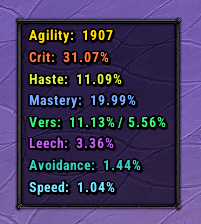
- Character stats display
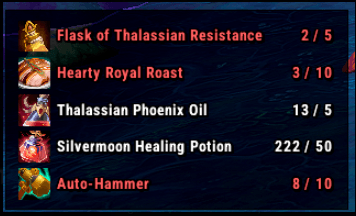
- Shopping list
- Tooltip customization
- More to come!
⮞ Enable only what you want to use!
Upon installation, NomTools prompts you to choose which modules you want to enable, nothing is enabled by default :)
A Deeper Look:
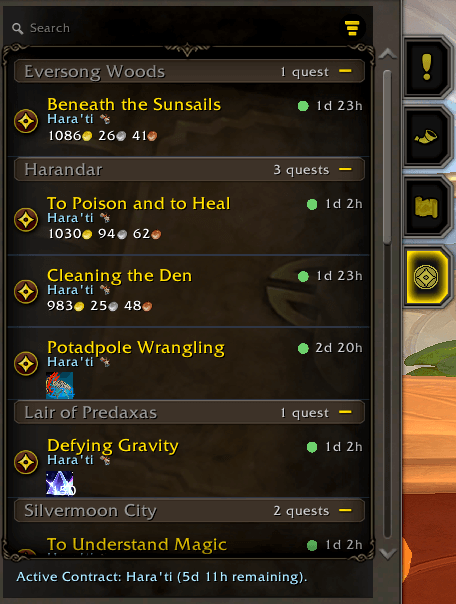
⮞ Objective Tracker
Improves the look and functionality of the blizzard Objective Tracker by default, and adds extensive customization options.
- Full visual customization (fonts, textures, colors, you name it!)
- Scrollable objective tracker
- Search, sort and filter by quest type, zone and more
- Group quests by zone
- Color coded quest types
- Reorder sections any way you want
- Seperate your focused quest from the rest
- Customizable Zone section (supports regular, campaign, world quests and bonus objectives)
- A convenient button to track all quests in your quest log
⮞ Consumables Reminder
Shows clickable icons to apply (and reapply!) flasks, food, augment runes, weapon oils, and rogue poisons.
- Full visual customization
- Only show the ones you care about
- Choose when and where to show it
- Show 1-60 minutes before expiration for reapplication
- Multiple custom setups (e.g. Mythic+ and Raid)
⮞ Housing Improvements
Various improvements to the housing experience.
- Highlight new decor obtained since you were last at home
- Fix Blizzard's "Sort By: Date Added" to actually show recently obtained decor first
- Disclaimer: Only works for decor obtained after installing the addon and enabling the Housing module, older items are sorted below new decor by blizzard's own "Date Added" method.
- Buy up to 100 decor items at a time with Shift+Right-Click. No more spam clicking!
- Auto-confirm decor purchases
⮞ World Quest List
A convenient way to get an overview of available world quests.
- Filter and search by quest type, reward type, faction, zone, and more
- Sort by time remaning, reward type, or faction
- Customize to your liking with changable fonts and sizes (more customization options coming soon!)
- Works for all expansions, and filters based on the map you're viewing, all the way from World view to the smallest subzones!
- Active contract information
⮞ Character Stats Display
A small customizable display of your characters stats
- Updates in combat
- Enable or disable specific stats you want to track
⮞ Shopping List
A shopping list that automatically reminds you when you're getting low on selected consumables.
- Contains a catalog of relevant items for easy adding
- Supports custom items
- Auctionator batch search integration to easily stock up on items
⮞ Classes
Class specific features currently available:
- Monk:
- Brewmaster:
- Segmented Expel Harm Tracker Bar
- Wisdom of the Wall Tracker
- Brewmaster:
用户评价
暂无 / 5,0 条评价相关推荐
继续看看这些内容
