插件中文资料库
中文说明、玩家点评、适用场景和替代推荐,方便快速判断是否适合你。
- 副本、团队本和大秘境战斗提醒
- 界面布局、头像框、姓名板和动作条优化
 Details! Mythic+ Scoreboard
 BagSync
 GroupFinder
EventQ 插件下载与使用指南
本页整理了 EventQ 的功能用途、适用人群、安装方法和常见问题,方便玩家快速判断是否需要安装。
适合谁用
EventQ 是一款 其他插件 / 公会 类插件,适合需要优化界面、提升操作效率或补充游戏信息提示的魔兽世界玩家。
基本信息
- 插件作者:LightskyGG
- 插件分类:其他插件 / 公会
- 适配版本:12.0.1
- 累计下载:0
安装方法
- 点击上方下载按钮获取 EventQ插件文件。
- 解压后将插件文件夹放入 World of Warcraft/_retail_/Interface/AddOns 目录。
- 重启游戏或在角色界面点击插件,确认 EventQ 已启用。
- 如果插件不生效,请检查版本是否匹配,或关闭同类冲突插件后重试。
使用建议
EventQ 安装后建议先在角色界面确认已启用,进入游戏后根据插件提供的命令、小地图按钮或设置面板进行调整。如遇到报错,可先单独启用该插件排查冲突。
EventQ 常见问题
EventQ 适合需要 其他插件 / 公会 类功能的玩家,特别是希望提升游戏便利性、界面管理或战斗信息获取效率的用户。
下载后解压到 Interface/AddOns 目录,然后重启游戏并在角色界面启用插件。
常见原因是目录多套一层、游戏版本不匹配、依赖插件缺失或同类插件冲突。
可以查看本页的替代插件推荐和相关插件区域,按下载量和分类选择同类工具。
插件 AI 问答
可以问:这个插件正式服能用吗、和 DBM 冲突吗、怎么设置、有没有替代插件。
EventQ 是一款魔兽世界插件,主要用于界面框架、头像、动作条或冷却显示优化、副本、团本、大秘境或钥石辅助。建议根据自己的版本和插件环境先测试兼容性。
插件用途
EventQ 主要面向需要其他插件功能的玩家,用来改善游戏体验、减少重复操作或补充默认界面没有直接提供的信息。
适用场景
- 界面框架、头像、动作条或冷却显示优化
- 副本、团本、大秘境或钥石辅助
使用建议
安装后建议先在角色选择界面或插件管理器中确认已启用,再进入游戏测试是否与现有整合包、WA 和其他插件冲突。如遇报错,可以先禁用同类插件排查。
EventQ is a World of Warcraft addon centered around improving interaction with the in-game calendar and its events. It's been built with the end user in mind, offering a phenomenal user experience.
Features
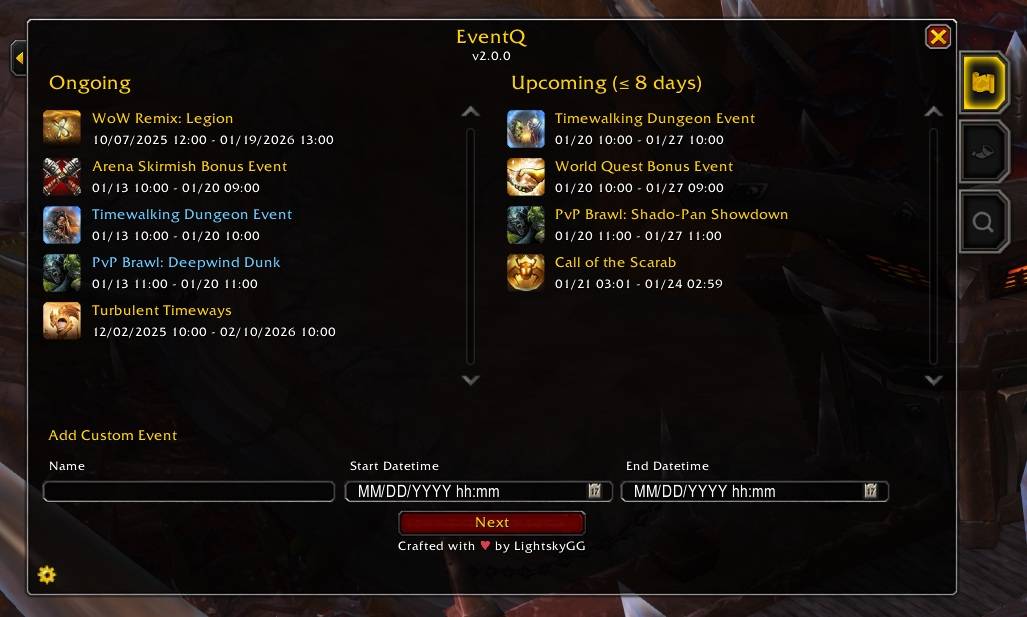
- Offers an intuitive interface for viewing ongoing and upcoming events from a single pane of glass.
- Events are automatically sorted by least remaining time so you know which activities to tackle first.
- Events with less than 24 hours remaining are highlighted in red to make them easy to spot.
- Events with a cyan title are Click-to-Queue events; simply left-click them to queue for it! Every major holiday (e.g. Hallow's End), Timewalking, and PvP brawl is supported.
- When queueing, if you haven't selected any roles, no problem! EventQ offers a seamless experience to quickly select your roles and immediately queue. No need to leave the experience and open additional windows.
- Guild events, such as raid nights, can also be clicked to quickly request a party invitation. (This only works between the event's start time and +10 minutes!)
- Add custom events!
- Custom events support a name, a start date, and an end date (obviously). However, the player can also select an icon for their event, add a description, set reminders, and define it as a series or not.
- The icon interface is simple and easy to use but offers a search box if you want to quickly locate a specific icon.
- Custom events can also be made into a series. You can adjust the frequency of the series using a dropdown, choosing between Minutely, Hourly, Daily, Weekly, Monthly, and Annually. Thus, if you wish to keep track of the Stranglethorn Fishing Extravaganza, it's never been easier than with EventQ!
- Custom event series have smart reminders baked into them (based on its duration), while standalone custom events can have up to 2 defined reminders. By default, reminders are printed near the top of your screen.
- All custom events can be right-clicked to Edit, Remove, Export, or to use View Series. The last option will open the View Series window, showcasing the next 12 occurrences in the series.
- An event series is indicated by its special clock icon.
- Export custom events and stash them away in a backup for safekeeping or share them with friends!
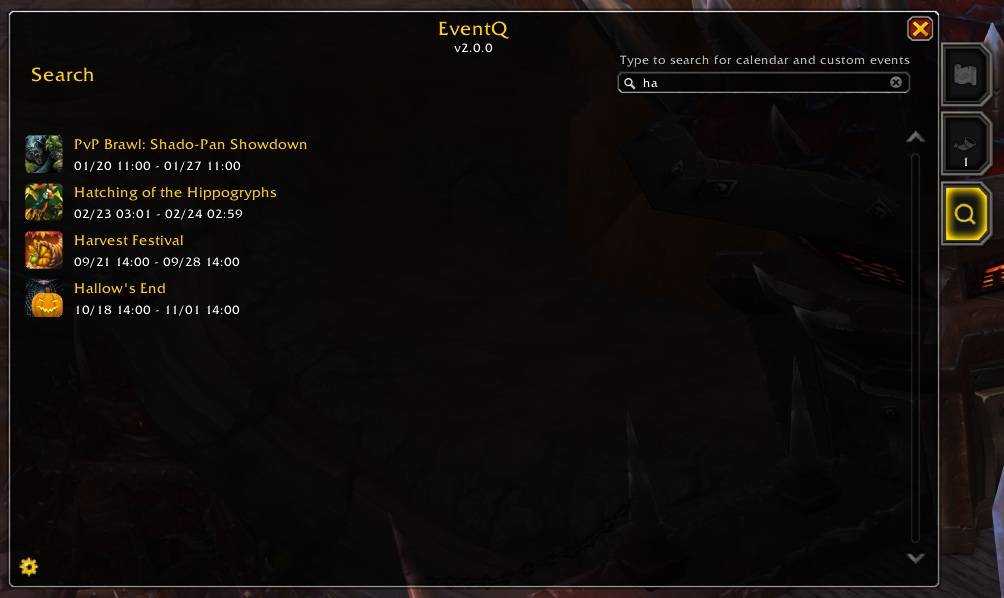
- Want to know when the next Trial of Style is in town? No problem! Use the addon's search tab to quickly locate the next occurrence of any event, calendar or custom alike!
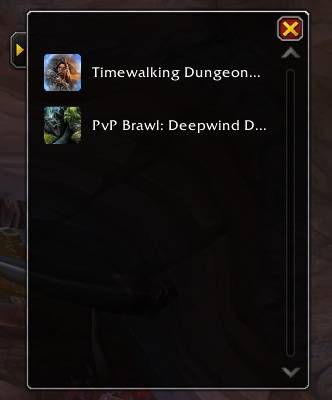
- If you're not interested in the Full Mode experience and want a portable experience, it's a click of a button to quickly swap to Portable Mode! Portable Mode offers a compact window, showing only the queueable events. Yes, click-to-queue works here too!
Settings
== Notifications ==
- Chat Notifications : Sends a message to the chat frame whenever an event transitions from upcoming to ongoing.
- Sound Notifications : Plays a sound whenever an event transitions from upcoming to ongoing.
== Reminders ==
- Reminder Type : Choose whether or not the addon should give you a reminder for custom events.
- Text : Sends a message to the top of your screen.
- Toast : Creates and shows an achievement-style toast near the bottom of your screen.
- ** Reminder Sound** : Choose which sound plays, if any, when a custom event reminder fires.
- Map Ping
- Raid Warning
- Ready Check
- Whisper
- Main Menu
- Custom
- Off
== Window ==
- Auto-Open Portable Mode : If the addon's window was last set to Portable Mode, the addon will reopen it on login/reload, if enabled.
- Reset Position : Reset the position of the addon's window and remove any record about its saved position (if moved).
Commands
These are optional. The addon has a minimap icon with left-click to open the addon's window and right-click to open its settings.
- /eventq : Opens the addon's window.
- /eventq settings : Opens the addon's settings.
Main Window
The main entry window for the addon, showing ongoing and upcoming events, granting the user the ability to create custom events, access the settings (bottom left), or enter Portable Mode (top left).
Future Events Window
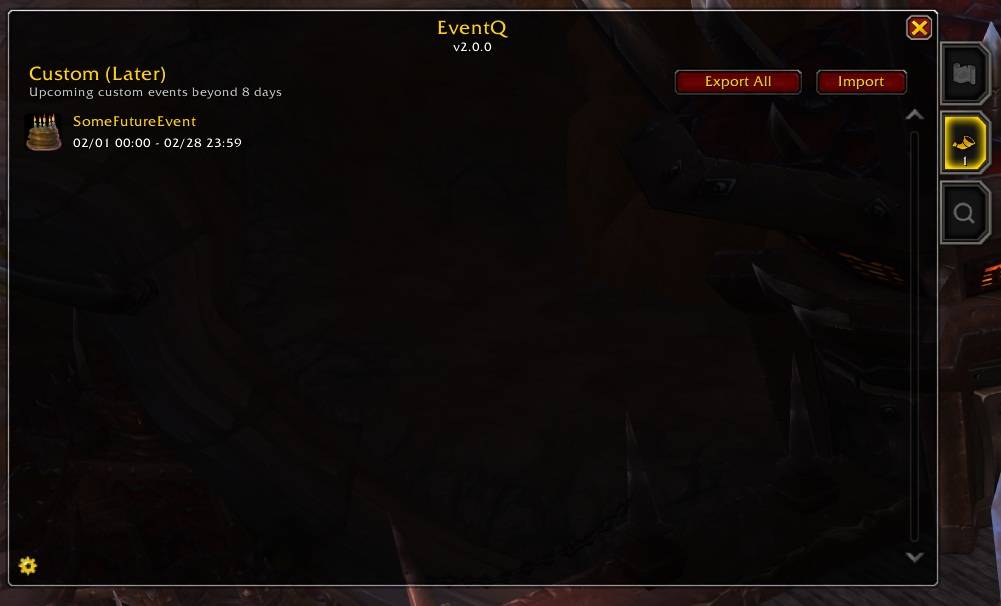
Custom events that are beyond 8 days in the future are shown in this tab. You can edit and remove them from here.
Search Window
Search for future occurrences of both calendar and custom events in one spot. This is a feature that isn't offered even in Blizzard's default UI! The addon will only search within the current or next calendar year (if the event you're looking for isn't in the current calendar year).
Portable Mode Window
In case you don't want the visual footprint of Full Mode, Portable Mode displays only click-to-queue events.
用户评价
暂无 / 5,0 条评价相关推荐
继续看看这些内容
