插件中文资料库
中文说明、玩家点评、适用场景和替代推荐,方便快速判断是否适合你。
- 界面布局、头像框、姓名板和动作条优化
 BagSync
 RightClickSelfCast
 GroupFinder
CustomSkinsCastBar 插件下载与使用指南
本页整理了 CustomSkinsCastBar 的功能用途、适用人群、安装方法和常见问题,方便玩家快速判断是否需要安装。
适合谁用
CustomSkinsCastBar 是一款 单位框架 类插件,适合需要优化界面、提升操作效率或补充游戏信息提示的魔兽世界玩家。
基本信息
- 插件作者:Hetoka
- 插件分类:单位框架
- 适配版本:12.1.0,12.1.5
- 累计下载:0
安装方法
- 点击上方下载按钮获取 CustomSkinsCastBar插件文件。
- 解压后将插件文件夹放入 World of Warcraft/_retail_/Interface/AddOns 目录。
- 重启游戏或在角色界面点击插件,确认 CustomSkinsCastBar 已启用。
- 如果插件不生效,请检查版本是否匹配,或关闭同类冲突插件后重试。
使用建议
CustomSkinsCastBar 安装后建议先在角色界面确认已启用,进入游戏后根据插件提供的命令、小地图按钮或设置面板进行调整。如遇到报错,可先单独启用该插件排查冲突。
CustomSkinsCastBar 常见问题
CustomSkinsCastBar 适合需要 单位框架 类功能的玩家,特别是希望提升游戏便利性、界面管理或战斗信息获取效率的用户。
下载后解压到 Interface/AddOns 目录,然后重启游戏并在角色界面启用插件。
常见原因是目录多套一层、游戏版本不匹配、依赖插件缺失或同类插件冲突。
可以查看本页的替代插件推荐和相关插件区域,按下载量和分类选择同类工具。
插件 AI 问答
可以问:这个插件正式服能用吗、和 DBM 冲突吗、怎么设置、有没有替代插件。
CustomSkinsCastBar 是一款魔兽世界插件,主要用于界面框架、头像、动作条或冷却显示优化。建议根据自己的版本和插件环境先测试兼容性。
插件用途
CustomSkinsCastBar 主要面向需要单位框架功能的玩家,用来改善游戏体验、减少重复操作或补充默认界面没有直接提供的信息。
适用场景
- 界面框架、头像、动作条或冷却显示优化
使用建议
安装后建议先在角色选择界面或插件管理器中确认已启用,再进入游戏测试是否与现有整合包、WA 和其他插件冲突。如遇报错,可以先禁用同类插件排查。
🎨 Project Presentation: CustomSkinsCastBar v1.2
Slide 1: Core Vision
-
Project Name: CustomSkinsCastBar
-
Goal: A complete, high-performance replacement for the default Blizzard cast bar, focusing on deep customization and unique media assets.
-
Tech Stack: Lua, Blizzard API (Optimized for Midnight 12.0 / TWW).
-
Philosophy: Speed, Zero Trust security, and clean "Nordic-Japanese" logic (Straightforward, Analytical, Orderly).
Slide 2: Core Features
-
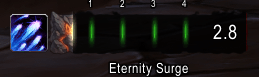
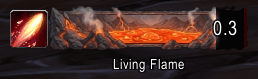
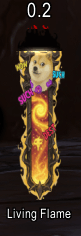
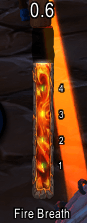
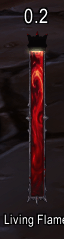
Massive Visual Library: Features 170+ high-quality cast bar textures, allowing for unparalleled visual variety.
-
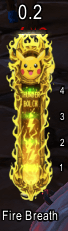
Hybrid Orientation: Native support for both Horizontal and Vertical layouts.
-
Profile System: Save, load, and delete custom setups for different characters or playstyles.
-
Smart Suppression: Seamlessly hides default Blizzard UI elements (Player, Target, Focus) without breaking game logic.
-
Zero Jitter Rendering: Smooth progression using an optimized
OnUpdateloop that compensates for network lag.
Slide 3: Visual Innovation
-
Texture Tinting: Innovative color application using
ADDBlend Mode, allowing users to change bar colors while preserving the intricate details of custom textures. -
Blizzard-Style Spark: A dynamic glow effect (Spark) that follows the cast progress, fully adapting to vertical or horizontal modes.
-
Icon Masking: Advanced shape control, allowing users to switch between Square and Circle spell icons on the fly.
Slide 4: Combat Performance (Pro Tools)
-
Latency Indicator (Safe Zone): Real-time ping visualization integrated directly into the bar, showing exactly when to start the next spell to optimize the Spell Queue.
-
Midnight Expansion Support: Full implementation of Empower mechanics (Evoker stages) with dynamic markers.
-
Enhanced Feedback: When a cast is interrupted (by movement or enemy kicks), the bar flashes red with an "Interrupted" status instead of simply vanishing.
Slide 5: Configuration UI (GUI)
-
Structured 3-Page Interface:
-
General & Text: Global sizing, locking, and precise font/timer positioning.
-
Appearance & Icon: Texture browser, color picker, and icon customization.
-
Profiles & Info: Preset management and slash command references.
-
-
Live Preview: All sliders and checkboxes update the UI in real-time.
Slide 6: Technical Specifications
-
Interface ID:
120005(Ready for 2026 Midnight PTR). -
Event Handling: Re-engineered event logic for
UNIT_SPELLCAST_FAILEDandSTOPto fix common "ghosting" or premature disappearing bugs. -
Resource Management: Minimal memory footprint; zero object creation during active combat.
用户评价
暂无 / 5,0 条评价相关推荐
继续看看这些内容
