插件中文资料库
中文说明、玩家点评、适用场景和替代推荐,方便快速判断是否适合你。
- 任务路线、地图标记和野外探索
 BagSync
 GroupFinder
 FollowerLocationInfo
WarCult 插件下载与使用指南
本页整理了 WarCult 的功能用途、适用人群、安装方法和常见问题,方便玩家快速判断是否需要安装。
适合谁用
WarCult 是一款 小游戏 / 战斗 / 竞技场 / PVP / 战场 类插件,适合需要优化界面、提升操作效率或补充游戏信息提示的魔兽世界玩家。
基本信息
- 插件作者:PVPXTV
- 插件分类:小游戏 / 战斗 / 竞技场 / PVP / 战场
- 适配版本:12.1.5
- 累计下载:0
安装方法
- 点击上方下载按钮获取 WarCult插件文件。
- 解压后将插件文件夹放入 World of Warcraft/_retail_/Interface/AddOns 目录。
- 重启游戏或在角色界面点击插件,确认 WarCult 已启用。
- 如果插件不生效,请检查版本是否匹配,或关闭同类冲突插件后重试。
使用建议
WarCult 安装后建议先在角色界面确认已启用,进入游戏后根据插件提供的命令、小地图按钮或设置面板进行调整。如遇到报错,可先单独启用该插件排查冲突。
WarCult 常见问题
WarCult 适合需要 小游戏 / 战斗 / 竞技场 / PVP / 战场 类功能的玩家,特别是希望提升游戏便利性、界面管理或战斗信息获取效率的用户。
下载后解压到 Interface/AddOns 目录,然后重启游戏并在角色界面启用插件。
常见原因是目录多套一层、游戏版本不匹配、依赖插件缺失或同类插件冲突。
可以查看本页的替代插件推荐和相关插件区域,按下载量和分类选择同类工具。
插件 AI 问答
可以问:这个插件正式服能用吗、和 DBM 冲突吗、怎么设置、有没有替代插件。
WarCult 是一款魔兽世界插件,主要用于坐骑、宠物或击杀记录。建议根据自己的版本和插件环境先测试兼容性。
插件用途
WarCult 主要面向需要战场功能的玩家,用来改善游戏体验、减少重复操作或补充默认界面没有直接提供的信息。
适用场景
- 坐骑、宠物或击杀记录
使用建议
安装后建议先在角色选择界面或插件管理器中确认已启用,再进入游戏测试是否与现有整合包、WA 和其他插件冲突。如遇报错,可以先禁用同类插件排查。
Watch PVPXTV on TWITCH for World of Warcraft mayhem
Demo videos of all PVPXTV addons on YOUTUBE
WarCult
WarCult WoW PvP addon tracks killing blows with a kill counter. Optional kb alert text, audio announcer, and minigame. Left mouse button drag the counter to position it. You can lock the position in addon's settings.
- WarCult is a simple killing blow counter by default: Kill an enemy player, number increases by one.
- Select what the counter displays in addon's settings: Cult Kills (kb since addon installed), kill streak (kb since last death), or session kills (kb since logged in).
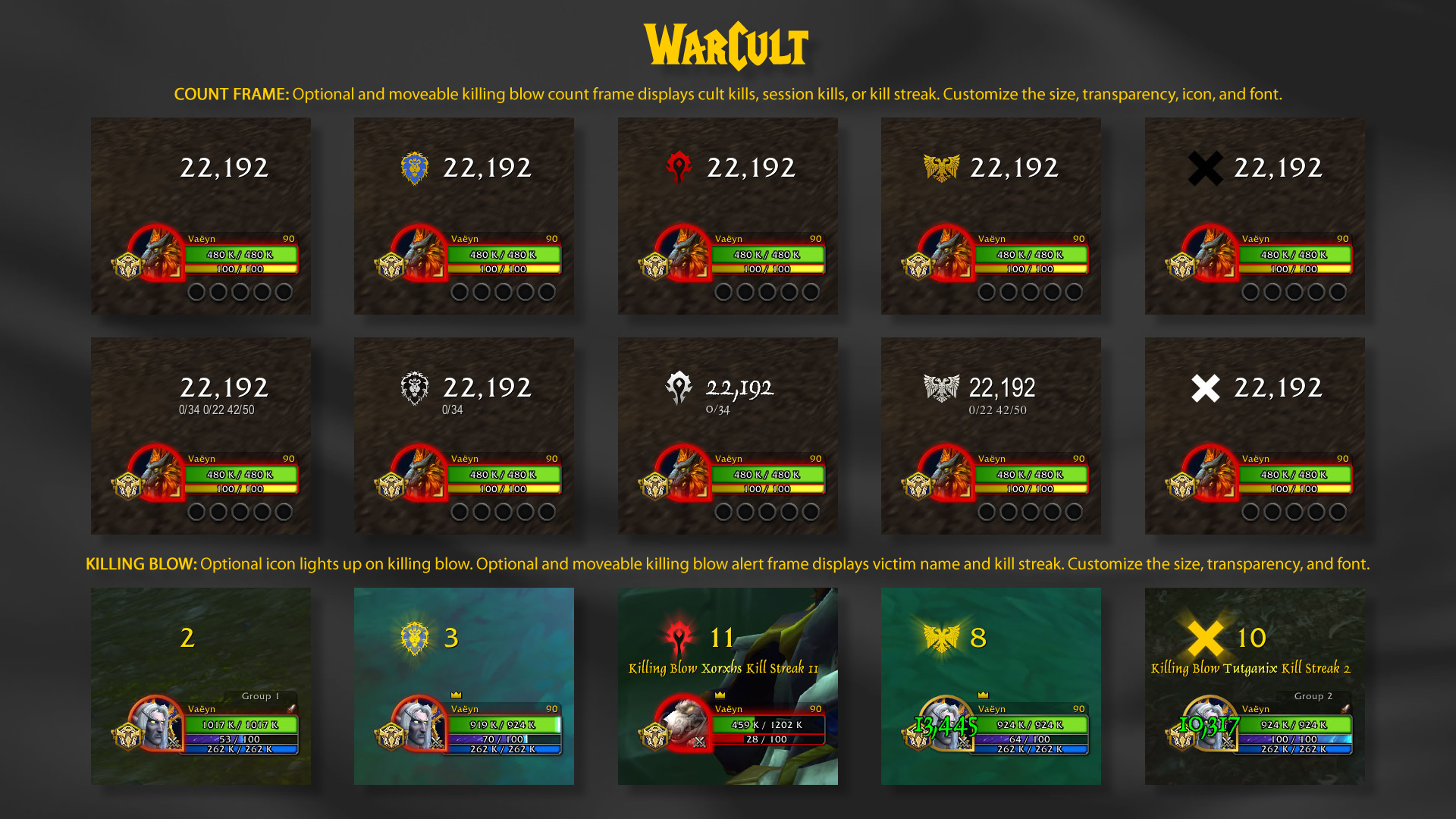
- Customize the counter size, transparency, font, shadow, outline, and enable an icon that reacts to killing blows.
- Optional, moveable and customizable alert text displays killing blow victim name and kill streak.
- Optional audio announcements for killing blows and other events.
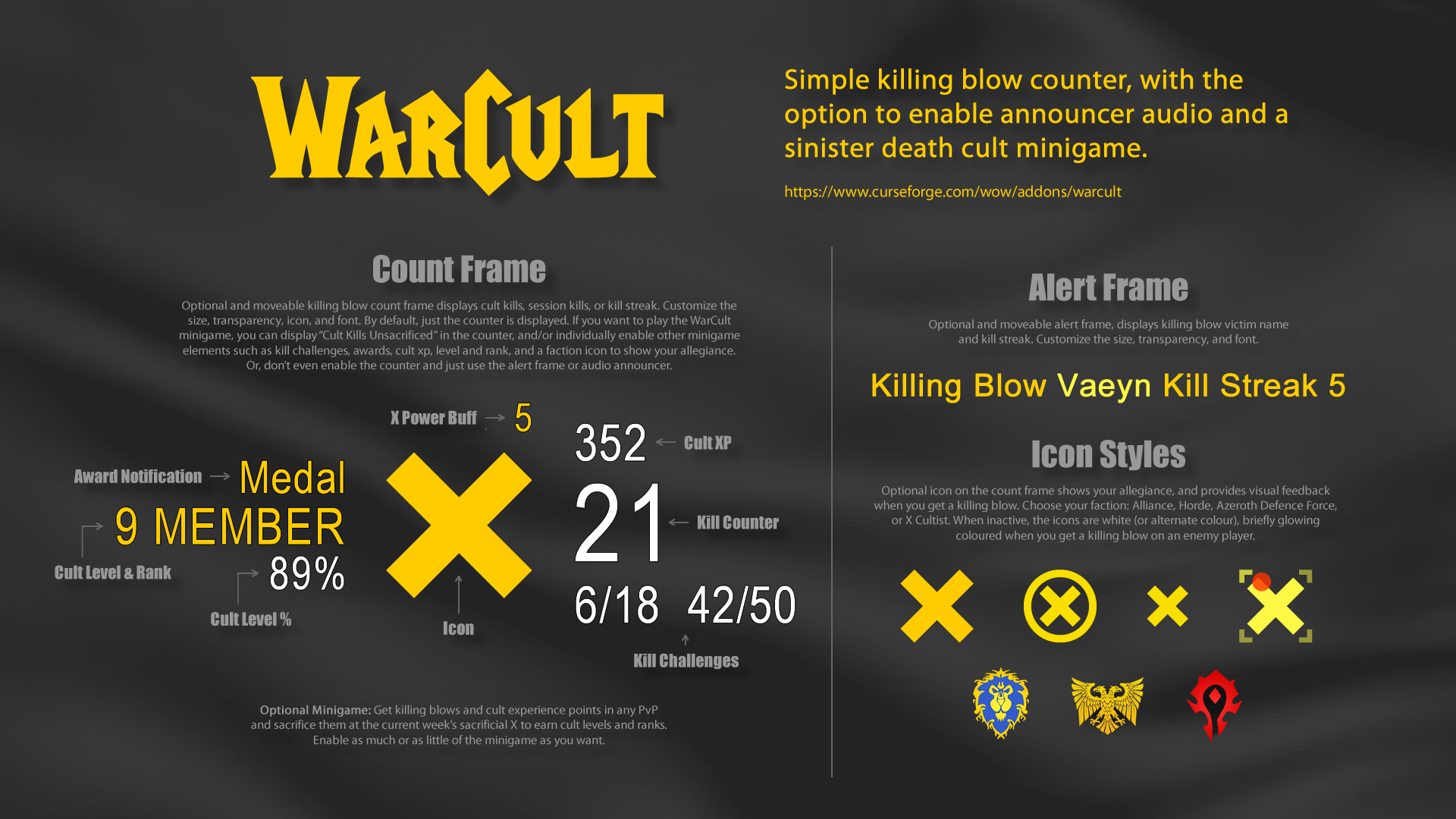
- Optional minigame: Get killing blows and cult experience points in any PvP and sacrifice them at the X to earn cult levels and ranks.
Simple KB Counter or PvP Minigame
Keep it simple and just track your killing blows, or use the addon's settings to enable WarCult's minigame features.
- In WarCult, killing blows on players get triggered slightly differently than WoW's built-in tracking, due to addon restrictions and workaround.
- Select what the counter displays in addon's settings via the "Display Count" menu: Cult Kills (kb since addon installed), kill streak (kb since last death), or session kills (kb since logged in).
- Cult Kills is the number of WarCult killing blows by your character since the addon was installed. If you are playing WarCult as a minigame, optionally select "Cult Kills Unsacrificed" in the Display Count menu to see your kills since last sacrifice at the X.
- Kill Streak is the number of WarCult killing blows since your last death, when it resets to zero. In the Display Count setting, you can select how to display the streak (streak / session best / best). The kill streak number resets to zero 30 minutes after player logout is detected.
- Session Kills is the number of WarCult killing blows since logged into the current character. In the Display Count setting, you can select how to display the session kills (session / best). The session kills number resets to zero 30 minutes after player logout is detected.
- By default WarCult tracks your own killing blows. However, there is an option in addon settings "Group KB Included". When enabled, killing blows from other players in your party or raid subgroup will be counted as well as your own. So you can take part whether you're a damager, tank or healer.
- The count frame is initially centered by default, unless previously moved. Left mouse button drag the count frame to move it. Lock frame position in addon settings.
- Alert text is visible after a killing blow. Enable the alert frame in addon settings to display demo alert frame for positioning. The alert frame is initially centered by default, unless previously moved. Left mouse button drag the alert frame to move it. Right mouse button press to hide the demo alert frame. Lock frame position in addon settings.
- The alert frame may not be able to properly display player character names containing letters that your WoW client does not fully support. Selecting Arial as the alert font in the addon's settings may resolve this issue.
- Adjust count and alert frames size, opacity, fonts, and count icon style in addon settings.
- Audio announcer is initially disabled. Enable audio in addon settings. Audio announcer uses the Dialog sound channel by default, set to preferred volume in WoW's settings. Change the sound channel in addon's settings.
- Combine with TopTarget to display an icon on your targeted enemy nameplate, highlighting it as a group targeted enemy.
- Combine with WinStreak, keep track of your win streaks in all PvP instances.
- For WoW retail battlegrounds, arenas and world PvP.
Optional PvP Minigame
Enable as much or as little of the minigame as you want. Get killing blows and cult experience points in any PvP and sacrifice them at the X to earn cult levels and ranks. Addon settings has options for displaying chat notifications, map X, cult xp, level, rank, and challenges. Killing blows and cult experience points gained in any PvP are automatically sacrificed on entering the current week's sacrificial X. This increases your cult level and progression to next rank. The more you progress, the more killing blows and cult experience points are required to progress. Current week's sacrifice zone name (if enabled) displayed on mouseover kb counter. Level information displayed while within the map Xs (if enabled).
Cult Zones
On the world map you'll see a yellow X (if enabled) in the cult zones below. Every week a cult zone is designated as the sacrifice zone, displayed on mouseover kb counter (if enabled). Get killing blows and cult xp in any PvP, and then on ground enter the X in the current sacrifice zone to sacrifice your killing blows and xp for cult level progression.
- Elwynn Forest, Eastern Kingdoms
- Redridge Mountains, Eastern Kingdoms
- Durotar, Kalimdor
- Northern Barrens, Kalimdor
- Hellfire Peninsula, Outland
Killing Blows
Killing blows will be counted as a kb when kb detection is possible and successfully validated. The number of player killing blows tracked by WarCult may differ from WoW's built-in tracking. When you get a killing blow on an enemy player, the kill counter increases by 1. These kills can be sacrificed at the current week's sacrifice X for level progression, reducing the kill counter to zero. If your kb display count is set to anything other than "Cult Kills Unsacrificed", the counter will shortly revert to whatever you are tracking. By default WarCult tracks your own killing blows. However, there is an option in settings "Group KB Included". When enabled, killing blows from other players in your party or raid subgroup will be counted as well as your own. So whether you're a damager, tank or healer, you can join the war cult and level up! Press the right mouse button on the counter to display your WarCult stats.
Display Counter
Select what the counter displays in addon's settings:
- Cult Kills Unsacrificed (kb since last sacrifice at the X).
- Cult Kills (kb since addon installed).
- Kill Streak (kb since last death).
- Session Kills (kb since logged in).
Cult XP
Displayed above the kill counter (if enabled), cult experience points are earned via PvP activity or standing in the current week's X. They can be sacrificed for cult level progression, reducing xp to zero. The methods below earn you cult xp in varying amounts.
Gain XP
- Stand in the current week's sacrifice X and get xp over time.
- Sacrificing killing blows at the X grants the 'X Power' buff with 5 charges. While buffed, a killing blow consumes one charge and gives xp.
- Kill streak killing blows give incrementally increasing xp.
- Kill streak milestones 10, 20, 30, 40, 50+ give increasing xp.
- Completing the kill streak, session kills, or 50 kills challenges gives increasing xp.
- Collect spirit, medal, and trophy awards for a chance to receive increasing award xp per killing blow.
- Honorable kills by you and other group members give xp.
Lose XP
- Death penalty, a random chance to receive an xp death penalty subtracted from current xp. Cultists just starting out are exempt from the death penalty.
Kill Challenges
WarCult has three repeating kill challenges, displayed below the kill counter (if enabled). They reward bonus cult xp on completion.
- Kill streak challenge: Your current kill streak/best kill streak. Equal your best kill streak to complete the challenge for xp reward.
- Session kills challenge: Your current session kills/most session kills in a WoW session. Equal your highest session kills to complete the challenge for xp reward.
- 50 kills challenge: Your kills progression/kills required. Equal the required kills to complete the challenge for xp reward.
Counter Icon
When not standing inside a map X, the counter icon (if enabled) on the count frame has an "off" style (adjustable), but flashes "on" after a killing blow. Stand in the X in the designated zone to sacrifice kills and earn cult level progression. When standing on ground inside the X on map, the icon is "on". If you want to see your exact position standing in the X, select the 'Track X' style in the addon's settings.
Cult Level & Ranks
Increase your cult level and earn ranks by sacrificing killing blows and cult experience points at the X in designated zone. The higher your level, the more killing blows and cult xp needed to progress. Level number and percent progress to next level is displayed (if enabled) on the left of the WarCult count frame when standing on ground in an X. The ranks below are displayed (if enabled) when you reach the required level.
- Supreme: Level 100
- Mythical: Level 90
- Legendary: Level 80
- Eminent: Level 70
- Illustrious: Level 60
- Elite: Level 50
- Paragon: Level 40
- Exalted: Level 30
- Revered: Level 20
- Honored: Level 10
- Member: Level 1
Cult Awards
Your determination and cult loyalty will be recognized with prestigious collectible award items and xp. The more items you collect, the higher your award bonus xp. View your award items count by right mouse button pressing the counter.
- Spirit: 10% chance to be awarded for sacrificing killing blows in the X.
- Medals: 5% chance to be awarded for getting a killing blow on an enemy player.
- Trophies: 1% chance to be awarded for completing a kill challenge.
Watch Demo Videos of All PVPXTV Addons on YouTube
- WarCult is the movable kill counter frame above player's unit frame. Optional kb text and audio alerts. See image demos.
- TopTarget is the red cornered bracket on targeted enemy nameplate, highlighting group targeted enemy.
- WinStreak is the movable match session performance frame below the player's unit frame, enable the numbers you want to track in settings.
PVPXTV
CurseForge: https://www.curseforge.com/wow/addons/warcult用户评价
暂无 / 5,0 条评价相关推荐
继续看看这些内容
