插件中文资料库
中文说明、玩家点评、适用场景和替代推荐,方便快速判断是否适合你。
- 拍卖行、交易和金币管理
- 界面布局、头像框、姓名板和动作条优化
 Details! Mythic+ Scoreboard
 BagSync
 RightClickSelfCast
Rematch_TSMPetValues 插件下载与使用指南
本页整理了 Rematch_TSMPetValues 的功能用途、适用人群、安装方法和常见问题,方便玩家快速判断是否需要安装。
适合谁用
Rematch_TSMPetValues 是一款 拍卖与商业 / 宠物对战 / 伙伴 类插件,适合需要优化界面、提升操作效率或补充游戏信息提示的魔兽世界玩家。
基本信息
- 插件作者:Expelliarm5s
- 插件分类:拍卖与商业 / 宠物对战 / 伙伴
- 适配版本:12.0.0,12.0.1
- 累计下载:0
安装方法
- 点击上方下载按钮获取 Rematch_TSMPetValues插件文件。
- 解压后将插件文件夹放入 World of Warcraft/_retail_/Interface/AddOns 目录。
- 重启游戏或在角色界面点击插件,确认 Rematch_TSMPetValues 已启用。
- 如果插件不生效,请检查版本是否匹配,或关闭同类冲突插件后重试。
使用建议
Rematch_TSMPetValues 安装后建议先在角色界面确认已启用,进入游戏后根据插件提供的命令、小地图按钮或设置面板进行调整。如遇到报错,可先单独启用该插件排查冲突。
Rematch_TSMPetValues 常见问题
Rematch_TSMPetValues 适合需要 拍卖与商业 / 宠物对战 / 伙伴 类功能的玩家,特别是希望提升游戏便利性、界面管理或战斗信息获取效率的用户。
下载后解压到 Interface/AddOns 目录,然后重启游戏并在角色界面启用插件。
常见原因是目录多套一层、游戏版本不匹配、依赖插件缺失或同类插件冲突。
可以查看本页的替代插件推荐和相关插件区域,按下载量和分类选择同类工具。
插件 AI 问答
可以问:这个插件正式服能用吗、和 DBM 冲突吗、怎么设置、有没有替代插件。
Rematch_TSMPetValues 是一款魔兽世界插件,主要用于坐骑、宠物或击杀记录。建议根据自己的版本和插件环境先测试兼容性。
插件用途
Rematch_TSMPetValues 主要面向需要拍卖与商业功能的玩家,用来改善游戏体验、减少重复操作或补充默认界面没有直接提供的信息。
适用场景
- 坐骑、宠物或击杀记录
使用建议
安装后建议先在角色选择界面或插件管理器中确认已启用,再进入游戏测试是否与现有整合包、WA 和其他插件冲突。如遇报错,可以先禁用同类插件排查。
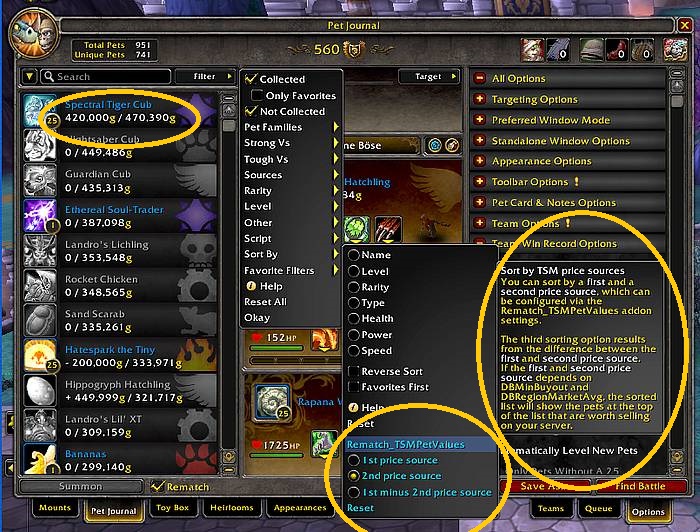
Rematch_TSMPetValues adds TSM or Oribos Exchange/Undermine Exchange market values to the Rematch pet list, so you don't have to cage a pet to see its auction house item value.
You can browse through your whole pet collection and can choose which precious pet is due to sell or which cheap pet to buy.
It uses TradeSkillMaster or Oribos Exchange to gather the item value and displays the Mininum Buyout Value (DBMinBuyout) and the Regional Market Value Average (DBRegionMarketAvg), but you can change that to any other TSM price source (/tsm sources) in the configuration.
New (v1.3.1): If TradeSkillMaster is unavailable or you don't want to mess around with an external TSMApplication, Oribos Exchange will now be used as the price source for server and regional market values when the Oribos Exchange addon is found.
- For TSM Rematch_TSMPetValues gets its pricing information from TradeSkillMaster and its desktop app. If the desktop app doesn't have data from your region (and server), Rematch won't show pet price values: it' that simple.
- In 99% cases of missing values a 3rd party addon downloader has junked your addons, be warned, use ƇurseForge and you'll be fine.
Thanks to Mandaeule for her inspirational idea to make this addon.
Media
- Addon to Show Value of Each Pet in Your Pet Journal | Battle Pet Gold Guide
- The Best Addons for Making Gold in Battle for Azeroth
- BEST WoW Addons For Making Gold
- 10 Gold Making Addons In WoW Shadowlands Gold Farming
- Perse's Pet Addons for World of Warcraft
- World of Warcraft|Addons |Rematch & Rematch_TSMPetvalues
- WOW | ТОП АДДОНЫ ДЛЯ БОЕВЫХ ПИТОМЦЕВ! | Rematch | Rematch_TSMPetValues
- Xu-Fu's Pet Guides - Recommended Addons
Configuration
No special configuration, Just install it and pet values will show up in Rematch, but you can change the used price sources in the configuration.
You could set the first and second price source to 'DBMinBuyout' and 'DBRegionMarketAvg'. A third price source, e.g. '5000g' or 'max(5000g, 50% DBRegionMarketAvg)'
or '33% DBRegionMarketAvg', can trigger a notice (+/-) in front of the market value.
The notice suggests selling a pet (+++ down to +) or buying a pet (--- down to -) on this server because the price is higher or lower than on other regional servers.
You can sort the pet list by first, second and the difference of first and second price source.
Example:
Set price sources to 'DBMinByout' (a) and 'DBRegionMarketAvg' (b) and the alert trigger to '20% DBRegionMarktAvg' (c), then '+' is a indication that the min buyout of that pet is (one * alarm trigger) higher than the average:
a - c >= b for '+', a - 2c >= b for '++' and a - 3c >= b for '+++'
or (one * alarm trigger) lower as the average:
a + c < b for '-', a + 2c < b for '--' and a + 3c < b for '---'.
Requirements
Rematch_TSMPetValues requires Rematch and as price source TradeSkillMaster or Oribos Exchange.
In case of TradeSkillMaster please enable the additional addon TradeSkillMaster_AppHelper and a working TSM Desktop App to get pet market values for your server and region. Oribos Exchange has the market values included in the addon itself.
FAQ
Is there a distinction between prices for Level 1 and Level 25 pets?
TSM does not differentiate between Tier 1 or Tier 25 pets. Please have an eye on which level or breed pets have before buying and selling.
Troubleshooting:
Please report any bugs you may find to Expelliarm5s on ƇurseFȯrɡe.
ATTENTION: The only original source for my addons is the ƇurseFȯrɡe site or the ƇurseFȯrɡe updater app. Do not download my addons from another website or with other download apps as they are likely to be out of date and may contain malware.
My other addons (may or may not be useful to you):
- Rematch_TSMPetValues - Add TSM market values to the Rematch pet list
- TradeSkillFluxCapacitor - Let the trade skills window remember the last recipe and salvage item
- RinseOBags - Move items between bags and banks (fast)
- LevelTimingsGold - Statistics for Character Level Challenges
- BioBreakTimer - Onscreen AFK Timer for bio breaks and other most important things
- IMODIT_FarmingBar - Add Items in Bank, Guild Bank and AH to the FarmingBars
- Broker_TSMProfile - Displays the current TSM profile and lets you switch between profiles
- SellableItemDrops - Logging your sellable item drops with location, time and market value
- DeTrashLoot - Delete or sell items in bags based on their sell or market value
- MakeMeGetMyMain - Notifies you when something happens to your character
- DebugLog - Collect and View Debug Logs
用户评价
暂无 / 5,0 条评价相关推荐
继续看看这些内容
