插件中文资料库
中文说明、玩家点评、适用场景和替代推荐,方便快速判断是否适合你。
- 拍卖行、交易和金币管理
- 界面布局、头像框、姓名板和动作条优化
 Details! Mythic+ Scoreboard
 BagSync
 GroupFinder
SellableItemDrops 插件下载与使用指南
本页整理了 SellableItemDrops 的功能用途、适用人群、安装方法和常见问题,方便玩家快速判断是否需要安装。
适合谁用
SellableItemDrops 是一款 拍卖与商业 / 数据代理 / 背包与库存 类插件,适合需要优化界面、提升操作效率或补充游戏信息提示的魔兽世界玩家。
基本信息
- 插件作者:Expelliarm5s
- 插件分类:拍卖与商业 / 数据代理 / 背包与库存
- 适配版本:12.0.0,1.15.8,5.5.3,2.5.5,12.0.1
- 累计下载:0
安装方法
- 点击上方下载按钮获取 SellableItemDrops插件文件。
- 解压后将插件文件夹放入 World of Warcraft/_retail_/Interface/AddOns 目录。
- 重启游戏或在角色界面点击插件,确认 SellableItemDrops 已启用。
- 如果插件不生效,请检查版本是否匹配,或关闭同类冲突插件后重试。
使用建议
SellableItemDrops 安装后建议先在角色界面确认已启用,进入游戏后根据插件提供的命令、小地图按钮或设置面板进行调整。如遇到报错,可先单独启用该插件排查冲突。
SellableItemDrops 常见问题
SellableItemDrops 适合需要 拍卖与商业 / 数据代理 / 背包与库存 类功能的玩家,特别是希望提升游戏便利性、界面管理或战斗信息获取效率的用户。
下载后解压到 Interface/AddOns 目录,然后重启游戏并在角色界面启用插件。
常见原因是目录多套一层、游戏版本不匹配、依赖插件缺失或同类插件冲突。
可以查看本页的替代插件推荐和相关插件区域,按下载量和分类选择同类工具。
插件 AI 问答
可以问:这个插件正式服能用吗、和 DBM 冲突吗、怎么设置、有没有替代插件。
SellableItemDrops 是一款魔兽世界插件,主要用于装备修理、金币或商人相关提醒。建议根据自己的版本和插件环境先测试兼容性。
插件用途
SellableItemDrops 主要面向需要拍卖与商业功能的玩家,用来改善游戏体验、减少重复操作或补充默认界面没有直接提供的信息。
适用场景
- 装备修理、金币或商人相关提醒
使用建议
安装后建议先在角色选择界面或插件管理器中确认已启用,再进入游戏测试是否与现有整合包、WA 和其他插件冲突。如遇报错,可以先禁用同类插件排查。
Sellable Item Drops logs name, time, location and market values of dropped items.
Sellable Item Drops provides a sortable list of all dropped items to identify rewarding farm locations or to document found items for yourself or others.
Market values are based on a selectable Trade Skill Master or Auction House DataBase or OribosExchange price source.
The current session data can be archived in a database and that database of previous sessions can be searched for items and more.
Sellable Item Drops is helpful during competitive Transmog Challenge runs or when farming instances or locations to track the accumulated market value of all dropped items over a given time period.
Usage:
The interface opens with "/sid" or with click on the LDB header. Addon options are configured through the normal game options.
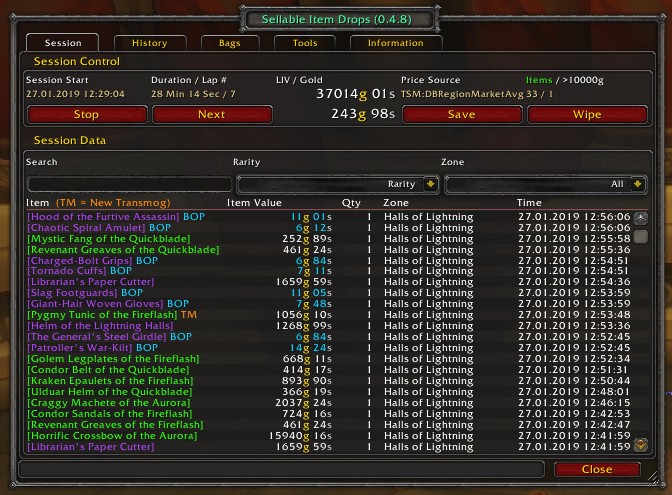
Requirements
SellableItemDrops works without any additional addons and then displays the vendor sell value of the items.
However, it may also use price sources from Auction House DataBase or Trade Skill Master or OribosExchange. If TSM is used, the TSM Desktop App should also be installed for price source 'DBRegionMarketAvg' to be available.
If Can I Mog it? is enabled, useful new Transmog Item are announced.
If Auctionator is enabled, items can be directly auctioned at the AH from the Bags Tab. (Currently disabled)
Session Tab
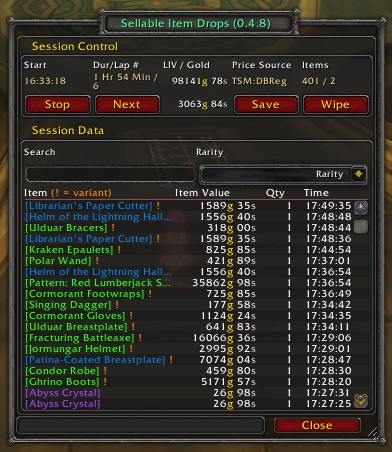
- GUI shows the current looted item value, the looted gold, price source, item count, noteworthy item count/value, lap number, session start time, session duration and a sortable and searchable (name, rarity, char, zone) item list
- sessions are continued after disconnects and game reloads
- GUI has buttons to start the next lap (and optional resetting the instance), to stop the session, to archive the session and to wipe the session
- saving and wiping the current session starts a new, fresh session
- market value can be based on VendorSell or any UJ or TSM price source (DBRegionMarketAvg etc.) with DBRegionMarketAvg as default
- item tooltips are fully working
- some blacklisted items (scarab idols etc.) are ignored
- mouseover an item and purge it from the list with Alt + Right-Click
- announcing new transmog items (using Can I Mog It?)
- session interface hides not used tabs, player, zone and time column automatically, if the interface frame size is reduced
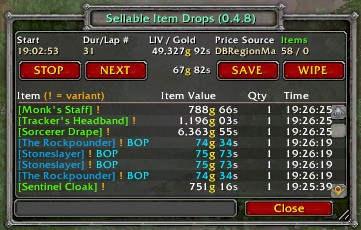
- Right-Click on the player, zone or time column title hides the column, Right-Click on the item column title shows the hidded columns again
- interface stays open (even if ESC is pressed)
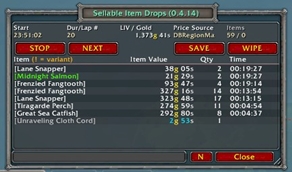
- (since v0.4.14) Stacked View mode combines the same items and shows the summed up item value of those items and the time column shows the duration that was needed for these items since start of the session
- Stacked View mode is enabled/disabled clicking the button next to the close button
History Tab
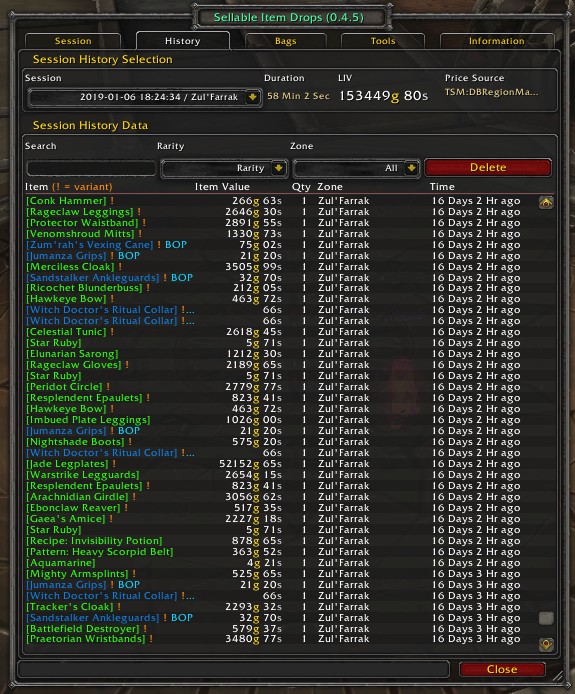
- GUI shows the session duration (first until last drop), the looted item value, the current configured price source and a sortable and searchable (name, rarity, char, zone) item list
- previous sessions are accessable via a drop down list (time / zone)
- item tooltips are fully working
- GUI has a button to delete the current history session data
- history data is saved per realm
- Right-Click on the player or zone column title hides the column, Right-Click on the item column title shows the hidded columns again
- mouseover an item and purge it from the list with Alt + Right-Click
Bags Tab
- all items in bags are displayed with their market value
at the AH an item can be directly auctioned (if the Addon Auctionator is installed) with mouseover and Ctrl + Right-Click
Data Broker
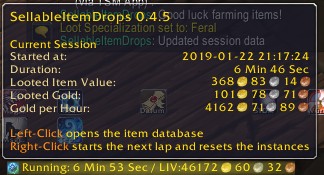
- displays the current looted item value and the looted gold in the LDB header
- Left-Click on the LDB header opens and closes the GUI
- Right-Click on the LDB header starts a new lap and optional resets the instance
- a Data Broker display addon is needed (like Bazzoka, Titan Panel, ChocolateBar etc.)
Addon Options
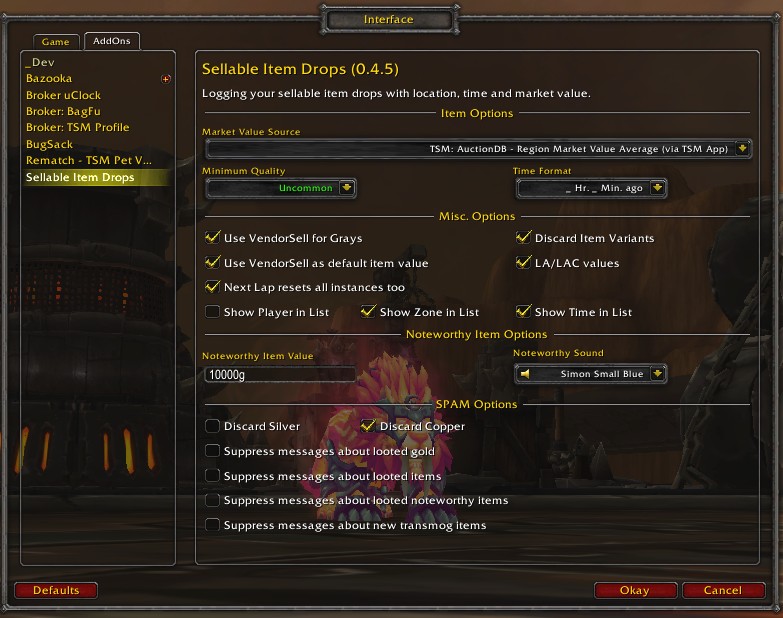
- Options with: Escape > Interface > Addons >SellableItemDrops
- Market Value Source (default: DBRegionMarketAvg)
Select your TSM+UJ market value source from a drop down list. - Minimum Quality (default: Uncommon)
Select the minimum item quality to display in lists. Items below this quality are ignored. - Noteworthy Item Value (default: 10000g)
Items above this value are counted as noteworthy and they fire an alarm sound on drop. - Time Format (default: ago format)
Select the format to display times in lists. - Use VendorSell for Grays (default: yes)
If checked, the price source 'VendorSell' is used for gray items instead of the market value, which is almost a really wrong value for grays. - Use VendorSell as default item value (default: yes)
If checked, the price source 'VendorSell' is used if a price source returns 0 gold for an item. - Discard Item Variants (default: yes, for compatiblity)
If checked, only the market value of the base item is used. This works only if TSM is enabled. - LA/LAC values (default: no)
use a predefined blacklist and a VendorSell list to be more compatible with LA/LAC - Extra VendorSells (default: yes)
use VendorSell values for blacklisted/VendorSell items from LA/LAC and some additional items - Next Lap resets all instances too (default: yes)
If checked, pressing the 'Next Lap' button or rightclicking on the LDB header resets the instance additional too. - Show Player in Lists (default: no)
If checked, the character name is shown in the lists. - Show Zone in Lists (default: yes)
If checked, the zone is shown in the lists. - Show Time in List (default: yes)
If checked, the time shown in the lists. - Noteworthy Item Value (default: 10000g)
Count items above this value and play an alarm sound. - Noteworthy Sound (default: Simon Small Blue)
Choose one sound file (LSM compatible). - Suppress messages about looted gold (default: yes)
- Suppress messages about looted items (default: no)
- Suppress messages about looted noteworthy items (default: no)
- Suppress messages about new transmog items (default:no)
- Suppress copper and/or silver values
Troubleshooting:
Please report any bugs you may find or any suggestions you might have to the ƇurseFȯrɡe Project Page
If you wish, you can send me a PM to Expelliarm5s on ƇurseFȯrɡe.
ATTENTION: The only original source for my addons is the ƇurseFȯrɡe site or the ƇurseFȯrɡe updater app. Do not download my addons from another website or with other download apps as they are likely to be out of date and may contain malware.
My other addons (may or may not be useful to you):
- Rematch_TSMPetValues - Add TSM market values to the Rematch pet list
- TradeSkillFluxCapacitor - Let the trade skills window remember the last recipe and salvage item
- RinseOBags - Move items between bags and banks (fast)
- LevelTimingsGold - Statistics for Character Level Challenges
- BioBreakTimer - Onscreen AFK Timer for bio breaks and other most important things
- IMODIT_FarmingBar - Add Items in Bank, Guild Bank and AH to the FarmingBars
- Broker_TSMProfile - Displays the current TSM profile and lets you switch between profiles
- SellableItemDrops - Logging your sellable item drops with location, time and market value
- DeTrashLoot - Delete or sell items in bags based on their sell or market value
- MakeMeGetMyMain - Notifies you when something happens to your character
- DebugLog - Collect and View Debug Logs
用户评价
暂无 / 5,0 条评价相关推荐
继续看看这些内容
