插件中文资料库
中文说明、玩家点评、适用场景和替代推荐,方便快速判断是否适合你。
- 拍卖行、交易和金币管理
- 界面布局、头像框、姓名板和动作条优化
 Details! Mythic+ Scoreboard
 BagSync
 GroupFinder
StatsPro 插件下载与使用指南
本页整理了 StatsPro 的功能用途、适用人群、安装方法和常见问题,方便玩家快速判断是否需要安装。
适合谁用
StatsPro 是一款 战斗 / HUD界面 / 其他插件 类插件,适合需要优化界面、提升操作效率或补充游戏信息提示的魔兽世界玩家。
基本信息
- 插件作者:antrakt92
- 插件分类:战斗 / HUD界面 / 其他插件
- 适配版本:12.1.5
- 累计下载:40
安装方法
- 点击上方下载按钮获取 StatsPro插件文件。
- 解压后将插件文件夹放入 World of Warcraft/_retail_/Interface/AddOns 目录。
- 重启游戏或在角色界面点击插件,确认 StatsPro 已启用。
- 如果插件不生效,请检查版本是否匹配,或关闭同类冲突插件后重试。
使用建议
StatsPro 安装后建议先在角色界面确认已启用,进入游戏后根据插件提供的命令、小地图按钮或设置面板进行调整。如遇到报错,可先单独启用该插件排查冲突。
StatsPro 常见问题
StatsPro 适合需要 战斗 / HUD界面 / 其他插件 类功能的玩家,特别是希望提升游戏便利性、界面管理或战斗信息获取效率的用户。
下载后解压到 Interface/AddOns 目录,然后重启游戏并在角色界面启用插件。
常见原因是目录多套一层、游戏版本不匹配、依赖插件缺失或同类插件冲突。
可以查看本页的替代插件推荐和相关插件区域,按下载量和分类选择同类工具。
插件 AI 问答
可以问:这个插件正式服能用吗、和 DBM 冲突吗、怎么设置、有没有替代插件。
StatsPro 是一款魔兽世界插件,主要用于装备修理、金币或商人相关提醒、界面框架、头像、动作条或冷却显示优化。建议根据自己的版本和插件环境先测试兼容性。
插件用途
StatsPro 主要面向需要其他插件功能的玩家,用来改善游戏体验、减少重复操作或补充默认界面没有直接提供的信息。
适用场景
- 装备修理、金币或商人相关提醒
- 界面框架、头像、动作条或冷却显示优化
使用建议
安装后建议先在角色选择界面或插件管理器中确认已启用,再进入游戏测试是否与现有整合包、WA 和其他插件冲突。如遇报错,可以先禁用同类插件排查。
StatsPro
Keep your character stats on screen without opening the Character panel. Choose which rows to show and place them beside your action bars.
For WoW Retail: Midnight and the WoW Forever beta.
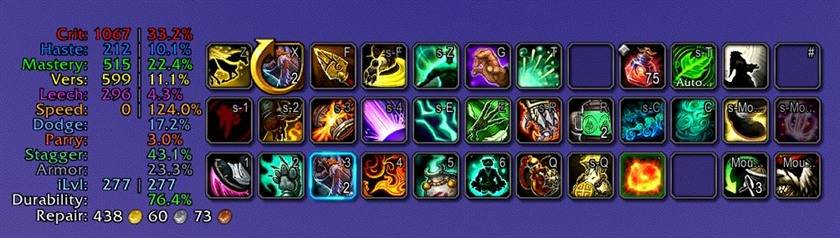
Earlier Retail capture; settings have changed since this screenshot.
What you can show
- Retail stats: Crit, Haste, Mastery, Versatility, main stat, Stamina, Leech, Avoidance and movement speed.
- Defence: class-appropriate Dodge, Parry, Block, Brewmaster Stagger and Armor damage reduction.
- Gear: item level, durability, lowest-durability slot and repair cost.
- Forever: its own stat list, including attributes, melee/ranged/spell stats, defenses, resistances and mana regeneration.
Every row is optional. Use one panel or split the HUD into two movable panels.
Getting started
- Type
/ssor/statspro. - Preview a Quick Setup preset and click Use this setup.
- Drag the panels into place, then lock them in Settings.
Retail presets: Compact, DPS, Tank. Forever presets: Compact, Physical, Caster, Healer, Tank. You can change individual rows afterwards.
Outside combat, right-click the HUD to open Settings. Use /ss toggle to show or hide it.
Make it fit your UI
- Choose fonts, colours, scale and background, or preview a theme such as High Contrast.
- Profiles & sharing: keep separate setups by character/spec in Retail, or by character in Forever. Share one setup across alts if you prefer.
- Export a profile for a friend or import just Stats, Layout or Appearance. Retail and Forever use separate profile formats.
Language and refresh rate are account-wide. Forever does not switch profiles when you change talents.
Archon references — Retail only
Hover a secondary stat for Archon reference snapshots covering all current Retail specializations: Mythic+ brackets and Normal, Heroic and Mythic raids. Each tooltip shows the snapshot date. Data comes with the addon; it is not fetched live.
In combat, cached comparisons are marked Last known. If comparison is unavailable, the reference remains visible.
These are reference values, not stat caps or personal gearing advice. Simulate your own character when choosing upgrades.
Client versions
Retail and Forever have separate builds and update independently. Classic Era and other Classic branches are unsupported.
Languages
All current WoW client languages are supported across the HUD, Settings and profile tools in both builds. Auto follows your WoW client; choose another language in Settings.






Help
- No HUD? Open
/ssand check the enabled rows. Settings open outside combat. - Moving from SwiftStats? See SwiftStats Import in the full guide.
Code & credits
Free to use. You may modify and share my original work under the Antrakt Attribution and CurseForge Rewards License 1.4 without asking first. Substantial reuse requires credit, a link to StatsPro and a positive share of the derivative project's CurseForge Reward Points if it earns them. You choose the percentage; there is no fixed minimum. See the full license for exceptions and third-party terms.
More by antrakt92
- ApplicantScout — Warcraft Logs and RaiderIO for applicants and your group; requires the Windows Companion.
- Do You Need It? — compare group loot and ask for items.
- Dungeon Pro — dungeon quests, prerequisite chains and quest-giver navigation for WoW Forever.
You can also find my Cyberpunk 2077 and Assassin's Creed Unity mods on Nexus Mods.
⭐ If you enjoy the addon, add it to your favorites.
🔔 Follow StatsPro on CurseForge to keep up with updates.
☕ You can also support my work on Ko-fi.
CurseForge: https://www.curseforge.com/wow/addons/statspro用户评价
暂无 / 5,0 条评价相关推荐
继续看看这些内容
